How to install and use Open Code Review (ocr): providers, review modes and JSON output
In this second part of the guide we install Open Code Review (ocr), connect it to a model and use it to review local changes, commits and whole branches. Every command and output comes from v1.13.2 running on tienda-api, a small Express sample API with a few bugs planted on purpose. If you don't know what the tool is or how it works inside, start with part 1.
Requirements
- Git 2.41 or later (
git --version).ocruses Git for diffs, searches and the merge-base. - Node.js 18 or later, only if you install with npm.
- An LLM with tool support (an Anthropic, OpenAI, DeepSeek, OpenRouter or Gemini key, a local Ollama…). Not needed if you use delegation mode with Claude Code.
Step 1: install ocr
With npm (recommended)
npm install -g @alibaba-group/open-code-review
ocr version
The npm package downloads the binary for your platform and updates itself: on each run it checks for a new version in the background (at most every 18 minutes). To disable that, for example in CI or to pin versions:
export OCR_NO_UPDATE=1
npm install -g @alibaba-group/open-code-review@1.13.2
With Homebrew (macOS and Linux)
brew install open-code-reviewWith the install script
curl -fsSL https://open-codereview.ai/install.sh | shOn Windows (PowerShell 5.1+):
irm https://open-codereview.ai/install.ps1 | iexIt honors OCR_INSTALL_DIR (default /usr/local/bin, or %LOCALAPPDATA%\Programs\ocr on Windows) and OCR_VERSION to pin a release.
GitHub Releases binary (no Node)
This is what we used in our test:
curl -Lo ocr https://github.com/alibaba/open-code-review/releases/latest/download/opencodereview-linux-amd64
chmod +x ocr && sudo mv ocr /usr/local/bin/ocr
There are binaries for darwin-arm64, darwin-amd64, linux-amd64, linux-arm64, windows-amd64.exe and windows-arm64.exe, plus a sha256sum.txt to verify them:
curl -LO https://github.com/alibaba/open-code-review/releases/latest/download/sha256sum.txt
shasum -a 256 -c sha256sum.txt --ignore-missing
The static binary does not self-update. Everything ocr stores lives in ~/.opencodereview/: deleting that folder is a clean uninstall.
Step 2: connect a model
Interactive
ocr config provider   # pick a provider, paste the API key and the model
ocr config model      # switch models later
When it finishes, ocr config provider runs ocr llm test to check the connection. ocr llm providers lists the 30 built-in providers.
With commands (CI, servers, scripts)
This was our Anthropic setup. We used a fake key on purpose to show the real authentication error:
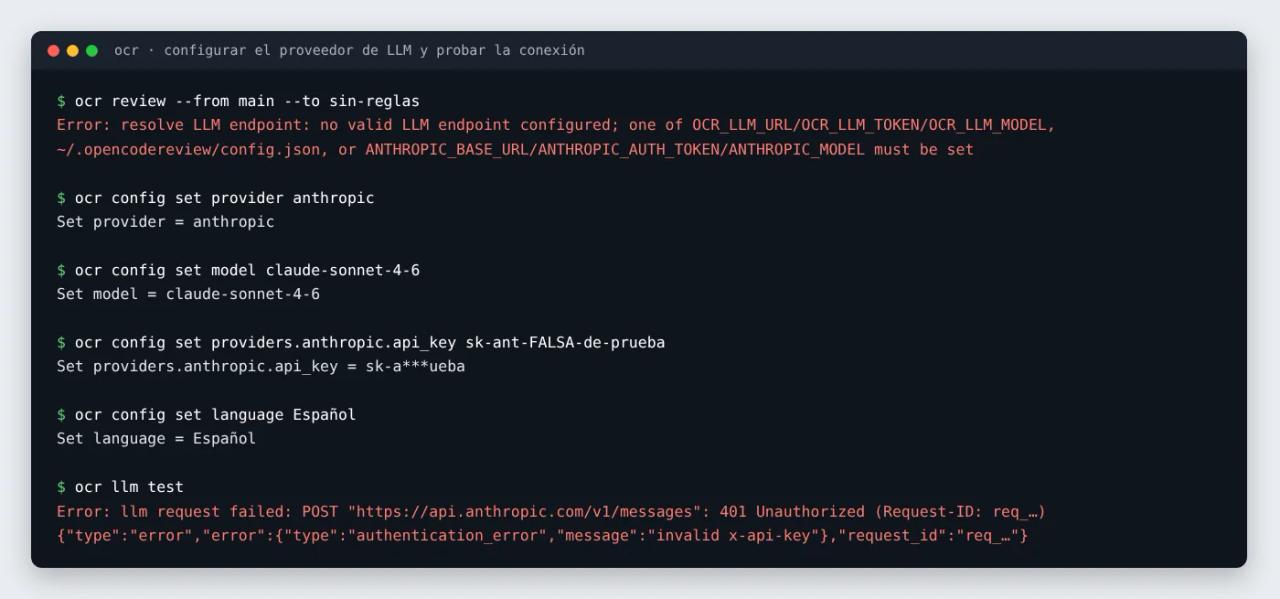
ocr config set provider anthropic
ocr config set model claude-sonnet-4-6
ocr config set providers.anthropic.api_key "$ANTHROPIC_API_KEY"
ocr config set language English
ocr llm test
language sets the language of the review comments (English by default; we used Español in the screenshot). Everything is saved to ~/.opencodereview/config.json with 0600 permissions:
{
    "provider": "anthropic",
    "providers": {
        "anthropic": {
            "api_key": "sk-ant-…",
            "model": "claude-sonnet-4-6"
        }
    },
    "language": "English"
}
Other common providers
DeepSeek or OpenRouter (every built-in provider follows the same pattern):
ocr config set provider deepseek
ocr config set providers.deepseek.api_key "$DEEPSEEK_API_KEY"
ocr config set model deepseek-v4-pro
A local Ollama model is added as a custom provider. The API key is required even though Ollama ignores it:
ocr config set provider                          ollama
ocr config set custom_providers.ollama.url       http://127.0.0.1:11434/v1
ocr config set custom_providers.ollama.protocol  openai
ocr config set custom_providers.ollama.model     qwen3:32b
ocr config set custom_providers.ollama.api_key   ollama
Pick a model with native tool calling (the "tools" tag on ollama.com). ocr drives the whole review through tool calls; a model that only narrates them in text, like deepseek-r1, ends in "No tool calls parsed" and zero comments. On slow hardware, raise the per-request timeout with custom_providers.ollama.timeout_sec or OCR_LLM_TIMEOUT=900.
Without storing the key on disk
With api_key_cmd, ocr fetches the key from your secret manager on each run:
ocr config set providers.anthropic.api_key_cmd "op read op://dev/anthropic/api-key"
# macOS Keychain
ocr config set providers.anthropic.api_key_cmd "security find-generic-password -s ocr-anthropic -w"
And if you already have environment variables, no config is needed: ocr reads ANTHROPIC_API_KEY, OPENAI_API_KEY and so on per provider, as well as Claude Code's ANTHROPIC_BASE_URL, ANTHROPIC_AUTH_TOKEN and ANTHROPIC_MODEL, or its own OCR_LLM_URL, OCR_LLM_TOKEN and OCR_LLM_MODEL.
Step 3: see what will be reviewed (without spending tokens)
Before the first review, use --preview. It runs the whole file filter but never calls the model. Here is our sample repo, with a feat/cupones branch that adds a coupons module, its test, a .env, a bundle in dist/ and a PNG:
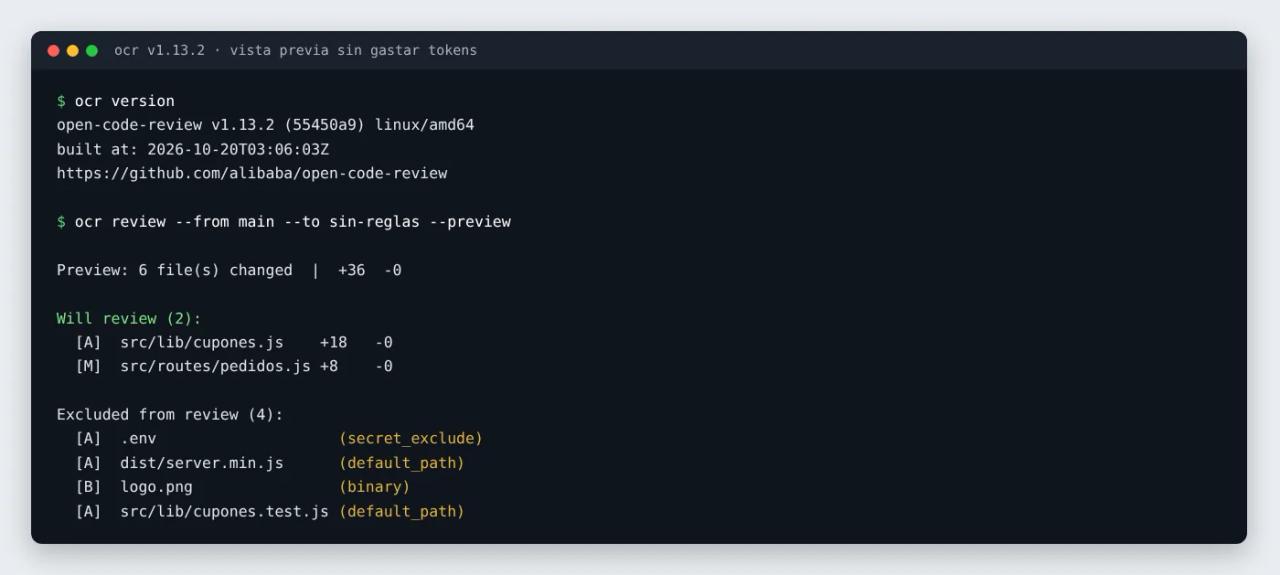
ocr review --from main --to feat/cupones --previewEach exclusion comes with its reason:
| Reason | Meaning | Can you force it? |
|---|---|---|
| `secret_exclude` | Secret path: `.env`, `.env.*` (except `.example`, `.sample`, `.template`), `.ssh/`, `id_rsa`, `.npmrc`, `.netrc`… | No |
| `binary` | Binary file | No |
| `user_exclude` | Matches your `exclude` or `--exclude` | Remove it |
| `default_path` | Tests, fixtures, snapshots, generated code, `node_modules`, `vendor`, `dist`, `target`… | Yes, with `include` |
| `unsupported_ext` | Extension outside the supported list | Yes, with `include` |
| `provider_directory` | `vendor/`, `node_modules/`… at the repo root, filtered when reading the diff | No |
| `too_large` | The diff alone exceeds 80% of the token limit | Raise `--max-tokens` |
With -f json you get the same thing in a parseable format: a files array with will_review and exclude_reason, plus reviewable_count and excluded_count.
Step 4: the first review
From the root of any repository:
# Local changes: staged + unstaged + untracked
ocr review

# A whole branch, as the pull request would show it
ocr review --from main --to feat/cupones

# One commit
ocr review --commit abc123
Flags worth knowing from day one:
| Flag | What for | ||
|---|---|---|---|
| `-b "text"` / `-B requirements.md` | **Business context**. The single biggest quality lever: "Adding coupons; amounts are stored in cents". | ||
| `--effort low\ | medium\ | high` | 1, 2 or 3 passes per group. `low` is the biggest cost saver. |
| `--exclude 'gen/**,**/*.sql'` | Exclude paths for this run only. | ||
| `--concurrency 4` | Fewer parallel sub-agents if you hit provider rate limits. | ||
| `--max-tokens-budget 2000000` | Total token cap. When reached, it publishes what it reviewed and marks the rest `failed(budget)`. | ||
| `--provider` / `--model` | Switch model for one run. | ||
| `--timeout 30` | Minutes for the whole task (default 15). | ||
| `--no-filter` | Disable the final comment filter (more findings, more noise). |
A full example reviewing the coupons branch with context and high effort:
ocr review --from main --to feat/cupones \
  --background "Discount coupons and installment payments. Amounts in cents." \
  --effort high
In text mode you see each group's progress and, at the end, the comments with path, line range, explanation and suggested code.
Step 5: JSON and SARIF output for other tools
For another program or agent to consume the result:
ocr review --format json --audience agent > review.json--audience agent drops the progress lines, so stdout holds a single JSON object. This is the documented format (we did not connect a paid API key in our test; the full model-driven review was done in delegation mode in part 4):
{
  "status": "success",
  "llm": { "provider": "anthropic", "model": "claude-opus-4-6" },
  "summary": {
    "files_reviewed": 9,
    "comments": 1,
    "total_tokens": 21344,
    "input_tokens": 18012,
    "output_tokens": 3332,
    "elapsed": "1m12s"
  },
  "comments": [
    {
      "path": "src/foo.go",
      "content": "Concurrent map access without a lock — wrap with sync.RWMutex.",
      "start_line": 42,
      "end_line": 47,
      "existing_code": "m[k] = v",
      "suggestion_code": "mu.Lock(); defer mu.Unlock(); m[k] = v",
      "thinking": "Looking at line 42, the map …"
    }
  ]
}
A couple of jq recipes:
# How many comments and how many tokens it cost
jq '.summary | {comments, total_tokens, elapsed}' review.json

# Readable list: file:line  comment
jq -r '.comments[] | "\(.path):\(.start_line)  \(.content)"' review.json
If a comment has start_line: 0, the model paraphrased the code and it could not be anchored: the finding is valid, you just have to locate it yourself.
For GitHub Code Scanning, --format sarif produces a SARIF 2.1.0 report (we use it in part 5). And -o file writes straight to disk in UTF-8.
Reviewing whole files with ocr scan
ocr review needs a diff. To audit an inherited project or a whole folder, use scan:
ocr scan --preview                     # which files would be included
ocr scan --path src/lib,src/routes     # only these paths
ocr scan --format json -o scan.json    # the whole repo to JSON
By default it batches files, plans per file, deduplicates findings and ends with a project summary. Skip steps with --no-plan, --no-dedup and --no-summary to spend less.
Sessions: resume, compare and browse
Every review is saved as JSONL in ~/.opencodereview/sessions/. With that you can:
ocr session list                         # sessions for the current repo
ocr session comments <id>                # one session's findings
ocr session compare <before> <after>     # new, persisting and resolved
ocr session export <id>                  # self-contained HTML to share
ocr review --from main --to feat/cupones --resume <id>   # resume an interrupted review
ocr viewer                               # web UI on localhost:5483
The viewer shows every model call by phase (plan, review, filter, memory compression, re-location). It is how you answer "why did it say that?" or "why does this file have no comments?". You can also mark findings as fixed or ignored while you work through them.
Common errors
Error: resolve LLM endpoint: no valid LLM endpoint configured No provider and no environment variables. Run ocr config provider, or set OCR_LLM_URL, OCR_LLM_TOKEN and OCR_LLM_MODEL. It is exactly what ocr review returned for us before any setup.
401 Unauthorized ... "invalid x-api-key" (or 403) The key is wrong or expired. If you set both api_key and api_key_cmd, api_key wins and ocr prints a warning.
Cannot find merge-base Range mode needs history. In CI, check out with fetch-depth: 0. Locally, git fetch origin main first.
No tool calls parsed for ..., retrying... then Max tool requests reached The model has no native tool calling. Switch to one that does (qwen3, Claude, GPT, DeepSeek V4…).
WARNING: prompt tokens (...) exceed 80% of max_tokens That group is too large and was skipped. Exclude the file if it is generated, split the change, or raise the limit with ocr config set max_tokens 400000 if your model has a bigger context.
The JSON has "comments": [] Check status: skipped means nothing was reviewable (check --preview); complete with files_reviewed above 0 means it reviewed and found nothing.
FAQ
How much does a review cost? It depends on the model and the change size. In the project's benchmark the average was 350K to 700K tokens per real PR. Turn on telemetry (ocr config set telemetry.enabled true and telemetry.exporter console) to see tokens per model, and use --effort low and --max-tokens-budget to cap it.
Which model should I use? In the project's own benchmark Claude Opus scored the best F1, with Qwen, GLM, GPT-5.5 and DeepSeek close behind. Any high-end model with tools is fine to start; to cut costs, try DeepSeek or a local Qwen.
Can I configure several providers and switch on the fly? Yes. Configure them all and use --provider and --model per run.
Does it review my tests? Not by default: test files are excluded. You can include them with an include rule, as shown in the next part.
Conclusion
Three commands (npm install, ocr config provider, ocr review) give you a working reviewer, and --preview shows what it will look at before you pay a token. For serious reviews, always add --background with the goal of the change.
Next, tailor it to your project: in part 3 we write custom rules with rule.json and look at the ordering mistake that caught us out.
// source code
// implementation
More on AI agents

- Skills for your agents
- Claude Code

- Skills for your agents
- Claude Code

- Skills for your agents
- Claude Code