webapp-testing: Anthropic's skill to test your web app with Playwright and Claude Code
webapp-testing is the skill in Anthropic's official repository that teaches Claude Code to test your local web app with Playwright for Python: it starts the server, opens a headless Chromium, fills in forms, takes screenshots and reads the browser's errors. Then it tells you what is broken and why.
In our tour of Anthropic's 19 official skills we flagged it as one of the three with the best return. Here we put it to a real test: we read all of its code (commit 2c5958e, November 6, 2026), used it by hand and with headless Claude Code against a form with a hidden bug. It found the bug in 19 seconds for 0.084 USD. Along the way we hit two pitfalls in the skill itself that you should know about before you trust it.
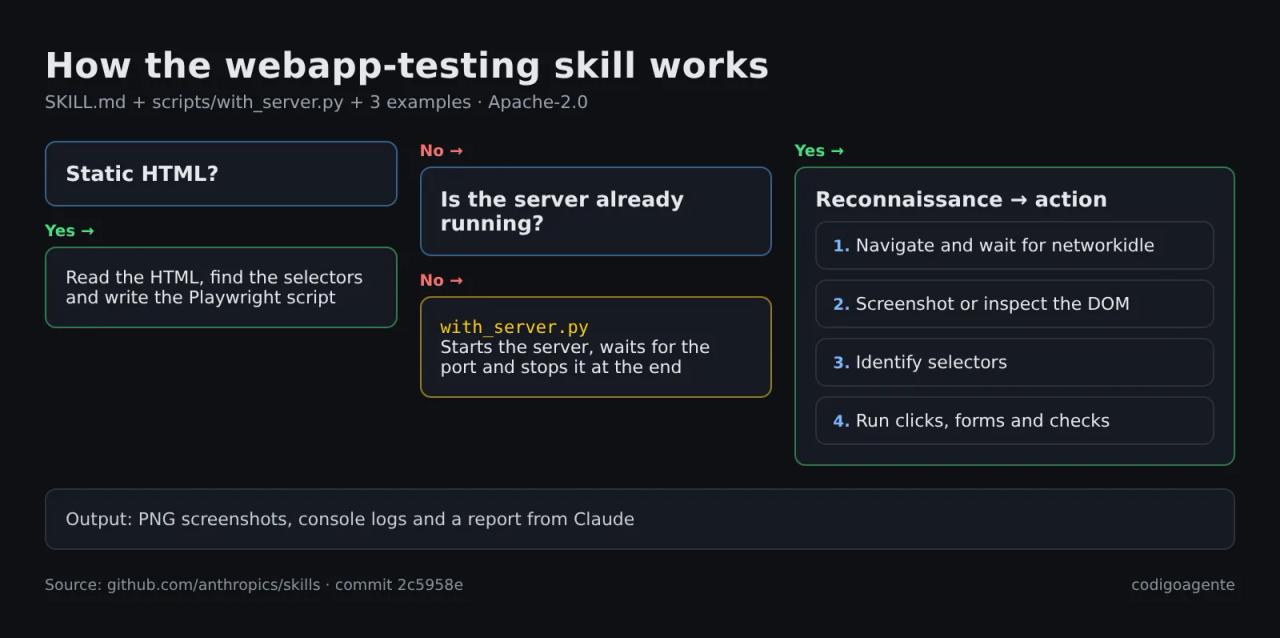
What webapp-testing is and what it ships
The skill lives in skills/webapp-testing of the anthropics/skills repository and is licensed under Apache-2.0: you can copy it, modify it and use it commercially as long as you keep the license notice. It is small, 210 lines of code in total:
| File | What it does |
|---|---|
| `SKILL.md` | The instructions: a decision tree, the "reconnaissance → action" pattern and best practices. About 3,900 characters. |
| `scripts/with_server.py` | Starts one or more servers, waits for their port to answer, runs your script and shuts them down at the end, even if the script fails. |
| `examples/element_discovery.py` | Lists a page's buttons, links and inputs and takes a screenshot. |
| `examples/static_html_automation.py` | Automates an HTML file opened with `file://`, no server needed. |
| `examples/console_logging.py` | Saves the browser console messages to a file. |
The core idea is that Claude doesn't use a browser tool: it writes Playwright scripts in Python and runs them with Bash, like a developer would. That has two upsides. The script stays on disk and you can rerun it without AI, and Claude only sees what the script prints, not the whole page tree, so it spends fewer tokens than a browser MCP server that returns a snapshot after every step.
SKILL.md tells Claude to run with_server.py --help and not to read its source, to keep the context clean. It's a pattern worth copying in your own skills: scripts as black boxes, documented by their --help.
Requirements and installation
The skill assumes you already have Python and Playwright. It doesn't install them:
pip install playwright
playwright install chromium
The second command downloads Chromium and its headless build (about 650 MB on disk, measured on Linux). Skip it and the first chromium.launch() fails with Executable doesn't exist at .../chrome-headless-shell and the message "Looks like Playwright was just installed or updated". It happened to us: we installed playwright 1.64.1 with pip and the Chromium already on the machine was a different version.
Then install just this skill, without the other 11 in the example-skills plugin:
npx skills add anthropics/skills --skill webapp-testing --agent claude-code -yOr as a full plugin, inside Claude Code:
/plugin marketplace add anthropics/skills
/plugin install example-skills@anthropic-agent-skills
If you're unsure about project versus global skills, see our Claude Code skills guide.
How with_server.py works
It's the skill's only script and it solves the most tedious part of end-to-end testing: having the server up before the browser starts and shutting it down afterwards.
python scripts/with_server.py --server "npm run dev" --port 5173 -- python test.pyUnder the hood it:
- Launches each
--serverwithsubprocess.Popen(..., shell=True), socd backend && python server.pyworks. - Tries a TCP connection to
localhost:<port>every half second, for up to 30 seconds (--timeoutchanges that). - Once every port answers, runs your command and returns its exit code.
- In a
finallyblock, callsterminate()on each server and, if it hasn't stopped within 5 seconds,kill().
For a backend and a frontend together, repeat the --server/--port pair:
python scripts/with_server.py \
  --server "cd backend && python server.py" --port 3000 \
  --server "cd frontend && npm run dev" --port 5173 \
  -- python test.py
Two limitations we saw in the code: it checks that the port accepts connections, not that the app answers correctly (a Next.js dev server that is still compiling already has the port open), and it pipes the server's output somewhere nobody reads it, so if the server crashes you won't see the error. If something looks off, start the server by hand in another terminal and test without the script.
The test: a booking form with a bug
We built a booking page for a café: name, WhatsApp number and time. The time slots come from horarios.json and the form shows up 800 ms later, as with many apps waiting on an API. We hid a classic bug: the code pulls the phone digits with tel.match(/\d+/g).join(''), which crashes when the field is empty because match() returns null.
We first did it by hand, following SKILL.md to the letter. That's where the two pitfalls showed up.
Pitfall 1: networkidle doesn't wait for your JavaScript
SKILL.md marks waiting for networkidle before inspecting the page as CRITICAL. We did that and the page still said "Cargando horarios…" (loading time slots): 0 visible buttons.
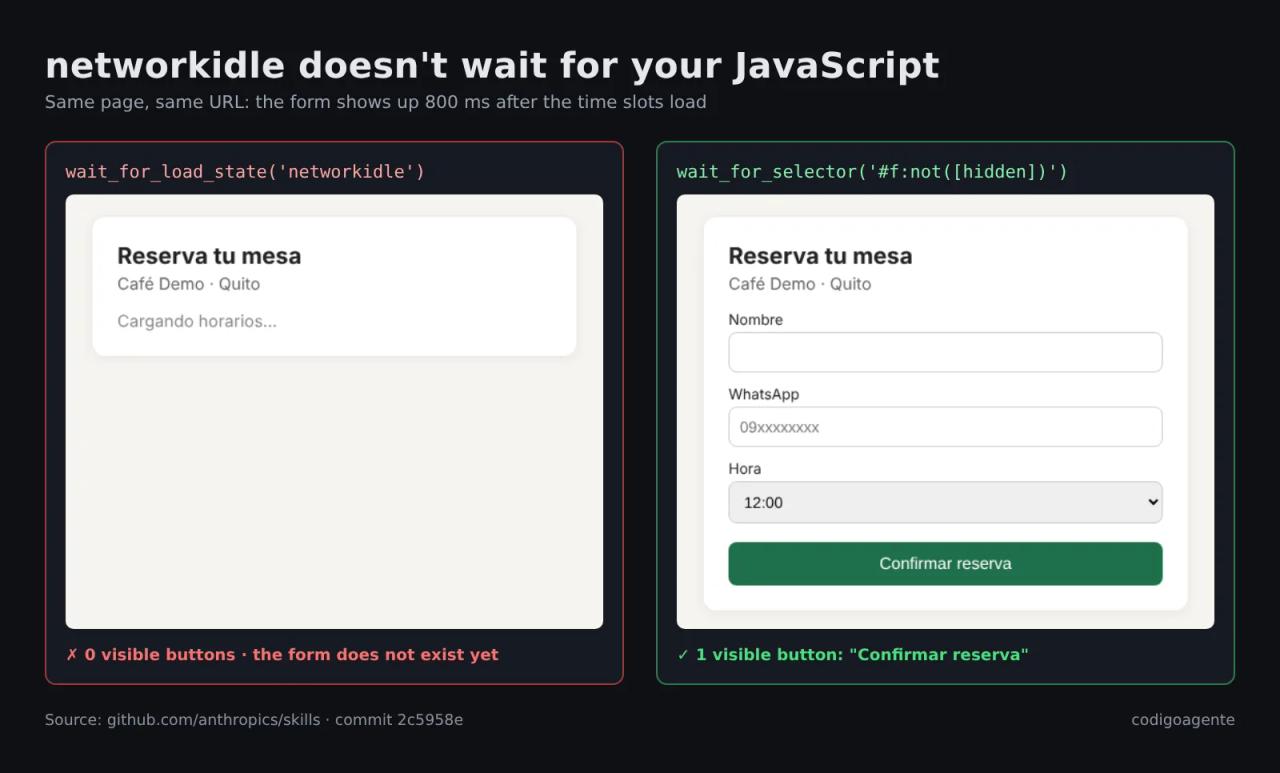
networkidle means "no network requests for 500 ms". Our form appears through a setTimeout, which is not network traffic, so Playwright considers the page loaded too early. The same goes for animations, debouncing or components that hydrate late. The fix is to wait for what you actually need:
page.goto("http://localhost:5173")
page.wait_for_selector("#f:not([hidden])")  # wait until the form is visible
Playwright's own docs discourage networkidle for testing, too. Use wait_for_selector or auto-waiting locators (page.get_by_role("button", name="Confirmar reserva").click()).
Pitfall 2: JavaScript errors don't show up in the console
With an empty phone number, clicking "Confirmar reserva" does nothing. The skill's console_logging.py example listens to page.on("console") and, in our test, only caught a 404 for the favicon. The real error wasn't there.
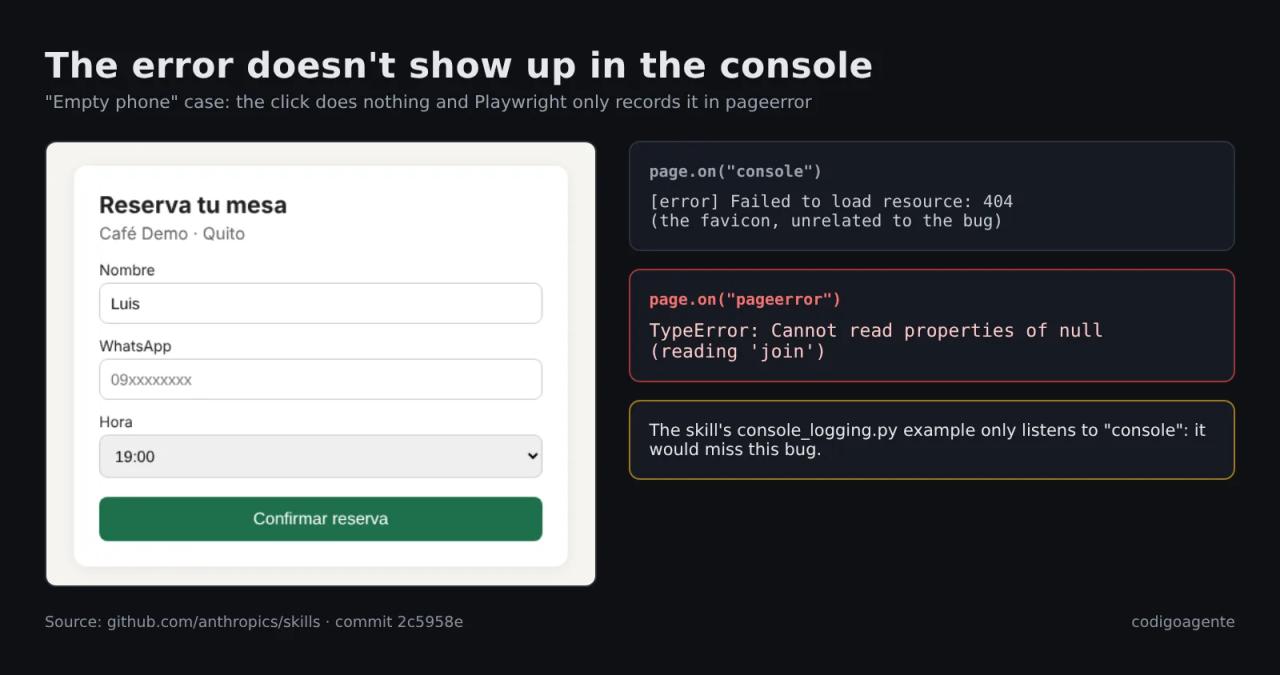
In Playwright, an uncaught exception on the page is emitted as a pageerror event, not as a console message. To catch JavaScript bugs, listen to both:
import sys
from playwright.sync_api import sync_playwright

url = sys.argv[1]
with sync_playwright() as p:
    browser = p.chromium.launch(headless=True)
    for phone in ["0991234567", ""]:
        page = browser.new_page()
        errors = []
        page.on("pageerror", lambda e: errors.append(f"pageerror: {e}"))
        page.on("console", lambda m: m.type == "error" and errors.append(f"console: {m.text}"))
        page.goto(url)
        page.wait_for_selector("#f:not([hidden])")
        page.fill("#nombre", "Ana")
        page.fill("#telefono", phone)
        page.get_by_role("button", name="Confirmar reserva").click()
        page.wait_for_timeout(300)
        print(repr(phone), "confirmation:", page.locator("#ok").is_visible(), errors)
        page.close()
    browser.close()
Actual output:
'0991234567' confirmation: True ['console: Failed to load resource: the server responded with a status of 404 (File not found)']
'' confirmation: False ['console: Failed to load resource: ...', "pageerror: Cannot read properties of null (reading 'join')"]
The same test with Claude Code
Then we handed the job to Claude. We copied the skill into .claude/skills/webapp-testing of an empty project with the app in app/ and ran Claude Code headless (the prompt was in Spanish, like the app):
claude -p "Use the webapp-testing skill to test the app in app/ (serve it with python3 -m http.server 5180 from app/). Test the booking form with a valid phone number and with an empty one, and tell me if there are JavaScript errors." \
  --model sonnet --allowedTools "Bash Read Write Skill"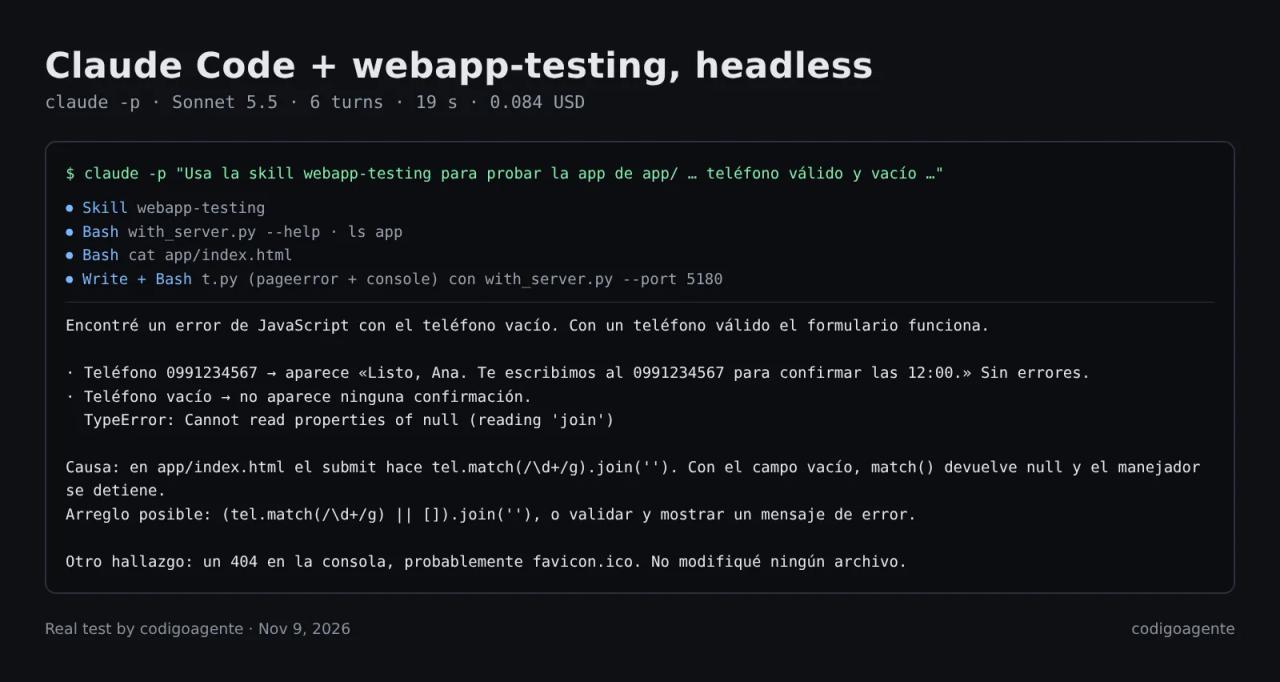
What Claude did, according to the session log:
- Loaded the skill and ran
with_server.py --help, as SKILL.md asks, without reading its source. - Read
index.htmldirectly: the decision tree says that if you can read the HTML, take the selectors from there. - Wrote a script that did listen to
pageerrorand waited withwait_for_selectoron top ofnetworkidle. It avoided both of the skill's pitfalls on its own. - Ran it through
with_server.pyand answered with a table of both cases, the exact buggy line and the fix:(tel.match(/\d+/g) || []).join(''). It didn't touch any file.
The skill provides the method and the server script; the judgment to wait for the right selector and listen to pageerror came from the model. We wouldn't take that for granted with a smaller model: if you'll use it with Haiku or for something critical, add those two rules to your copy of SKILL.md (Apache-2.0 allows it).
What it costs to test your web app with webapp-testing
| Piece | Cost |
|---|---|
| webapp-testing skill | Free (Apache-2.0) |
| Playwright for Python + Chromium | Free (Apache-2.0). About 650 MB of disk |
| Claude Code, pay as you go | Our test: **0.084 USD** with Sonnet 5.5. A real app with more pages will cost more, but in the range of cents per run |
| Claude Code subscription | Included in Pro (20 USD/month) |
| Rerunning the script without AI | 0 USD: the Playwright script Claude writes runs by hand or in CI |
For reference, a cloud testing service such as BrowserStack Automate starts at 99 USD per month (Desktop, billed annually) and 175 USD with mobile browsers, according to its pricing page in November 2026. It isn't the same thing: BrowserStack gives you hundreds of real browsers and devices, webapp-testing only the Chromium on your machine. But for a small business that wants to check its booking form or checkout doesn't break before each deploy, Playwright plus this skill covers 90% of the job for cents.
Our advice to spend as little as possible: use Claude with the skill to write the tests the first time and find bugs, keep the scripts in your repo and run them for free on every deploy. To turn them into a proper suite with assertions, pair this with TDD and bug diagnosis in Claude Code.
Common mistakes
Executable doesn't exist at .../chrome-headless-shell. The browser is missing: playwright install chromium. If you already have Chromium, pass it with p.chromium.launch(executable_path="/path/to/chrome").
The script can't find buttons that are clearly there. You waited for networkidle and the page hadn't rendered yet. Use page.wait_for_selector(...) or get_by_role locators.
The test "passes" but the page is broken. You were only listening to console. Add page.on("pageerror", ...).
Server failed to start on port 5173 within 30s. The server command failed or uses another port. Since with_server.py hides its output, start it by hand to see the error, or raise --timeout if your project takes a while to compile.
The skill doesn't kick in. Name it in the prompt ("use the webapp-testing skill") or call it with /webapp-testing. With claude -p you must allow the Skill tool as well as Bash.
A server is left running. It happens if you kill with_server.py with kill -9, because the finally block never runs. Find it with lsof -i :5173 and stop it.
FAQ
Does webapp-testing work with my Next.js, Vite or Laravel app?
Yes. The skill knows nothing about the framework: it runs whatever command you give it (npm run dev, php artisan serve) and tests whatever is served on the port. With Next.js in dev mode the first load of each route compiles, so wait for a specific selector.
Do I need to know Python?
Not to use it: Claude writes the scripts. Reading them helps, since they stay in your project and you'll want to reuse them.
Does it test on mobile?
Playwright can emulate phones (p.devices["iPhone 15"]), and Claude will use it if you ask. It's screen-size and user-agent emulation in Chromium, not a real iPhone.
Can I test a production site instead of a local one?
Yes, point the script at the public URL and skip with_server.py. Don't do it against forms that send real emails or charge real money.
Is it better than the Playwright MCP?
They're different approaches. The Playwright MCP lets Claude drive the browser step by step and returns the page state after each action. webapp-testing makes it write a script and only reads its output: less context used and a reusable test left behind. To explore an unknown site the MCP is handier; to test your own app, the skill.
Conclusion
webapp-testing is the cheapest way to have Claude Code really test your web app: a 210-line skill, free Playwright and cents of tokens per run. It works, but its instructions have two gaps: it trusts networkidle too much and its logging example misses JavaScript exceptions. Sonnet worked around them on its own; don't assume yours will.
Next step: install it with npx skills add anthropics/skills --skill webapp-testing, ask Claude to test the most important form on your site and keep the script it writes. Before installing skills from other authors, run them through SkillSpector.
// source code
// implementation
More on AI agents

- Skills for your agents
- Claude Code

- Skills for your agents
- Claude Code
- Skills for your agents
- Claude Code