Claude Code skills: what they are, how to install them and how to get Claude to use them
Claude Code skills are the simplest way to teach Claude a procedure and have it repeat that procedure the same way every time: publishing a post, auditing a site, drawing an illustration or reviewing a contract. This guide covers what a skill looks like inside, where it is installed, how to get Claude to use it and how to share it with your team. Everything was tested with Claude Code 2.1.284 on Windows 11.
If you are after a specific skill, we have already reviewed social-media-skills for LinkedIn and Instagram and Anatomy, the skill that draws interactive isometric figures. This guide is the groundwork for both.
What a Claude Code skill is
A skill is a folder with a SKILL.md file. The file has two parts:
- A YAML header with a
nameand adescription. The description tells Claude *when* to use the skill. - Markdown instructions: the steps, rules and quality bar Claude follows once the skill is active.
Next to SKILL.md you can ship more files: reference guides, templates, Node or Python scripts and examples. Claude opens them only when it needs them.
---
name: handover-checklist
description: Checks that a website is ready to hand over to the client (basic SEO, forms, broken links, legal pages). Use when asked to "check before handover" or for a "handover checklist".
---

1. List the project's pages and check each has a title and a meta description.
2. Test every form and note what happens on submit.
3. Look for broken links and images without alt text.
4. Check that a privacy policy and a cookie notice exist.
5. Return a table: item, status, how to fix it.
That is a complete, working skill. Nothing to compile, nothing to register.
Skill, CLAUDE.md, plugin or MCP: which is which
| Piece | What it is | When it loads |
|---|---|---|
| `CLAUDE.md` | Project facts and rules ("we use pnpm", "never touch main") | Always, every session |
| Skill | A procedure with steps and supporting files | Only the description at start; the rest when used |
| Plugin | A package that can bundle skills, agents, hooks and MCP servers | When you enable it with `/plugin` |
| MCP server | A connection to an external tool (database, GitHub, Sanity) | Its tools are available in the session |
The practical difference from CLAUDE.md: a skill's body only takes up context when it is used. A skill can carry hundreds of lines of guidance without making your everyday conversations more expensive.
The Agent Skills standard: one skill, several assistants
Claude Code skills follow the open Agent Skills standard. The same folder works, with few or no changes, in Codex, OpenCode and Antigravity. If your team mixes assistants, one well-written skill serves all of them.
Where skills are installed
The location decides which sessions can see the skill:
| Location | Path | Available in |
|---|---|---|
| Personal | `~/.claude/skills/<name>/SKILL.md` | All your projects on that machine |
| Project | `.claude/skills/<name>/SKILL.md` | That repository. Commit it and your whole team has it |
| Plugin | `<plugin>/skills/<name>/SKILL.md` | Wherever the plugin is enabled, as `/plugin:name` |
On Windows, ~ is your user folder (C:\Users\<you>\.claude\skills).
Rule of thumb: personal for your own working tools (writing, reviewing), project for anything tied to the repository (deploying, publishing, client conventions).
How to install a skill step by step
There are three ways. All three end the same: a folder with its SKILL.md in one of the paths above.
Option 1: the skills CLI (the easiest)
`skills` is an open source CLI that downloads a skill from GitHub and copies it into the right folder for each assistant. It needs a recent Node.js: version 1.7.x asks for Node 22.20 or later.
# In the current project (.claude/skills/)
npx skills add user/repository -a claude-code

# For your user, across all projects (~/.claude/skills/)
npx skills add user/repository -g -a claude-code
-a picks the assistant (claude-code, codex, opencode, antigravity) and -g installs at user level. Without -y the CLI asks interactive questions; with -y it accepts the defaults.
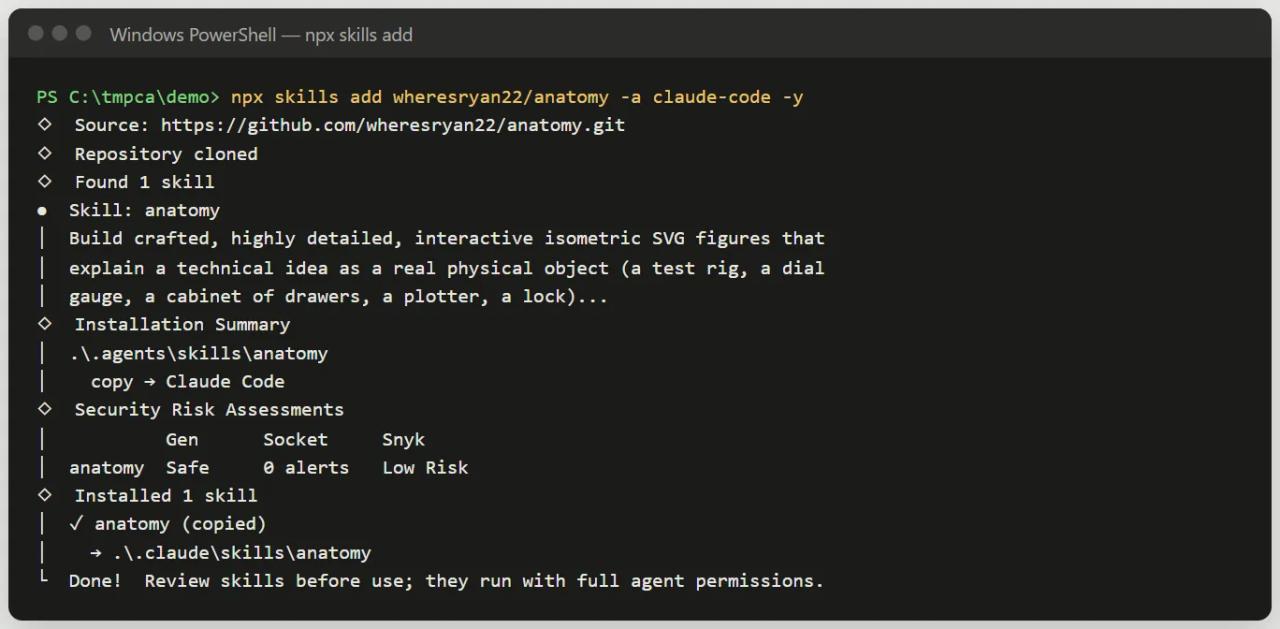
Note the last line: *"Review skills before use; they run with full agent permissions"*. A skill can ask Claude to run commands, so read the SKILL.md before using a skill from someone you don't know.
Option 2: with git
git clone https://github.com/user/repository.git ~/.claude/skills/skill-nameTo update it later, run git pull inside that folder. If you clone into a very long path on Windows and get Filename too long, clone into a short path (for example C:\src) or use git -c core.longpaths=true clone ....
Option 3: write it yourself
Create the folder and the file:
mkdir -p .claude/skills/handover-checklistPaste in a SKILL.md like the one above. Claude Code watches the skills folders and picks it up in the open session, no restart needed. The one exception: if the skills folder did not exist when the session started, run /reload-skills.
How to get Claude to use a skill
1. Invoke it by name
Type / followed by the name at the start of your message, then what you want:
/handover-checklist review the client site in the site/ folderThat runs the skill for sure. If you write the name mid-sentence ("review this and then use /handover-checklist"), Claude treats it as permission to use it but decides whether it is needed.
2. Let Claude pick it
At session start Claude only sees each skill's name and description. If your request matches a description, it loads the skill without you naming it. That is why a good description includes the phrases a user would say: "check before handover", "handover checklist".
To see which skills Claude has in your session, just ask: *"What skills are available?"*. The /skills menu lists them too.
3. How to write good requests
- State the outcome, not the steps. The skill already has the steps; you bring the context: which project, which client, which output format.
- Give real data. Numbers, URLs, file names. Good skills use them instead of making things up.
- Say where the result goes. "Save it in
docs/", "as a React component", "as a single HTML page". - Review and ask for a second pass. Most skills are designed to iterate: "the title is too long, shorten it and validate again".
Controlling who runs the skill
Two header fields change the behaviour:
| Field | Effect | Use it for |
|---|---|---|
| `disable-model-invocation: true` | Only you can run it with `/name` | Actions with consequences: deploying, publishing, sending messages |
| `user-invocable: false` | Only Claude uses it; it doesn't appear as a command | Background knowledge, such as "how the client's legacy system works" |
On this blog, for example, the skill that publishes articles to Sanity is launched by hand. We don't want Claude deciding to publish because a draft "looks ready".
Skills in real projects and agencies
Skills shine wherever a procedure repeats. Some uses that work:
- Publishing content: this blog has a
escribir-postskill that researches, writes in Spanish and English, checks SEO and publishes. Every article ships with the same structure without restating instructions. - Per-client conventions: a
.claude/skills/folder in each client repository with their style guide, deploy process and legal rules. Whoever joins the project, person or agent, works the same way. - Visual deliverables: skills like Anatomy produce interactive technical illustrations for landing pages and docs.
- Audits: SEO, accessibility or a legal review of an AI-built site, always against the same checklist.
For an agency, the key is to commit skills to the repository. They become part of the project, get reviewed in pull requests and don't depend on anyone's laptop setup.
Common errors
The skill doesn't show up under /
Check the path is exactly .../skills/<name>/SKILL.md (not skills/SKILL.md or skills/<name>/<name>/SKILL.md). This often happens when unzipping a GitHub ZIP, which adds an extra name-main folder. If you created the skills folder with the session already open, run /reload-skills.
Claude doesn't use the skill even though the request fits
Check the description: it must contain the words you would use to ask for it. If the header YAML is malformed, the skill still runs with /name but Claude can't match it to your requests. claude plugin validate .claude/skills catches those errors.
Claude stops following the skill mid-session
After the conversation is compacted, Claude Code keeps only the start of each skill. Invoke it again with /name. If you write your own skills, put the most important instructions at the top of SKILL.md.
npx skills add fails with a Node version error
CLI 1.7.x needs Node 22.20 or later. Check with node -v and upgrade.
FAQ
Are Claude Code skills free?
The feature ships with Claude Code. Community skills are usually open source (MIT in the cases we have reviewed). What you pay for is your Claude plan and any external services a skill calls.
Do they work in Claude Desktop or claude.ai?
Yes, with caveats. In claude.ai and Claude Desktop you upload them as a ZIP from the skills settings, and skills enabled on your account also sync to Claude Code.
Can a skill run commands on my computer?
It can ask Claude to run them, and Claude will, within your session's permissions. That is why you should read the SKILL.md and any bundled scripts before installing.
Do I need to code to create a skill?
No. A skill is a Markdown file with clear instructions. Scripts are optional.
What is the difference between a skill and a .claude/commands/ command?
Today they are the same thing: Claude Code merged custom commands into skills. Old .claude/commands/ files keep working, but skills add supporting files and automatic loading.
Conclusion
A skill is a SKILL.md in the right folder: install it with npx skills add, with git or by writing it yourself, and use it with /name or let Claude pick it from its description. The next step is to try one for real. In the Anatomy guide we install a community skill and use it to build a real interactive illustration.
// source code
// implementation
More on AI agents

- Skills for your agents
- Claude Code

- Skills for your agents
- Claude Code

- Skills for your agents
- Claude Code