Bang Motion: the skill that turns Claude Code into a motion designer (not a slide generator)
Ask an AI agent for "a promo video" and you nearly always get the same thing: one slide per idea, a title, a photo and a fade between sections. Bang Motion is a skill for Claude Code, Codex, Gemini CLI or Cursor that goes after exactly that problem. It turns the agent into something close to a motion designer: openers, promos, product demos, kinetic typography and explainers that play like video, delivered as a single index.html built with HTML, CSS, GSAP and, when needed, Three.js.
We read all of it (version 1.19.0, commit c1aa65e) to explain what it ships, how its rules work, what you need to run it and what it actually costs. Short version: the skill is free, and the output can cost nothing extra if you already pay for an agent.
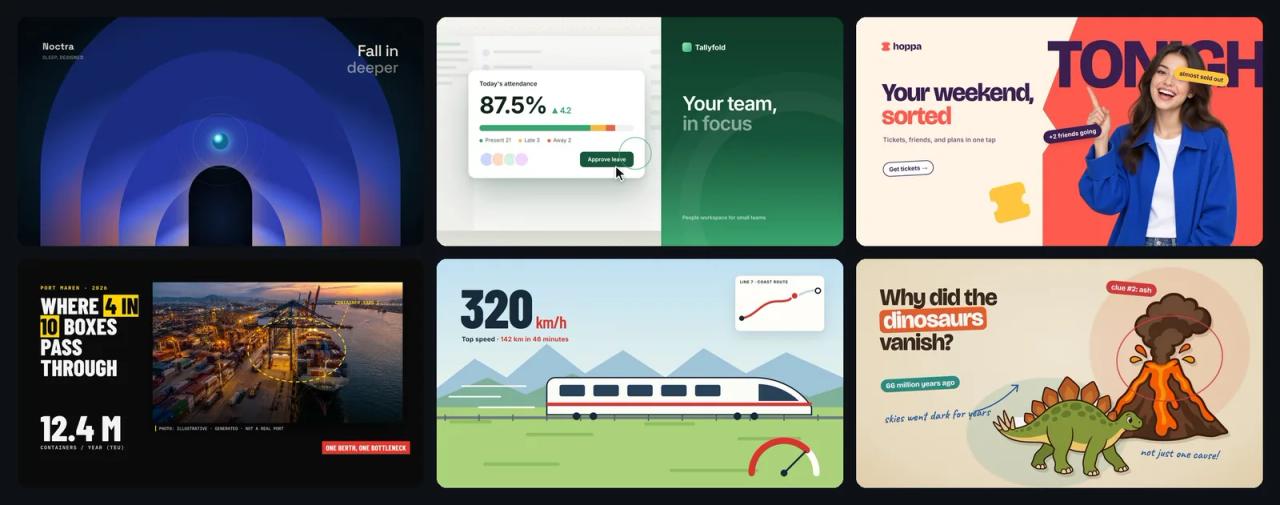
What Bang Motion is
- Repository: github.com/bangtutorial/bang-motion
- Author: Bang Tutorial, an Indonesian YouTube channel.
- License: MIT, © 2026 Bang Tutorial. You can use it, modify it and use it for client work; keep the copyright notice if you redistribute it.
- Version: 1.19.0, released 15 September 2026. The repository was created on 5 September and, as of 7 November, has about 1,280 stars and 159 forks.
- Format: a standard Agent Skills folder (
SKILL.mdwith frontmatter,references/,assets/,scripts/) that also ships as a Claude Code plugin. - Language: the README is in English, but
SKILL.md, the references and the changelog are in Indonesian. The agent doesn't care; you will if you want to edit the rules.
The core idea is solid: instead of asking the model to "make it more cinematic", the skill turns what a motion designer insists on into rules the agent can check in its own code, plus starters that make the right architecture the easy path.
What you can make with it
| Type | Examples | Typical length |
|---|---|---|
| Openers and promos | launches, app promos, teasers | 15–40 s |
| Product and SaaS demos | the UI is assembled and used on screen, the camera follows the clicks | 20–60 s |
| Kinetic typography | event announcements, manifestos, lyrics | 10–30 s |
| Bumpers, idents, channel intros | short looping brand moments | 3–10 s |
| Explainers | six styles, optional voice-over, 16:9 or 9:16 | 30–120 s |
Three menus combine behind those looks: 10 style directions (cinematic dark, poster color-block, editorial light, paper and print, retro, brutalist mono, pastel, luxury dark, flat pop with photos and grainy gradient), 19 opener concepts (one continuous shot, problem → gone, before/after, journey inside the UI, living number, product tour with claims…) and 6 explainer styles (continuous action, cartoon collage, visual journalism, white catalog, vintage sketch and cartoon stage).
How it works: brief, approval, then code
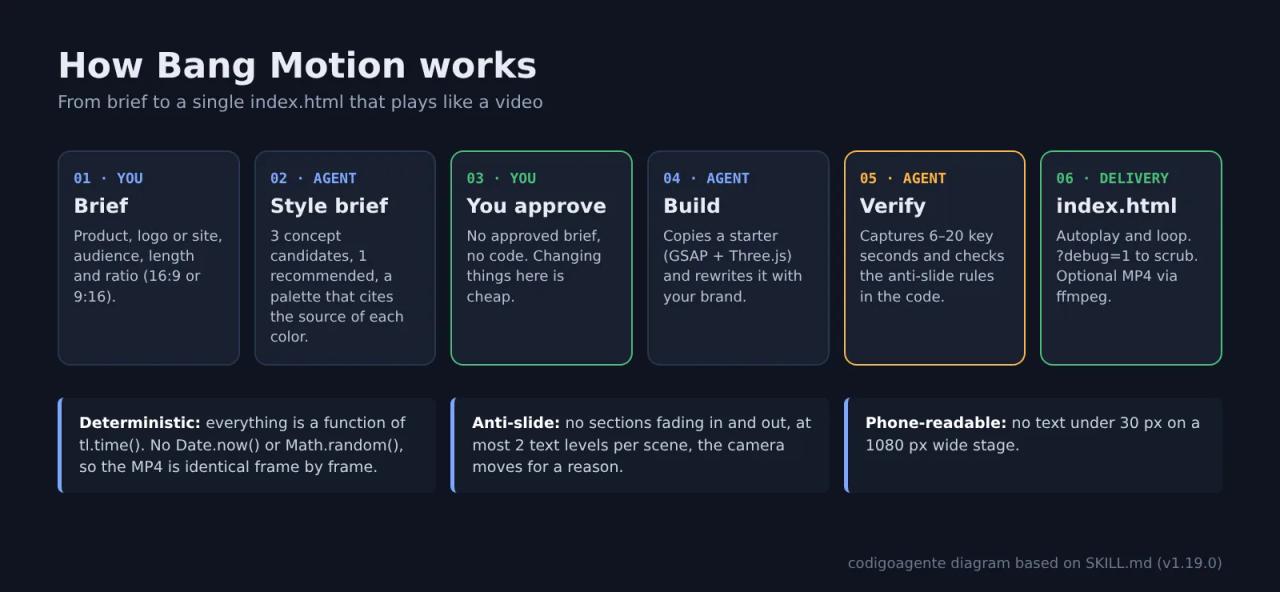
The order of work is strict, and it is what sets it apart from just asking an agent for a video:
- Brief. You give it the product, logo or site, audience, length and ratio. For explainers it asks one single question covering style, ratio, length and voice.
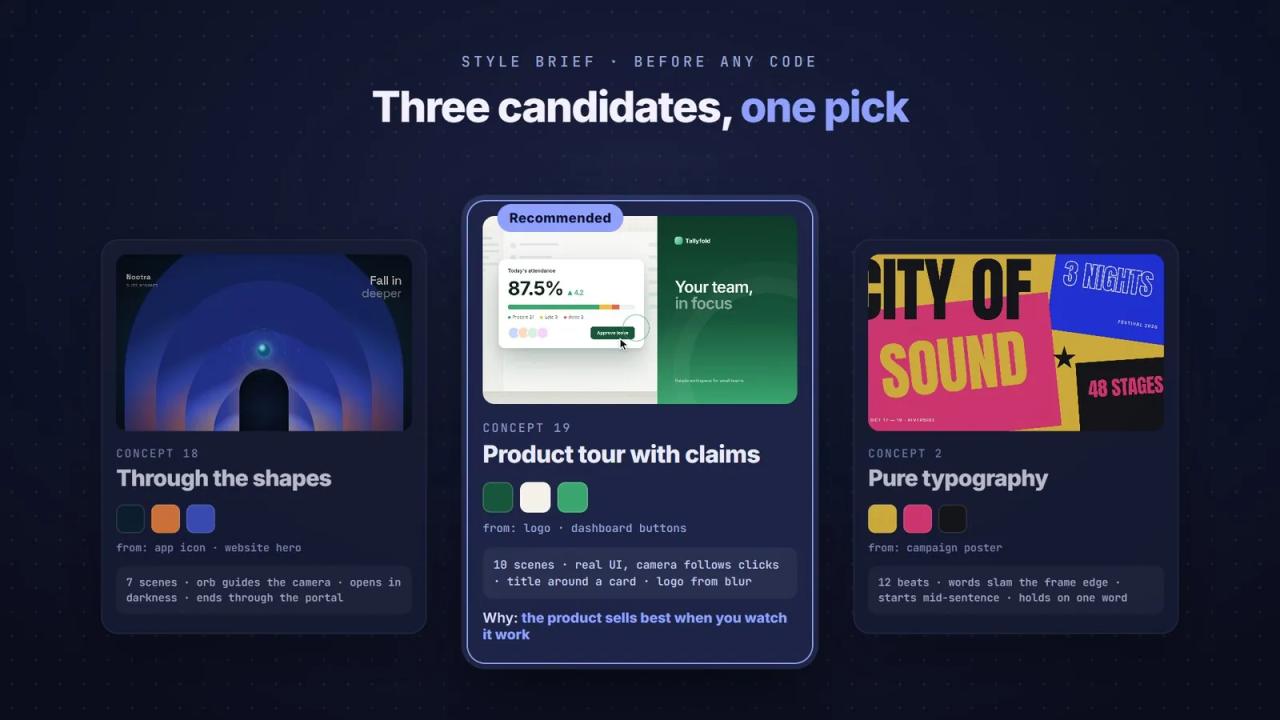
- Style brief before any code. The agent proposes three candidate concepts from the menu, recommends one and writes a "structure fingerprint" (
concept · scene count · main object per scene · opening · ending). The palette must come from your brand and every color cites its source (logo, app icon, website); any color that does not is marked as "derived" with a reason. - You approve. Without an approved style brief, the skill forbids touching code. Rewriting a rundown is cheap; rewriting code is not.
- Build. It copies the right starter (
starter-opener.htmlor one of the sixstarter-explainer-*.html) and rewrites it with your color tokens, fonts and background motion. Starters are deliberately grey so nobody inherits a look. - Visual verification. The agent can't watch a video, only frames.
scripts/snap.mjsfreezes the timeline at 6–20 key seconds and captures them with Puppeteer so the agent can check for clipped text, overlaps or scenes that still read as slides. - Delivery. One
index.htmlthat opens with a double click: autoplay, loop, no visible player.?debug=1shows a scrub bar, and R/Space restart or pause.
The technical rules that make the difference
Deterministic or dead
"Law #2" in SKILL.md says no line may read the system clock. Everything on screen is a pure function of tl.time(), the GSAP timeline time: particles, counters, camera shake (high-frequency sines, not Math.random()) and "flowing" objects (tween the distance, never accumulate per-frame velocity).
The practical payoff is big: you can scrub the animation like an After Effects timeline, and the frame-by-frame MP4 render produces the same image every time. That is why every starter exposes window.OPENER = { tl, DURATION, seek, ready }, used by both verification and export.
An anti-slide test you can check in code
Before handing over, the skill makes the agent check the code, not its feelings. Some of its eight points:
- Three or more
<section>elements toggled with opacity means it is a slide deck. Scenes change because the world or camera moves (push-through, whip to another angle), not because a section fades. - At most two text levels per scene: one big line or number plus one label. Kicker + title + body already reads as PowerPoint.
- A Ken Burns (scale 1.0 → 1.05 on a photo) as the only motion fails.
- A rundown following hook → feature → feature → promise → logo → CTA, or three feature tiles in a row, is a template even with a new skin.
Failing a single point means a rework before you ever see it.
Style derived from your brand
The most common failure the skill tries to prevent is your product's opener coming out with the same skin as the last one: dark background, blue accent, glow and the same font. The checklist requires each project to differ from the previous one in at least three of palette, font, background motion and signature move. A reference video only contributes rhythm and energy, never colors, fonts, scene order or specific moments.
Built for phones
No text under 30 px on a 1080-wide stage (body ≥ 44, labels ≥ 34, credits ≥ 30). If the video is going to Reels or TikTok, this is the rule you'll appreciate most.
Video as footage layers
Since v1.18.0 the starters include a clip(el, {at, in, out, rate, hold}) helper: you can drop a screen recording inside a laptop mockup or a mask, and the clip follows the timeline clock, so scrubbing and export stay frame-accurate.
How to install Bang Motion
As a Claude Code plugin
/plugin marketplace add bangtutorial/bang-motion
/plugin install bang-motion@bang-motion
To update: /plugin marketplace update bang-motion.
Manually (any agent)
git clone https://github.com/bangtutorial/bang-motion ~/.claude/skills/bang-motionOn Windows the folder is C:\Users\<you>\.claude\skills\bang-motion. In Codex CLI it goes in your skills folder or you reference it from AGENTS.md; in Gemini CLI or Cursor, copy the folder into the project and point to SKILL.md from GEMINI.md or .cursor/rules. If this is your first skill, our Claude Code skills guide explains how they load.
Install one copy only: a plugin and a manual folder with the same name conflict, and the plugin wins.
Prompting it
Make a 30-second opener for my note-taking app. Logo and screenshots attached.Explain how a container port works in 60 seconds, visual journalism style, no voice-over.The README gives advice worth following: start each video in a new chat. The skill is read when invoked, and a long chat carries decisions from earlier projects. Also, ask for a style by name ("grainy gradient") rather than a list of scenes: describing a reference's scenes gets you a copy.
Exporting to MP4
The deliverable is HTML. If you need a video file:
npm i puppeteer
python -m http.server 5178
node scripts/export-frames.mjs
ffmpeg -framerate 60 -i frames/f%05d.png -c:v libx264 -pix_fmt yuv420p -crf 16 opener.mp4
export-frames.mjs does not record the screen: it sets the timeline time, waits two requestAnimationFrame ticks and captures, so no frames drop even if one takes 300 ms to draw. It reads FPS, OUT and SCALE from environment variables (60 fps at 1920×1080 by default). Without ffmpeg you can record the tab with OBS, though that can drop frames.
What Bang Motion costs
The skill is MIT and free. The cost is in what surrounds it:
| Piece | Price | Required? |
|---|---|---|
| Bang Motion | 0 USD (MIT) | Yes |
| Agent: Claude Code | from a Claude Pro subscription (20 USD/month) or pay-per-token on the API | One of the options |
| Agent: Gemini CLI | free tier with a Google account (check the current limits) | One of the options |
| GSAP and Three.js (via CDN) | 0 USD | Yes |
| Browser | 0 USD | Yes, to watch it |
| Node + Puppeteer + ffmpeg | 0 USD | Only to verify or export MP4 |
| Image MCP (fictional people or product photos) | per-image pricing, depends on the provider | No |
| After Effects + Higgsfield MCP bridge | Adobe subscription; the author says building 10 stages uses 0 Higgsfield credits | No |
Compared with the usual alternative, a subscription motion design tool or a freelancer per piece, the math looks like this:
- If you already pay for Claude Pro or have Codex access: zero extra cost. Build the opener, export with ffmpeg, done.
- If you pay for no agent: Gemini CLI on its free tier plus a browser is the cheapest route. Its usage limits are the ceiling, not the skill.
- If you need photographed people or products and have no photos: this is where an image MCP adds cost. To avoid it, pick an illustrated or typographic style that needs no photos.
We could not measure the token use of a full opener in this review; keep in mind the process takes several rounds (style brief, build, captures and fixes), so on the API it is not a single call.
What the README doesn't tell you
The rules are in Indonesian
SKILL.md (551 lines) and the eight references (about 2,850 more lines) are written in Indonesian. Claude, Codex or Gemini follow them fine, but if you want to tweak a rule, say switching the default ratio to 9:16, you'll need to translate that section. On-screen copy comes out in whatever language you ask for.
It needs internet to play
The starters load gsap@3.12.5 and three@0.161.0 from jsDelivr and fonts from Google Fonts. Opening index.html offline breaks the animation. If you'll play it at an event, download the libraries and swap the URLs for local paths (as classic scripts rather than modules: local modules are blocked when opened over file://).
GSAP is free, but not MIT
Since version 3.13, after the Webflow acquisition, GSAP is free for commercial use too, under its own "no charge" standard license. It is not MIT and has some restrictions (for example, not using it in a tool that competes with Webflow's visual builder). For client openers and promos that is fine. To get the latest version, update the starter's CDN URL. Three.js is MIT.
The verification scripts need Puppeteer
snap.mjs and export-frames.mjs import puppeteer, which is not in the repository (npm i puppeteer). snap.mjs opens the file over file://; export-frames.mjs expects a server on 127.0.0.1:5178. Without Node, verification is manual with ?debug=1.
What we did not test
In this review we did not run the starters or generate an opener: this is a code and documentation analysis. The gallery images come from the repository itself and, according to the README, each is a single static scene with fictional brands and data; portraits and product photos were generated with GPT Image 2.5.
FAQ
Is the output a video file? Not directly. It is an index.html that plays like video. For MP4 you use export-frames.mjs + ffmpeg.
Can I use it for client work? Yes. The skill is MIT and GSAP is free for commercial use. Check the license of any photos or clips you add.
Does it work outside Claude Code? Yes: Codex CLI, Gemini CLI, Cursor, or even a plain chat by pasting SKILL.md and the relevant reference.
Will every video look the same? That is exactly what it tries to prevent: the palette comes from your brand, the concept is chosen per product and each project must differ from the previous one.
Does it do vertical shorts? Yes, explainers support 9:16. If you want 3D characters, also look at Claude Animated Shorts.
Conclusion
Bang Motion is one of the most useful video skills we've seen for a small business: no GPU, no per-render fees, and the deliverable opens with a double click. The value is not the templates but the way it turns a motion designer's judgment into checkable rules (determinism, an anti-slide test, a palette with sources). To compare approaches, HyperFrames also renders video from HTML and OpenMontage orchestrates a full production with agents. For a 30-second opener or promo on no budget, start with Bang Motion.
// source code
// implementation
More on AI agents

- Skills for your agents
- Claude Code

- Skills for your agents
- Claude Code

- Skills for your agents
- Claude Code