Paymenter: the open source WHMCS alternative for hosting and subscription billing
Billing subscriptions looks trivial until you have to issue the invoice seven days before renewal, charge the saved card, suspend the service if nobody pays and reactivate it when the money lands. That is exactly what Paymenter automates: an MIT-licensed, open source billing and client management platform built for hosting companies, and easy to adapt to other recurring-revenue models.
In this review we look at what it is, how it works internally (reading the code of the official repository), how to install it, and where it fits, and where it does not, for SMBs, small software agencies and other businesses.
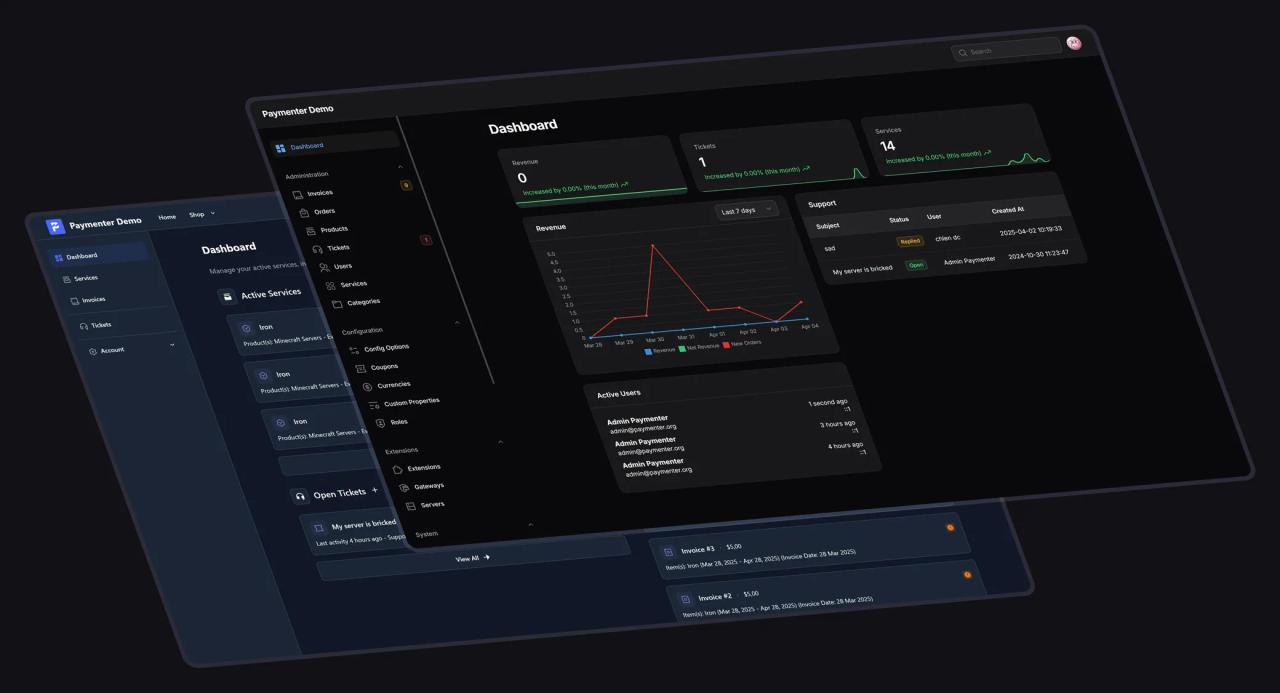
What is Paymenter?
Paymenter describes itself as "Open-Source Billing, Built for Hosting": a self-hosted alternative to WHMCS or Blesta. It covers the full lifecycle of a recurring-services business: product catalog, cart and checkout, invoices, gateway payments, automatic provisioning of the purchased service, support tickets and a client area.
- License: MIT. You can use it, modify it and resell it as part of your solution without per-client or per-install fees.
- Stack: PHP 8.3+, Laravel 13, Filament 5 (admin panel), Livewire 4 (client area), MariaDB, and Redis for cache and queues.
- Community: about 2,700 stars and 500+ forks on GitHub at the time of writing, with an active Discord and a marketplace for extensions and themes.
- Languages: the repository ships translations for 24 languages and supports multiple currencies.
- Public demo: demo.paymenter.org to try it before installing anything.
How it works internally
The data model
The core lives in app/Models. The main chain is Product → Plan → Price: a product (say, "2 GB VPS") has one or more plans (free, one-time, or recurring every N days, weeks, months or years) and each plan has per-currency prices with an optional setup fee. When a client checks out, an Order is created with one or more Service records; each service produces Invoice documents with InvoiceItem lines, and payments are stored as InvoiceTransaction.
Around that sit the pieces any serious billing system needs: Coupon (recurring or one-cycle discounts), TaxRate, Credit (account balance), BillingAgreement (a saved payment method for automatic charges), ServiceUpgrade for prorated plan changes, and ServiceCancellation.

The automatic billing cycle
The recurring business logic lives in a single command, app:cron-job (app/Console/Commands/CronJob.php), which the Laravel scheduler runs once a day at the configured time. On each run, inside a database transaction, it:
- Creates an invoice for every active service expiring within the next N days (7 by default) and applies recurring coupons.
- Attempts an automatic charge when the client has a billing agreement (saved card or PayPal).
- Cancels orders whose first invoice was not paid in time.
- Suspends services overdue for X days and terminates them after Y days, cancelling pending invoices.
- Closes stale tickets and purges old logs.
Expensive actions (creating, suspending or terminating a server on the hosting panel) are dispatched as queued jobs, which is why the installation needs a Laravel queue worker running permanently.
Extension architecture
Everything that connects Paymenter to the outside world is an extension under extensions/, in three types:
- Gateways: Stripe, PayPal, PayPal IPN and Mollie ship with it. A gateway implements
pay()and, optionally, billing agreements (createBillingAgreement,charge) and refunds (refund). - Servers (provisioning): Pterodactyl, cPanel, Plesk, DirectAdmin, Enhance, Convoy, VirtFusion and Virtualizor. They implement
createServer,suspendServer,unsuspendServer,terminateServerandupgradeServer, which Paymenter calls as the service changes state. - Others: feature modules such as Affiliates (referral program with commissions), Announcements and Discord notifications.
A custom extension is a PHP class with an #[ExtensionMeta] attribute. Here is the minimal skeleton of a gateway, based on the repository's real Mollie implementation:
# Scaffold an extension (types: gateway, server, other)
php artisan app:extension:create MyGateway gateway<?php
namespace Paymenter\Extensions\Gateways\MyGateway;
use App\Attributes\ExtensionMeta;
use App\Classes\Extension\Gateway;
use App\Helpers\ExtensionHelper;
use App\Models\Invoice;
use Illuminate\Http\Request;
#[ExtensionMeta(name: 'My Gateway', description: 'Local gateway', version: '1.0.0', author: 'codigoagente')]
class MyGateway extends Gateway
{
// Fields the admin fills in under Admin → Gateways (stored encrypted)
public function getConfig($values = [])
{
return [
['name' => 'api_key', 'label' => 'API Key', 'type' => 'text', 'encrypted' => true, 'required' => true],
];
}
// Return the provider's checkout URL (or a view)
public function pay(Invoice $invoice, $total)
{
// ... create the charge in the provider's API using $invoice->id as reference
return $checkoutUrl;
}
// Provider webhook: mark the invoice as paid
public function webhook(Request $request)
{
ExtensionHelper::addPayment($request->input('invoice_id'), 'MyGateway', $request->input('amount'), transactionId: $request->input('id'));
}
}Beyond the panel, Paymenter exposes a REST API documented with OpenAPI plus OAuth clients, so you can wire it into an ERP, a CRM or your own frontend.
Support and client data
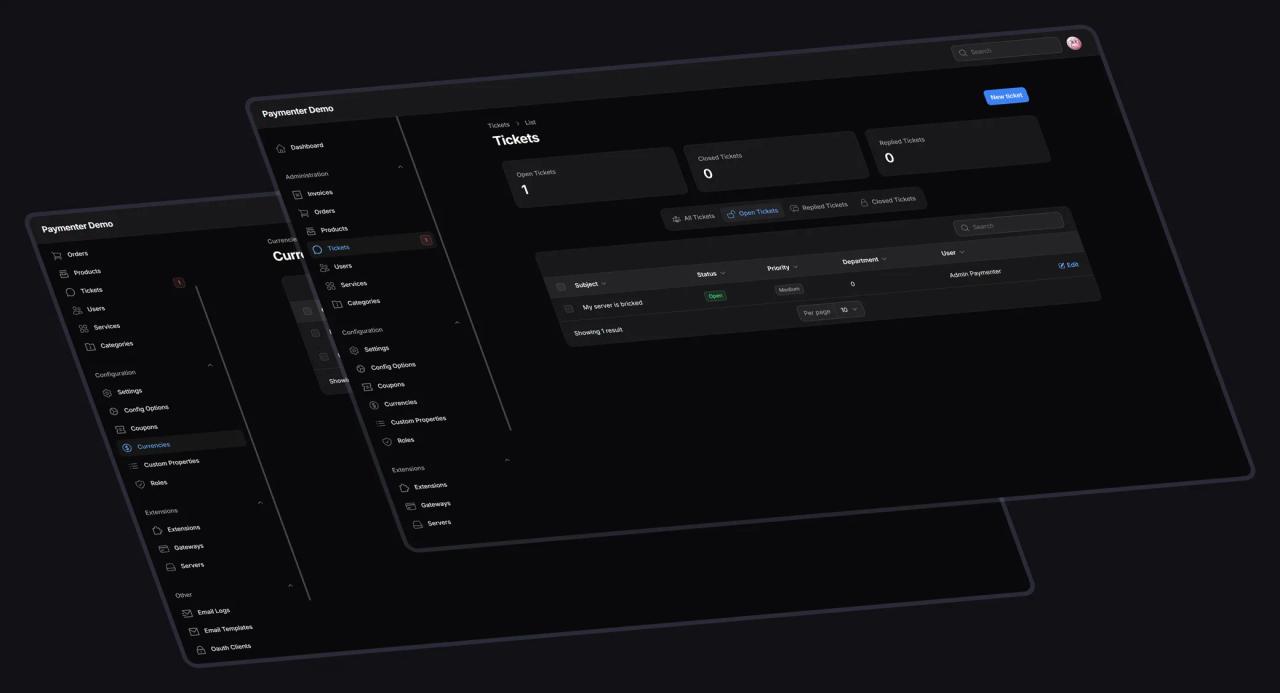
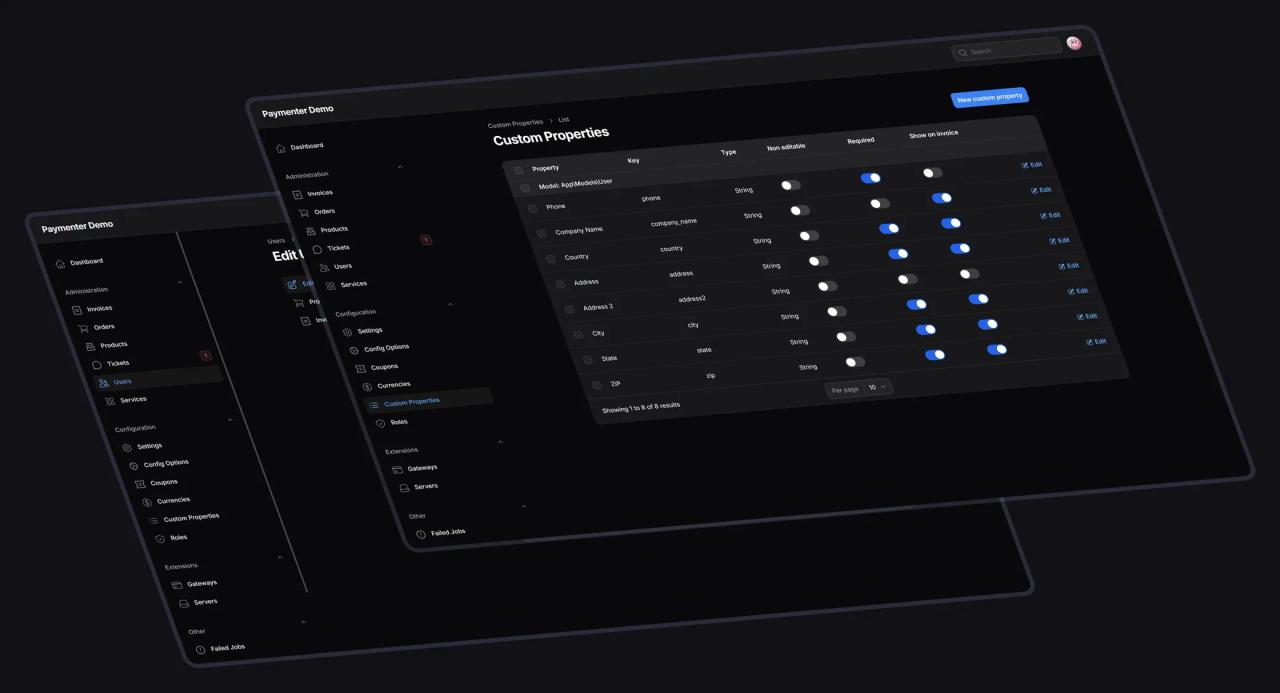
The ticket system includes departments, priorities and IMAP email import (app:fetch-emails, every five minutes). Custom Properties let you add your own fields to clients or services (tax ID, company name, billing address) and decide whether they are required or printed on the invoice.
Installation
Quick option: Docker
The shortest path to evaluate it on a VPS or locally. The official compose file starts MariaDB, Redis and the ghcr.io/paymenter/paymenter image, which already bundles nginx, PHP-FPM, the scheduler cron and the queue worker under supervisord:
# 1. Download the example docker-compose from the official repository
curl -Lo docker-compose.yml https://raw.githubusercontent.com/Paymenter/Paymenter/master/docker-compose.example.yml

# 2. Change MYSQL_PASSWORD and MYSQL_ROOT_PASSWORD (and the port if 80 is taken)
nano docker-compose.yml

# 3. Start MariaDB, Redis and Paymenter
docker compose up -d --force-recreate

# 4. Set the public URL, seed properties and create the admin user
docker compose exec paymenter php artisan app:init
docker compose exec paymenter php artisan db:seed --class=CustomPropertySeeder
docker compose exec paymenter php artisan app:user:create
Paymenter listens on port 80. If you put it behind a reverse proxy, add its IP or subnet under Admin → Settings → Security as a trusted proxy, or file uploads will fail.
Production option: Linux server
The official guide supports Ubuntu 22.04/24.04, Debian 11–13 and CentOS 8/9 (Windows is not supported). Dependencies:
# Ubuntu 24.04 / 22.04 (per the official guide)
apt -y install software-properties-common curl apt-transport-https ca-certificates gnupg
LC_ALL=C.UTF-8 add-apt-repository -y ppa:ondrej/php
apt update
apt -y install php8.3 php8.3-{common,cli,gd,mysql,mbstring,bcmath,xml,fpm,curl,zip,intl,redis} \
  mariadb-server nginx tar unzip git redis-server
Download the latest release and set up the base configuration:
mkdir -p /var/www/paymenter && cd /var/www/paymenter
curl -Lo paymenter.tar.gz https://github.com/paymenter/paymenter/releases/latest/download/paymenter.tar.gz
tar -xzvf paymenter.tar.gz
chmod -R 755 storage/* bootstrap/cache/

cp .env.example .env
php artisan key:generate --force
php artisan storage:link
Database (inside mysql -u root -p):
CREATE USER 'paymenter'@'127.0.0.1' IDENTIFIED BY 'change-this-password';
CREATE DATABASE paymenter;
GRANT ALL PRIVILEGES ON paymenter.* TO 'paymenter'@'127.0.0.1' WITH GRANT OPTION;
Migrations, admin user and cron:
php artisan migrate --force --seed
php artisan db:seed --class=CustomPropertySeeder
php artisan app:init
php artisan app:user:create

# Laravel scheduler (fires app:cron-job daily and app:fetch-emails every 5 min)
# sudo crontab -u www-data -e
* * * * * php /var/www/paymenter/artisan schedule:run >> /dev/null 2>&1
Finally, the queue worker as a systemd service and an nginx server block pointing to /var/www/paymenter/public (the official guide has the full block with and without SSL):
[Unit]
Description=Paymenter Queue Worker

[Service]
User=www-data
Group=www-data
Restart=always
ExecStart=/usr/bin/php /var/www/paymenter/artisan queue:work
StartLimitInterval=180
StartLimitBurst=30
RestartSec=5s

[Install]
WantedBy=multi-user.targetsudo systemctl enable --now paymenter.service
sudo systemctl enable --now redis-serverMigrating from WHMCS
If you are coming from WHMCS, the bundled importer brings over currencies, clients, admins, categories, products, orders, services, invoices, payments and tickets:
# Import clients, products, services, invoices and tickets from a WHMCS DB
# (wipes existing Paymenter data: back up first)
php artisan app:import-from-whmcs whmcs_temp root 127.0.0.1 3306
How it helps SMBs, agencies and other businesses
Hosting and game-server companies
This is its native use case. A client buys a plan, pays with Stripe or PayPal, and Paymenter creates the cPanel, Plesk or DirectAdmin account, the VPS on VirtFusion, Convoy or Virtualizor, or the game server on Pterodactyl, with no human in the loop. If they do not pay, the service is suspended and later terminated automatically.
Small software agencies
A 2-to-10-person agency usually has scattered recurring revenue: client site hosting, monthly maintenance, support-hour bundles, plugin licenses or its own SaaS. Paymenter brings all of that together:
- Maintenance plans as recurring products (Basic, Pro, Premium) with prorated upgrades and downgrades.
- Reseller hosting provisioned automatically if you run cPanel, Plesk, DirectAdmin or Enhance.
- Ticket-based support tied to the purchased service instead of loose emails.
- Your own SaaS: a Server-type extension can call your product's API to create, suspend or delete the client's tenant based on payment status.
- White label: customizable themes (
app:theme:create) so the client portal carries your brand.
SMBs in other industries
A Paymenter product does not need a server: if you pick no provisioning extension, the service simply becomes active for you to fulfill manually. That makes it viable for any business selling recurring services: memberships, gym or academy fees, accounting or legal retainers, software licenses, equipment maintenance or IT support plans.
There are limits worth knowing before adopting it:
- It is not a physical-goods e-commerce platform: it has stock and per-client limits, but no shipping, logistics variants or multi-warehouse inventory.
- Bundled gateways: Stripe, PayPal and Mollie. Local Latin American gateways (Payphone, Kushki, Mercado Pago, etc.) must come from the marketplace or be written as an extension, as shown above.
- Tax e-invoicing: Paymenter invoices are payment documents, not electronic tax receipts valid for authorities such as Ecuador's SRI, Mexico's SAT or Colombia's DIAN. If your country requires them, you need to integrate a certified issuer, for example through an extension that listens for the payment and issues the receipt.
- Operations: self-hosting means maintaining PHP, MariaDB, backups, TLS and updates. If that does not suit your team, the project offers managed hosting starting at USD 5/month according to its website.
Security and compliance
Paymenter does not store card numbers: charging and tokenization happen at Stripe, PayPal or Mollie, which reduces your installation's PCI scope. Extension credentials are stored encrypted with Laravel's APP_KEY, and the panel includes roles, auditing and API keys. Still, being self-hosted, the attack surface is yours: keep it updated (php artisan app:upgrade), enforce HTTPS and restrict access to the admin panel.
Verdict
Paymenter is today one of the most mature open source alternatives to WHMCS: a modern stack (Laravel + Filament), an MIT license with no fine print, clear extension points and an automatic billing cycle that is well solved in code. For hosting companies it is a direct fit; for agencies and SMBs with recurring revenue it is a solid foundation, as long as you take on the integration of local gateways and your country's e-invoicing.
Resources
- GitHub repository (MIT)
- Official documentation
- Installation guide and Docker guide
- Live demo
- Extensions marketplace
Screenshots belong to the Paymenter project and come from its documentation repository, published under AGPL-3.0.
// source code
// implementation