It's a Plan: the open source Linear and Jira alternative where AI agents are teammates
It's a Plan is an open source project management and issue tracking tool that you host on your own server and that treats AI agents as team members: an agent gets a role, permissions and can be assigned issues on the same board as people. It positions itself as an alternative to Linear, Jira, Trello and Plane, it is released under the AGPL-3.0 license, and its latest version is 1.5.0, from October 13, 2026.
In this review we read its code and documentation to explain what it really does, how it works under the hood, how a software team uses it, whether it pays off for a company or a freelancer, and where it wins and loses against paid tools.
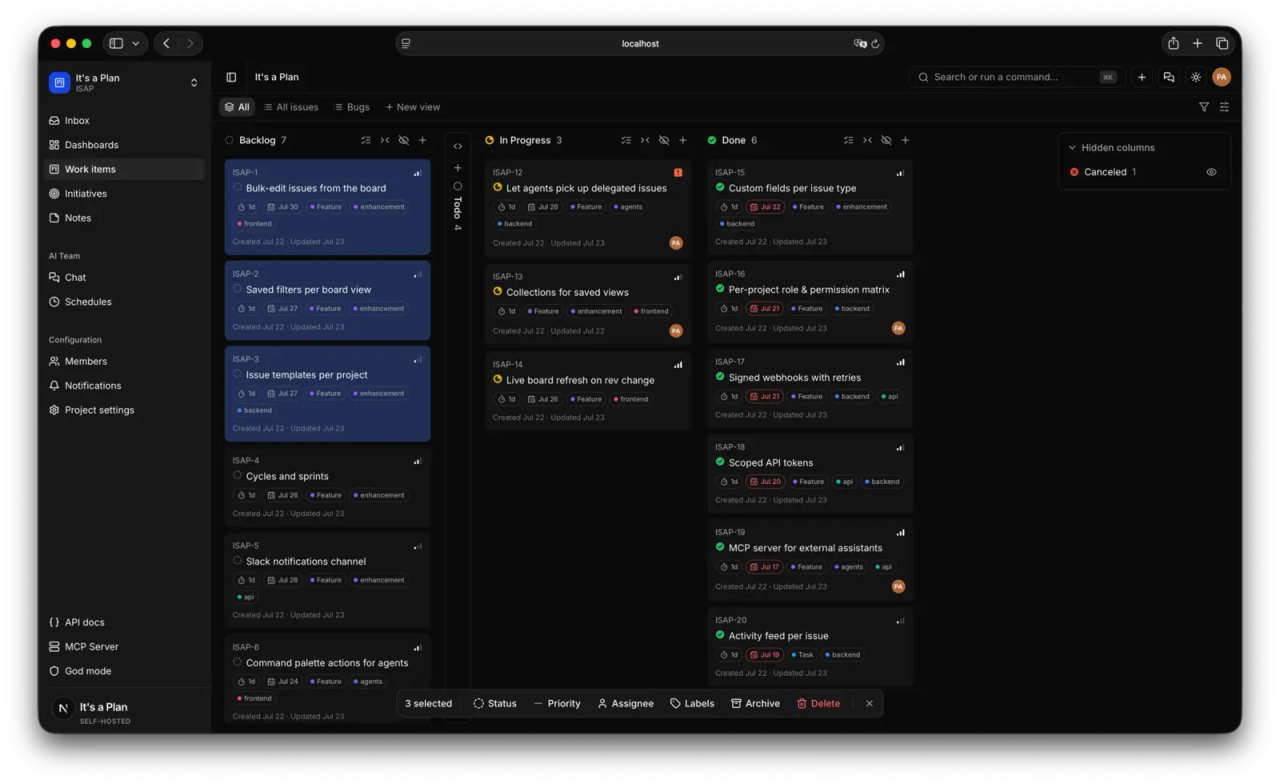
What It's a Plan is and who builds it
- Repository: github.com/croffasia/itsaplan
- Website: itsaplan.dev
- Version reviewed: 1.5.0 (October 13, 2026), plus the changes on
mainup to October 17. Releases ship almost weekly: 1.4.0 came out on October 8. - License: AGPL-3.0 for the whole project, except the
@itsaplan/runnerpackage, which is Apache-2.0. The author also sells a commercial license for companies where AGPL does not fit. - Author: Andrii Poluosmak, per the README copyright. Contributions are accepted under an Individual Contributor License Agreement (ICLA).
- Status: under active development. The README says it plainly: "Expect breaking changes before the first stable release."
A note on the license, because it changes things compared with the MIT projects we usually cover. AGPL-3.0 lets you use it for free, including in a company and for commercial work. The obligation kicks in if you modify the code and offer that modified version to others over a network (for example, as a SaaS for clients): then you must publish your changes under the same license. Running it internally as is requires you to publish nothing.
What it does: a full issue tracker, with or without AI
The README insists it works as a regular tracker even if you never turn on a single agent. This is what 1.5.0 ships:
| Area | What you get |
|---|---|
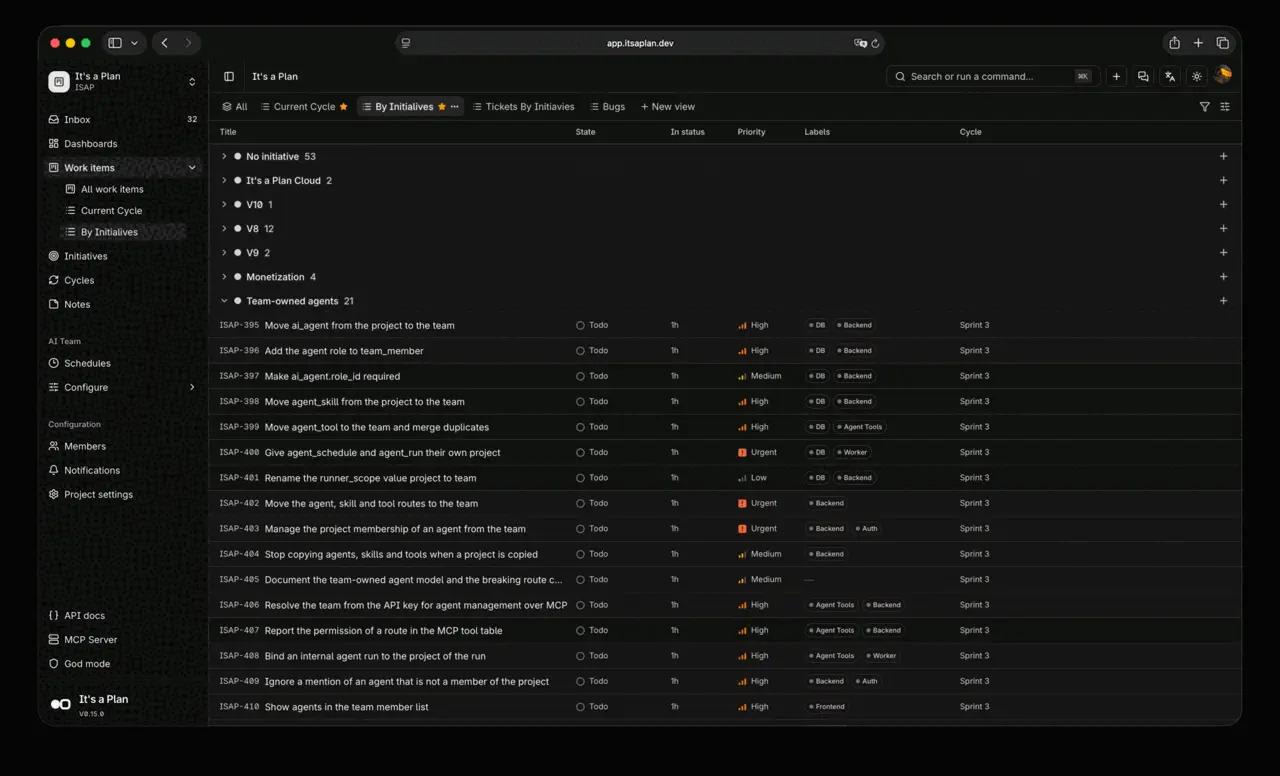
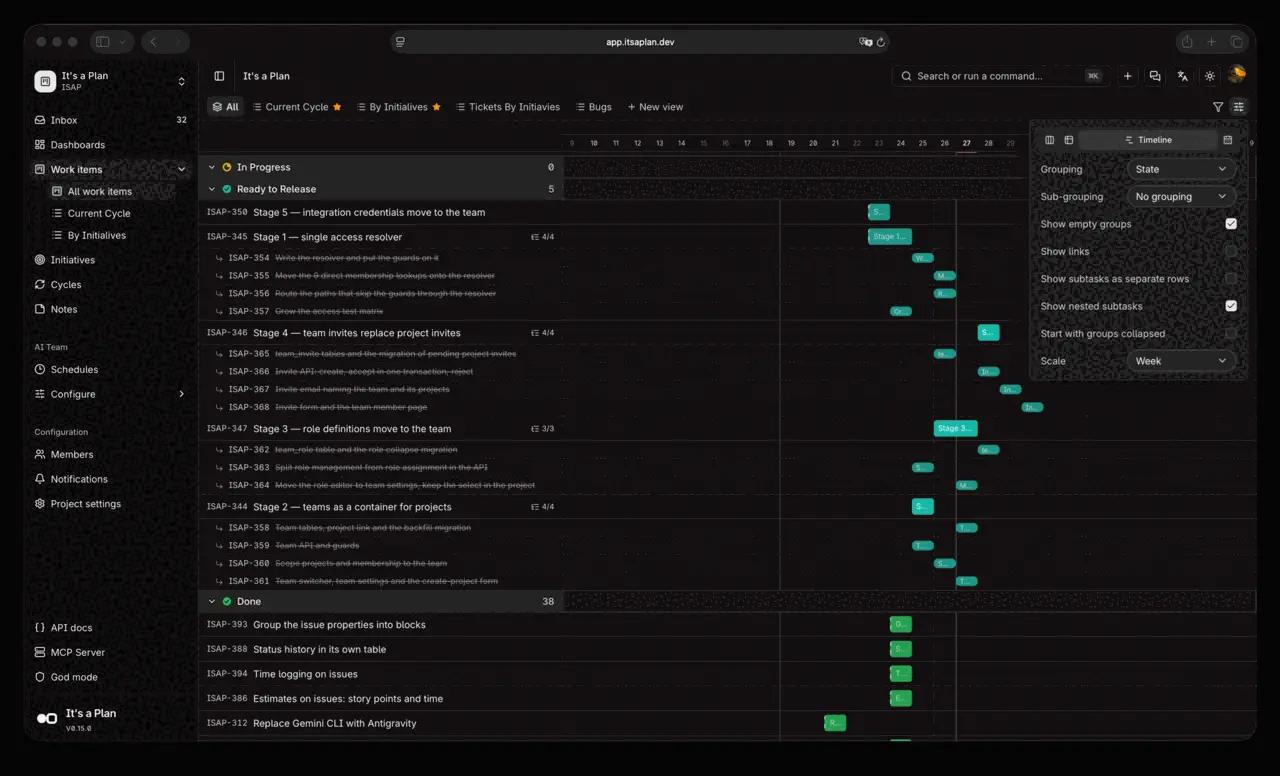
| Views | Kanban, table, timeline (Gantt-style) and calendar. Each view is saved as a tab with its own filters and two-level grouping |
| Organization | Projects, cycles (sprints) that roll unfinished work forward, initiatives, custom fields, labels, issue types, subtasks, checklists, relations (blocks, relates, duplicates) |
| Tracking | Dashboards with throughput, burnup with a projected completion date, breakdown and pulse; time logging (worklogs) |
| Docs | Markdown pages in a tree with revision history, plus sticky-note boards |
| Sharing | Read-only public link to a view or an issue, no sign-in needed |
| Code | Pull requests from GitHub, GitLab, Gitea, Forgejo and Bitbucket: "Fixes KEY-42" links the PR and moves the issue when it opens and merges |
| Platform | REST API with OpenAPI, MCP server, signed webhooks, passkeys, Google and OIDC (Keycloak, Authentik, Okta, Entra), SCIM |
| Notifications | Email (SMTP, Resend or Microsoft 365) and Telegram |
| Migration | Importers from Linear and Plane |
| Languages | About ten, Spanish and English included |
What sets it apart: AI agents as teammates
This is the part that made the project go viral. In It's a Plan an AI agent is added as a project member, with its own role and permissions, just like a person. There are two kinds:
- Internal agents. They run on the server itself. You pick the model, the system prompt, the tools and reusable "skills" that you write inline or import from a GitHub repository. They are built on Mastra and take keys from OpenAI, Anthropic, Google (Gemini), xAI, Mistral, Groq, DeepSeek, OpenRouter and dozens more providers, or any OpenAI-compatible endpoint. They come with tools for Notion, Telegram, Threads, Instagram, Jina, Firecrawl and Gitea.
- External agents. They run on your own machine, under your own account. You install
@itsaplan/runnerand it hands each task to Claude Code, Codex, opencode, Antigravity CLI, GitHub Copilot CLI, Pi, Oh My Pi or any command that reads stdin.
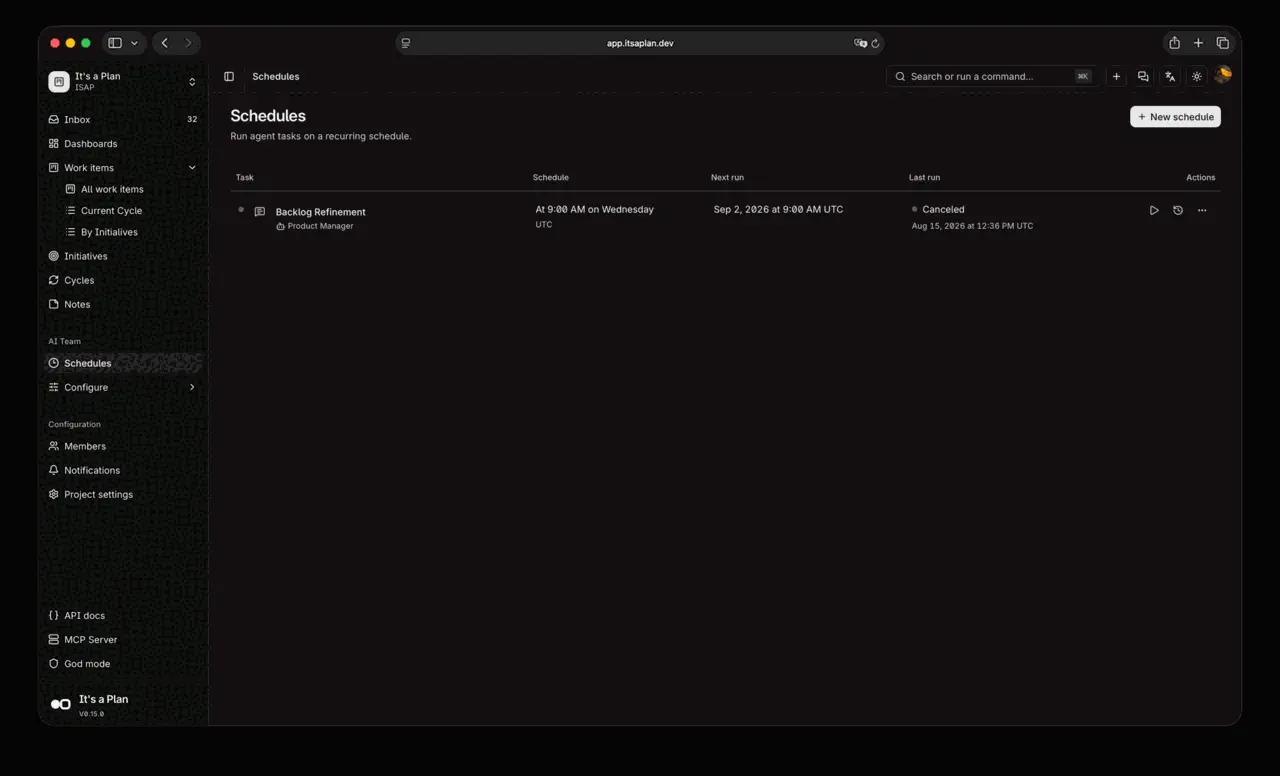
An agent starts working in three ways: you @mention it in a comment, you assign it an issue, or a schedule fires (for example, "every Wednesday at 9, refine the backlog"). Each agent also has its own chat with history, and since 1.5.0 the instance shows what each agent spends in tokens, per team and per workspace.
How it works under the hood
A technical team should know what it is putting on its server. The repository is a Bun and Turborepo monorepo:
| Layer | Technology |
|---|---|
| Backend (API) | Elysia on Bun |
| Frontend | Next.js (App Router) with shadcn/ui and Tailwind v4 |
| Database | PostgreSQL 17 with Drizzle ORM |
| Attachments | RustFS (S3-compatible storage) |
| Auth | better-auth (password, passkeys, Google, OIDC) |
| Agents | Mastra |
In production, Docker Compose starts postgres, rustfs, migrate (applies migrations before the API starts), api, worker (background jobs such as internal agents, schedules and deliveries), bot (Telegram) and web.
The most interesting technical detail is the MCP server. It is not hand-written: it is generated from the API routes that carry an x-mcp marker in their OpenAPI definition. Each MCP tool forwards the call to the real route, so validation and permissions are the same as in the API. The code on main declares about 200 tools (create_issue, update_issue, add_comment, get_project_burnup, create_agent_schedule...). That means Claude Code, Claude Desktop or any MCP client can drive almost the entire tracker, not just read issues.
This is the flow of an external agent:
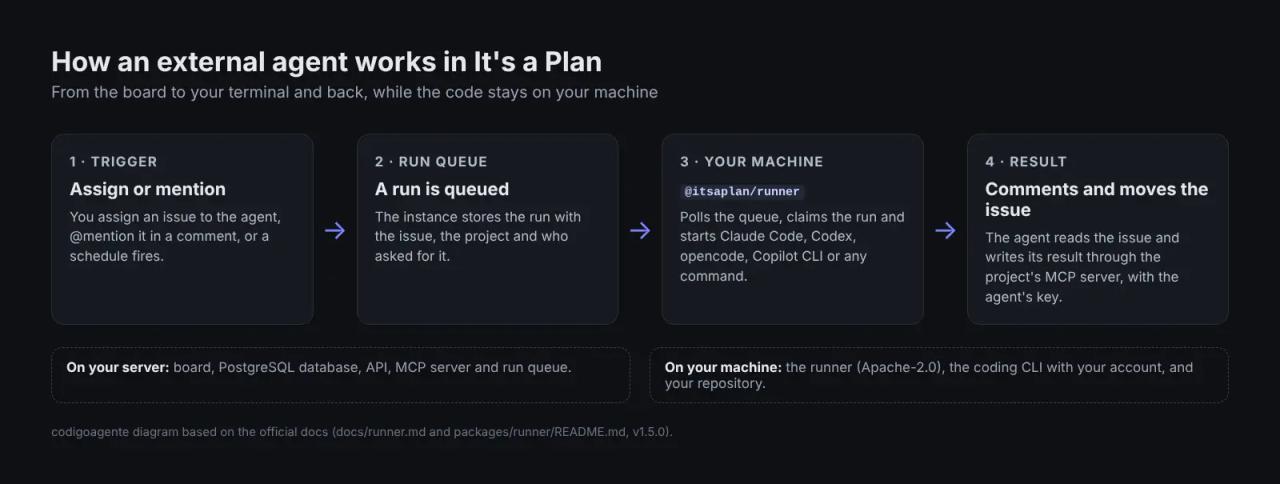
The runner polls your instance's queue (no ports to open on your machine), claims the work and starts the CLI. With Claude Code, for instance, the preset passes --permission-mode auto and --output-format stream-json, so nobody has to approve actions and the board's chat sees the answer word by word. Your code never leaves your machine: what reaches the instance is what the agent writes through MCP (comments, state changes).
How a software team uses it
Given the above, these are concrete jobs the tool handles:
- Bug triage. An internal agent on a daily schedule reviews new issues, sets labels and priority, and asks in comments for what is missing.
- Delegating small tasks to the coding agent. You assign "ISAP-42: the date filter ignores the time zone" to the external agent. The runner opens Claude Code in your repository, the agent makes the change, opens a PR with "Fixes ISAP-42", and the issue changes state by itself when the PR opens and when it merges.
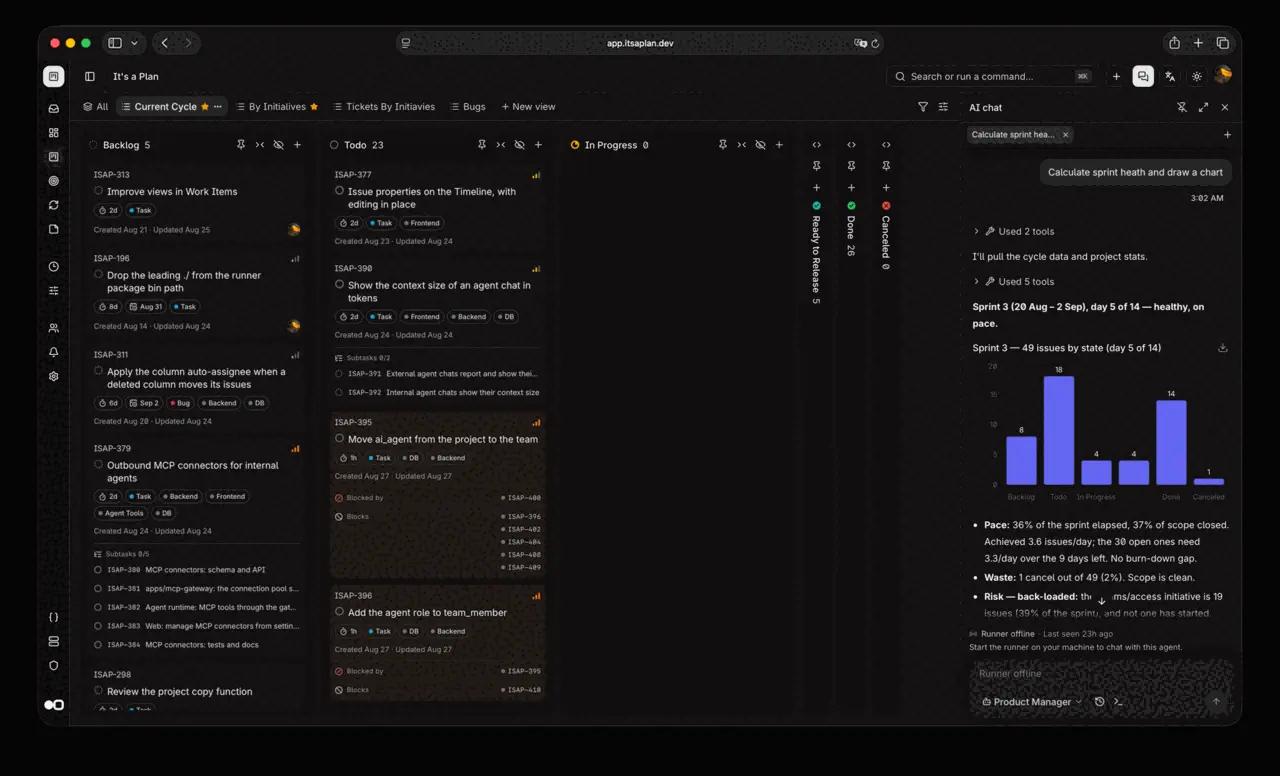
- Sprint reports. You ask the agent in the chat to "calculate sprint health and draw a chart" and it answers with the cycle data, as in the screenshot above.
- Backlog refinement. A weekly schedule groups duplicates, suggests estimates and flags blocked issues.
- Living documentation. Agents can create and update Docs pages linked to the issues they describe.
The point is that everything happens on the same board: the team sees what the agent did, when and on which issue, as with any colleague. That is the difference from running Claude Code by hand and pasting the result into Jira. If you want that agent to work with discipline (design, plan, tests), pair it with skills like Superpowers for Claude Code; if you are new to skills, start with this Claude Code skills guide.
Does it help if you work at a company?
Yes, if three things are true: someone can maintain a server, you want project data to stay inside your infrastructure, and you already use coding agents.
- License savings. There is no per-seat fee. A 20-person team on Linear Basic (about $10 per user per month billed yearly, per 2026 public pricing) pays around $2,400 a year; here you pay for the server and the AI usage.
- Data at home. Database, attachments and AI keys are yours. For regulated sectors or clients who demand it, that is a strong argument.
- Enterprise integration. OIDC SSO, SCIM provisioning, roles and permissions, signed webhooks. That is more than most projects this young offer.
- But there is no Slack or Microsoft Teams integration (notifications go by email and Telegram), no Jira importer, and a release that changes weekly with announced breaking changes means you should test upgrades before applying them.
Does it help if you are a freelancer?
It depends on how much you work with agents.
- For: you can run one project per client, share a read-only public link to the board or roadmap with the client, log hours per issue, and hand small tasks to Claude Code or Codex while you review the PRs. The Community edition has no per-seat cost, so inviting the client is free.
- Against: you have to maintain a server with HTTPS, two domains (or one domain with an
/apipath) and PostgreSQL backups. With only a few projects, Linear's or Trello's free plan gives you a board with zero maintenance. And isolating clients in separate workspaces is exactly one of the features the website reserves for the Pro edition ($99 a year, still "in development").
If you already run a VPS with Coolify, like the one we set up in the Paymenter on Coolify guide, It's a Plan is just another app on the same server.
Comparison with Linear, Jira and Plane
Approximate public prices checked in October 2026; confirm them on each product's site before deciding.
| It's a Plan | Linear | Jira Cloud | Plane | |
|---|---|---|---|---|
| Price | Free (Community); Pro $99/year in development | Limited free tier; Basic ~$10 and Business ~$16 per user/month | Free up to 10 users; Standard ~$8 and Premium ~$15 per user/month | Free Community; paid per-seat plans |
| License | AGPL-3.0 | Proprietary | Proprietary | AGPL-3.0 (Community) |
| Self-hostable | Yes, every feature | No | Only Data Center, which Atlassian is retiring | Yes |
| AI agents as assignable members | Yes, internal and external | Agent integrations and paid AI credits | Atlassian Rovo | AI features on paid plans |
| Runs your CLI (Claude Code, Codex) on your machine | Yes, with the runner | Not natively | No | No |
| Bring your own AI keys | Yes, dozens of providers | No | No | Not stated |
| MCP server | Yes, ~200 tools | Yes | Yes | Yes |
| Slack integration | No | Yes | Yes | Yes |
| Native mobile apps | No (installable web app, PWA) | Yes | Yes | Yes |
| Maturity | 1.x released in 2026, frequent changes | Very mature | Very mature, huge ecosystem | Mature |
What It's a Plan solves compared with paid tools: per-seat cost, vendor lock-in, picking your model and paying only for what it uses, and letting the coding agent work on your machine with your repository and your tools.
What it does not solve: Jira's ecosystem (thousands of Marketplace apps, advanced reporting, service management), Linear's polish and mobile apps, Slack or Teams integrations, and the peace of mind of maintaining nothing.
Is it easy to use?
Separate the people who use it from the person who installs it.
- For the team using it: yes. The interface follows Linear's patterns: sidebar,
⌘Kcommand palette, saved views as tabs and shortcuts. Anyone coming from Linear or Plane finds their way at once; anyone coming from Jira will find it simpler. Assigning an issue to an agent works like assigning it to a person. - For whoever installs it: medium. Trying it locally is one command. Production means understanding environment variables, an HTTPS proxy and where the API lives. Setting up an external agent takes two JSON files and turning on the project's MCP. Not hard for a developer, but not "sign up and go" either.
How to install It's a Plan
There are five documented paths: Railway (one click, on your Railway account), Docker Compose, Coolify, Kubernetes with Helm, and local development. The commands in this section come from the official 1.5.0 docs.
Try it on your machine
You need Docker and Bun:
git clone https://github.com/croffasia/itsaplan.git
cd itsaplan
bun install
bun run setup
The wizard asks what you want to do: pick Try it. It finds free ports, generates the secrets, starts everything in Docker and opens http://localhost:3001. The first account you register becomes the instance admin.
In production with Docker Compose
git clone https://github.com/croffasia/itsaplan.git
cd itsaplan
cp .env.example .env
docker compose up -d
Before up, fill in these variables in .env; the stack refuses to start while one is missing:
API_URL=https://api.yourdomain.com
APP_URL=https://app.yourdomain.com
POSTGRES_PASSWORD=   # openssl rand -base64 32
BETTER_AUTH_SECRET=  # openssl rand -base64 32
APP_ENCRYPTION_KEY=  # openssl rand -base64 32
S3_ACCESS_KEY_ID=    # RustFS root user, more than 3 characters
S3_SECRET_ACCESS_KEY=  # openssl rand -base64 32
VERSION in .env pins one release instead of the newest. If you prefer a single domain, API_URL can be a path (https://app.yourdomain.com/api), and the proxy must strip that prefix on the way to the API.
With Coolify
In Coolify: New Resource → Public Repository, paste https://github.com/croffasia/itsaplan.git, choose Docker Compose as the Build Pack and /docker-compose.coolify.yml as the file. Switch the branch to release to get only published versions (main carries the latest and can break), and give the API and the web app one domain each. Coolify generates the secrets.
Connect Claude Code as an external agent
- In the project, Settings → AI agents: create an agent of kind External and copy the key (it is shown once).
- Settings → MCP Server: turn it on. It is off by default.
- In your repository folder, create
.mcp.json:
{
  "mcpServers": {
    "itsaplan": {
      "type": "http",
      "url": "https://api.yourdomain.com/mcp",
      "headers": { "Authorization": "Bearer ${ITSAPLAN_API_KEY}" }
    }
  }
}- And
itsaplan-runner.jsonnext to it:
{
  "url": "https://api.yourdomain.com",
  "apiKey": "the key you copied",
  "agent": "claude"
}- Start the runner:
npx -y @itsaplan/runnerWithin seconds the agent shows as online in the project. Assign it an issue or mention it in a comment and you will see the work start in your terminal. Do not commit itsaplan-runner.json to Git: it holds the agent's key.
Pros and cons
Pros
- A full tracker without turning on AI: Kanban, timeline, calendar, cycles, dashboards, docs and time logs.
- AI agents with roles, permissions, mentions, assignments and schedules, plus spend tracking.
- Uses the coding agent you already pay for (Claude Code, Codex, Copilot CLI) on your machine, with your repository.
- Bring your own AI keys, from dozens of providers.
- API, MCP with about 200 tools and webhooks: everything can be automated.
- OIDC SSO, SCIM, passkeys and roles.
- No per-seat cost, and your data stays on your server.
- Imports from Linear and Plane.
Cons
- A very young project with breaking changes announced before the stable release.
- AGPL-3.0: if you modify it and offer it as a service, you must publish your changes.
- Telemetry on by default (anonymous and bucketed; turn it off with
TELEMETRY_DISABLED=1). - No Slack, no Teams, no native mobile apps and no Jira importer.
- Requires HTTPS and careful domain setup.
- A project with one main author: weigh the risk of its pace changing.
- AI cost does not vanish: it moves from a subscription to your token bill.
Common errors and surprises
Taken from the official docs, which describe them in detail:
- You sign in and the app stays signed out. In production the cookie is
Secureand the browser drops it overhttp://. You need HTTPS (onlyhttp://localhostworks without it, and not in Safari). - Changing secrets after first start.
BETTER_AUTH_SECRETandAPP_ENCRYPTION_KEYencrypt data: change them once the database exists and the instance can no longer read its own data. - The API on another domain.
api.otherdomain.comwith the web app onapp.yourdomain.comdoes not work: the session cookie cannot be shared across registrable domains. - The external agent does nothing. Check that the project's MCP is on (it ships off) and that the CLI has its own MCP config pointing at your instance.
- MCP clients with OAuth over HTTP. On a plain-HTTP
API_URLthat is notlocalhost, MCP takes personal API keys only, not OAuth.
FAQ
Is It's a Plan free?
Yes. The Community edition is free with no user limit. You pay for your server and the AI model usage. The website announces a Pro edition at $99 a year, still in development.
Can my company use it under the AGPL?
Yes. Using it internally, even for a business, obliges you to nothing. The AGPL only requires publishing the source if you modify it and offer that version to third parties over a network. For other cases the author sells a commercial license.
Do I need to pay for an AI to use it?
No. It works as an issue tracker without agents. If you use them, internal agents need a key from a provider (OpenAI, Anthropic, Gemini, OpenRouter...) and external agents use your CLI's subscription, Claude Code for example.
Can I migrate from Jira or Linear?
From Linear and Plane, yes, with built-in importers. There is no Jira importer in version 1.5.0.
Is it available in Spanish?
Yes. The interface is translated into Spanish (Spain), plus English, French, Brazilian Portuguese, Chinese, Arabic and other languages.
Did we install it?
For this review we read the code and documentation of version 1.5.0. The app screenshots are the project's official ones, and the flow diagram is ours.
Conclusion
It's a Plan is one of the few issue trackers where handing a task to an AI agent feels as natural as assigning it to a colleague, and it does so without per-seat fees or moving your data off your server. If your team already works with Claude Code or Codex and someone can maintain a server, it is worth a local test with bun run setup. If you depend on Slack, mobile apps or the Jira ecosystem, or you want zero maintenance, wait until it matures.
If you are into open source alternatives to paid software, also see our test of FigCraft, the open source Figma alternative.
// source code
// implementation
More on Open source tools
- Free alternatives to paid apps
- Run it on your server

- Design, image and video
- Free alternatives to paid apps
- Free alternatives to paid apps
- Design, image and video