Modern Web Guidance: Google Chrome's skill that makes Claude Code write modern HTML, CSS and JS (real test)
Modern Web Guidance is the skill the Google Chrome team released so coding agents (Claude Code, Codex, Gemini, Copilot, Cursor) stop writing the HTML, CSS and JavaScript of ten years ago. Before building a modal, a tooltip or a form, the agent queries a local CLI that returns the modern pattern, the usual gotchas, browser support and a fallback for browsers that lag behind. The team says it is stewarded together with the Microsoft Edge, Mozilla Firefox and MDN teams.
It targets a real problem: models learned from millions of pages full of jQuery, z-index: 9999 and hand-rolled validation, so they keep repeating them even when the browser now does the job. We tried it in Claude Code with the same prompt twice, with and without the skill. With it, Claude used closedby, popover="hint", interestfor, :user-invalid and light-dark(); without it, a correct <dialog> with a lot of hand-written logic. It also cost twice as much, took longer and brought along a visual bug copied from one of its guides.
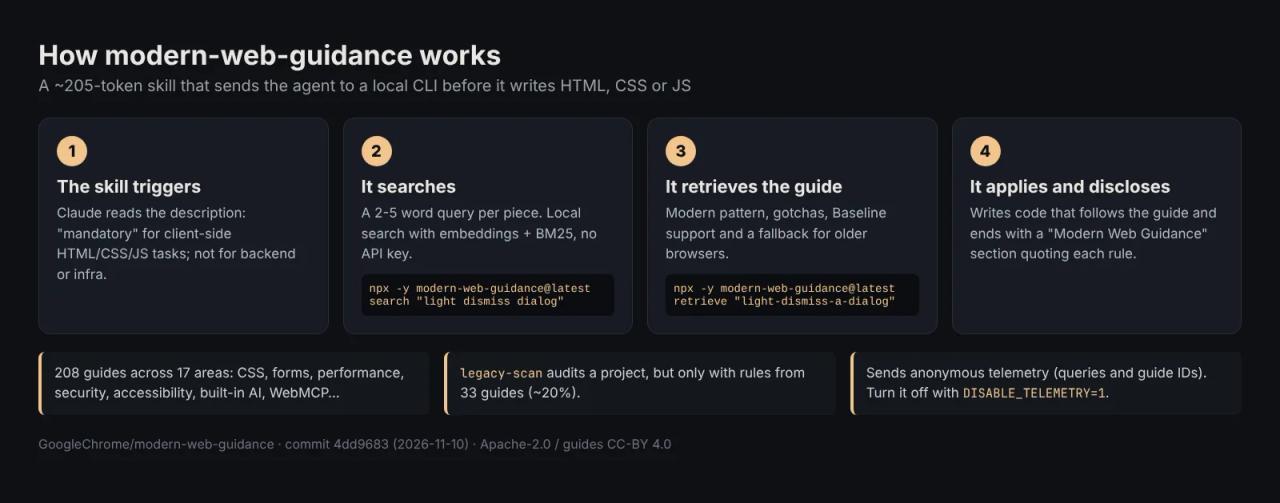
What Modern Web Guidance is
The GoogleChrome/modern-web-guidance repository (we reviewed commit 4dd9683, from November 10, 2026, version 1.0.0 on npm) ships two skills:
| Skill | What it covers | Context cost |
|---|---|---|
| `modern-web-guidance` | Client-side HTML, CSS and JS: dialogs, popovers, forms, dark mode, Core Web Vitals, security, accessibility, built-in AI, WebMCP | ~205 tokens |
| `chrome-extensions` | Chrome extensions with Manifest V3, service workers and Chrome Web Store publishing | ~175 tokens |
The heavy part is not in the skill. The SKILL.md only tells the agent when and how to call the modern-web-guidance CLI, which is downloaded with npx and bundles 208 guides across 17 areas (the biggest: UI behaviors with 40, performance with 26, components and visual design with 22 each). The README talks about "250 modern web features" covered.
Search runs locally: a small embedding model plus BM25 packed into the CLI, with no API key and no server calls to search. The package is 16.5 MB unpacked and has no dependencies.
License: Apache-2.0 and CC-BY 4.0, not MIT
- The code (CLI and scripts) is Apache-2.0: you can use, modify and redistribute it, commercial projects included, keeping the license notice and stating what you changed.
- The guides under
guides/are Creative Commons BY 4.0: you can copy and adapt them, even inside something you sell, as long as you credit the source. Part of the text comes from MDN and from W3C, WHATWG and IETF specs.
For your project nothing changes: code the agent writes with help from the guides is yours.
How to install Modern Web Guidance in Claude Code
The official route is an interactive wizard that detects your agents:
npx modern-web-guidance@latest installYou need Node.js 22 or newer. If you prefer Claude Code's plugin system:
/plugin marketplace add GoogleChrome/modern-web-guidance
/plugin install modern-web-guidance@googlechrome
/reload-plugins
There are also commands for Codex (codex plugin marketplace add GoogleChrome/modern-web-guidance), Gemini (gemini-extension.json), Copilot CLI, Cursor, Kimi, Grok and Google Antigravity, and it works with npx skills add GoogleChrome/modern-web-guidance. If you have never installed a skill, start with what Claude Code skills are and how to install them.
You can try it without installing anything. This is what it returned on our machine, in 1.7 s:
npx modern-web-guidance@latest search "animate a dialog modal backdrop"
# [{"id":"animate-to-from-top-layer", ...},
#  {"id":"light-dismiss-a-dialog", ...},
#  {"id":"prevent-page-scroll-under-modal-dialog", ...}, ...]

npx modern-web-guidance@latest retrieve "light-dismiss-a-dialog"
retrieve returns a Markdown guide: the implementation (closedby="any" on the <dialog> and opening it with showModal()), rules tagged MANDATORY, DO and DO NOT, real support data (Chrome 134, Edge 134 and Firefox 141 yes; Safari no) and the fallback script for browsers without support.
Turn telemetry off if you don't want it
The CLI sends Google anonymous usage data: install counts, which agent calls it, which guides it retrieves and the search queries the agent writes (not your prompt). To disable it, add this to your .bashrc, .zshrc or Windows environment variables:
export DISABLE_TELEMETRY=1Note that the variable name is generic; if another tool of yours reads it, you will switch telemetry off there too.
How the agent uses it
Its SKILL.md is unusually bossy. The description says "MANDATORY: Execute FIRST for all HTML/CSS and clientside JS tasks" and lists what must not trigger it (SQL, Docker, CI, Vite, tests). The flow is:
- Search with a 2-5 word query per piece ("light dismiss dialog", not "close the React modal when clicking outside"). No framework names.
- Retrieve the matching guides, several at once separated by commas.
- Check the code against the guide, fallbacks included.
- Disclose: end the answer with a
### Modern Web Guidancesection, one line per applied guide with a verbatim quote of the rule it followed.
That last step helps in review: you know which decision came from a guide and which one the model improvised.
By default the guides assume you can use anything that is Baseline Widely available (in the major browsers for more than 30 months) without a fallback. For newer features, the guide requires one. If your audience uses specific browsers, write it in your CLAUDE.md or AGENTS.md; the skill itself suggests something like:
**Browser Support:** Allow Newly Available features, but only adopt custom
fallback code that adds <= 20 lines and no external dependencies
Guides for experimental APIs (Origin Trials) or "volatile" ones (single engine, under 3 months old) show up in search but are not served until you allow them with set-allow-origin-trials or set-allow-volatile-features, which are saved to an .mwgrc file at the project root.
Real test: the same prompt with and without the skill
We created two empty folders. In one we copied the skill into .claude/skills/; the other got nothing. We ran Claude Code non-interactively in both (claude -p, Claude Code 2.1.322, Sonnet 5.5 model) with this prompt (originally in Spanish):
Create a single index.html file (vanilla HTML, CSS and JS, no libraries) for a coffee shop landing page: a "Subscribe" button that opens an email form in a modal window that closes on a click outside or with Esc, with an entry and exit animation; a "?" button next to the email field that shows a floating hint attached to the button; email validation that only shows the error after the user has touched the field; and automatic dark mode.
To let it use the CLI we allowed only that command: --allowedTools "Bash(npx -y modern-web-guidance@latest *)". That is what the skill itself recommends, never a blanket npx *.
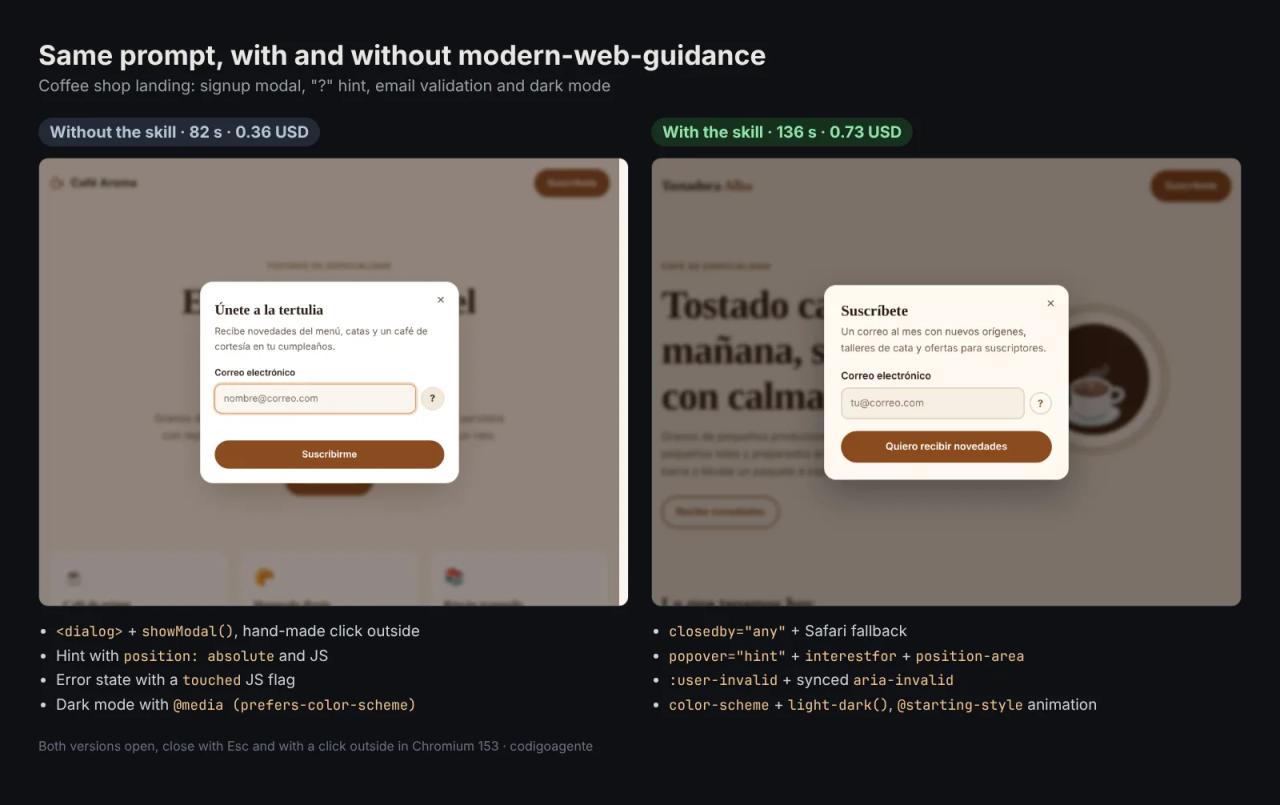
With the skill, Claude ran 4 searches ("light dismiss dialog", "anchored popover hint", "form validation touched", "automatic dark mode") and retrieved 9 guides in one go, about 100 KB of text, which it read in three chunks. Here is the result:
| Without the skill | With the skill | |
|---|---|---|
| Modal | `<dialog>` + `showModal()`, click outside computed in JS | `<dialog closedby="any">` + Safari fallback |
| Entry and exit animation | `animationend` in JS | `@starting-style` + `transition-behavior: allow-discrete` |
| "?" hint | `div` with `position: absolute` and an `.open` class | `popover="hint"`, `interestfor` and `position-area`, with a JS fallback |
| Email error | `touched` flag and `blur` event | `:user-invalid` with synced `aria-invalid` |
| Dark mode | `@media (prefers-color-scheme: dark)` | `color-scheme: light dark` + `light-dark()` |
| Lines (non-empty) | 345 | 489 |
| Time and cost | 82 s, 0.36 USD | 136 s, 0.73 USD |
We tested both in Chromium 153 with Playwright: they open, close with Esc, close with a click outside and throw no console errors.
Two important caveats. First, the result without the skill was already good: Sonnet 5.5 used a native <dialog>, honored prefers-reduced-motion and pulled in no libraries. The gain is in details you don't see, such as letting the browser handle dismissal and focus. Second, the code with the skill is not shorter: fallbacks for Safari and Firefox add lines. What you get is that once those browsers catch up, the fallback JavaScript simply stops running.
The bug it inherited from a guide
Hovering the "?" button in the skill version darkened and blurred the whole dialog, with the hint floating on top:
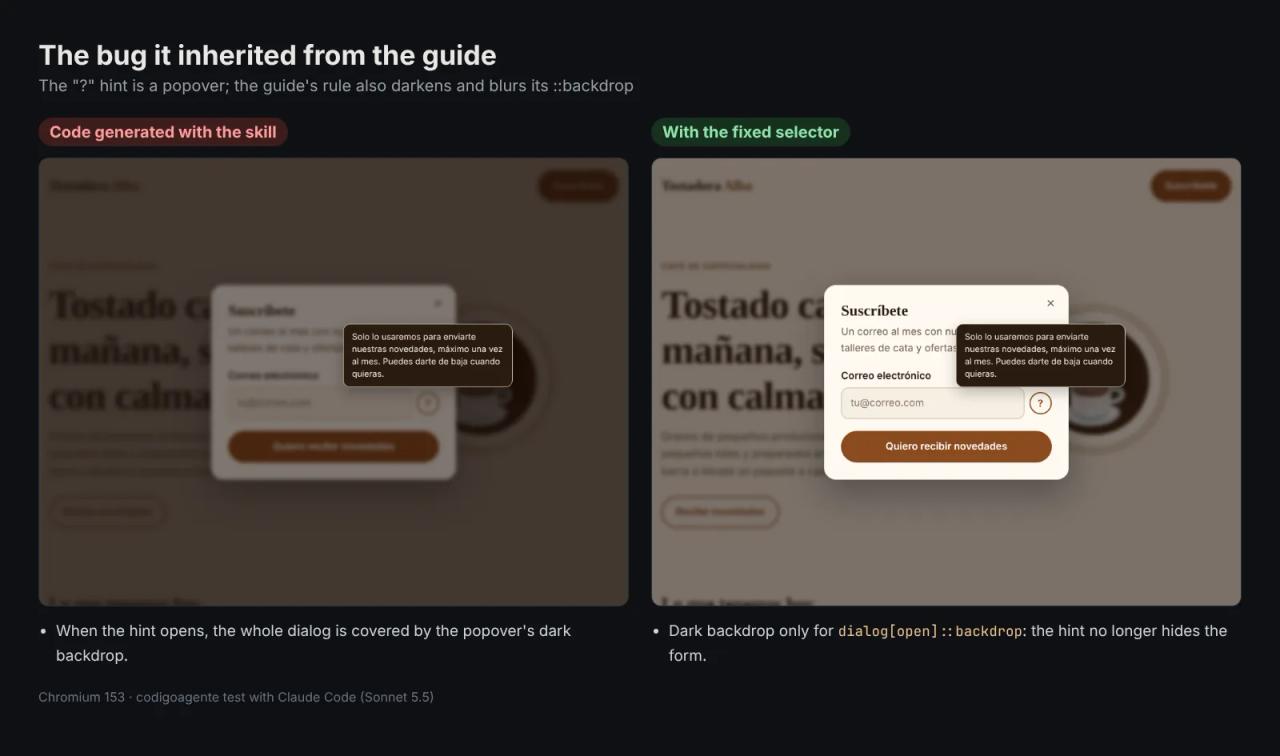
The cause is in the animate-to-from-top-layer guide. Its example animates dialogs and popovers together, and the dark backdrop lives inside the same selector:
:is(dialog[open], [popover]:popover-open):where(:not([data-closing])) {
  opacity: 1;
  &::backdrop {
    background-color: rgb(0 0 0 / 0.5);
  }
}
A popover has a ::backdrop too, so opening the hint adds a second dark layer above the dialog. Claude copied the pattern as is. The fix is to move the backdrop to a dialog-only rule:
:is(dialog[open], [popover]:popover-open):where(:not([data-closing])) {
  opacity: 1;
}

dialog[open]:where(:not([data-closing]))::backdrop {
  background-color: rgb(20 10 4 / 0.55);
  backdrop-filter: blur(3px);
}
We confirmed it by reading the computed style: before, the hint's ::backdrop was rgba(20, 10, 4, 0.55) with blur(3px); after, transparent with no filter. The lesson: the skill improves which APIs the agent picks, but you still need to look at the result in a browser. That is where webapp-testing, the skill that tests your site with Playwright, fits in.
legacy-scan: auditing a project you already have
The CLI has a third command for existing projects:
npx modern-web-guidance@latest legacy-scan ./my-project
npx modern-web-guidance@latest legacy-scan ./my-project --json
We ran it on this blog's src/ folder (Next.js 16): 0 findings in 1.3 s. Then we wrote a page on purpose with everything we wanted it to catch: a jQuery modal, e.keyCode === 27, overflow: hidden on body, a tooltip placed with getBoundingClientRect(), a scroll-event parallax, moment(), innerHTML with user data, an unload handler, JSON.parse(JSON.stringify()), ::-webkit-scrollbar styling and a dark mode without color-scheme.
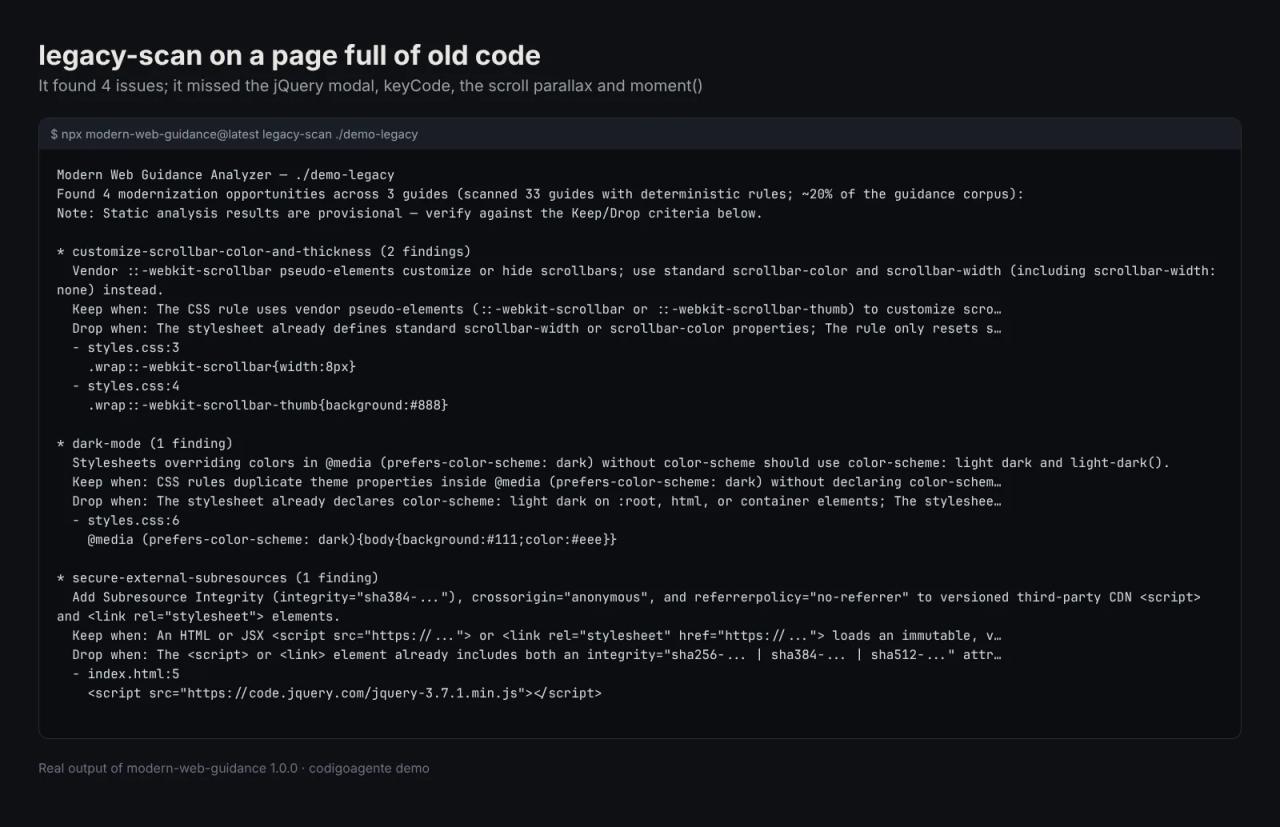
It found 4 issues across 3 guides: the two ::-webkit-scrollbar rules (use scrollbar-color and scrollbar-width), the dark mode without color-scheme and the jQuery <script> from a CDN without integrity. Nothing else. This is not a hidden flaw: the tool says it only has rules for 33 guides, about 20% of the total, and each finding comes with "keep" and "drop" criteria so the agent can filter false positives. Use it as a first pass, not a full audit.
What it costs
| Piece | Cost |
|---|---|
| Skill, CLI and guides | Free (Apache-2.0 and CC-BY 4.0) |
| Searching and fetching guides | Local, no API key. You only need internet for `npx` to download the package the first time |
| Extra agent tokens | In our test, **from 0.36 to 0.73 USD** with Sonnet 5.5: reading 9 guides (~100 KB) doubled the cost of that task |
| With a Claude Pro subscription (20 USD/month) | The spend comes out of the plan's usage limit instead of being billed separately |
The other tools that help an agent write better frontend are free as well, so the real difference is tokens. To spend less, don't let it fire for everything. For a copy change or a simple style tweak the skill should not trigger (its description already excludes "copy/renames"). It earns its cost on components with many states, such as modals, validated forms, menus or carousels, which is where an unguided agent adds the most unnecessary JavaScript.
On results, Google publishes an eval dashboard in the README with over 200 tasks. In its November 8, 2026 run, Claude Code with Opus 5.5 went from 57% to 88% of assertions passed with the skill; Codex went from 54% to 82%. Those are the team's own numbers, measured with their Playwright tests on their sample apps.
Modern Web Guidance vs other frontend skills
- [Impeccable](/en/blog/impeccable-design-skill-claude-code) handles design: typography, color, not looking AI-made. Modern Web Guidance handles APIs: which HTML, CSS and JS each piece is built with. They complement each other.
- frontend-design (from Anthropic) gives aesthetic direction, not browser compatibility data.
- webapp-testing does not write code: it tests it in a browser. It is what would have caught the popover bug.
To see several skills working together on a real site, how to build a landing page with Claude Code by combining 4 skills walks through the whole process.
Common errors
The agent doesn't use it. In non-interactive mode or with strict permissions, Claude can't run npx and quietly carries on without the skill. Allow the specific command: npx -y modern-web-guidance@latest * (or pnpx modern-web-guidance@latest *). In our test, Claude first tried the 4 searches inside a for loop with a variable; Claude Code refused it because it couldn't check the command before running it, and Claude then ran the searches one by one.
npx hangs. When offline, try npx --offline modern-web-guidance@latest .... Where ~/.npm is read-only, the skill says to set NPM_CONFIG_CACHE=/tmp/npm-cache.
On Windows it can't find npx. Some agents need npx.cmd. The skill accounts for it, but if you call it from your own script, use that name.
The agent adds fallbacks you don't need. If your audience uses Chrome (an internal dashboard, say), state it in your CLAUDE.md: "Recent Chrome and Edge only, no fallbacks". The skill reads that policy and stops adding them.
TypeScript types in React. New attributes such as popover="hint", interestfor or closedby aren't in @types/react. The skill asks to pass them with a spread ({...({ interestfor: id } as any)}) instead of dropping them.
FAQ
Does Modern Web Guidance work with React, Next.js or Vue?
Yes. The guides use framework-free HTML, CSS and JS, and the skill tells the agent how to adapt them: use refs for showModal(), generate per-instance ids with useId() and guard window during server rendering.
Does it send my code to Google?
No. Search is local and telemetry only includes the query the agent writes, the guide ids and the agent name. Your code and your prompt stay on your machine. Still, if you work for clients, set DISABLE_TELEMETRY=1.
Can it help build Chrome extensions?
Yes, with the second skill, chrome-extensions, installed with npx modern-web-guidance@latest install --choose. It covers Manifest V3, service workers and Chrome Web Store publishing.
Can I use the guides in a course or a paid product?
Yes, they are CC-BY 4.0: you can copy, translate and sell them inside another work as long as you credit the authors and link the license. Part of the text comes from MDN, which also requires attribution.
How do I update it?
If you installed it with the wizard: npx modern-web-guidance@latest update. If you installed it as a plugin, from /plugin in Claude Code, where you can turn on auto-update.
Conclusion
Modern Web Guidance makes Claude Code use what the browser already ships in 2026: closedby, popovers, :user-invalid and light-dark(), with fallbacks for Safari and Firefox. It is free and local, but in our test it doubled the cost of the task and copied a bug from one of its guides. Install it for frontend work with interactive components, turn telemetry off if it worries you and always check the result in a browser.
Next step: if you have never written your own skill, create one with skill-creator and compare it with and without, as we did here.
// source code
// implementation
More on AI agents
- Skills for your agents
- Claude Code
- Skills for your agents
- Claude Code
- Claude Code
- Security and code review