senior-frontend: the skill that makes Claude Code test your UI before saying “done”
senior-frontend is a free (MIT) Claude Code skill that changes how the agent builds user interfaces: before writing, it reads your components and tokens, lists the states (loading, empty, error, long content), uses semantic and accessible HTML, designs at 375 px and, above all, opens the page in a real browser before saying it is done. It is listed on the aitmpl.com catalog from the claude-code-templates project and has over 31,000 downloads (new to it? see how to choose aitmpl agents without installing a dangerous one).
We put it to the test with the same prompt twice, with and without the skill, on a "team members" page with search and a remove button. With the skill, the result was more accessible and more usable on a phone for 0.06 USD and 16 seconds more. We also found a focus bug that both versions shared and that neither the skill nor its checker caught, and we show how to catch it.
What the senior-frontend skill is and where it comes from
A skill is a folder with a SKILL.md that Claude Code loads when a task matches its description. If you have never installed one, start with what Claude Code skills are and how to install them.
senior-frontend lives in the davila7/claude-code-templates repository, the collection of agents, commands and skills behind aitmpl.com. What we reviewed:
- Version 2.0.0, a full rewrite of the original skill (
mainat commit30f72e1, November 11, 2026). - MIT license (Copyright (c) 2025 Daniel Ávila). The
SKILL.mdalso declareslicense: MIT. - 6 files, 686 lines: the
SKILL.md(181 lines), two references, a license notice and two Node scripts. - Declared sources in
references/NOTICE.md: Vercel's Web Interface Guidelines and agent-skills, and Addy Osmani's web-quality-skills, all MIT. It is one of the few skills in the catalog that cites the exact commit behind each rule.
Its description is written to trigger often: "You MUST use this whenever you build, change or review user interface code, including small UI tweaks and when the user is in a hurry". So it also loads for small changes, which is exactly when error states get forgotten.
What it includes: 7 steps and a checker
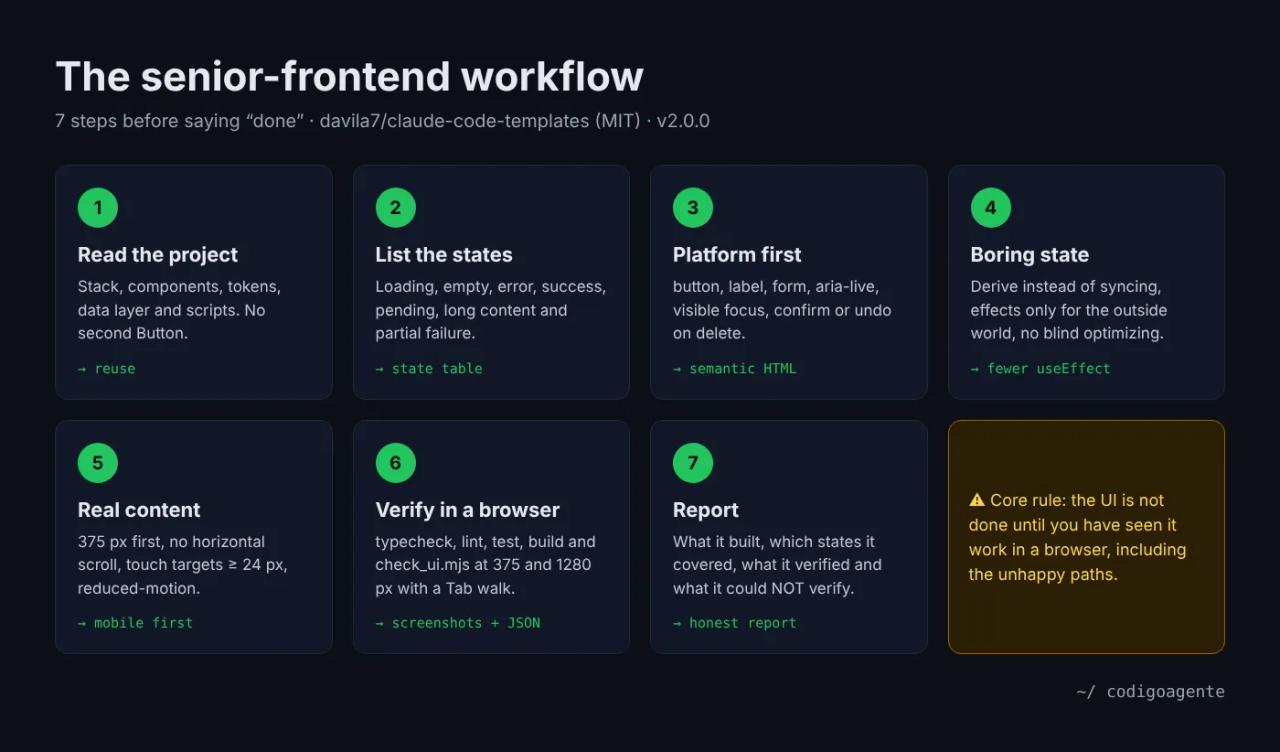
The SKILL.md is a seven-step procedure with one core rule: the UI is not done until you have seen it work in a browser, including the unhappy paths. A passing typecheck says nothing about whether the button can be reached with Tab or whether a long name breaks the layout on a phone.
- Read the project before writing. Stack and versions (React 18 and 19 differ on
forwardRef,useand actions), existing components, design tokens, data layer and scripts. Ask before adding dependencies. - List the states. A table of what the user must see while loading, empty, on error, on success, during a pending action, with long content and on partial failure.
- Platform first.
<button>for actions,<a>for navigation, a<label>on every field,aria-livefor async results, visible focus, and confirm or undo on every delete. - Boring state. Derive instead of syncing, effects only to talk to the outside world, no components defined inside other components, and no optimizing without measuring.
- Layout that survives real content. 375 px first, no horizontal scroll,
min-width: 0on flex children with text, touch targets of at least 24 px (44 px for primary actions) and respect forprefers-reduced-motion. - Verify.
typecheck,lint,testandbuild, then the bundled checker against your dev server. - Report. What it built, which states it covered, what it verified and what it could not verify.
It ends with a list of red flags: a new <button> style in a project that already has a Button, errors that only reach console.error, a <div> with onClick, a useEffect that copies props into state, or a delete with no confirmation.
The check_ui.mjs checker
scripts/check_ui.mjs opens the page in Chromium with Playwright at 375 and 1280 px and returns JSON with:
- a full-page screenshot per width;
- console errors and horizontal overflow (with the elements that stick out);
- buttons and links without an accessible name, or several sharing one ("Delete" twelve times);
- fields without a
<label>, images withoutaltorwidth/height, and pointer-cursor elements that are not buttons; - a Tab walk listing each focus stop and whether it shows visible focus;
- axe-core WCAG 2.2 AA violations, if axe-core is installed in the project.
node .claude/skills/senior-frontend/scripts/check_ui.mjs "http://localhost:5173/" --out .ui-checkWe read both scripts in full before running them: they only write inside the --out folder, make no requests except to the URL you pass, and install nothing. If Playwright is missing, they exit with code 2 and say so.
Installing senior-frontend in Claude Code
From your project root, with the catalog installer (claude-code-templates 1.33.1 at the time of writing):
npx claude-code-templates@latest --skill development/senior-frontendIt copies the folder into .claude/skills/senior-frontend/. If you would rather not run an npm package, copy the folder from the repository by hand: it is six text files. Before installing any skill from a catalog, scan it with SkillSpector; the aitmpl.com page says its scan found nothing, but notes that it was partial.
The checker needs Node 18+ and Playwright in the project (pnpm add -D playwright and pnpm exec playwright install chromium). axe-core is optional (pnpm add -D axe-core).
The test: the same prompt with and without the skill
We set up two identical folders with a fake api.js: fetchMembers() takes 600 ms and fails when the URL has ?fail=1, and removeMember(id) always fails for member 3, who also has a very long name and email. Only one folder had the skill in .claude/skills/. Both got the same prompt through headless Claude Code (claude -p, Sonnet 5.5):
Build a "Team members" page in index.html (plain HTML, CSS and JavaScript
modules, no dependencies, no build step). Use fetchMembers() and
removeMember(id) from ./api.js (do not modify api.js). The page shows the list
with name, email and role, a search box to filter by name, and a button on
each row to remove that member. Keep it short.
The prompt leaves out error states, accessibility and mobile on purpose: it is what someone in a hurry types.
| Without the skill | With senior-frontend | |
|---|---|---|
| Time and cost | 17 s · 0.09 USD · 3 turns | 33 s · 0.15 USD · 9 turns |
| Loading, empty, error with "Retry" | Yes | Yes |
| Long names and emails | Wrap | Wrap |
| Accessible name per row ("Remove Ada Lovelace") | Yes | Yes |
| Confirmation before deleting | No | Yes |
| Button height | 34 px | 44 px |
| `:focus-visible` ring and dark mode | No | Yes |
| Screen-reader announcement after removing | No | "Ada Lovelace removed." |
| No-results message | `No members match "zz".` | Adds "Clear the search to see everyone." |
| Focus after removing someone | Lost (`<body>`) | Lost (`<body>`) |
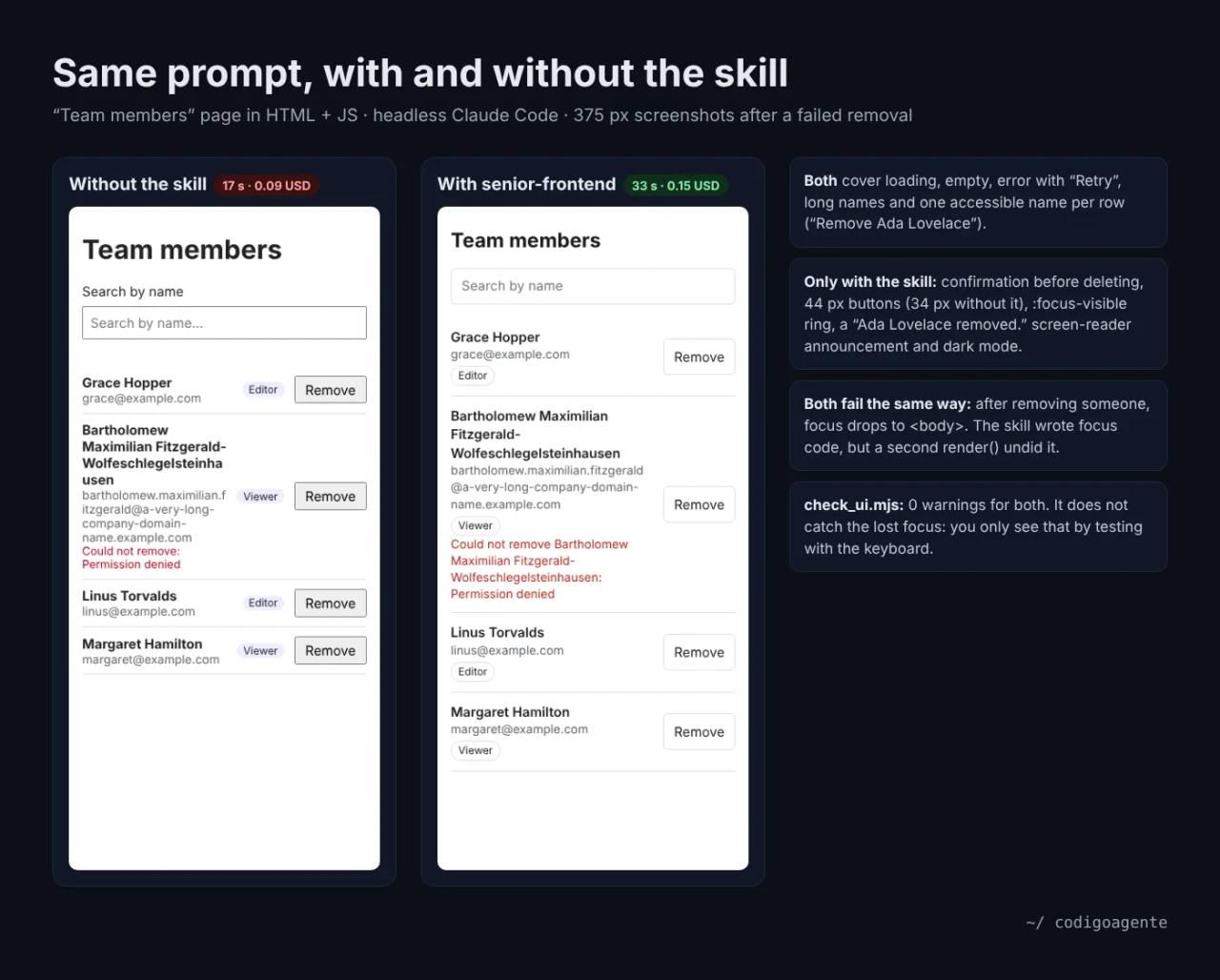
First surprise: the model without the skill already did decent work. It covered loading, empty and error, used role="status" and gave each button its own accessible name. Current models know these rules; what the skill adds is applying all of them every time, including the parts nobody asked for: the confirmation before deleting, 44 px touch targets, visible focus and the screen-reader announcement.
What the checker said
We ran check_ui.mjs on both pages: 0 warnings on both, no horizontal overflow, no console errors and visible focus on all six stops of the Tab walk (the search box and the five buttons). On a page this small the checker does not tell the two versions apart; its value shows on real projects, where unsized images, clickable divs and unlabeled fields do turn up.
The bug nobody saw: lost focus
Then we tested what the checker does not: removing someone with the keyboard only. In both versions, pressing Enter on "Remove Ada Lovelace" leaves focus on <body>. Keyboard and screen-reader users are thrown back to the top of the page after every removal.
The interesting part is that the skill version did write code to move focus, as step 3 asks. But after focusing the next button, the finally block called render() again, which replaces the whole list, including the focused button. The skill did not see it because in our headless test we did not give it permission to run commands: it tried to start python3 -m http.server and the checker, was denied, and said so plainly in its report: "Not verified: none of the above has been run. I haven't tried the keyboard flow…". The version without the skill also said it had not opened the page, but did not list what remained untested.
The fix is six lines: a single render() at the end, then focus.
async function remove(m) {
  if (!confirm(`Remove ${m.name} from the team?`)) return;
  rowErrors.delete(m.id); pending.add(m.id); render();
  try {
    await removeMember(m.id);
    members = members.filter((x) => x.id !== m.id);
    status.textContent = `${m.name} removed.`;
  } catch (err) {
    rowErrors.set(m.id, `Could not remove ${m.name}: ${err.message}`);
  }
  pending.delete(m.id);
  render();
  const again = [...list.querySelectorAll("button")]
    .find((b) => b.getAttribute("aria-label") === `Remove ${m.name}`);
  (again || list.querySelector("button") || q).focus();
}
With the change, our Playwright script confirmed that after removing Ada, focus moves to "Remove Grace Hopper", and that when a removal fails it stays on that row's button. Focus is still lost for a moment during the request, because the list is redrawn with the button disabled; avoiding that means updating the row instead of redrawing the whole list.
The lesson is the skill's own core rule: let Claude Code open the browser. In a normal session it will ask permission to start the server and run the checker; accept it, and also ask for step 4 of its verification section: force the error, search for something that does not exist, remove the last item and walk everything with the keyboard.
How much senior-frontend costs
| Piece | Cost |
|---|---|
| The senior-frontend skill | Free (MIT) |
| Playwright and axe-core for the checker | Free (Apache-2.0 and MPL-2.0) |
| Building the page without the skill | 0.09 USD and 17 s with Sonnet 5.5 |
| Building the page with the skill | 0.15 USD and 33 s: **+0.06 USD** per component |
| With a Claude Pro subscription (20 USD/month) | Comes out of the plan's usage limit instead of being billed separately |
The extra cost comes from reading the SKILL.md (about 9 KB) and the extra verification turns; output was twice the tokens (3,908 vs 1,942). Six cents per component is little next to a manual accessibility review, and less than finding out in production that a customer cannot use your form on a phone.
To spend as little as possible: keep the skill installed in projects with a UI and use Sonnet or Haiku for small changes. The skill does not need the most expensive model: its rules are concrete and checkable.
senior-frontend compared with other frontend skills
- [impeccable](/en/blog/impeccable-design-skill-claude-code) focuses on looks: typography, color, layout and avoiding generic AI design. senior-frontend focuses on whether it works: states, accessibility, keyboard and mobile. They complement each other.
- [webapp-testing](/en/blog/test-web-app-claude-code-playwright-skill), from Anthropic, teaches Claude to write and run Playwright tests. senior-frontend ships a ready-made checker and a build procedure; webapp-testing covers flows the checker does not, like focus after a delete.
- frontend-design, from Anthropic's official skills, gives aesthetic direction. Like impeccable, it does not verify anything in a browser.
Common errors
Playwright not found. Add it to the project as a dev dependency (and download its Chromium build), or install it globally. The checker cannot find Playwright. Install it in the project with pnpm add -D playwright and download the browser with pnpm exec playwright install chromium. It exits with code 2.
page.goto: net::ERR_CONNECTION_REFUSED The dev server is not running or is on another port. Watch out: in this case the script exits with code 0 and the error sits inside the JSON, under widths.<width>.error. Read the report; do not rely on the exit code alone.
axe: "axe-core not installed (optional)" Not an error: it just means there is no automatic WCAG check. Add axe-core as a dev dependency if you want it.
The skill says "Not verified" in its report. It could not open the browser, usually because you denied the server command or your permission mode blocks it. Run the checker yourself or grant permission again.
Skill paths. The SKILL.md example assumes .claude/skills/senior-frontend/. If you installed it as a user skill, the path is ~/.claude/skills/senior-frontend/scripts/check_ui.mjs.
FAQ
Is it only for React?
No. Its description names React, Next.js, Vue, Svelte, Astro and HTML/CSS/Tailwind, and our test was plain HTML and JavaScript with no framework. The react-patterns.md reference is React-specific.
Can I use senior-frontend in a commercial project?
Yes. It is MIT: you can use, modify and redistribute it as long as you keep the copyright notice and license. The parts adapted from Vercel and Addy Osmani are MIT too, with their notice in references/NOTICE.md.
Does it slow Claude Code down?
In our test, from 17 to 33 seconds and from 3 to 9 turns. Almost all of the extra time is verification, which is what you want it to do.
Does it work with Codex or other agents?
The SKILL.md is Markdown with general instructions, so any agent that reads skills or project instructions can follow it. The checker is a Node script independent of the agent.
Does it replace an accessibility audit?
No. It covers what can be checked automatically and with the keyboard, and it misses things like focus after a delete unless you test for them on purpose. For a public product, add tests with a real screen reader.
Conclusion
senior-frontend does not make Claude write prettier HTML: it makes it apply what it already knows about states, accessibility and mobile every time, and say clearly what it has not tested. At six cents per component it is worth keeping installed in any project with a UI. Its core rule is the one that matters: let it open the browser and test the keyboard yourself too, because neither the skill nor its checker caught the lost focus until we tried it by hand.
Next step: to automate exactly those keyboard and flow tests, see how to test your web app with Playwright and webapp-testing.
// source code
// implementation
More on AI agents
- Skills for your agents
- Claude Code
- Skills for your agents
- Claude Code
- Claude Code
- Security and code review