System Design 101: ByteByteGo's free visual guide to learn system design
System Design 101 is ByteByteGo's repository that explains, with diagrams and short text, how the systems you use every day work: APIs, load balancers, databases, caching, message queues, Kubernetes, payments, and real case studies from companies like Netflix and Figma. It holds 400 free guides across 15 categories, has more than 90,000 stars on GitHub, and works both for system design interview prep and for understanding what runs underneath your own application.
We cloned and read the ByteByteGoHq/system-design-101 repository (commit b28380a, April 4, 2025, the latest one) to show what it really contains, how it is organized, in which order to study it, how to use it offline or with Claude Code, and what its license allows. That license is not MIT and not open source: it is CC BY-NC-ND 4.0, and that changes what you can do with it.
What System Design 101 is and what it is for
System design is the part of engineering that decides how the pieces of an application are laid out as it grows: where each piece of data lives, what gets cached, how services talk to each other, what happens when a server goes down. It is also the interview that carries the most weight for senior backend roles at large companies.
The problem is that the material is usually scattered across papers, talks and 600-page books. System Design 101 does the opposite: each topic fits in one diagram and, almost always, 100 to 350 words. It is maintained by ByteByteGo, the company of Alex Xu, author of the *System Design Interview* books, and it is the open version of the guides published on its website and newsletter.
| Fact | Value |
|---|---|
| Repository | [ByteByteGoHq/system-design-101](https://github.com/ByteByteGoHq/system-design-101) |
| Stars and forks | 90,698 stars and 10,087 forks (October 24, 2026) |
| Content | 400 guides in 15 categories, about 90,000 words in total |
| Latest commit | `b28380a`, April 4, 2025 |
| License | CC BY-NC-ND 4.0 (non-commercial, no derivatives) |
| Language | English only; the project has no translation plans |
| Website | [bytebytego.com/guides](https://bytebytego.com/guides) |
| Price | Free |
What's inside: the 400 guides by category
We counted the frontmatter of every guide in the repository. This is the breakdown:
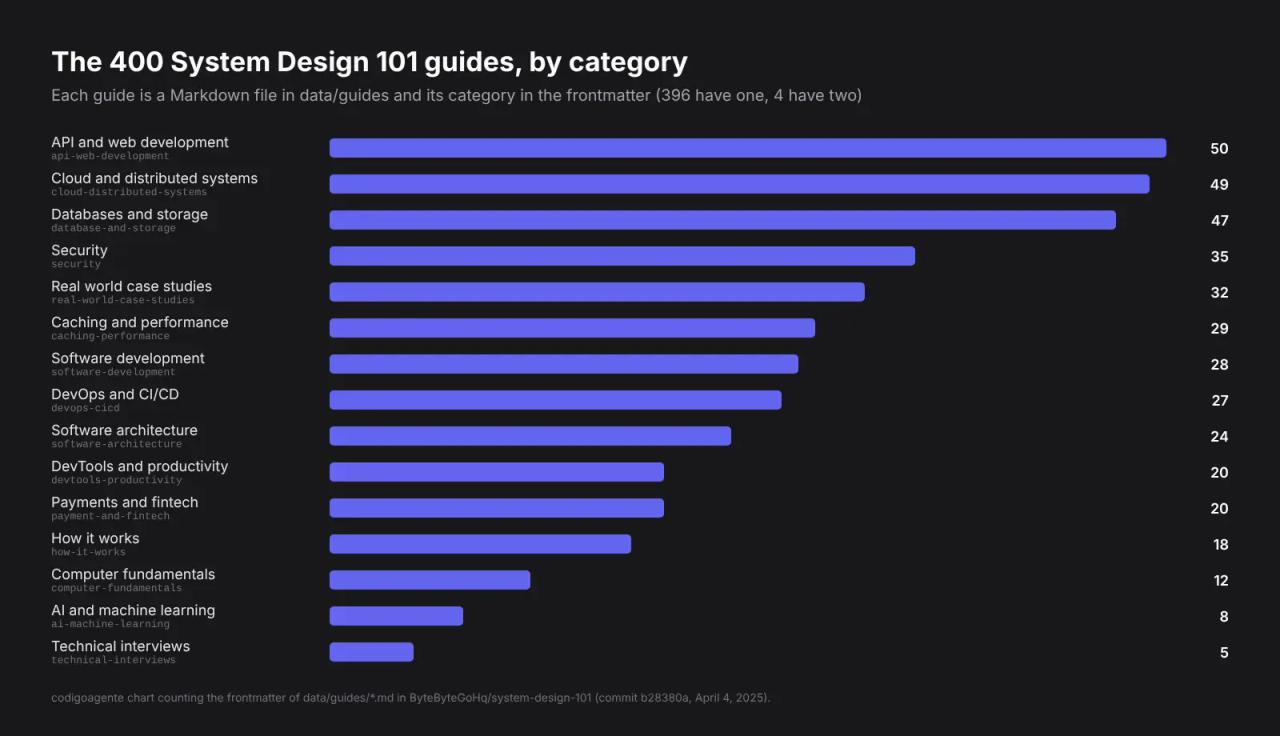
The most useful parts of each block, with guide names as they appear in the repository:
- API and web development (50). REST vs GraphQL, gRPC, HTTP/1 → HTTP/2 → HTTP/3, polling vs webhooks, pagination, API gateways, proxy vs reverse proxy and API security.
- Cloud and distributed systems (49). The CAP theorem, consistent hashing, sharding, Kafka, message queues and disaster recovery strategies.
- Databases and storage (47). ACID, isolation levels, read replicas, database scaling strategies and Redis vs Memcached.
- Security (35). Sessions, cookies, JWT, OAuth 2.0 and its flows, SSO and HTTPS.
- Real world case studies (32). How Figma scaled Postgres 100x, Netflix's tech stack, the evolution of Airbnb's microservices and the journey of a Slack message.
- Caching and performance (29). Caching strategies, eviction policies, what can go wrong with a cache, and latency numbers worth knowing.
- DevOps and CI/CD (27), architecture (24), software development (28), devtools (20), payments and fintech (20), how it works (18), fundamentals (12), AI and machine learning (8) and technical interviews (5).
How the repository is built
If you plan to use it seriously, it helps to know what lands on your disk when you clone it:
- One Markdown file per guide in
data/guides/, with YAML frontmatter:title,description,image,createdAt,categoriesandtags. The 15 categories live indata/categories/. - The diagrams are not in the repo. Each guide links its image on
assets.bytebytego.com, so offline you get the text but not the drawings. - The README is generated.
scripts/readme.tsreads categories and guides withgray-matterand writes the table of contents (pnpm update-readme). The links point to the website, not to the repo files. - Every guide is dated 2024 (January 25 to March 16). That is the migration of the content to the current format; there have been no new commits since April 2025.
Two things you will notice while reading: there are repeated topics with similar titles (two guides on microservices best practices, several on caching strategies, half a dozen on sessions, cookies and JWT), and the guides are short on purpose. They are a map, not a book: they tell you what exists and how it fits together, and you dig deeper from there.
In which order to study System Design 101
The README follows the category order, which is not the best order to learn. This is the path we suggest, from basics to the interview, using guides that exist in the repository:
- How a request travels. Proxy vs Reverse Proxy, What is a Load Balancer? and HTTP/1 -> HTTP/2 -> HTTP/3.
- How services talk. REST API vs. GraphQL, What is gRPC? and Polling vs Webhooks.
- Where data lives. What does ACID mean?, What are database isolation levels? and Read Replica Pattern.
- Making it fast. Top 5 Caching Strategies, How Can Cache Systems Go Wrong? and Which latency numbers should you know?.
- Spreading the load. A Crash Course on Database Sharding, Consistent Hashing Explained and CAP Theorem.
- Decoupling with queues. Why is Kafka Fast?, Can Kafka Lose Messages? and Top 6 Cases to Apply Idempotency.
- Looking at real systems. 100X Postgres Scaling at Figma and Designing a Chat Application.
- Preparing for the interview. How to Ace System Design Interviews and Algorithms for System Design Interviews.
At one or two guides a day, the full path takes about three weeks. What makes the difference is the next step: after each block, draw the diagram yourself without looking and explain out loud why each piece is there.
How to use it offline and search by topic
Cloning the repository gives you all 400 guides as plain text, easy to search with grep. We tested this on Linux; the same commands work on macOS and in Git Bash on Windows.
git clone --depth 1 https://github.com/ByteByteGoHq/system-design-101.git
cd system-design-101
ls data/guides | wc -l
The last command prints 400. To list every guide in a category (here, caching and performance: 29 files):
grep -l "caching-performance" data/guides/*.mdTo find every guide that mentions a concept, even when it is not in the title:
grep -ril "consistent hashing" data/guidesIt returns four guides: consistent hashing, system design building blocks, sharding algorithms and the journey of a Slack message. That shows which concepts show up in several contexts, which is exactly what interviewers ask about.
In PowerShell, the equivalent search is:
Select-String -Path data\guides\*.md -Pattern "consistent hashing" -List | Select-Object PathStudying System Design 101 with Claude Code
With the repository cloned, you can open Claude Code in the folder and use it as a tutor: it reads the guides from disk and quizzes you on them. An example prompt:
Read the guides in data/guides from the database-and-storage category.
Ask me 10 system design interview questions, one at a time,
and grade each answer citing the guide that explains it.
Another one that works well for the study path:
I have 3 weeks to prepare for a backend interview.
Using the titles and categories in data/guides, build a daily plan
of 2 guides and flag which topics appear in several guides.
This is the kind of personal use the license allows. What you cannot do is publish what the agent produces if it is a translation or a summary of the guides: that is a derivative work, and the license does not allow sharing it.
System Design 101 license: what you can do
The LICENSE.md file says the content is under Creative Commons Attribution-NonCommercial-NoDerivatives 4.0 International (CC BY-NC-ND 4.0). GitHub shows it as "Other" because it is not a software license, and package.json has a typo (cc-by-nc-sd-4.0), but the text that counts is LICENSE.md.
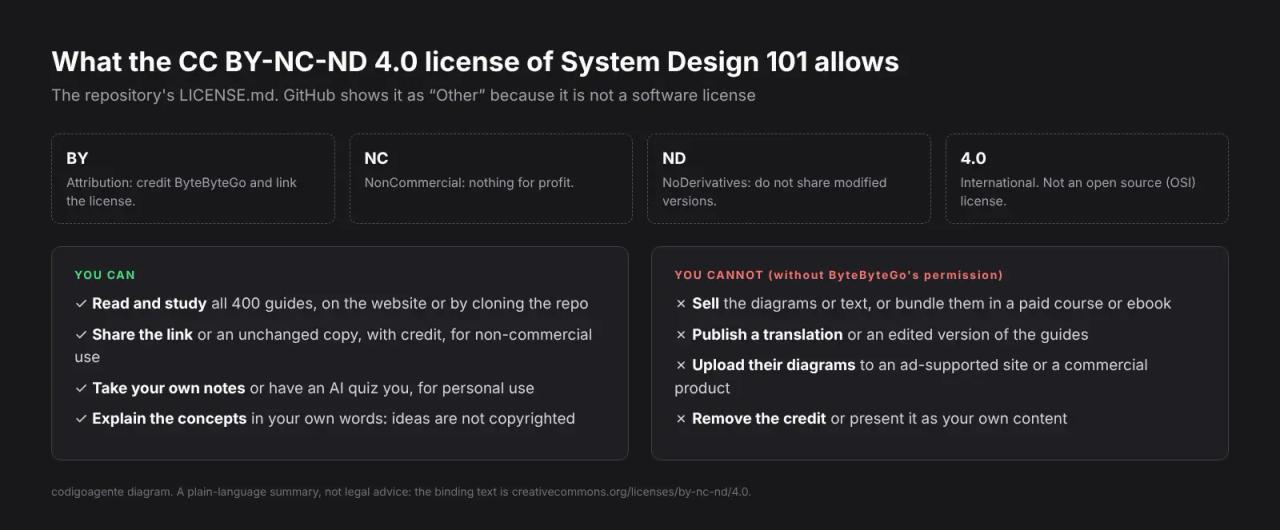
In practice:
- You can read, clone and study it for free, including at work.
- You can share the link or an unchanged copy, crediting ByteByteGo and the license, as long as it is not for commercial purposes.
- You cannot publish a translation or an edited version (ND). That includes a PDF in another language built from the guides or a summary using the diagrams.
- You cannot use it commercially (NC): not in a paid course, an ebook or an ad-supported website.
- Ideas are not copyrighted. The CAP theorem and consistent hashing are general knowledge; you can explain them in your own words and with your own diagrams.
That is why this article does not reproduce any of their diagrams: the charts you see are ours, built by counting the repository files. It is a far more restrictive license than the MIT or Apache 2.0 of most projects we cover here. If you want to create derivative material, what you need is an alternative with a more open license.
One last detail from CONTRIBUTING.md: the project accepts single-topic pull requests, asks contributors not to use AI tools to generate the content, and states it has no plans to translate the guides.
System Design 101 vs other free guides
| System Design 101 | System Design Primer | karanpratapsingh/system-design | |
|---|---|---|---|
| Author | ByteByteGo | Donne Martin | Karan Pratap Singh |
| Stars | 90,698 | 375,393 | 46,611 |
| Format | 400 short guides with a diagram | One long README, exercises and Anki cards | A long course in chapters |
| License | CC BY-NC-ND 4.0 | CC BY 4.0 | CC BY-NC-ND 4.0 |
| Latest commit | April 2025 | March 2026 | October 2026 |
| Best for | Reviewing a topic in 5 minutes | Deep study and adapting the material | Reading start to finish |
System Design Primer is the most complete and the only one of the three under CC BY 4.0, which does allow translating, adapting and commercial use with credit. karanpratapsingh/system-design is a linear course with the same restrictive license as System Design 101. The sensible approach is to combine them: System Design 101 for the quick overview, the other two to go deeper.
Common issues
Images do not load when reading the repo offline. The diagrams live on assets.bytebytego.com, not in the repository. You need an internet connection to see them, or read the guides on the website.
The README links do not open the repo files. The table of contents points to bytebytego.com/guides/<name>. For the local Markdown, open data/guides/<name>.md: the file name matches the end of the URL.
grep by category returns extra guides. Search for the exact key from data/categories (for example database-and-storage, not database), because the bare word also shows up in tags and body text.
GitHub says "Other" for the license. The license is not missing: it is a Creative Commons license, which GitHub does not classify as a software license. Read it in LICENSE.md.
Frequently asked questions
Is System Design 101 free? Yes. All 400 guides are free to read on GitHub and on the ByteByteGo website. ByteByteGo sells longer courses and books separately.
Is it open source? The repository is public, but the CC BY-NC-ND 4.0 license is not open source under the OSI definition: it forbids commercial use and derivative works.
Is it available in other languages? No. Everything is in English and CONTRIBUTING.md says there are no translation plans. You also cannot publish your own translation without permission.
Is it enough to pass a system design interview? It works as a map and a review, but the guides are short. Pair it with deeper material such as System Design Primer, and practice designing complete systems out loud.
Can I use their diagrams on my blog or in my classes? Only unchanged, with credit and for non-commercial purposes. If your blog runs ads or your classes are paid, you need ByteByteGo's permission or your own diagrams.
Is it still updated? The latest commit is from April 4, 2025. The content is still valid because these are foundational concepts, but do not expect new guides in the repository.
Conclusion
System Design 101 is the fastest way to get a complete map of system design: 400 topics, one diagram per topic and no filler. Use it to review and to find your gaps, and go deeper with other material. Before reusing anything, remember that its CC BY-NC-ND license only lets you read it and share it as is. For more free projects that replace paid tools, see our guide to Open Code Review for AI code review.
// source code
// implementation
More on Open source tools
- Free alternatives to paid apps
- Run it on your server

- Design, image and video
- Free alternatives to paid apps
- Free alternatives to paid apps
- Design, image and video