BG0: remove image backgrounds for free in your browser, without uploading (open source remove.bg alternative)
BG0 is an open source background remover that runs entirely inside your browser. You pick a photo, an AI model called BiRefNet processes it on your own graphics card (WebGPU) or CPU (WebAssembly), and you download a transparent PNG. The image is never uploaded to a server, there is no account or usage limit, and the code ships under the Apache 2.0 license.
We read the code of the opencoredev/bg0 repository (commit 420442c, September 29, 2026) to explain exactly what it does with your photo, how it picks a model for your hardware, how to add it to your own site with the @bg0/browser library, and where its limits are. If you are into free alternatives to paid software, this topic also covers FigCraft, the open source Figma alternative.
What BG0 is and what it is for
BG0 ("Background → zero") does one job: remove the background from an image and give you a PNG with transparency. Services like remove.bg do the same, with one design difference: in BG0 inference happens on your device. The server only delivers the page and the model; the photo never leaves the tab.
Use it to cut out product photos for a store, portraits for a profile, logos, or any image you are about to drop into a design. Its contributor instructions (AGENTS.md) are explicit about scope: no editor, asset library or project system.
| Fact | Value |
|---|---|
| Website | [bg0.dev](https://bg0.dev) (free, no account) |
| Code reviewed | commit `420442c`, September 29, 2026 |
| Code license | Apache 2.0 |
| Model | BiRefNet (MIT-licensed weights), exported to ONNX |
| Engine | Transformers.js 4.3.0 with ONNX Runtime: WebGPU or WebAssembly |
| Input formats | PNG, JPG, WebP, HEIC and HEIF, up to 60 MB |
| Output | PNG with an alpha channel (download or clipboard) |
| Library | `@bg0/browser` on npm (0.1.1 published; the repo is at 0.1.2) |
| Web stack | TanStack Start, React 19, Tailwind, Bun and Turborepo |
How it works under the hood
Every step that touches the image lives in packages/browser, which the web app treats as a black box: the UI never imports ONNX or model internals. The full path looks like this:
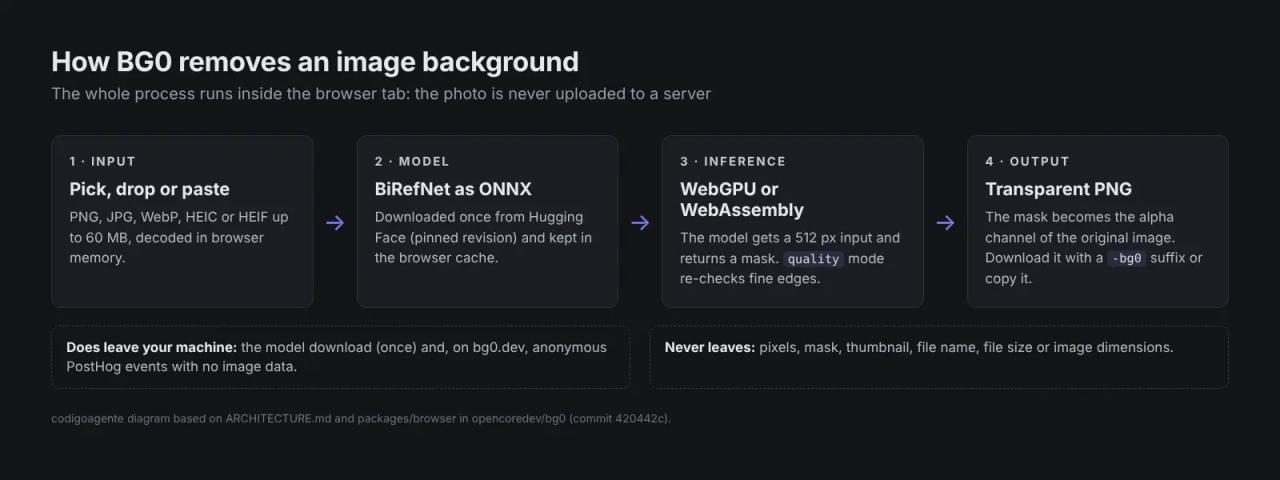
- Input. You pick the image, drop it on the page or paste it with
Ctrl+V. It is decoded in memory. iPhone HEIC files go through a WebAssembly decoder (heic-to) that is only fetched when your browser cannot open them natively. - Model. On first use the browser downloads the BiRefNet ONNX model from Hugging Face, pinned to a fixed revision in the code so it never changes silently. It is stored in the browser cache (Cache API, or IndexedDB on development origins) and later visits read it from there.
- Inference. The model gets the image scaled to 512 pixels and returns a mask: one value per pixel saying how much it belongs to the foreground.
- Output. The mask is scaled back to the original size and applied as the alpha channel of your full-resolution image. The result is a PNG you can download (with a
-bg0suffix) or copy to the clipboard.
"quality" mode: a second pass on the subject
The library has two modes, fast (the default) and quality, which bg0.dev uses. The difference lives in refinement.ts: a 512 px model wastes most of its detail budget when the subject is small in the frame. In quality mode BG0 finds the subject's bounding box in the first mask, crops that area with some padding and runs the model again on it, so hair and fine edges get more resolution. If the subject already fills the frame it skips the second pass, and if the second pass fails it keeps the first mask.
Which model it runs on your device
BG0 ships two desktop BiRefNet variants and one for iPhone. Before the first image, @bg0/browser reads what the browser reports (GPU, memory and CPU cores) and decides where to start:
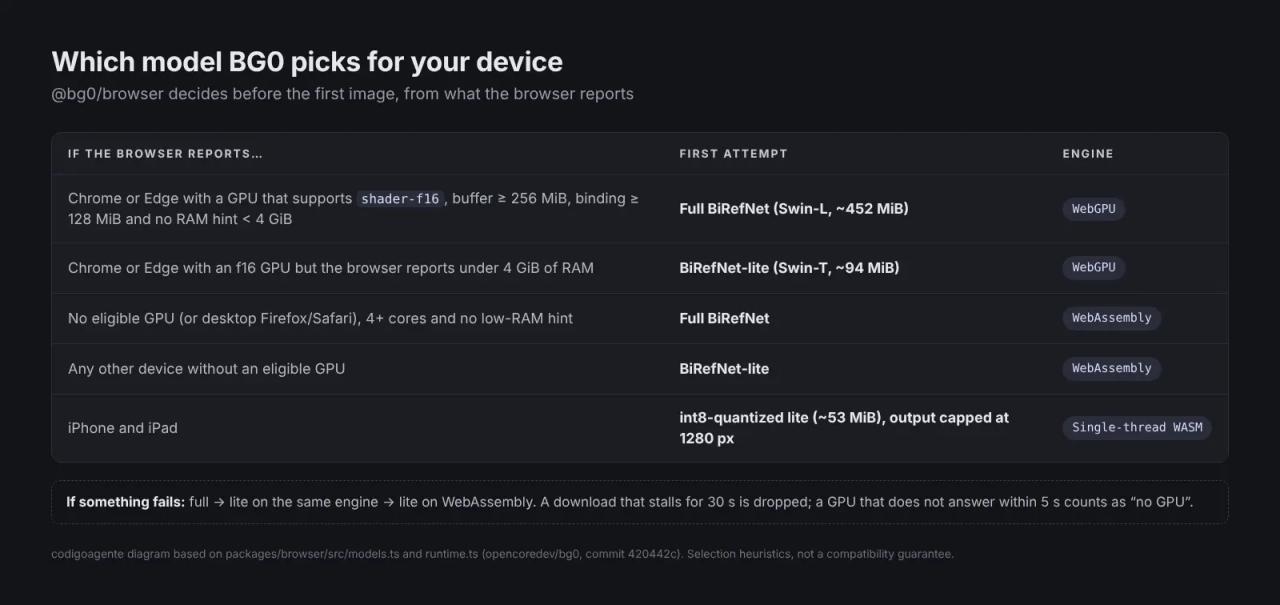
- Full BiRefNet (Swin-L backbone, about 452 MiB): the best quality. Tried on Chrome or Edge when the GPU supports
shader-f16with enough memory limits, or on the CPU with at least 4 cores. - BiRefNet-lite (Swin-T, about 94 MiB): the light option for low-memory devices and the last resort for everything.
- Quantized lite for iOS (about 53 MiB): on iPhone and iPad it runs in a single-threaded WebAssembly worker, and output is capped at 1280 px on the long edge to stay within Safari's per-tab memory budget.
WebGPU is only used on Chromium browsers. Desktop Firefox and Safari go straight to WebAssembly, which works but is slower.
If the chosen model fails to load or run, the library steps down: full → lite on the same engine → lite on WebAssembly. Timeouts keep it from hanging: a GPU that does not answer within 5 seconds counts as "no GPU", and a download that receives no bytes for 30 seconds is dropped. If a tab dies while the full model loads, BG0 remembers it and that device uses lite for a week.
Privacy: what leaves your machine and what does not
This is the project's whole point, so we checked it in the code and in ARCHITECTURE.md:
- Never leaves: image bytes, pixels, mask, thumbnails, file name, file size or dimensions. It is written down as a product invariant: none of it goes to analytics, logs or error reports.
- Does leave: the request that downloads the model (Hugging Face only sees an ordinary file download) and, on bg0.dev, anonymous PostHog events such as "an image was chosen", "removal finished" or "result downloaded".
Those events are trimmed more than usual. Processing time is sent in buckets (<5s, 5-15s...) rather than milliseconds, because an exact duration could hint at image size. Session recordings, automatic click capture and person profiles are off, and the only free-text survey answer is scrubbed of emails, links, file names and long numbers before it is sent.
You can check it yourself: open the developer tools (F12), go to the Network tab and process an image. You will see the page, the model download and small PostHog requests, never one carrying the photo. If you self-host BG0, analytics is off: the code only enables it on bg0.dev unless you set VITE_POSTHOG_ENABLED=true.
How to remove an image background with bg0.dev
- Go to bg0.dev.
- Drop an image on the page, paste it with
Ctrl+Vor open it withCtrl+O. - The first time, wait for the model download (the progress bar shows the megabytes). Later runs read it from the cache.
- Check the result in the compare view: drag the divider or move it with the arrow keys.
- Download the PNG with
Ctrl+Sor copy it withCtrl+Cto paste into Figma, Canva or a chat.
Keyboard shortcuts documented by the project (use ⌘ instead of Ctrl on Mac):
| Keys | Action |
|---|---|
| `Ctrl+O` / `Ctrl+V` | Open the file picker or paste an image |
| `Space` (hold) | Peek at the full original |
| `←` `→` (faster with `Shift`) | Move the compare line |
| `1` `2` `3` | Compare, result or original view |
| `Ctrl+S` / `Ctrl+C` | Download or copy the PNG |
| `Esc` | Clear and wait for the next image |
How to use @bg0/browser in your own site
The engine behind bg0.dev is published as a library, so you can add background removal to your app without paying for an API or running an inference server:
npm install @bg0/browserimport { removeBackground } from '@bg0/browser'
const input = document.querySelector<HTMLInputElement>('#photo')!
input.addEventListener('change', async () => {
const file = input.files?.[0]
if (!file) return
const result = await removeBackground(file, {
quality: 'quality',
onProgress: ({ stage, progress, message }) => {
console.log(stage, Math.round(progress * 100), message)
},
})
const url = URL.createObjectURL(result.blob)
document.querySelector<HTMLImageElement>('#result')!.src = url
console.log(result.model, result.provider, `${result.durationMs} ms`)
})What the API gives you, according to packages/browser/src/index.ts:
removeBackground(blob, { quality, onProgress, signal })returns the PNG (blob), its width and height, the model and engine used, and the duration in milliseconds. It accepts anAbortSignalfor cancellation.onProgressreports the stage (preparing,downloading,processing,finishing) and, while downloading, the bytes received: enough for a real progress bar.prepareBackgroundRemoval()downloads and initializes the model before the user picks an image.getBrowserCapabilities()tells you whether WebGPU is available;clearModelCache()deletes the stored model.- Errors arrive as
BackgroundRemovalErrorwith acode(image-too-large,model-load-failed,out-of-memory,cancelled...) so you can show a useful message.
One important detail before production. Transformers.js 4.3.0 stops loading models in a page after one ONNX load fails. bg0.dev applies a small patch to avoid that, but npm does not apply it for you. Without it the library works the same as long as nothing fails; after a failed load the user has to reload the page before retrying. To match bg0.dev, pin @huggingface/transformers to 4.3.0 and apply the patch with patch-package or Bun's patchedDependencies.
Running BG0 locally
The repository is a Bun 1.4 monorepo with Turborepo:
git clone https://github.com/opencoredev/bg0
cd bg0
bun install --frozen-lockfile
bun run dev
The web app starts on port 3000 and the docs on 4321 (also served under /docs). Before contributing, the project asks you to pass bun run lint, bun run typecheck, bun run test and bun run build. There is no database and no secret environment variable: the deployed site does no server-side image processing.
BG0 license: can you use it in a commercial project?
Three licenses are involved, and it helps to keep them apart:
| Piece | License | What it means |
|---|---|---|
| BG0 code and `@bg0/browser` | Apache 2.0 | Commercial use, modification and redistribution allowed; keep the copyright notice and license. |
| BiRefNet weights (full and lite) | MIT | Not bundled in the repo: the browser downloads them from Hugging Face under their own permissive license. |
| HEIC decoder (`heic-to`, libheif, libde265) | LGPL-3.0-or-later | Served as a separate module; BG0 ships the exact source code to comply with the LGPL. |
In short: you can use BG0 or its library in a commercial product. If you redistribute the HEIC decoder, keep its notices and source available, as the project does in THIRD_PARTY_NOTICES.md.
Limits and common errors
- The first run is slow. The full model is about 452 MiB and lite about 94 MiB. On a slow connection the first image can take minutes; after that it comes from the cache.
- A reload is not instant. Even with the model cached, ONNX has to initialize and the weights have to be uploaded to the GPU. Private browsing or clearing site data forces a new download.
- "This image needs more memory than your browser can provide. Try a smaller image." The browser ran out of memory. Close tabs or shrink the image; on iPhone the equivalent message mentions Safari.
- "The local model could not be loaded. Check your connection and try again." The model download failed. Make sure your network or ad blocker is not blocking huggingface.co.
- "This image could not be opened. Try exporting it as PNG or JPG." The file could not be decoded. HEIC/HEIF sequences (burst or Live photos) are not supported.
- 60 MB limit per image.
- Testing is limited to specific devices. The project says it verified everything on an M4 Max Mac with Chrome, and the iOS build on an iPhone 13. Firefox, Safari and other devices are listed as unverified.
What we checked ourselves
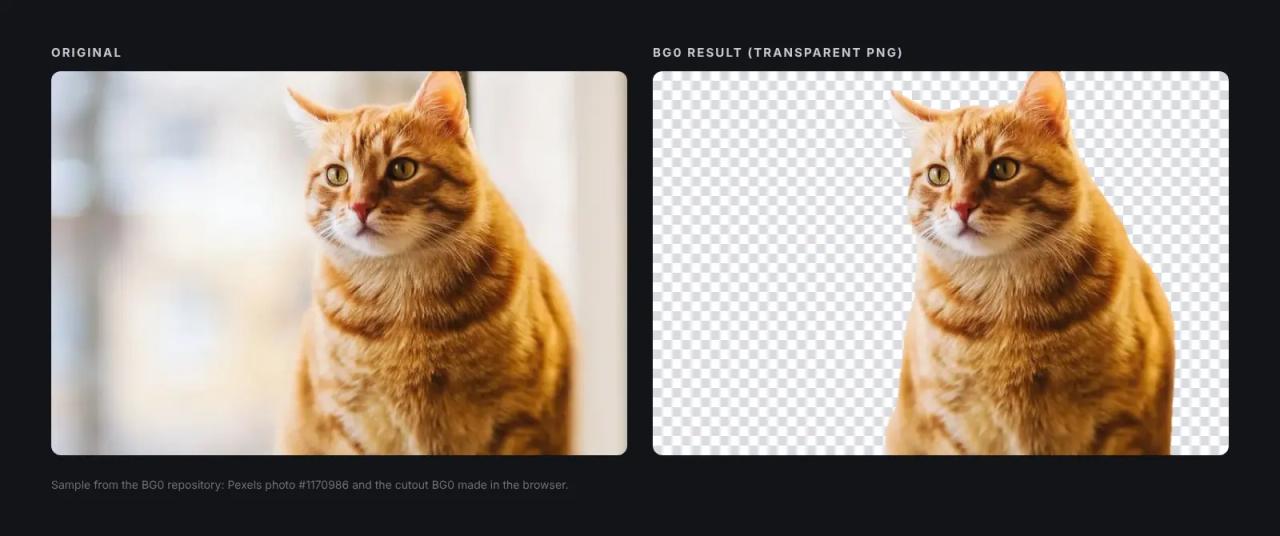
We reviewed all of packages/browser and the web app, the architecture notes, the licenses and the docs, and installed the dependencies. We could not run inference in our test environment because it has no access to Hugging Face, where the models are hosted. That is why the cat image is the sample bundled with the repository, made with BG0 in the browser, and the diagrams in this article are drawn from the code rather than invented screenshots.
Frequently asked questions
Is BG0 free?
Yes. bg0.dev has no account, subscription or credits, and the code is Apache 2.0. The only cost is the model download and your own device's work.
Does BG0 upload my photos?
No. The image is processed in browser memory. The only download is the model, and the only data sent is anonymous usage events with no image information.
Does it work offline?
You need a connection the first time to download the model. After that the model is in the browser cache, but the page itself still loads from bg0.dev; for fully offline use, run BG0 locally.
Does it work on mobile?
Yes. Android uses the same system as desktop. iPhone and iPad use a quantized lite model and cap output at 1280 px because of Safari's memory limit.
How is it different from remove.bg?
remove.bg is a cloud service: you upload the image to its servers and high-resolution downloads are paid with credits. BG0 processes on your device, free and unlimited, but depends on your hardware: without a compatible GPU it will be slower.
Can I use @bg0/browser in a commercial app?
Yes: the code is Apache 2.0 and the BiRefNet weights are MIT. Keep the license notices and apply the Transformers.js patch if you want the same failure recovery as bg0.dev.
Conclusion
BG0 shows that a browser can now run a serious segmentation model with no server: BiRefNet on WebGPU, orderly fallbacks to WebAssembly and a privacy story you can audit by reading the code. If you just need to cut out photos, open bg0.dev; if your site needs it, @bg0/browser saves you from paying an API per image.
If you like testing open source tools that replace paid services, continue with It's a Plan, the Linear and Jira alternative, or HyperFrames, for making videos with HTML.
// source code
// implementation
More on Open source tools
- Free alternatives to paid apps
- Run it on your server
- Design, image and video
- Free alternatives to paid apps
- Free alternatives to paid apps
- Design, image and video