Idol: the open source model that turns a single image into a 3D object (Gaussian Splatting) on your GPU
Idol is an open source model that turns a single image of an object into a 3D model made of *Gaussian splats*. Give it a render, an AI-generated image or a product photo; it removes the background, frames the object and generates up to 1,048,576 Gaussians, including the sides the picture never showed. It runs on your own GPU with a 7.2 GB VRAM peak, and both the code and the weights are released under Apache-2.0.
In this review we read the SDK source (speridlabs/idol-sdk, version 0.1.0, published on 29 October 2026) to explain what it does at each step, which GPU you really need, how to install it and use it from the command line or from Python, and the fine print in the licenses of the models it depends on. It is for you if you build online stores, 3D websites, game prototypes, or you simply want to stop paying per model for image-to-3D services.
What Idol is and who makes it
- Repository: github.com/speridlabs/idol-sdk
- Weights:
speridlabs/idolon Hugging Face, about 3 GB. - Online demo: a Hugging Face Space with 93 ready examples and an upload option for your own image.
- Author: Speridlabs (speridlabs.com).
- Version reviewed: 0.1.0, the repository's initial commit. The project has been public for one day.
- License: Apache-2.0 for the code and for Idol's weights. Its dependencies have their own (see below).
- Lineage: the README says Idol builds on TripoSplat by VAST AI Research.
What a Gaussian splat is (in two paragraphs)
A classic 3D model is a mesh: triangles with a texture on top. A Gaussian splat (3DGS) is something else: a cloud of hundreds of thousands of ellipsoid "blobs", each with a position, size, rotation, colour and opacity. Drawn on top of each other from any angle, they look very photographic, with reflections and soft edges that meshes struggle with.
The catch is that a splat is not a mesh. It looks great in a web viewer or an engine that supports it, but you cannot 3D print it, rig it for animation or drop it as is into most game pipelines. Keep that in mind before picking Idol for your use case.
How it works under the hood
The key file is idol/pipeline.py. Every call goes through these steps:
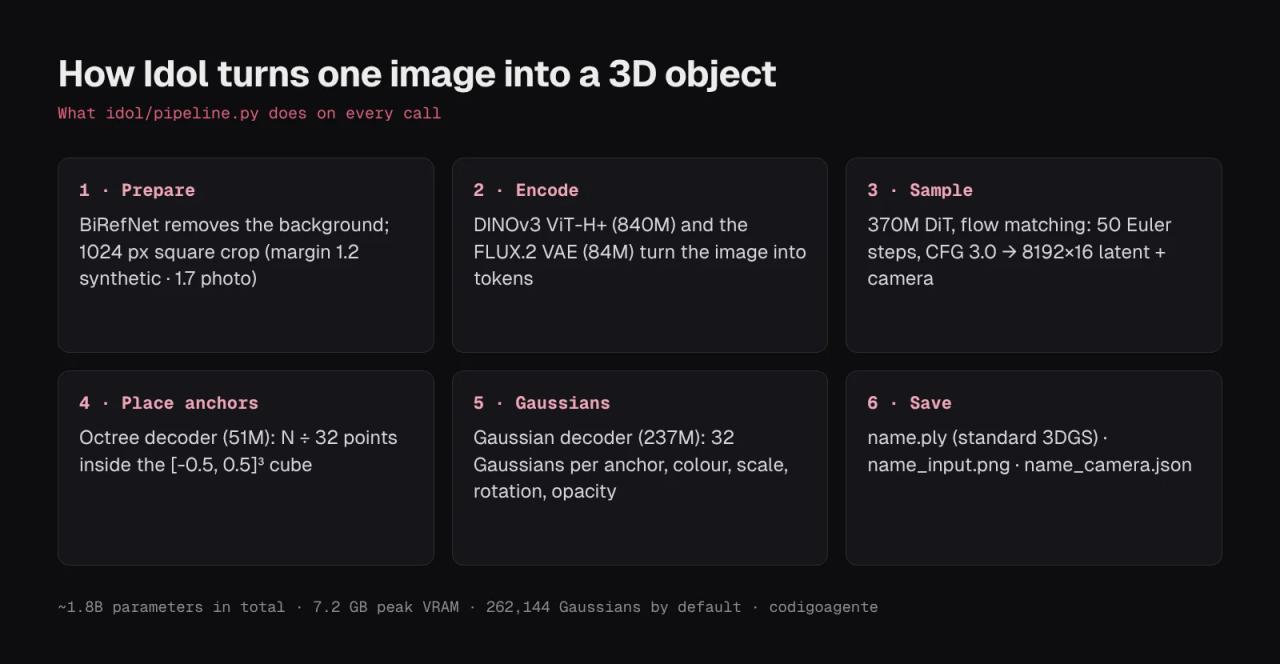
- Prepare the image (
preprocess.py). If the image has no alpha channel, BiRefNet removes the background. It then erodes the edge by 1 px so no halo survives, crops a square around the object and scales it to 1024 × 1024 on black. The crop margin depends on the mode: 1.2 for synthetic images and 1.7 for real photos. - Encode (
conditioning.py). Two image encoders turn that square into tokens: DINOv3 ViT-H+ (840 million parameters) and the FLUX.2 VAE. - Sample (
sampler.py). A 370 million parameter diffusion transformer (DiT) starts from noise and, in 50 Euler steps with classifier-free guidance 3.0, reaches an 8192 × 16 latent plus a prediction of the camera the picture was taken from. - Place anchors. An octree decoder spreads N ÷ 32 anchor points inside a unit cube.
- Generate Gaussians. A second decoder turns each anchor into 32 Gaussians with colour, scale, rotation and opacity.
- Save. It writes a
.plyin the standard 3DGS format (rotated from z-up to the y-up convention viewers expect), the cropped image the model saw and a JSON with the estimated camera (yaw,pitch, radius and field of view).
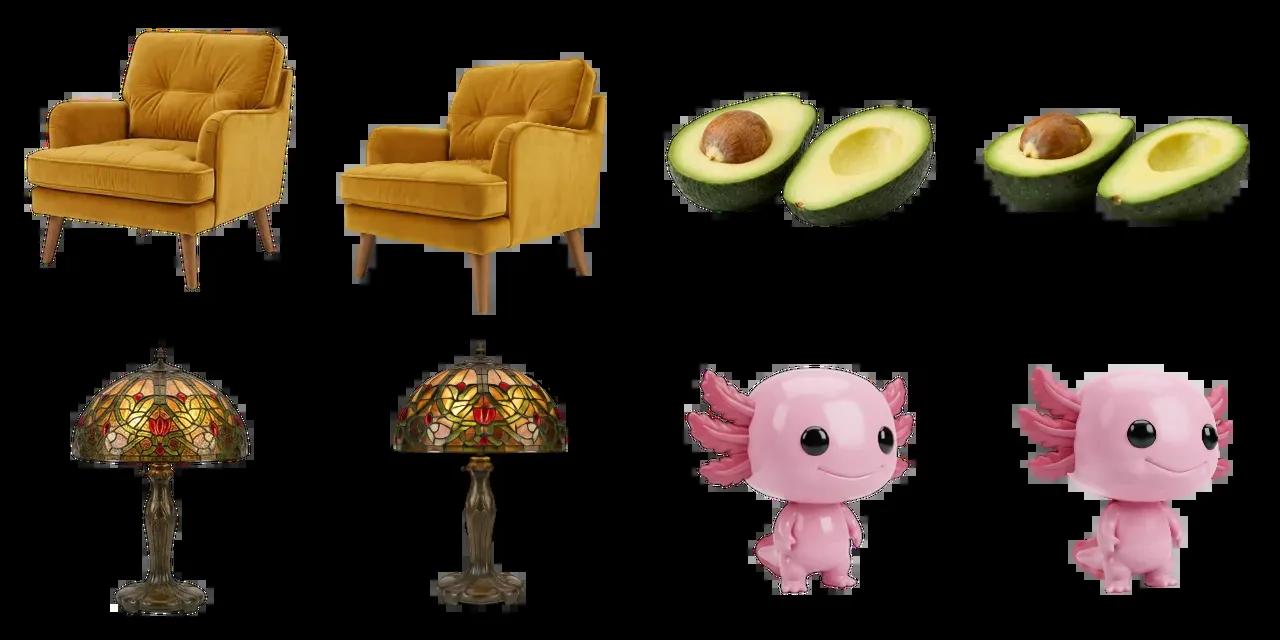
Step 3 is the interesting one: the model invents the hidden parts based on what it learned from thousands of objects. The axolotl in the official gallery, shown only from the front, makes it obvious:

The back and tail are consistent with the front, but they clearly carry less detail than the visible side. That is expected from any single-image model.
Which GPU you need
The README lists timings measured with the same code on different GPUs, one image to 262,144 Gaussians at 50 steps:
| GPU | VRAM | Time per image |
|---|---|---|
| RTX 5090 | 32 GB | 14.1 s |
| RTX 4090 | 24 GB | 19.1 s |
| RTX 3080 | 10 GB | 46.2 s |
| L4 | 22 GB | 54.6 s |
| H100 | 80 GB | 6.7 s |
| B300 | 269 GB | 3.4 s |
Three things that come from the code and are less visible in the README:
- CUDA or CPU only.
pipeline.pypickscudawhen available and otherwisecpu; there is no Apple Silicon (MPS) support. On CPU the optimizations are off and the README gives no timings, so expect it to be very slow. - The first image is slower. With optimization on (the default on GPU), the first generation in each process compiles the model with
torch.compile. If you are processing many images, pass a folder in a single run instead of launching the command once per image. - More Gaussians barely cost more. The Gaussian count only affects the decoders (steps 4 and 5); sampling, the expensive part, is the same. What grows is the
.plysize.
10 GB of VRAM (an RTX 3080) is enough, since the measured peak is 7.2 GB. With 8 GB it will be very tight.
Installing Idol step by step
You need Python 3.10 or newer, PyTorch 2.5 or newer with CUDA, and a Hugging Face account.
1. Request access to the two encoders
Idol's weights are public, but two of the pieces it uses are behind a terms acceptance on Hugging Face. Sign in and accept the terms at:
facebook/dinov3-vith16plus-pretrain-lvd1689m(DINOv3)black-forest-labs/FLUX.2-dev(only the VAE is downloaded from here)
Approval may take a while. Meanwhile, create a read token in your Hugging Face account.
2. Clone and install
git clone https://github.com/speridlabs/idol-sdk.git
cd idol-sdk
python -m venv .venv
source .venv/bin/activate        # on Windows: .venv\Scripts\activate
pip install -e .
hf auth login                    # paste your token
If you want the demo's web UI locally, install the extra as well: pip install -e ".[demo]". If flash-attn is installed, Idol uses it; otherwise it uses PyTorch's built-in attention (same result, a bit slower). Force either with ATTN_BACKEND=sdpa or ATTN_BACKEND=flash_attn.
3. Generate your first object
python -m idol.sample --image photo.jpg --mode real
python -m idol.sample --image renders/ --mode synthetic --out output
The first run downloads about 3 GB of Idol weights plus the two encoders. For each image you get name.ply, name_input.png and name_camera.json in the output folder (outputs by default).
Pick the right mode: synthetic (the default) is for renders and AI-generated images of a single object; real is for photos taken with a camera or phone. The only difference is the crop margin, but it shows.
Useful options
| Option | Default | What for |
|---|---|---|
| `--seed` | 42 | Same seed, same object. Change it if you don't like the back. |
| `--steps` | 50 | Sampling steps. Fewer steps, faster and less detail. |
| `--cfg_strength` | 3.0 | How closely the result follows the image. |
| `--num_gaussians` | 262144 | 32,768 to 1,048,576, a multiple of 32. |
| `--crop_margin` | per mode | Overrides the crop margin if the object comes out cut off or too small. |
| `--dinov3_dtype` | bf16 | `fp32` uses 1.7 GB more memory. |
| `--weights` | `speridlabs/idol` | A Hugging Face repo or a local folder with the weights. |
| `--no_optimize` | optimized | Turns off `torch.compile` and the other speed-ups. |
Using it from Python
from idol import IdolPipeline

pipeline = IdolPipeline.from_pretrained("speridlabs/idol")
output = pipeline("photo.jpg", mode="real", seed=42, num_gaussians=1_048_576)
output.gaussian.save_ply("photo.ply")
output.preprocessed_image.save("photo_input.png")
print(output.camera)  # yaw, pitch, radius, fov
If your object is already cut out in a PNG with transparency, Idol detects the alpha channel and skips BiRefNet. If you need that step, you can remove the background beforehand in your browser with BG0, an open source background remover that never uploads your image.
Where to view and use the .ply
The .ply follows the standard 3D Gaussian Splatting format, so any splat viewer opens it: SuperSplat (by PlayCanvas, in the browser) is the quickest way to check the result. To put it on a website there are splat libraries for three.js and engines such as PlayCanvas that support them.
If what you want is a 3D website with AI-generated objects, compare it with Dioramas, the framework for three.js 3D websites: Dioramas generates GLB meshes with Meshy at about 1.20 USD per model; Idol generates splats for free on your machine. Meshes if you need dynamic lighting and shadows, printing or animation; splats if you want a photographic look and the object stays still.
How it compares with other models
Speridlabs publishes a comparison with TripoSplat, TRELLIS and LGM, run on an H100. Summary with the easiest metrics to read:
| Model | Gaussians | Similarity in new views (CLIP ↑) | Sharpness (distance ↓) | Time |
|---|---|---|---|---|
| **Idol** | 262,144 | **0.885** | **0.81** | 6.8 s |
| TripoSplat | 262,144 | 0.868 | 1.03 | 9.9 s |
| TRELLIS | paper setting | 0.868 | 0.97 | 7.1 s |
| LGM | 65,536 | 0.784 | 1.22 | **1.1 s** |
Idol wins almost every column and is about 30% faster than TripoSplat, the model it builds on. Two caveats: the table comes from the author, with no independent evaluation yet, and it does not say which image set it was measured on. LGM is much faster but its results are visibly blurrier.
Licenses: what to check before using it in a business
At codigoagente we usually cover MIT projects; Idol uses Apache-2.0, which is just as permissive for commercial use and adds an explicit patent grant. You can use, modify and sell it, keeping the license and change notices.
The nuance is in the two third-party pieces it downloads on every run:
- DINOv3 has its own Meta license. It allows use, modification and redistribution, but if you redistribute the model (for example, bundled inside your product) you must include the license and display "Built with DINOv3" in the product's documentation or website. It also forbids military and weapons uses.
- The FLUX.2 VAE. Black Forest Labs released the FLUX.2 VAE under Apache-2.0, but Idol downloads it from the gated
FLUX.2-devrepository, which has its own license. You have to accept those terms to download it. If you are building a commercial service, read that repository's license and check whether it covers you, or whether you would rather point to a copy of the VAE published under Apache-2.0 (--weightslets you load Idol's weights from a local folder, and the encoders are fetched from the repositories named in itsconfig.json).
The objects you generate carry no restrictions from Idol. If the input image belongs to someone else (a third party's product photo, a copyrighted character), the rights issue is still yours.
What we did not test and why
We did not run Idol for this article: it needs an NVIDIA GPU with roughly 8-10 GB free and access to the gated Hugging Face repositories, and our test environment has neither. Everything above comes from reading the SDK source line by line and the README. The 3D object images come from the repository's official gallery, credited.
If you try it yourself, the fastest way to see whether it fits your needs is the Hugging Face Space: upload a photo of one of your products, spin the result and look at the back.
Common errors
Idol needs two image encoders that are downloaded from Hugging Face: you have not accepted the DINOv3 or FLUX.2-dev terms, or you are not logged in. Accept on both pages and runhf auth login. If you already accepted, check withhf auth whoamithat the token belongs to that same account.Your Hugging Face account does not have access yet: you accepted but approval is pending. Wait and try again.no object found in the image (the alpha channel is empty): BiRefNet found no object, or your PNG has a fully transparent alpha channel. Use an image with one clear object and a distinguishable background, or drop the alpha channel.- The first image takes ages and the rest don't: that is
torch.compilecompiling. Normal. Turn it off with--no_optimizeif you only need one image. - The object is cut off or too small: switch
--modeor adjust--crop_margin(higher means more room around it). - The back looks odd: try other seeds with
--seed. Each seed gives a different "interpretation" of what is hidden.
FAQ
Is Idol free? Yes. Code and weights are Apache-2.0 and run on your GPU. No per-model fee and no account on any service, apart from a free Hugging Face account to download the encoders.
Does it run on a Mac? Not with acceleration. The code only uses CUDA or CPU; Apple Silicon is not supported.
Does it produce meshes for 3D printing or Unity and Unreal? Not directly. It produces Gaussian splats as .ply. For a mesh you would need to convert it with another tool or use an image-to-mesh model.
Can I use phone photos? Yes, with --mode real. Best with a single, well-lit object fully inside the frame.
Can I use the objects in a commercial product? Idol does not prevent it. Check the DINOv3 and FLUX.2-dev licenses if you redistribute the models or run a service, and the rights to the input image.
How big is an object? It depends on the Gaussian count: each one is 17 four-byte values in the .ply, so 262,144 Gaussians come to about 18 MB and 1,048,576 to about 71 MB, uncompressed.
Conclusion
Idol does on your own GPU, in 14-46 seconds on a consumer card and with no per-model fee, what image-to-3D services have been charging for: going from a photo to an object you can spin around. Its limits are the format, splats instead of meshes, and the fine print of the two third-party encoders. If you have an NVIDIA card with 10 GB or more, the next step is to get access to the two Hugging Face repositories, install it with pip install -e . and try a photo of one of your products in real mode.
// source code
// implementation
More on Open source tools
- Free alternatives to paid apps
- Run it on your server
- Free alternatives to paid apps
- Design, image and video

- Design, image and video
- Step-by-step tutorials