Concat: the open source CapCut alternative that Claude Code can drive over MCP
Concat is a free, open source video editor that pitches itself as a CapCut alternative for Windows, macOS, Linux, Android and iOS. It covers what most people open CapCut for (auto-captions, text to speech, background removal, keyframes, effects and 4K export) with no watermark, no account, no subscription and no uploads: everything runs on your machine on a native Rust engine.
What makes it relevant to this blog is something else: it ships a built-in MCP server (concat --mcp), so Claude Code or any other AI agent can create projects, cut, add titles and export with the same edit commands the window uses. In this review we read its source (version 0.2.8) to explain what it really does, how it is built, where its limits are and how to plug it into your agent.
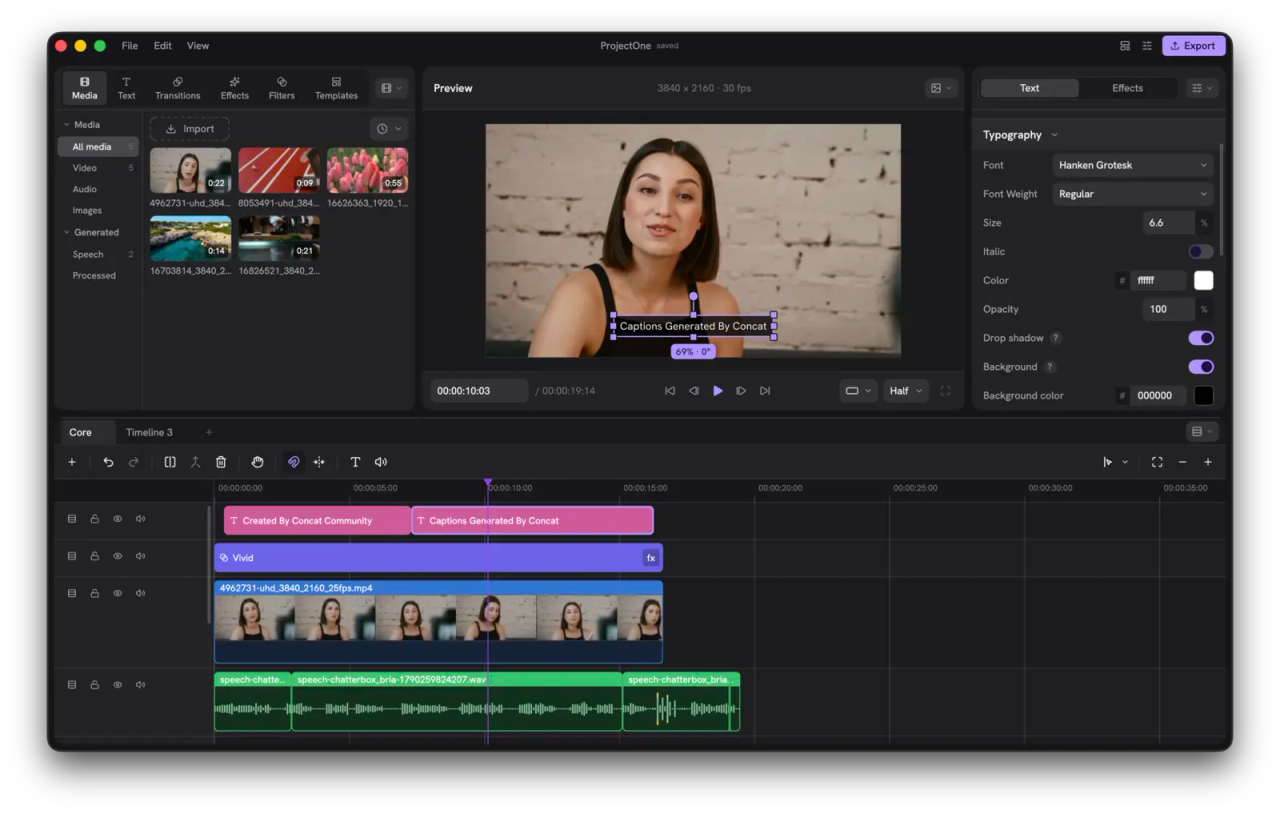
What Concat is and who makes it
- Repository: github.com/jub0t/Concat
- Website and downloads: concatenate.pages.dev
- Version reviewed: 0.2.8 (tagged October 18, 2026), plus
mainup to October 28. The first public build, 0.1.0-alpha.1, shipped on August 27, 2026: the project is two months old. - License: AGPL-3.0-or-later. The name and logo are a separate trademark (more below).
- Author: Jareer Abdullah (@jub0t), who holds the copyright and the marks. Outside contributions go through a contributor license agreement (CLA).
- Status: beta. In the README's own words: "it works, and it still has edges".
- Interface languages: 26.
A note on the license
We usually cover MIT projects; Concat is not one. The AGPL-3.0 lets you use it for free, including for commercial work: the videos you export are yours and the license does not touch them. Obligations only kick in if you modify the code and distribute it, or offer that modified version to others over a network: then you must publish your changes under the same license. Editing your own videos with the app as shipped requires nothing from you.
There is a second limit on top of the license. Per TRADEMARK.md, if you distribute a modified build you must give it your own name and icon. Writing about Concat, packaging it unmodified for a Linux distribution or forking it is fine; shipping a modified Concat under the Concat name is not.
What it does: the feature set in 0.2.8
| Area | What you get |
|---|---|
| Cutting | Split, trim, ripple delete, merge, freeze frame, speed, optional magnetic timeline |
| Tracks | Multi-track and multiple timelines per project, overlays and picture-in-picture, blend modes (screen, add, multiply...), crop and flips |
| Animation | Keyframes for position, scale, rotation, opacity, volume and effect parameters, with a curve editor |
| Effects | 127 packages in the repo across color filters, transitions and audio effects (VHS, glitch, film grain, teal-orange, chroma key, telephone, robot...). The README advertises "100 effects, filters and transitions" rendered on the GPU |
| Titles | Fonts, stroke, shadow, background plate and starter presets |
| Audio | One-switch voice cleanup (denoise, enhance, loudness) plus voice effects |
| Local AI | Whisper auto-captions, text to speech, voice cloning, background removal for people, objects or a painted mask |
| Export | H.264, HEVC and AV1, up to 4K 60 fps and 10-bit color |
| Automation | MCP server for agents, JSON-RPC API over a socket and, in source builds, gRPC and a command-line tool |
Keyboard shortcuts are what you would expect from a pro editor and can be rebound under Settings > Shortcuts: Ctrl + B splits at the playhead, Q and W delete left or right of the playhead, F freezes the frame and Shift + Delete ripple-deletes.
How it is built
Concat is not a web UI wrapped around an FFmpeg subprocess. It is a Rust workspace (edition 2024, Rust 1.93 or newer) of 17 crates split by responsibility, and the window is just one client of the engine.
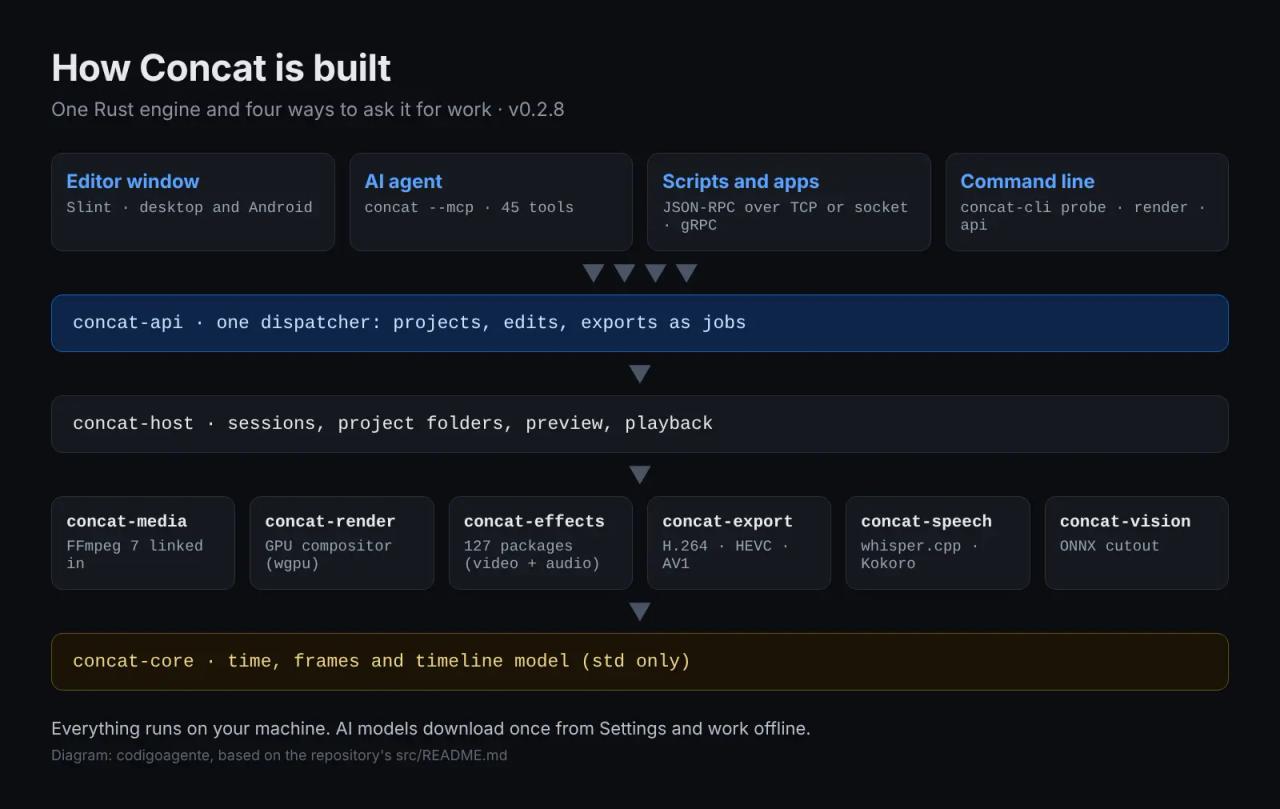
The parts that matter:
concat-core: time, frames and the timeline model. Depends on nothing but std.concat-media: reading and writing files. It links FFmpeg 7 as a library (nothing is spawned at run time) and is the only crate that knows FFmpeg exists.concat-render: composites each frame on the GPU with wgpu. It shares a device with the window's Slint renderer, so a preview frame never leaves the GPU.concat-effects: each effect is a folder with a TOML manifest plus a WGSL shader for pictures or an FFmpeg filter chain for sound.concat-speech: transcription with whisper.cpp compiled in, and text to speech with Kokoro through sherpa-onnx.concat-vision: the cutout models on ONNX Runtime, using each platform's accelerator: CoreML on macOS and iOS, DirectML on Windows, NNAPI on Android.concat-api: one JSON request dispatcher. The window, the MCP server, the JSON-RPC socket and the CLI all talk to it, so any edit you make with the mouse a script can make too, with the same refusals and the same undo.
Projects are folders with a concat.json, and every process that opens one locks it with concat.lock so the window and an agent cannot clobber each other.
The AI models: what downloads and from where
The installers carry no model weights. Each model downloads the first time a feature needs it, from Settings, and works offline afterwards. models/manifest.toml pins every model to a SHA-256 digest (a download with no digest to check is refused) and serves it from a mirror release on the project's own repo, with the original upstream as fallback:
| Feature | Model | Approx. size |
|---|---|---|
| Captions | Whisper `tiny`, `base` or `small` (multilingual or English-only) | depends on the size you pick |
| Text to speech | Kokoro v1.0, compact int8 or full precision | 132 MB / 350 MB |
| Voice cloning | Pocket TTS (Kyutai, 100M) | 98 MB |
| "Studio" voice | Chatterbox Turbo (Resemble AI) | about 1 GB |
| Background removal | RobustVideoMatting (people), ISNet (objects), SlimSAM (brush) | various |
| Upscaling | Real-ESRGAN general x4v3 | — |
According to its code signing policy, the app only reaches the network when you ask: checking for updates, downloading a model, or if you turn on the remote API. There is no telemetry.
Language limits worth knowing
A detail the README does not spell out, which we found in concat-speech/src/tts.rs:
- Auto-captions work in many languages as long as you pick a multilingual Whisper model (
tiny,baseorsmall, not the.envariants). The largest model offered issmall: fine for clean audio, but with noise or strong accents you will fix more lines than you would withmediumorlarge, which are not on the list. - Text to speech only speaks English and Chinese. Kokoro bundles 53 voices in nine languages, but the code only lists English and Chinese because, as the author notes in a comment, its lexicons only cover those two well. Pocket TTS and Chatterbox, the cloning models, are English-only.
If you need narration in another language, generate the audio elsewhere and drop it on the timeline. We reviewed VoiceStudio, an open source voice cloner you can use for that.
Installing Concat
Two ways in: the project website, which picks the right build for your system, or GitHub Releases, with every installer and its checksums.
| System | Format | Heads-up |
|---|---|---|
| Windows x86_64 | `.exe` setup and `.msi` | Unsigned: SmartScreen warns, click **More info › Run anyway**. With Smart App Control on, Windows refuses to run it. ARM builds are paused |
| macOS (Intel and Apple silicon) | `.app` | Also unsigned. If macOS will not open it: `xattr -dr com.apple.quarantine /Applications/Concat.app` |
| Linux x86_64 and ARM | `.deb`, `.rpm`, `.AppImage`, Arch package, community Flatpak | — |
| Android | APK | Phones and tablets |
| iOS / iPadOS | Sideloaded | Not on the App Store |
Unsigned Windows binaries are normal for a two-month-old project, but keep it in mind on managed company machines. The signing policy (CODE_SIGNING.md) states that every build comes from GitHub Actions off a tag, never from someone's laptop, and you can verify downloads against the release checksums.
Building from source
You need Rust 1.93 or newer, the FFmpeg 7 development libraries, cmake and a C++ compiler. The Cargo workspace lives in src/, not the repo root:
git clone https://github.com/jub0t/Concat.git
cd Concat/src
cargo run -p concat                    # the editor, debug build
cargo build --profile app -p concat    # the shipping binary (fat LTO, stripped)
On macOS, brew install ffmpeg is enough. On Windows, and on Linux distros whose FFmpeg is older than 7, grab a BtbN shared build and point FFMPEG_DIR at it. On Nix, nix run at the repo root builds everything with pinned dependencies.
Driving Concat from Claude Code over MCP
This is what sets it apart from CapCut and from most free editors. The MCP server lives inside the same binary, so there is nothing extra to install. With Claude Code on macOS:
claude mcp add concat -- /Applications/Concat.app/Contents/MacOS/concat --mcpOn Windows the path is %LOCALAPPDATA%\Programs\Concat\concat.exe (per-user install) or C:\Program Files\Concat\concat.exe (all users or the .msi); on Linux, /usr/bin/concat or the .AppImage file itself. For Claude Desktop and most other clients the config looks like this:
{
  "mcpServers": {
    "concat": {
      "command": "/Applications/Concat.app/Contents/MacOS/concat",
      "args": ["--mcp"]
    }
  }
}
What the agent can do
We counted 45 tools in crates/concat-mcp/src/tools.rs:
| Area | Tools |
|---|---|
| Projects | `project_create`, `project_open`, `project_save`, `project_list`, `project_set_video`... |
| Reading | `timeline_read` (compact view of lanes and clips), `project_get`, `concat_version` |
| Media | `media_probe`, `media_import` |
| Editing | `clip_add`, `clips_add_sequence`, `clip_trim`, `clips_split`, `clips_move`, `clip_speed`, `track_add`... |
| Picture | `clip_mask`, `clip_stabilize`, `timeline_background` |
| Titles and captions | `title_add`, `title_style_words`, `captions_add` |
| Keyframes and effects | `keyframe_set`, `effects_list`, `effect_layer_add`, `effect_key_set` |
| Export | `export_start`, `export_wait` (with progress), `export_status`, `export_cancel` |
| Looking | `preview_frame`: returns the composited frame as an image so the agent can check its own work |
Argument schemas are generated from the Concat API's own types, so the agent gets the same limits the engine enforces. Times are in seconds, a keyframe's position is a fraction of its clip (0 to 1) and sizes are fractions of the frame. Edits stay in memory until project_save, just like in the window.
A realistic task for Claude Code once the server is connected:
Create a vertical 1080x1920 project in ~/Videos/reel-demo, import ~/Videos/raw/interview.mp4, remove silences longer than one second, add auto-captions with the key words in yellow, apply the teal-orange filter, check three frames with preview_frame and export to ~/Videos/reel-demo.mp4 as H.264.
Two modes and their safety rules
concat --mcp runs one of two ways, and concat_version tells you which:
- Through the window (
--mcp window): with Concat open and Settings > Automation > Scripts and apps on, the window writes its server address and token toautomation.jsonand the agent goes through it. This is the safer mode while you edit: the agent's exports take turns with yours and it cannot save over the project on your screen. - On its own (
--mcp headless): with no window open, the MCP server runs the engine itself.
Either way the agent only writes under your home folder; to allow other paths in headless mode, list them in CONCAT_MCP_ROOTS. And the agent works on projects of its own: live editing of the project open in the window is planned in issue #337.
The JSON-RPC socket API requires a token as the first line of every connection, loopback included, but it does not encrypt traffic. If you bind it off loopback, put it behind something that terminates TLS.
Concat vs CapCut
| Concat 0.2.8 | CapCut | |
|---|---|---|
| Price | Free, no paid tier | Free with limits; advanced features and unrestricted export need a subscription |
| Watermark and account | Neither | Asks you to sign in for several features and cloud |
| Where your footage is processed | On your machine | Some AI features run in the cloud |
| Code | AGPL-3.0, auditable | Closed |
| Platforms | Windows, macOS, Linux, Android, iOS (sideloaded) | Windows, macOS, web, Android, iOS. No Linux |
| Automation | MCP server, JSON-RPC, CLI | No |
| TTS languages | English and Chinese | Many |
| Templates, music, stickers | Own templates and a sound library, small catalog | Huge catalog and TikTok trends |
| Maturity | Two-month-old beta | Mature product |
Bottom line: Concat wins on privacy, Linux support, cost and, above all, automation. CapCut still wins on template catalog, voices and overall polish.
Who is it for?
- TikTok, Reels and Shorts creators who want no watermark and no subscription: yes, if you can live with a beta.
- Linux users: probably the closest thing to CapCut you can run.
- Teams handling sensitive footage (internal training, interviews, client material): local processing and zero telemetry are the main argument. Sort out the signing question before rolling it out on managed Windows machines.
- Developers and agencies automating video: the MCP server and JSON-RPC API make "raw footage to reel" pipelines possible without touching the window. If you want to generate video from code, compare it with HyperFrames, which renders MP4 from HTML: HyperFrames animates designs; Concat edits footage.
- If you need non-English narration or a production-critical workflow, wait or combine it with other tools.
Common errors and warnings
- "Windows protected your PC": SmartScreen, because the installer is unsigned. More info › Run anyway. With Smart App Control on, there is no way to run it without turning that off.
- "Concat is damaged and can't be opened" on macOS: Gatekeeper quarantine. Run
xattr -dr com.apple.quarantine /Applications/Concat.app. - The agent cannot open the project you have in the window: that is the
concat.lock. Turn on Settings > Automation > Scripts and apps and use--mcp window, or close the project in the window. - The agent cannot save to an external drive: in headless mode it only writes under your home folder. Add the path to
CONCAT_MCP_ROOTS(:-separated on macOS and Linux,;on Windows). cargo runfails with "no such file or directory" when building: you are in the repo root. Cargo commands run fromsrc/.
FAQ
Is Concat really free? Yes. No paid plan, no watermark, no account. It is funded by Patreon donations and a sponsor listed in the README.
Can I use it for commercial videos? Yes. The AGPL governs the program's code, not the videos you export with it.
Does it upload my footage anywhere? No. All processing, captions and cutout included, is local. It only goes online to check for updates, download models, or if you turn on the remote API.
Can it caption non-English video? Yes, with the multilingual Whisper models (up to small). Text to speech, however, is English and Chinese only.
Can I edit video with Claude Code? Yes: claude mcp add concat -- <path to concat> --mcp. The agent creates its own projects, edits, checks frames with preview_frame and exports.
How stable is it? It is a two-month-old beta shipping releases almost weekly. For important work, keep backups of the project folder.
Conclusion
Concat is the open source project that comes closest to CapCut's feature set today, with two things CapCut cannot offer: your footage never leaves your machine, and an AI agent can edit with it over MCP. It still lacks maturity, Windows code signing and voices beyond English and Chinese. To try it, download 0.2.8, cut a short reel, then connect Claude Code and see what it can do with just timeline_read, captions_add and export_wait.
// source code
// implementation
More on Open source tools
- Free alternatives to paid apps
- Run it on your server
- Design, image and video
- Free alternatives to paid apps

- Design, image and video
- Step-by-step tutorials