VoiceStudio: clone voices, dub videos and transcribe locally (open source ElevenLabs alternative)
VoiceStudio is an open source desktop app to clone voices, design new voices from a text description, dub videos into other languages, dictate and transcribe audio, all with models that run on your own machine. It positions itself as a local alternative to paid services like ElevenLabs, runs on Windows, macOS and Linux (with preview builds for Android and iPhone), and ships an MCP server so agents like Claude Code can speak in your voice. It is licensed under AGPL-3.0 and the latest release is 0.5.7, from October 26, 2026.
In this review we read its code and documentation to explain what it does, how it works under the hood, what you need to install it and, above all, what you can legally do with the audio it generates: that is where the most important fine print lives.
What VoiceStudio is and who makes it
- Repository: github.com/debpalash/VoiceStudio
- Website: voicestudio.sh
- Version reviewed: 0.5.7 (October 26, 2026), plus
mainup to commit85ff469from October 27. - License: AGPL-3.0 for the app. The models it downloads have their own licenses (more on that below). There is a paid commercial license for embedding it in a closed product, and a VoiceStudio Pro edition with extra features.
- Authors: Palash Debnath (creator) and Shimul Debnath, who joined the core team in this release. Contributions are signed under a CLA.
- Status: very active development. 0.5.7 brings hundreds of fixes, preview mobile apps and support for PCs without a GPU.
The project started as "OmniVoice Studio", a front end for k2-fsa's OmniVoice model, which is why many environment variables still start with OMNIVOICE_. Today it is a full suite with more than fifteen swappable voice engines.
What you can do with VoiceStudio
| Feature | What it does |
|---|---|
| Voice cloning | Upload a clean reference recording, type the text and it generates audio in that voice. |
| Voice design | Describe the voice ("female, young adult, low pitch, British accent") and it creates it with no reference audio. |
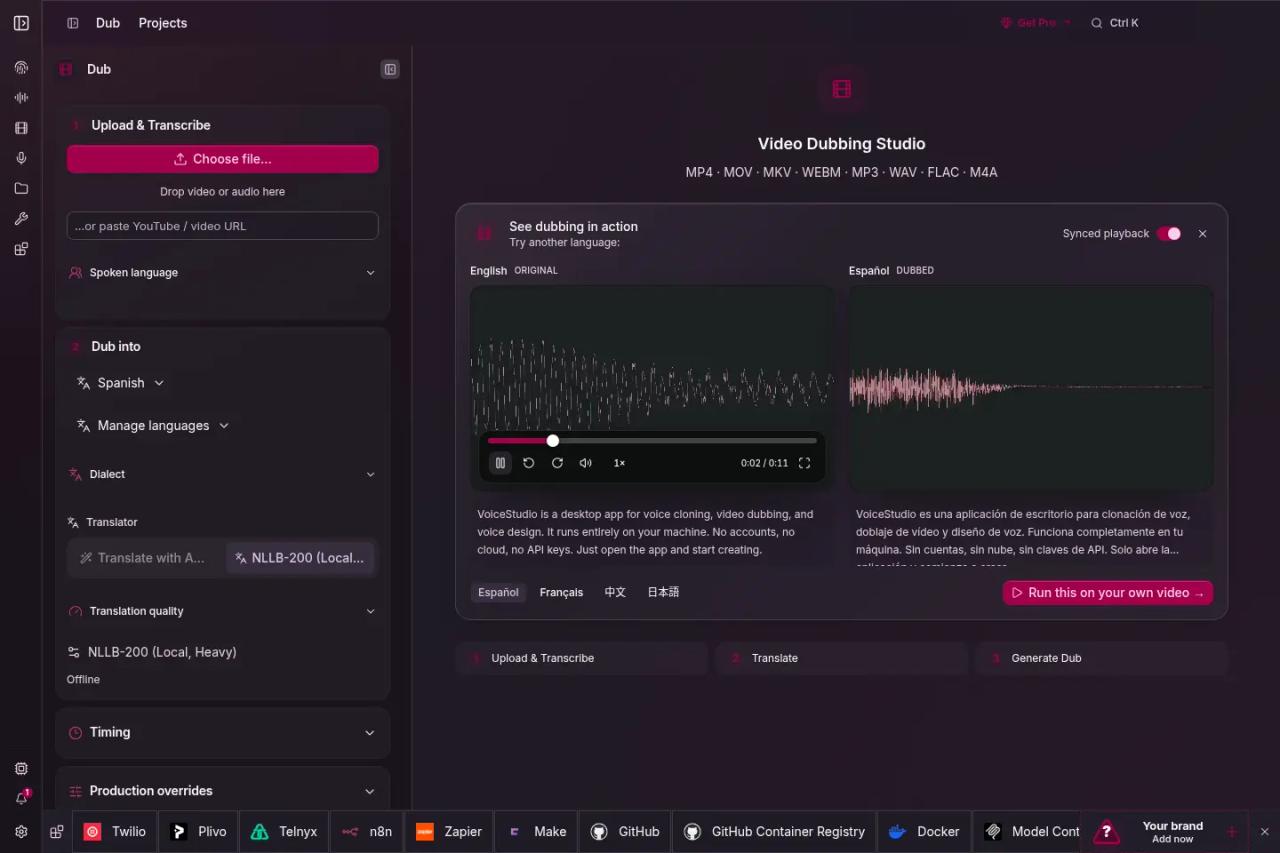
| Video dubbing | Transcribes a video, translates the text, generates speech in the target language and fits the timing per segment. |
| Dictation | A floating widget with a keyboard shortcut that transcribes what you say and inserts it where you type. |
| Transcription | Speech to text with Whisper, Parakeet and others, with speaker diarization. |
| Stories and audiobooks | Long-form text by chapters, multiple characters and batch jobs. |
| Vocal isolation | Separates the voice from background music or noise. |
| API and MCP | A local server compatible with the OpenAI API and an MCP server for agents. |
The README advertises 646 languages, which is the OmniVoice model's figure. Spanish and English are covered, and other engines such as VoxCPM2, IndexTTS, CosyVoice 3 and MOSS-TTS-Nano support them too.
How it works under the hood
VoiceStudio has two parts: a desktop app built with Electron (the older Tauri app was retired after 0.5.3) and a Python backend on FastAPI listening on localhost:3900. The app is just one more client: your scripts and agents can talk to the same backend.
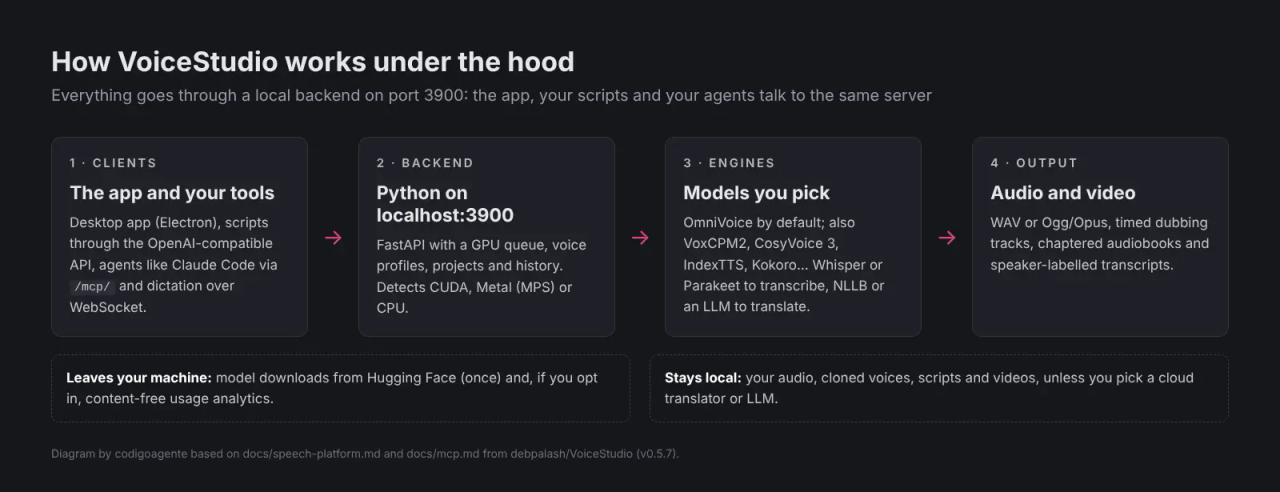
The backend keeps models loaded, runs a GPU queue, stores voice profiles, projects and history, and detects whether you have CUDA (NVIDIA), Metal (Apple Silicon) or just a CPU. Engines are installed from the app's model catalogue; some run in a separate process with their own Python environment.
| Task | Bundled engines |
|---|---|
| Speech generation | OmniVoice (default), VoxCPM2, CosyVoice 3, IndexTTS 2.5, MOSS-TTS, KittenTTS, Kokoro (via MLX-Audio or sherpa-onnx), GPT-SoVITS, Supertonic-3, PocketTTS, dots.tts, Confucius4-TTS |
| Transcription | WhisperX (default), Faster-Whisper, MLX Whisper, Parakeet TDT, Moonshine, FunASR, sherpa-onnx, whisper.cpp |
| Translation (dubbing) | Local NLLB-200, Argos, Google or an LLM you configure |
Hardware requirements
| Machine | What to expect |
|---|---|
| NVIDIA on Windows or Linux | CUDA acceleration, the fastest option. |
| Apple Silicon Mac (M1-M5) | Metal acceleration. |
| PC with no dedicated GPU | Runs on the CPU, slower. Installs a small PyTorch build (about 5 GB free). Pick light engines like KittenTTS, Supertonic-3 or PocketTTS. |
| AMD Radeon on Windows | CPU by default; optional ROCm on supported hardware and Vulkan for some GGUF engines. |
| Intel Mac | UI only, connected to a remote backend. |
| Android 10+ / iOS 17+ | Preview; models run on the phone. |
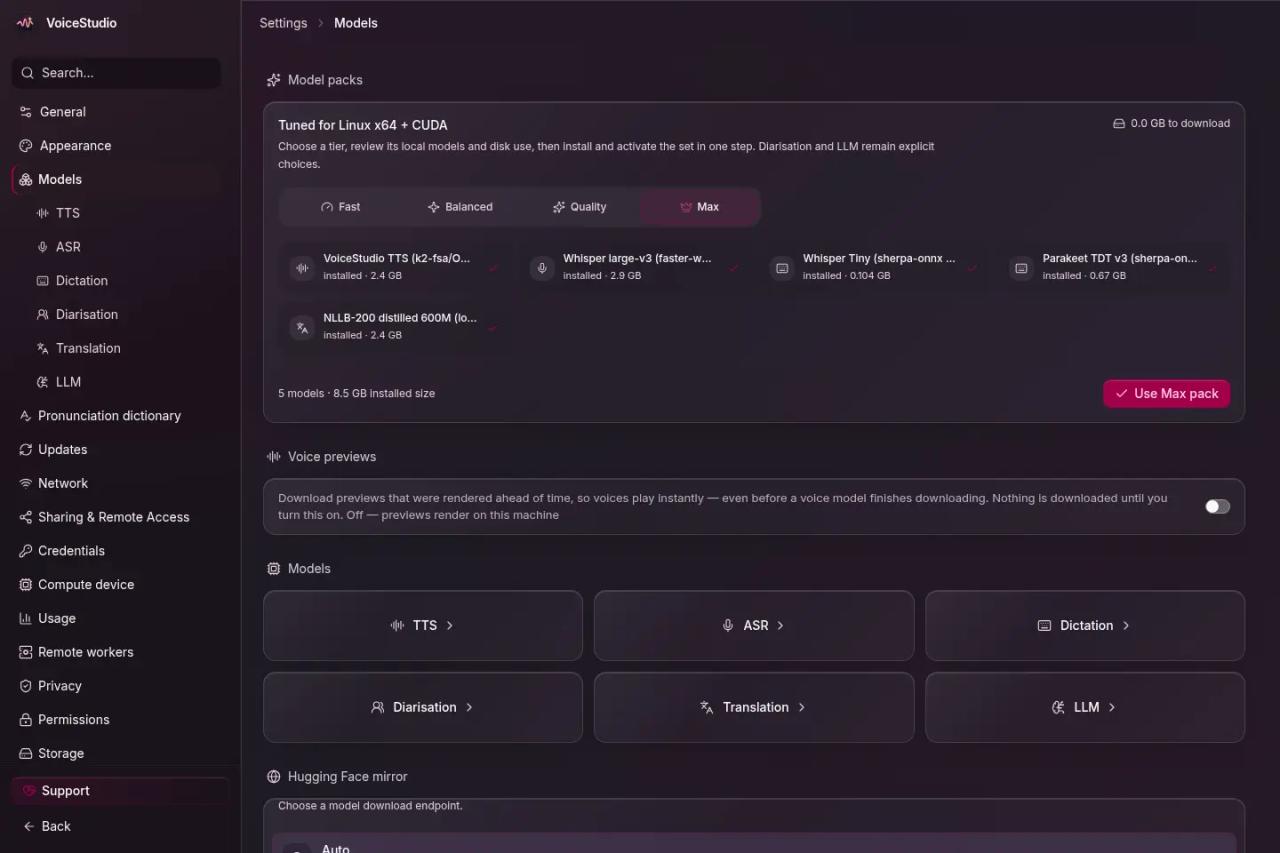
On Windows, plan for about 10 GB free for the app, its Python environment and models. The OmniVoice model alone is about 2.3 GB, and the "Max" pack in the screenshot reaches 8.5 GB. The first generation after a start is always the slowest, because it loads the weights into memory.
How to install VoiceStudio
On Windows, download VoiceStudio-0.5.7-win-x64.exe from the releases page, or let the official script pick and verify the installer from a regular (non-admin) PowerShell:
irm https://voicestudio.sh/install.ps1 | iexOn macOS and Linux:
curl -fsSL https://voicestudio.sh/install | shThe Windows installer is not code-signed yet, so SmartScreen may warn you; check the file against the release's SHA256SUMS.txt before running it. On first launch the app downloads Python, FFmpeg and the models you choose.
If the engines would take too much space on C:, move them to another drive before opening the app:
[Environment]::SetEnvironmentVariable('OMNIVOICE_ENGINES_DIR', 'D:\VoiceStudio\engines', 'User')There is also a Docker image (ghcr.io/debpalash/voicestudio:stable) for GPU servers, which serves the UI in the browser and requires an admin key (OMNIVOICE_API_KEY).
Cloning and designing a voice
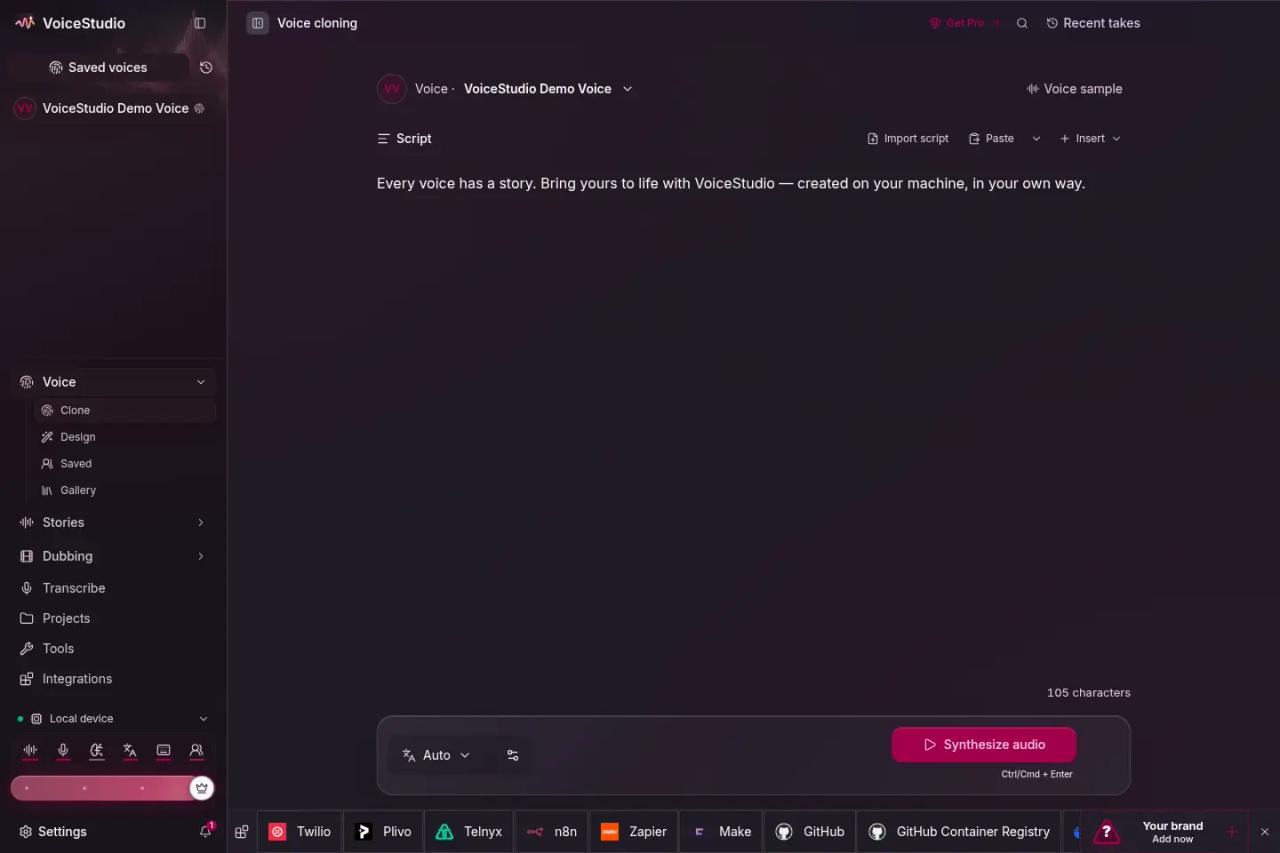
To clone, open *Voice → Clone*, pick a saved voice or add a clean reference recording, type the script and click Synthesize audio. The app transcribes the reference recording once and saves the text on the profile; if that field stays empty, every generation transcribes it again and everything gets much slower.
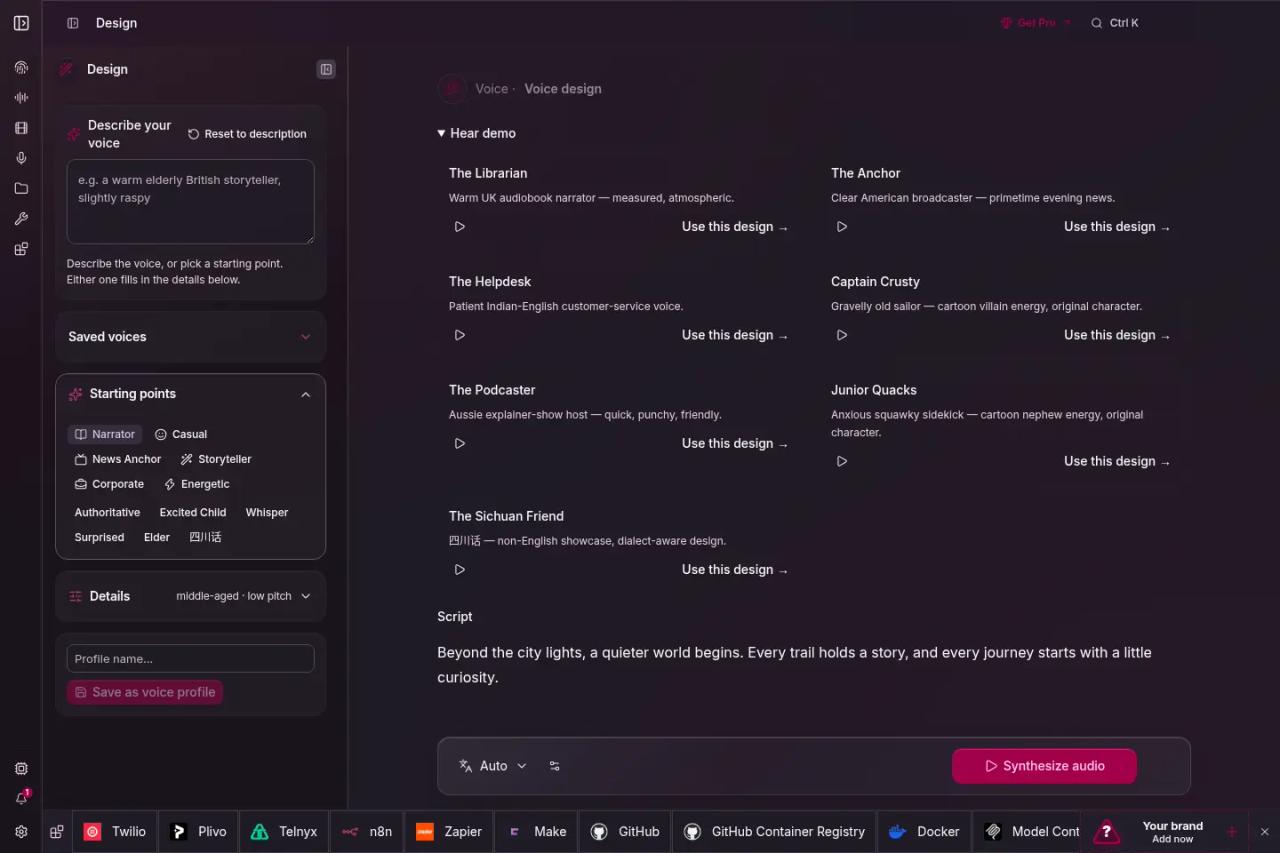
To design, open *Voice → Design* and describe the voice or start from a preset (narrator, news anchor, corporate, whisper...). Internally the description is mapped to gender, age, pitch, style and accent attributes. The design is saved as a profile with a fixed seed, so the voice sounds the same every time.
Using VoiceStudio from Claude Code (MCP) and your scripts
With the app open, the MCP server is already mounted at http://localhost:3900/mcp/. Under Integrations the app exports ready-made configs for Claude Code, Cursor and Codex. By hand, in Claude Code:
claude mcp add --transport http voicestudio http://127.0.0.1:3900/mcp/ --header "X-OmniVoice-Client-Id: claude-code"The X-OmniVoice-Client-Id header lets you bind a fixed voice to each agent. The exposed tools are generate_speech, clone_voice, design_voice, describe_voice, transcribe, list_voices and check_health. One useful detail: by default audio comes back to the agent as base64, which burns a lot of context. With OMNIVOICE_MCP_OUTPUT_MODE=files and OMNIVOICE_MCP_BASE_PATH pointing at a folder, the agent only gets the file path.
For scripts, the API mirrors OpenAI's, so any SDK you already use works by changing the base URL:
curl --fail-with-body http://localhost:3900/v1/audio/speech \
  -H "Content-Type: application/json" \
  -d '{"model":"tts-1","voice":"<your-voice-id>","input":"Hello, this is a test.","response_format":"wav"}' \
  --output test.wav
tts-1 and OpenAI's voice names are only compatibility aliases; for repeatable results use a saved voice ID from GET /v1/audio/voices. Transcription lives at POST /v1/audio/transcriptions, and live text at a WebSocket on /v1/audio/transcriptions/stream. The repo also ships a skill (npx skills add debpalash/VoiceStudio) that teaches an agent to use all of this.
License: what you can do with VoiceStudio and its audio
There are two separate layers here, and it pays not to mix them up.
1. The app is AGPL-3.0. You can use it for free, including at work or for clients. The AGPL only asks something of you if you modify VoiceStudio and offer that modified version to others over a network (for example, as a web service): then you must publish your code under the same license. If you want it inside a closed product without that obligation, the author sells a commercial license.
2. Each model has its own license, and this is the catch. The default model, OmniVoice, releases its weights under CC-BY-NC (non-commercial), and so does NLLB-200, the local dubbing translator. Since 0.5.7 the app asks you to accept those licenses once in the model catalogue, and until then the API and MCP return a license error when you use them.
Other engines publish their weights under more open licenses according to their model cards: VoxCPM2, CosyVoice 3, MOSS-TTS and Kokoro are listed as Apache-2.0, and several Whisper models as MIT. Note that the project's own license inventory (docs/licensing/model-inventory.md) says it has not yet cleared any model for commercial use; the label is what each author declares, and checking it is on you.
In practice: if the voice goes into something you sell (ads, product videos, a paid course), don't use OmniVoice or NLLB; pick an engine with a commercial-friendly license, read its Hugging Face card and keep the link.
And one rule that has nothing to do with licenses: only clone voices with their owner's permission. The README asks for it explicitly, and using someone's voice without consent can breach personality and data protection rights in most countries. If that worries you, we cover it in legal risks of AI-built apps.
Limits and common errors
- "Can't reach the local backend": usually memory pressure. With 16 GB and a browser full of tabs, the OS can kill the backend mid-dub. Close things or unload models in *Settings → Models*.
- Everything is very slow: check *Settings → Performance* to see whether you are on
cpuwithout knowing it. On Windows, PyTorch acceleration is NVIDIA-only; a Radeon falls back to CPU. - License error from the API or MCP: you haven't accepted the OmniVoice license in the model catalogue.
- The first MCP call times out: if the OmniVoice model wasn't downloaded, the first generation fetches it (about 2.3 GB) inside the timeout. Install it from the app first.
- SmartScreen blocks the installer: the
.exeisn't signed yet; verify the SHA-256 and continue. - Docker by host name fails: since 0.5.7 you must add that name to
OMNIVOICE_ALLOWED_HOSTS.
What we checked
We read the repository's code and docs at commit 85ff469 (October 27, 2026): the README, the 0.5.7 changelog, the install guides, the MCP and local API guides, and the model license inventory (backend/config/model_licenses.json). We could not generate audio in our test environment because it has no access to Hugging Face model downloads, so the app screenshots are the project's official ones and the diagram is ours.
FAQ
Is VoiceStudio free?
Yes. The app is open source under AGPL-3.0 and you can use it without paying, including commercially. What costs money is VoiceStudio Pro (features like remote workers or GPU sharing) and the commercial license for embedding it in a closed product.
Does it work offline?
Once the models are downloaded, cloning, design, transcription and dubbing with NLLB work without a connection. You need internet to download models and if you choose a cloud translator or LLM.
Does it support Spanish and other languages?
Yes. OmniVoice covers 646 languages, and engines like VoxCPM2 (30 languages), IndexTTS, CosyVoice 3 and MOSS-TTS-Nano cover the major ones. Quality depends on the engine and on the reference recording: a clean sample with no music and a correct transcript makes a big difference.
Can I use the audio in commercial videos or ads?
It depends on the model, not the app. With OmniVoice (the default), no, because its weights are non-commercial. With engines that declare Apache-2.0 or MIT, like VoxCPM2 or CosyVoice 3, in principle yes, after checking their card. And always with your own voice or with permission.
How is it different from ElevenLabs?
ElevenLabs is a pay-as-you-go cloud service with very polished voices and nothing to install. VoiceStudio is free and local: your audio never leaves your machine and you don't pay per minute, but you depend on your hardware and on checking each model's license yourself.
Do I need a graphics card?
It's not required. Without a GPU it runs on the CPU with light engines, just much slower. For dubbing long videos, an NVIDIA card or an Apple Silicon Mac makes the difference.
Conclusion
VoiceStudio puts what used to be five tools into one app: cloning, voice design, dubbing, dictation and transcription, with an API and an MCP server that turn it into your agents' voice. It is free and local, but the default model's license does not allow commercial use: if you'll use it for something you sell, switch engines before you record anything.
If you like open source tools for making content, continue with HyperFrames, for making videos with HTML or Recordly, the screen recorder with automatic zoom.
// implementation
More on Open source tools
- Free alternatives to paid apps
- Run it on your server
- Design, image and video
- Free alternatives to paid apps
- Free alternatives to paid apps
- Design, image and video