Recordly: the open source screen recorder with automatic zoom (free Screen Studio alternative)
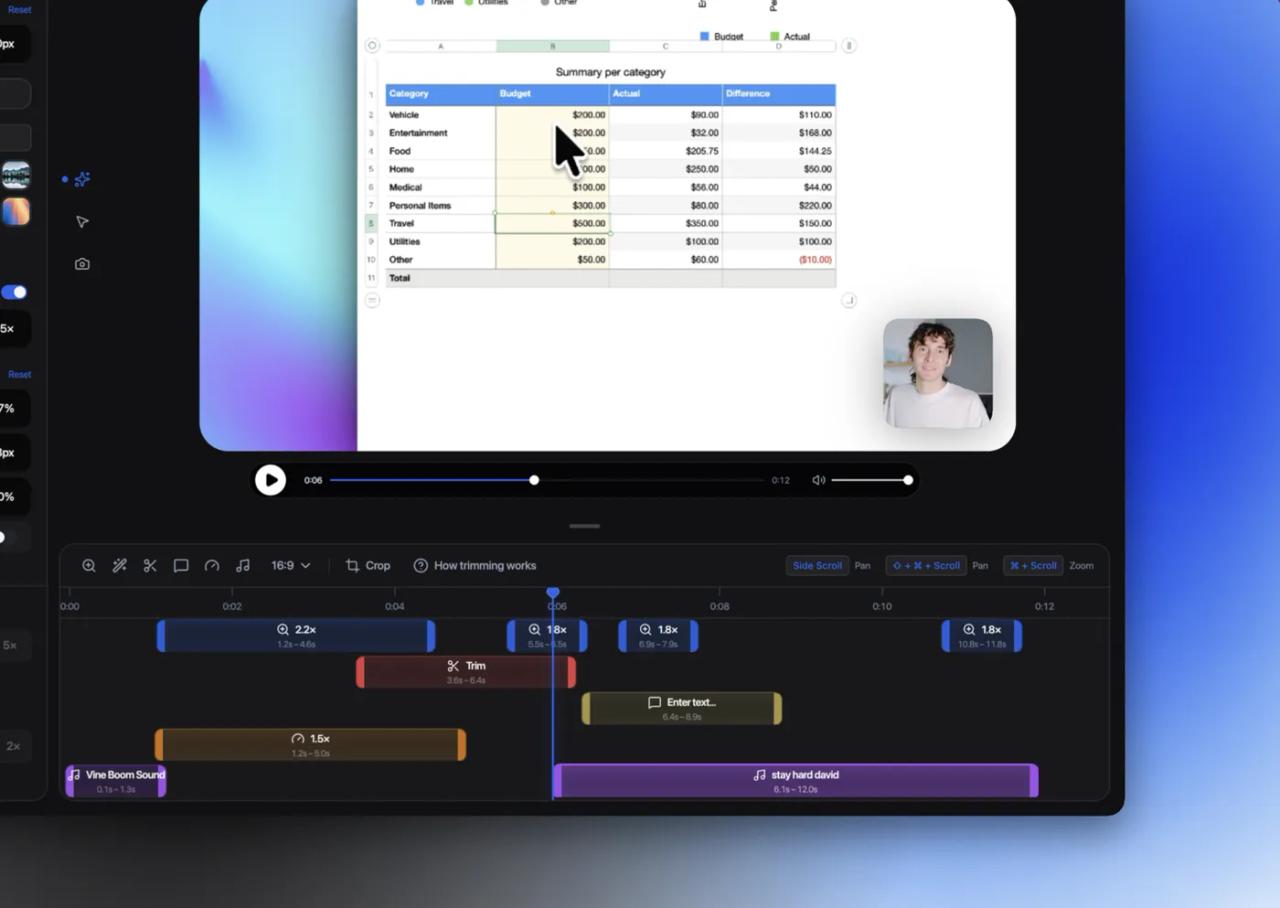
Recordly is an open source screen recorder and editor built for demo videos: tutorials, product walkthroughs and launch videos. You record your screen or a window, and the editor automatically adds zooms where you clicked, smooths the cursor, places the recording on a background with shadow and rounded corners, and exports to MP4 or GIF. It runs on Windows, macOS and Linux, the stable release is 1.4.0 (September 8, 2026) and the code is published under the AGPL-3.0 license.
It is the most direct free alternative to Screen Studio, which is paid and macOS-only. With almost 35,000 GitHub stars, it is also one of the fastest-growing open source video projects this year. We read the code of the webadderallorg/Recordly repository (commit e4a9d04, October 17, 2026) to explain what it really does, how it decides where to zoom, what your project files contain and what changes in the next release.
What Recordly is and what it is for
Anyone who has recorded a demo knows the problem: raw footage looks small, the cursor jumps around and the video feels flat. Fixing it by hand in a video editor (zooming on every click, animating the cursor, adding a background) takes longer than recording. Recordly does that post-production work in the same app you record with.
| Item | Value |
|---|---|
| Repository | [webadderallorg/Recordly](https://github.com/webadderallorg/Recordly) |
| Stable release | 1.4.0, September 8, 2026 |
| Code reviewed | commit `e4a9d04`, October 17, 2026 |
| License | AGPL-3.0 (started as a fork of OpenScreen, MIT) |
| Platforms | macOS 14+, Windows 10 build 19041+, modern Linux |
| Exports | MP4 and GIF |
| Projects | `.recordly` files you can reopen and keep editing |
| Stack | Electron 43, React 19, PixiJS 8, Vite and TypeScript |
| UI languages | 11 |
What version 1.4.0 includes:
- Recording of a full display or a single window, with microphone and system audio.
- Automatic zoom from your clicks, plus manual zoom regions.
- Cursor polish: size, smoothing, motion blur, click bounce, sway and a loop mode for GIFs that repeat without a jump.
- Webcam bubble: position, size, mirroring, shadow, roundness and scaling that follows the zoom.
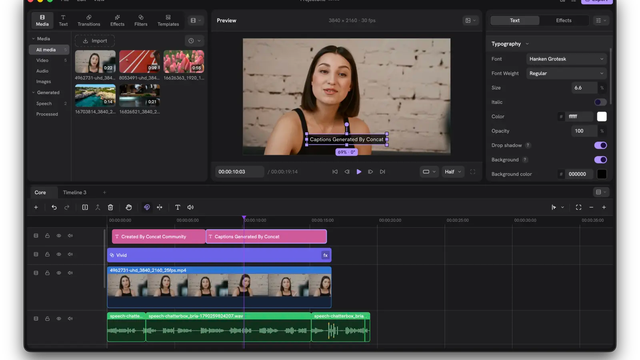
- Timeline with trims, speed changes, text, image and arrow annotations, and extra audio tracks.
- Frame: built-in wallpapers, colors, gradients, your own image, blur, padding, corners and shadow, with aspect ratio presets.
- Automatic captions generated on your machine with whisper.cpp.
- Community extensions from a marketplace.
How the automatic zoom works
This is the feature that shows most in the result, and the one people ask about: does it analyse the video with AI? No. While you record, Recordly logs where the cursor was and when you clicked, and uses that telemetry to propose zoom regions. It all lives in src/components/video-editor/timeline/zoomSuggestionUtils.ts.
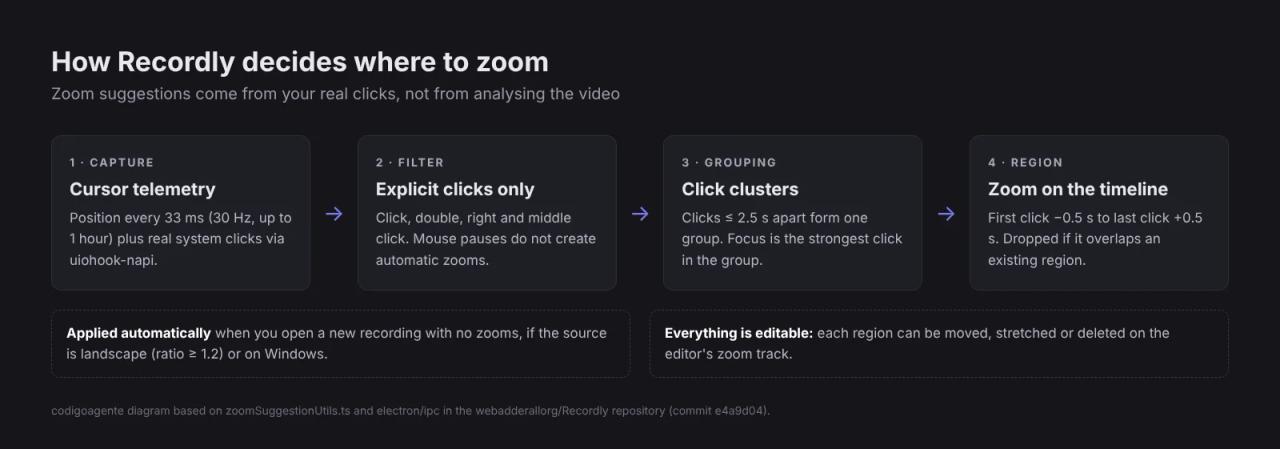
The pipeline, with the numbers from the code:
- Capture. The Electron process samples the cursor position every 33 ms (30 per second), capped at one hour of samples. Clicks come from
uiohook-napi, an operating-system input hook, so it can tell left, double, right and middle clicks apart. - Filter. Only explicit clicks count for suggestions. The code also detects mouse pauses, text selections and dropdowns, but those heuristics pick the cursor shape (for example the text cursor during a horizontal drag), not zooms.
- Grouping. Clicks 2.5 seconds apart or less are merged into one cluster. The focus point is the strongest click in the group.
- Region. Each cluster becomes a region that starts 0.5 s before the first click and ends 0.5 s after the last one. If it overlaps an existing region, it is dropped.
When you open a fresh recording with no zooms, Recordly applies these suggestions automatically. On macOS and Linux it does so if the source is landscape (aspect ratio of at least 1.2); on Windows always, because window capture already normalises coordinates to that window.
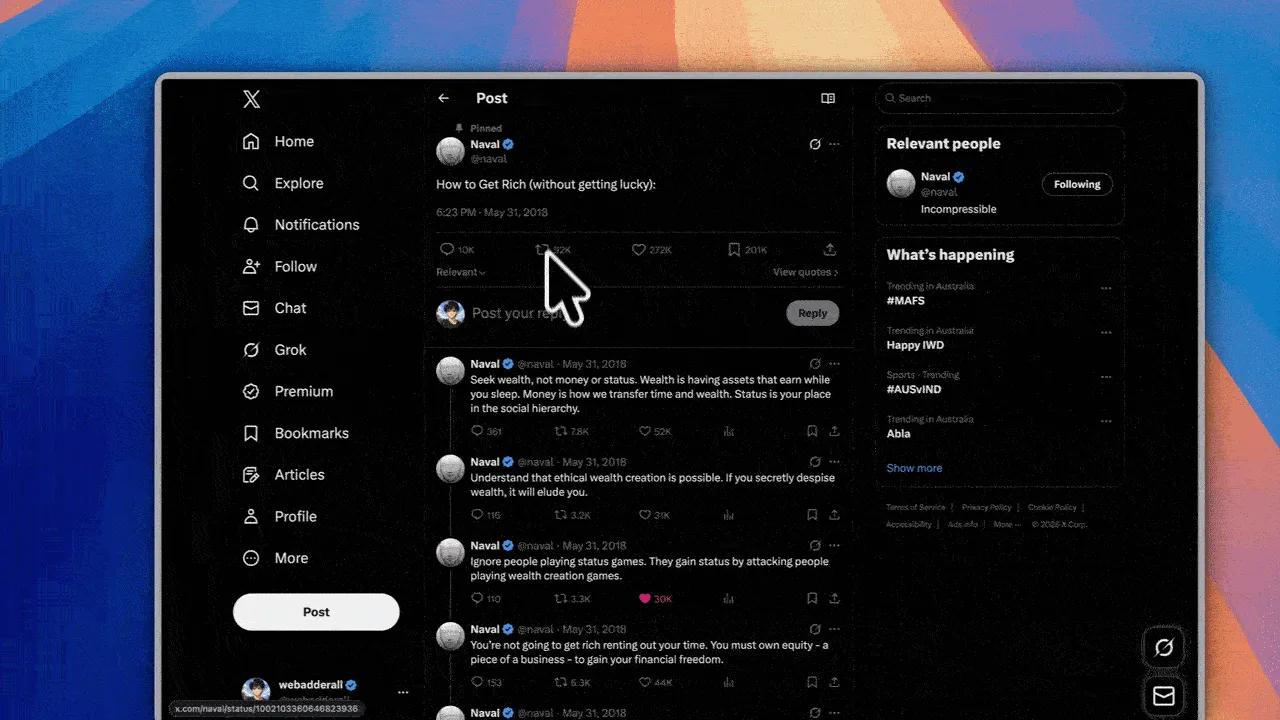
The practical takeaway: click where you want the video to zoom in. If you move the mouse to point at something without clicking, there will be no automatic zoom there; you will have to add one on the zoom track.
Transitions are tunable too. The project state stores zoom-in and zoom-out duration, the easing curve, whether two nearby zooms chain without going back to the wide shot, and spring parameters (stiffness, damping and mass) for the camera and the cursor. That is where the smooth motion typical of these videos comes from.
Capture by operating system
Recordly does not record the same way on all three platforms, which explains its limits:
| OS | How it captures | What to know |
|---|---|---|
| macOS 14+ | Native ScreenCaptureKit helpers | Hides the real cursor cleanly; system audio needs macOS 14 |
| Windows 10 19041+ | Native Windows Graphics Capture helper and WASAPI audio | On older builds it falls back to Electron capture and the real cursor may show |
| Linux | Electron capture APIs | Cannot hide the real cursor; system audio usually needs PipeWire |
On Linux there is one detail to know before recording: since the system cursor cannot be hidden, enabling Recordly's rendered cursor gives you two cursors in the export. Turn one of them off.
How to install Recordly
Prebuilt versions are on the repository's releases page. Download the installer for your OS from version 1.4.0 (the latest without a *beta* tag).
Windows. Run the installer. Check your version first with winver: if it is older than build 19041 (Windows 10 20H1, May 2020), the app works but the real cursor may appear in recordings.
macOS. Open the .dmg and drag Recordly to Applications. On your first recording, grant Screen Recording and Accessibility permissions in System Settings. If macOS says the app cannot be opened (mostly with local builds), remove the quarantine flag:
xattr -rd com.apple.quarantine /Applications/Recordly.appLinux. It ships as an AppImage:
chmod +x Recordly-linux-x64.AppImage
./Recordly-linux-x64.AppImage
On Arch or Manjaro it is also in the AUR:
yay -S recordly-binFrom source. You need Node.js and your platform's native build tools (Xcode Command Line Tools on macOS, Visual Studio 2022 with C++ and CMake on Windows, build-essential and cmake on Linux), because the build compiles the capture helpers and whisper.cpp:
git clone https://github.com/webadderallorg/Recordly.git recordly
cd recordly
npm install
npm run dev
A transparency note: we could not run the app in our test environment, so the images in this article are the project's official ones and everything we explain about how it works comes from reading the code.
Record, edit and export: the workflow
- Open Recordly and pick a display or a window.
- Enable the microphone and system audio if you need them.
- Record. Click on the spots you want to highlight.
- When you stop, the editor opens with zooms already proposed.
- Adjust: trim silences, speed up waits (installs, loading), add text or arrows and choose the background and aspect ratio (16:9 for YouTube, vertical for social).
- Save the project as
.recordlyto continue later. - Export to MP4 or GIF.
What a .recordly file stores
The project file does not contain the video: it stores the path to the original video and the full editor state as JSON (format version 2). That includes zoom, trim, speed, annotation, audio and caption regions, plus background, cursor, webcam and aspect ratio. Two consequences: projects are small, and if you move or delete the original video the project can no longer find it. Keep the recording and the .recordly file together.
Export
Preview and export use the same PixiJS scene, so what you see is what you get. For MP4 there is a modern route with native encoding and a legacy one with WebCodecs; on Windows there is also a GPU exporter and an experimental CUDA compositing option for NVIDIA cards, which only shows up if your machine supports it. For GIF you choose frame rate, size and looping.
Automatic captions with whisper.cpp
Recordly generates captions on your machine, without sending audio to any service. It uses whisper.cpp (the build pins version 1.8.4) and on first use downloads the ggml-small.bin model from Hugging Face into the app's data folder. If you do not set a language, it auto-detects it. Captions are edited in their own panel and burned into the video on export.
Extensions: extend Recordly with JavaScript
Recordly has an extension API documented in EXTENSIONS.md. An extension is a folder with a recordly-extension.json manifest and an index.js that exports activate(api). You install them from the marketplace or by copying them into the extensions folder of the app data (*Extensions → Open Directory*).
{
  "id": "com.example.my-extension",
  "name": "My Extension",
  "version": "1.0.0",
  "description": "A short description",
  "main": "index.js",
  "permissions": ["render"]
}
Each extension declares permissions: render (draw into the pipeline), cursor (telemetry and cursor effects), audio, timeline, ui (settings panels and device frames), assets (wallpapers and cursor styles) and export. Render hooks run in phases (post-video, post-zoom, post-cursor, post-webcam, post-annotations and final) in both preview and export. That is how click-sound, phone or browser frame and wallpaper extensions are built.
Before installing third-party extensions, remember they are JavaScript running inside the editor. Review the permissions they request as you would with a browser extension.
What is coming: mandatory account and share links
The 1.4.0 release you download today does not require an account. But the repository's main branch, not yet shipped in a release, has two changes worth knowing about:
- Mandatory sign-in. The code adds Supabase authentication (email magic link, Google, Microsoft or GitHub). According to
docs/authentication.md, without a session the welcome dialog cannot be dismissed and recording cannot start; there is no guest mode. Signing out keeps local projects on disk. - Share links. A first-party service (Recordly Share, on Cloudflare R2 and D1) to upload the MP4 and get a link with timestamped comments, password and expiry. For now it points to a local development server, and the docs say production integration is planned.
If recording without an account matters to you, stay on 1.4.0 or build a version from before that change. Because the project is AGPL, the code already published cannot be taken away.
Recordly license: what you can do
Recordly started as a fork of OpenScreen (MIT license) and is now published under AGPL-3.0; LICENSE.md keeps the MIT notice of the original code. In practice:
- You can use it for free, including at a company and for commercial videos. The videos you record are yours; the license covers the code, not what you make with it.
- If you modify the code and distribute the app or offer it as a network service, you must publish your code under the same license.
- The summary in
LICENSE.mdadds two conditions: you cannot use the Recordly name or branding for your project, and if you derive code from Recordly you must credit it in the UI and the repository.
It is stricter than the MIT license of many projects we cover, but for normal use (recording and editing your videos) nothing changes.
Recordly vs Screen Studio
| Recordly | Screen Studio | |
|---|---|---|
| Price | Free | Paid |
| Platforms | Windows, macOS and Linux | macOS only |
| Code | Open (AGPL-3.0) | Closed |
| Click-based auto zoom | Yes | Yes |
| Smooth cursor and backgrounds | Yes | Yes |
| Local captions | Yes, with whisper.cpp | Not verified |
| Extensions | Yes, public API and marketplace | Not verified |
| Account | No in 1.4.0; mandatory on main | Paid license |
If you work on Windows or Linux, Recordly is practically the only no-cost option of this kind. On macOS, Screen Studio has had more years to polish the experience; Recordly makes up for it with extensions, local captions and code you can read.
Common errors
The real system cursor shows next to Recordly's cursor. On Linux this is a known limitation: turn off the rendered cursor or accept both. On Windows, check you are on build 19041 or later; otherwise the app uses fallback capture and cannot hide it.
No automatic zoom after recording. Zooms are only created from clicks. If you did not click, if the recording already had zooms, or if the source is not landscape (outside Windows), none are applied. Add them on the zoom track.
System audio is not recorded on Linux. PipeWire is usually missing. Modern distros ship it by default; older ones still on PulseAudio may not capture system audio.
macOS says Recordly cannot be opened. Run the xattr -rd com.apple.quarantine command from the install section and open it again.
The .recordly project cannot find the video. The project stores the path, not the video. Move the file back to its original folder, or reopen the video and reapply your settings.
FAQ
Is Recordly free?
Yes. The app is free and the code is open source under AGPL-3.0. We found no watermark or duration limit in the code we reviewed.
Does it work on Windows?
Yes, on Windows 10 build 19041 or later with its native capture. Older versions can still record, but the real cursor may show in the video.
Does Recordly use AI for automatic zoom?
No. Suggestions come from cursor telemetry and your clicks with fixed rules (merge clicks under 2.5 s apart and add half a second before and after). The only AI model involved is for captions, generated locally with whisper.cpp.
Can I use Recordly videos commercially?
Yes. The AGPL governs the program's code, not the videos you make with it.
Do I need an account to use Recordly?
Not in version 1.4.0. The main branch adds a mandatory sign-in that will ship in an upcoming release.
Conclusion
Recordly does what it promises: it turns a flat recording into a demo video with zooms, a smooth cursor and a polished frame, without a trip through a video editor. The automatic zoom has no magic, and that is an advantage: you know exactly when it will zoom in (when you click) and can plan your recording accordingly. If you record tutorials or product demos on Windows or Linux, it is the tool to try first; just keep an eye on the move to a mandatory account in the next release.
If you would rather generate videos programmatically than record them, see HyperFrames, which turns HTML into MP4 videos with AI agents. And for another image tool that works locally, BG0 removes photo backgrounds in your browser without uploading them.
// source code
// implementation
More on Open source tools
- Free alternatives to paid apps
- Run it on your server
- Design, image and video
- Free alternatives to paid apps
- Free alternatives to paid apps
- Design, image and video