Dioramas: the open source framework for interactive 3D websites with three.js and AI-generated models
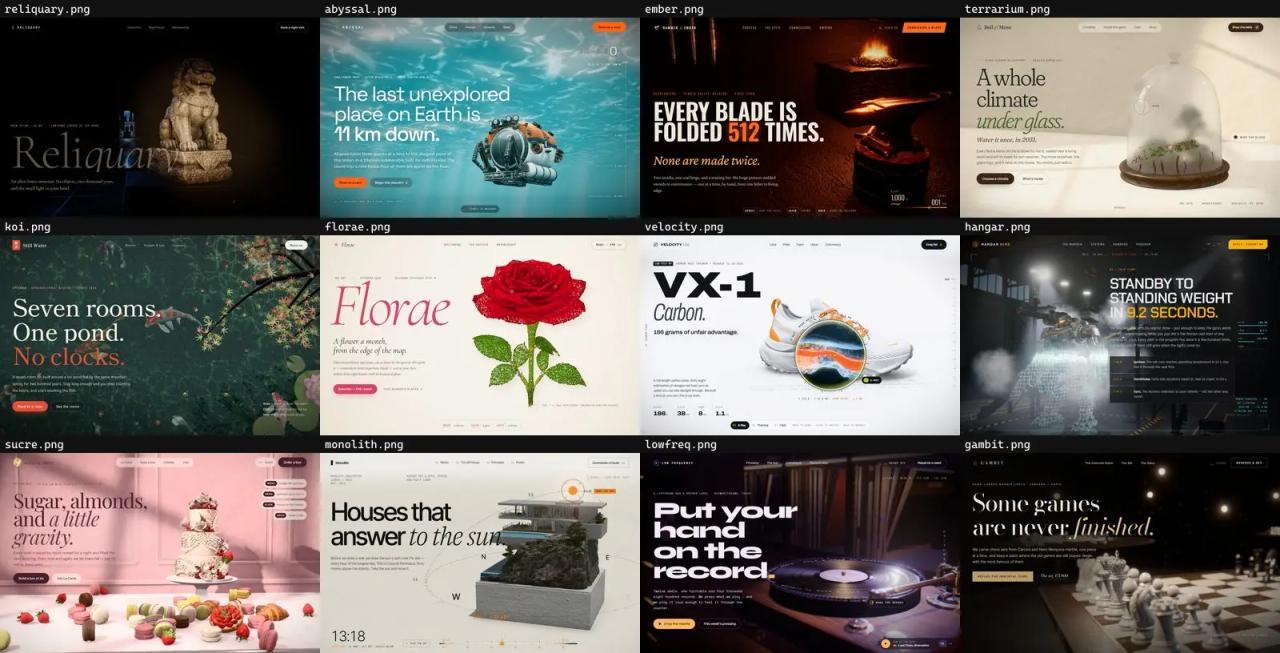
Dioramas is an open source framework for building interactive 3D websites where the three.js scene is not a hero decoration but the whole page: a hyper-detailed object, studio lighting, a camera choreographed to the scroll and one interaction the visitor can touch. The interesting part is where the objects come from: they are not modelled in Blender, they are generated with AI from a prompt (an image with Nano Banana 2 and a 3D mesh with Meshy 7.1), and then a small engine on top of three.js makes them look expensive.
This article covers what ships in the repository, how each layer works internally, what generating the models costs, how to get it running and how to use it with a coding agent to build your own page.
What Dioramas is
It is the blendi-remade/dioramas repository. Facts as of this review (October 28, 2026):
- License: the code is MIT. The generated 3D models and images are released under CC BY 4.0 (you can use them with the credit "Dioramas (github.com/blendi-remade/dioramas)").
- Version: 0.1.0, released as a single commit on September 29, 2026.
- Stack: three.js r186, postprocessing (pmndrs), N8AO, GSAP with ScrollTrigger and SplitText, Lenis, Rapier (physics) and Vite 8.
- Contents: the engine (
src/core/, about 840 lines), the asset pipeline scripts (scripts/), 20 complete example sites (examples/, about 14,500 lines in themain.jsfiles alone), the brief for each example (docs/briefs/) and the exact prompts used to generate every model (assets/jobs/). - Size: models live in the repo without Git LFS:
public/models/is about 310 MB across 91 GLB files.
There is no paid tier, account or CLI. You only pay fal if you want to generate new models; viewing and editing the 20 examples needs no key at all.
The three layers
Dioramas is easiest to understand as three pieces that fit together:
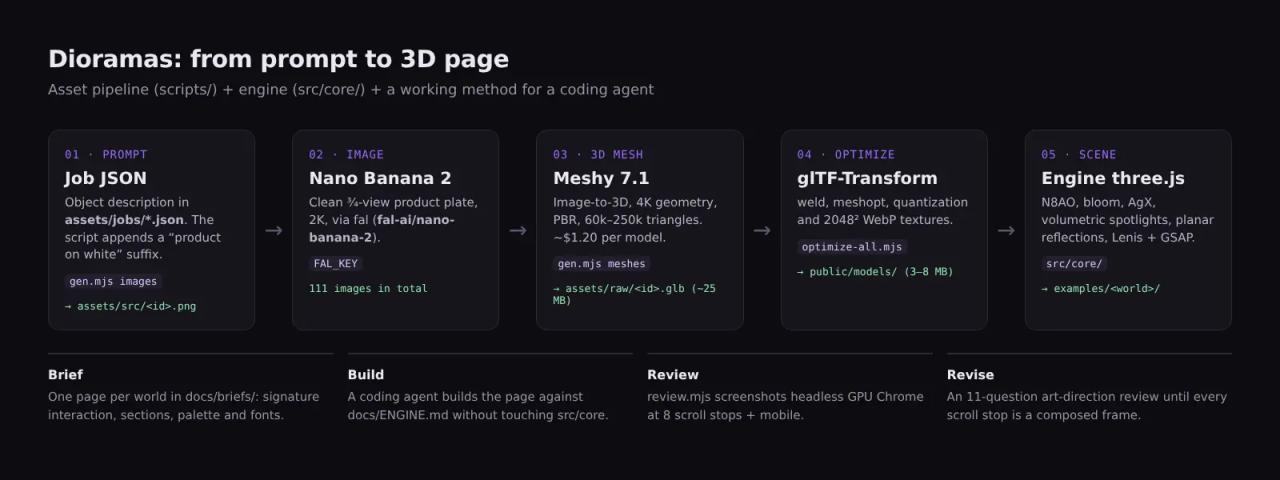
- Asset pipeline: prompt → image → 3D model → web-optimized GLB.
- Engine: a thin layer over three.js with post-processing, lighting and scroll already solved.
- Method: brief → build → review → revise, designed so an AI agent can build the page.
Layer 1: the pipeline that generates 3D models with AI
Everything starts with a JSON file in assets/jobs/. Each entry is an object with an id and a prompt, such as the helmet from the *Reliquary* museum: "An ancient Greek bronze Corinthian hoplite helmet, deep verdigris green-blue patina…".
The scripts/gen.mjs script runs two steps against the fal API:
- Reference image with
fal-ai/nano-banana-2. Unless the job setsraw: true, the script appends a fixed suffix asking for a single isolated, centered object in three-quarter view on a pure white background with no cast shadows. That is the ideal "product plate" for 3D conversion. It lands inassets/src/<id>.png. - 3D mesh with
meshy/v7.1/image-to-3d: triangle topology, 150,000 polygons by default, 4K geometry, PBR textures and remeshing. The raw GLB (around 25 MB) goes toassets/raw/<id>.glb.
One well-thought-out detail: each mesh's request_id is written to assets/manifest.json before polling for the result. If the process crashes halfway through a Meshy job (they take minutes), rerunning it resumes the same request instead of paying for the same model twice.
Then scripts/optimize.mjs runs each GLB through glTF-Transform: dedup, weld, optional simplification, 2048 px WebP textures, quantization and meshopt compression. A 25 MB model drops to 3-8 MB.
cp .env.example .env                                   # add your FAL_KEY
node scripts/gen.mjs all assets/jobs/<your-job>.json   # images + meshes (resumable)
node scripts/optimize-all.mjs                          # → public/models/<example>/
What generating the models costs
According to the README, a textured model costs about $1.20 on fal, and the whole collection (65 models and 111 images) cost roughly $90. The repo's manifest.json matches: 111 images and 65 meshes, all made with meshy/v7.1/image-to-3d.
For an agency the maths is simple: the hero object of a landing page costs less than an hour of a 3D modeller's time. What still takes time is everything else (lighting, camera, interaction and copy), which is what the rest of the framework is for.
Layer 2: the engine on top of three.js
The engine lives in src/core/, so every page shares the same "expensive render" look without duplicating code. What each file handles:
| File | What it solves |
|---|---|
| `engine.js` | Renderer, camera and loop. HDR post-processing in a half-float buffer: N8AO (ambient occlusion), mip-chain bloom, AgX tone mapping, grain, vignette and chromatic aberration. A softbox studio environment (`studioEnvironment`) and `normalize()` to fit any Meshy model. |
| `volumetric.js` | Raymarched volumetric spotlights (up to 4) as a post effect. Beams stop at scene depth, so they pass behind objects correctly. |
| `reflector.js` | Planar floor reflections blurred according to material roughness. |
| `textures.js` | Tileable noise textures (fbm, ridge) baked on the GPU. |
| `scroll.js` | Lenis wired to GSAP ScrollTrigger, page and section progress, and text reveals with SplitText. |
| `input.js` and `ui.js` | Damped pointer with velocity, preloader, custom cursor, magnetic buttons and the navigator across the 20 worlds. |
| `assets.js` | GLB and texture loading with progress, plus `sampleSurface()` to sample particles from a model's surface with their colours. |
Here is how a page is configured (excerpt from examples/lithos/main.js):
const engine = new Engine({
  canvas: document.getElementById('gl'), fov: 30, near: 0.05, far: 60, dpr: 1.6, background: 0x040306,
  post: {
    ao: { aoRadius: 0.35, intensity: 2.4, distanceFalloff: 0.6, halfRes: false, denoiseRadius: 8 },
    bloom: { intensity: 1.0, luminanceThreshold: 0.6, luminanceSmoothing: 0.3, radius: 0.64 },
    pre: cam => {
      vol = new VolumetricSpotEffect(cam, { density: 0.026, noise: 0.92, noiseScale: 1.7, maxDist: 12, floorY: 0, wind: V3(0.03, 0.06, 0.01) });
      dof = new DepthOfFieldEffect(cam, { focusDistance: 3.5, focusRange: 1.4, bokehScale: 2.2, resolutionScale: 0.5 });
      return Q.has('nodof') ? [vol] : [vol, dof];
    },
    tone: 'agx', vignette: { offset: 0.18, darkness: 0.84 }, noise: 0.045, ca: 0.0008,
  },
});
Tone mapping happens in post-processing, not in the renderer (renderer.toneMapping stays at NoToneMapping), so bloom works on real HDR values. It is one of those decisions that separate a scene that "looks like default three.js" from one that looks like a product shot.
Layer 3: the brief → build → review → revise method
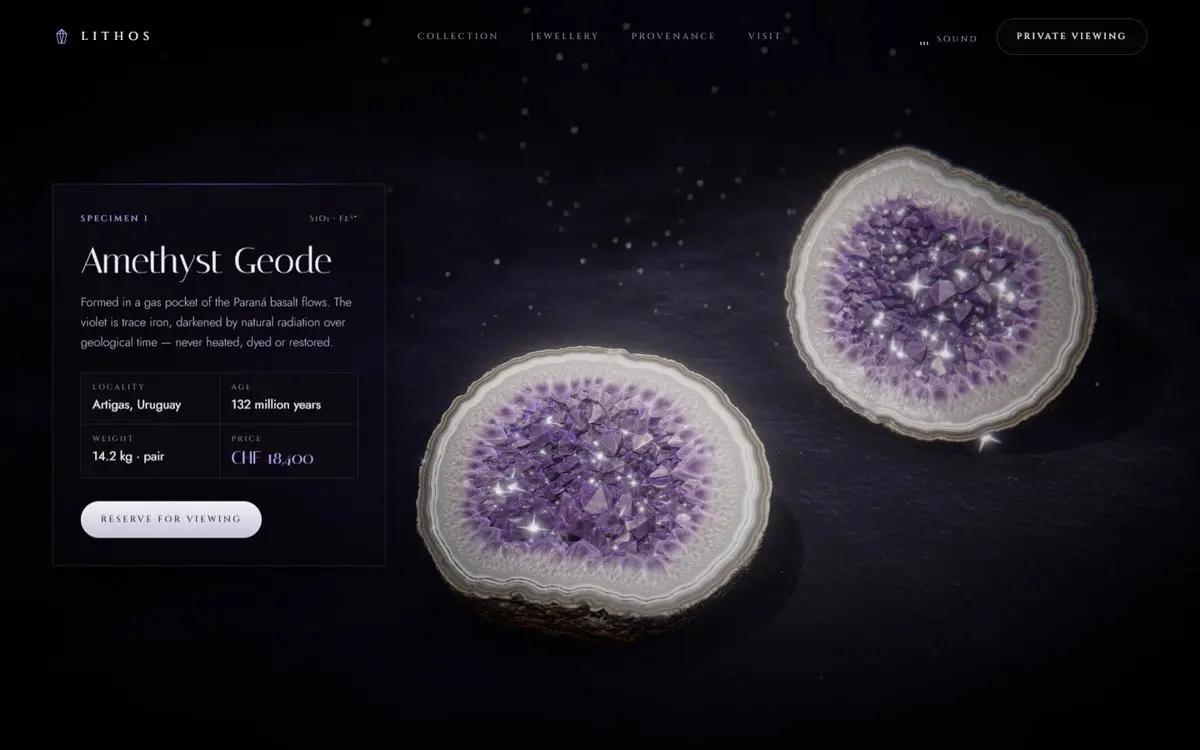
This is the most interesting part if you work with agents. Each example started as a one-page brief in docs/briefs/. The *Lithos* brief, for instance, defines:
- The signature interaction: "Crack the geode": press and hold to make violet cracks glow along the seam; the stone trembles, then splits.
- The page sections: nav, hero, the crack, a collection of four specimens, jewellery, provenance and footer.
- Art direction: velvet black, amethyst violet
#9d6bffand platinum; Cinzel or Italiana fonts with Jost. - What must be true: the opened-geode frame has to be jaw-dropping and the quartz has to read as glassy crystal, not plastic.
Then a coding agent built each page against docs/ENGINE.md, the engine guide. That document is effectively a system prompt for the agent: it documents the whole API, forbids editing src/core/ (several pages were being built in parallel) and sets 11 quality questions that must all be answered "yes" before a page is done: would it stop someone scrolling on Awwwards? Is the lighting motivated? Are there at least 4 sections with real copy? Does it hold at 390×844 on mobile? 60 fps and zero console errors?
Review is done with automated screenshots. scripts/review.mjs opens the example in headless Chrome with a GPU, takes screenshots at 8 scroll stops plus two on mobile, stitches them into a contact sheet and reports console errors and fps. The agent can "see" its own page and iterate without anyone opening a browser.
The 20 examples and their interactions
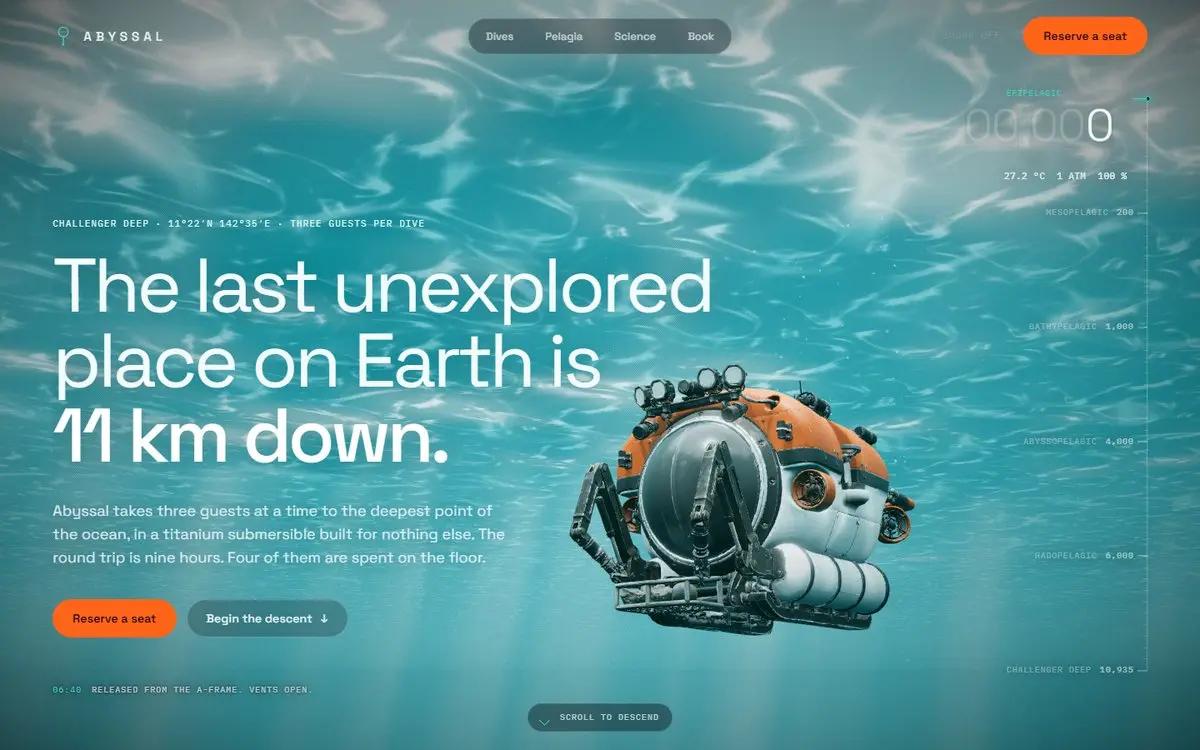
Each example is a fictional brand with its own palette, type and interaction. The ones that teach the most technique:
| Example | Interaction | Technique you can reuse |
|---|---|---|
| Abyssal | Scroll dives 11 km; the cursor steers the floodlights | Volumetric spotlights, fog and colour driven by depth |
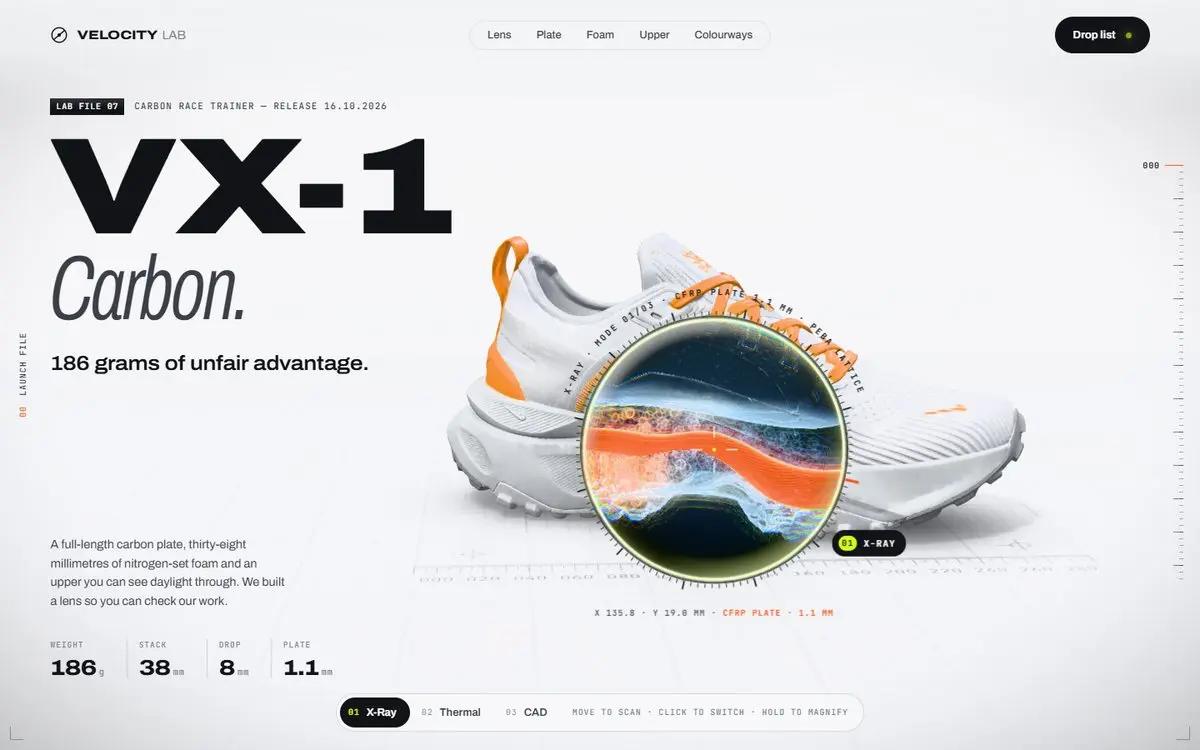
| Velocity Lab | An X-ray, thermal or CAD lens over a running shoe | A second render of the shoe scissored to the lens and composited with a glass rim |
| Maison Sucre | Pastries with real physics you can toss | Rapier (`@dimforge/rapier3d-compat`) with Meshy models |
| Florae | 200,000-particle flowers that scatter | `sampleSurface()` on the generated mesh |
| Low Frequency | Play and scratch a record | Audio synthesized with `OfflineAudioContext`, no sound files |
| Artemis | A rigged astronaut walks as you scroll | A rigged, animated Meshy model |
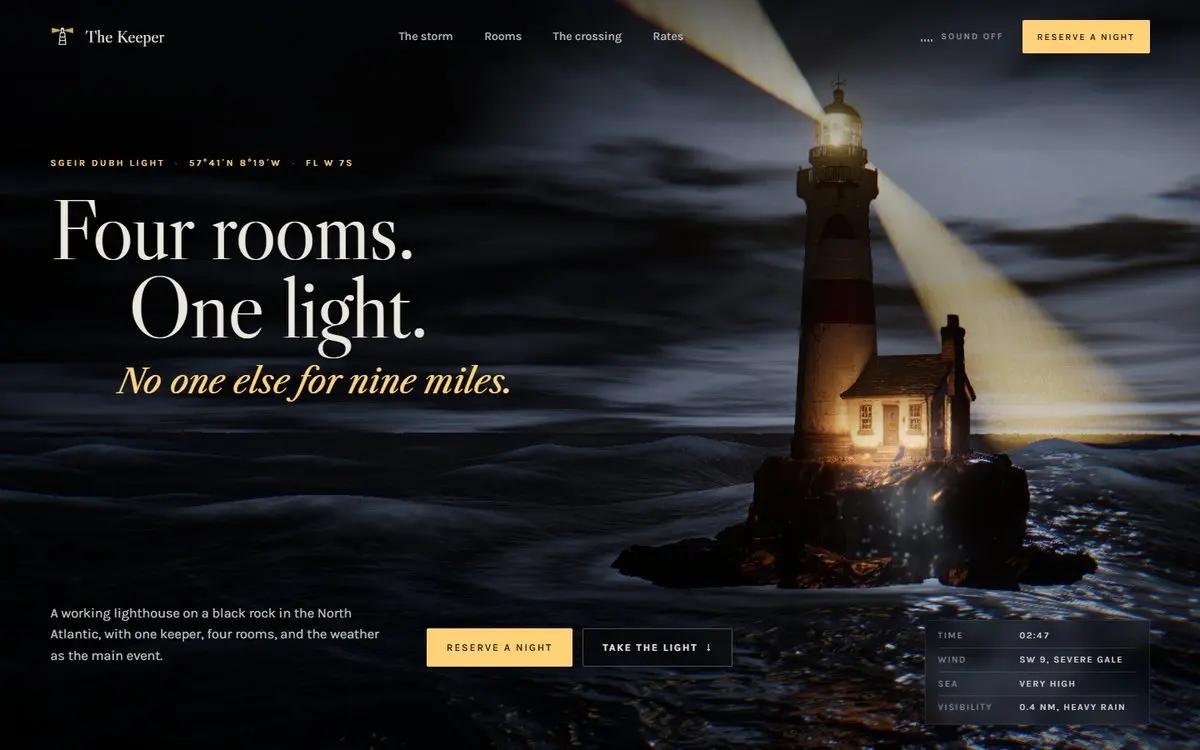
| The Keeper | Aim a lighthouse beam through a storm | A custom beam effect (`beams.js`) whose density rises with the storm |
| Lithos | Press and hold to open a geode | Crack shader, particles and glints |

How to install Dioramas and run the examples
You need Node.js and git. The README recommends a desktop GPU: everything is tuned for 60 fps, and ENGINE.md warns it will be 2-3× slower on laptops.
git clone https://github.com/blendi-remade/dioramas && cd dioramas
npm install
npm run dev        # http://127.0.0.1:5190: the gallery; each example at /examples/<name>/
The clone downloads about 310 MB of models. If you only want to read the code, git clone --depth 1 skips the history, though the models still come along.
To create a new world, the structure is always the same: an examples/<your-world>/ folder with index.html, main.js and style.css, your models in public/models/<your-world>/ and your images in public/img/<your-world>/. Vite automatically picks up any folder in examples/ that has an index.html and adds it to the build.
For this review we read all of the repository's code, but we did not run the examples on a machine with a GPU. The screenshots are the ones the project publishes in docs/media/ (CC BY 4.0), and the diagram is ours, drawn from the code.How to use it with Claude Code or another agent
The repository is designed for exactly this: "hand a brief plus docs/ENGINE.md to your agent". A practical workflow with Claude Code:
- Copy an existing brief from
docs/briefs/as a template and write yours: brand, signature interaction, sections, palette, fonts and what must be true. - Generate models with your own job in
assets/jobs/andgen.mjs, or reuse the ones from the examples (CC BY 4.0). - Ask the agent something like:
Read docs/ENGINE.md and examples/reliquary/ as the reference implementation.
Build examples/my-brand/ following docs/briefs/my-brand.md.
Do not edit src/core: if you need different behaviour, copy the function into your folder.
After every significant change, run node scripts/review.mjs my-brand,
check the contact sheet and answer the 11 quality questions in ENGINE.md.- Iterate on screenshots until every answer is "yes", and check the mobile version.
If you have never set up a project for an agent, the Claude Code skills guide shows how to package instructions like these so you can reuse them.
Common pitfalls and things to watch for
ENGINE.mdsayspages/, the repo usesexamples/. The guide was written when the folder waspages/<slug>(and the model viewer was/pages/_viewer/). Today everything is inexamples/, with the viewer at/examples/_viewer/. Fix this in your agent's prompt or it will look in the wrong place.- The screenshot scripts assume Windows.
shot.mjsandreview.mjslaunch Chrome withchannel: 'chrome'and--use-angle=d3d11. On macOS or Linux, drop that ANGLE flag and make sure Chrome is installed (or use Playwright's Chromium). - Glass that renders white. Transmission materials refract the clear colour, and the post stack clears with alpha 0, so without a
scene.backgroundglass looks like a white void. Add a background or a backdrop mesh. envMapIntensitydoes nothing. In three.js r186 it only applies when the material has its ownenvMap; withscene.environment, usescene.environmentIntensity.PCFSoftShadowMapis gone in r186: the engine usesPCFShadowMap, and you tunelight.shadow.radius.- Rigged Meshy characters: the idle animation can be broken and the rigged GLB only carries base colour; reuse the static model's normal and roughness maps (same UV layout).
- Page weight: the guide caps each page at 45 MB of downloads and 1.6 million on-screen triangles. That is a lot for mobile: if your audience is on phones, simplify with
--ratioinoptimize.mjs. - GSAP license: Dioramas' code is MIT, but GSAP (including ScrollTrigger and SplitText) ships under GSAP's own "no charge" standard license, not an open source license. Check it before using it in a commercial product.
What it is good for (and what it is not)
Good for product landing pages, launches, agency portfolios and campaigns where the object is the star: a watch, a shoe, a perfume, a motorcycle. There, a $1.20 generated model and an engine with lighting already solved save weeks.
Not good for a corporate site or blog template. Each example is custom code (its main.js runs from 440 to 1,200 lines) and the experience depends on the visitor's GPU. Nor is it a library you install from npm: it is a repository you clone, copy the engine from and adapt.
If you are interested in other ways to add motion to a website with AI, in HyperFrames for websites we built two scroll-driven motion graphics landing pages, and Anatomy draws interactive isometric illustrations to explain technical ideas.
Frequently asked questions
Is Dioramas free?
Yes. The code is MIT and the models and images are CC BY 4.0. You only pay fal if you generate new models: about $1.20 per textured model.
Do I need to know three.js?
Not to view the examples. To build your own world it helps a lot, although the method is designed for an AI agent to write the page following docs/ENGINE.md while you review the result.
Can I use the 3D models in a commercial project?
CC BY 4.0 allows commercial use as long as you credit the source: "Dioramas (github.com/blendi-remade/dioramas)".
Does it work on mobile?
Per the quality guide, every example must hold its layout at 390×844 and offer a touch equivalent for its interaction. Performance depends on the phone: these are heavy scenes.
Which AI models does it use?
Nano Banana 2 for the reference images and Meshy 7.1 image-to-3D for the meshes, both through fal.
Conclusion
Dioramas brings together three things that usually live apart: generating the 3D object with AI, making it look good in the browser, and a method for an agent to build the page and review itself with screenshots. The value is not in copying the 20 examples but in the src/core/ engine and docs/ENGINE.md, which you can hand to your agent as is.
Next step: clone the repository, open examples/reliquary/ (the reference implementation) and write your first brief.
// source code
// implementation
More on Open source tools
- Free alternatives to paid apps
- Run it on your server
- Design, image and video
- Free alternatives to paid apps
- Free alternatives to paid apps
- Design, image and video