Superpowers for Claude Code: the plugin that makes your agent design, plan and test before it codes
Superpowers is a skills plugin for coding agents (Claude Code, Codex, Cursor, Gemini CLI, Copilot CLI and a dozen more) that changes *how* the agent works: before writing code it asks what you actually want, writes a design, turns it into a plan of small tasks, executes it with subagents, demands failing tests first and refuses to call anything done without evidence. It is maintained by Jesse Vincent and his company Prime Radiant and released under the MIT license.
We installed it in Claude Code 2.1.301, read all 15 skills and ran two real tests to see whether the agent behaves as promised. Here is what it does, how to install it, what happened in the tests and when it is worth it.
If skills are new to you, start with our Claude Code skills guide: Superpowers is, at heart, a bundle of skills with an automatic bootstrap.
What Superpowers is and who builds it
The README describes it as "a complete software development methodology for your coding agents, built on top of a set of composable skills". The first version shipped on 9 October 2025; a year later it is at v7.0.0 (9 October 2026), with more than 680 commits and install instructions for 16 different environments.
Facts we checked in the obra/superpowers repository:
| Item | Value |
|---|---|
| Version tested | 7.0.0 (`.claude-plugin/plugin.json`) |
| License | MIT, Copyright (c) 2025 Jesse Vincent |
| Skills included | 15 |
| Supported environments | Claude Code, Codex (app and CLI), Cursor, Gemini CLI, GitHub Copilot CLI, OpenCode, Antigravity, Devin CLI, Factory Droid, Grok Build CLI, Kimi Code, Pi, Qwen Code, Hermes Agent, Muse |
| Dependencies | None for the skills; Node only for the "visual companion" server |
Unlike a single skill, Superpowers does not add one specific capability (drawing, SEO audits, social posts). It adds process discipline: a fixed order of work and rules the agent cannot talk its way out of.
How it works under the hood
Superpowers relies on two pieces:
- A
SessionStarthook. When a session opens (and after/clearor a compaction), thehooks/session-startscript injects the fullusing-superpowersskill into the context, wrapped in<EXTREMELY_IMPORTANT>You have superpowers.. - The skills themselves, in
skills/<name>/SKILL.md. Claude sees each description and loads the skill with theSkilltool when it fits the task.
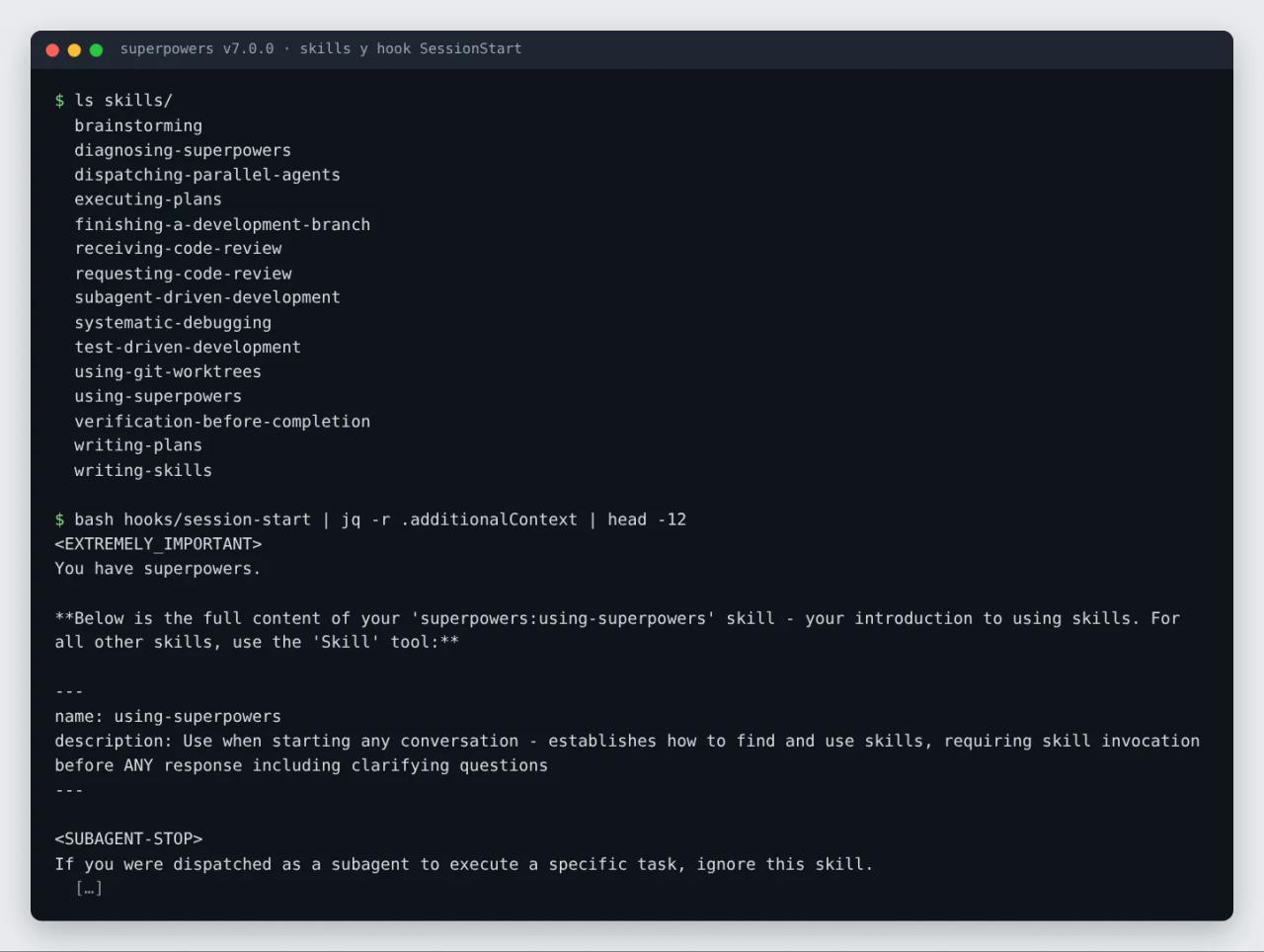
The bootstrap skill is short (65 lines) but deliberately aggressive. Its core rule says that if there is "even a 1% chance" a skill applies, the agent must invoke it before responding, even before asking clarifying questions. It includes a "red flags" table of the model's usual excuses ("this is just a simple question", "let me explore the codebase first", "the skill is overkill") with a rebuttal for each.
One important detail: the same skill states that your instructions win. Priority goes user instructions (CLAUDE.md, AGENTS.md, direct requests), then skills, then default behavior. If your CLAUDE.md says "no TDD in this repo", your CLAUDE.md wins.
The 15 Superpowers skills, one by one
The README groups them into four blocks. This is what each one does according to its SKILL.md:
Design and planning
brainstorming: fires before you build anything. Asks what you want and why, plays back what it understood in 200-300 word chunks and sizes the work (quick task, small change, or a project with a design doc indocs/superpowers/specs/). It has a hard gate: no code until you approve the description.writing-plans: turns the approved design into a plan indocs/superpowers/plans/with single-action steps that each have a checkable result: exact signatures, test assertions and verification commands.using-git-worktrees: creates an isolated workspace (a Git worktree or the environment's native tool) and confirms tests pass before work starts.
Execution
subagent-driven-development: dispatches a fresh subagent per task, with a spec-compliance and code-quality review after each one and a whole-branch review at the end. It does not stop to ask between tasks except for four reasons: something irreversible, something security-sensitive, a side effect outside the worktree (merge, push, publish) or a broken plan.executing-plans: the cheaper alternative; the agent does every task in the same session and gets one review at the end.dispatching-parallel-agents: runs independent tasks with no shared state in parallel.
Quality and debugging
test-driven-development: RED-GREEN-REFACTOR with an "iron law":NO PRODUCTION CODE WITHOUT A FAILING TEST FIRST. Code written before its test gets deleted.systematic-debugging: four mandatory phases (root cause investigation, pattern analysis, hypothesis and testing, implementation). After three failed fixes in a row it forces a discussion of the architecture before a fourth attempt.verification-before-completion:NO COMPLETION CLAIMS WITHOUT FRESH VERIFICATION EVIDENCE. No "it's fixed" without running the command that proves it.requesting-code-reviewandreceiving-code-review: request a review against the plan with severities, and receive one with technical rigor instead of agreeing with the reviewer out of politeness.finishing-a-development-branch: verifies tests and offers exactly three options: merge locally, push and open a pull request, or keep the branch as is.
Meta
using-superpowers: the bootstrap skill described above.writing-skills: a guide to creating new skills by applying TDD to the documentation itself (at 681 lines, the longest in the bundle).diagnosing-superpowers: reads the transcript of a session that went wrong and explains, with evidence, what failed, such as a skill that never fired or an agent that ignored its plan.
The full workflow
In practice a new feature goes through these phases without you asking for any of them:
- brainstorming → you talk with the agent until the design is clear and approve it.
- using-git-worktrees → isolated branch with a green test baseline.
- writing-plans → a plan of small, verifiable tasks.
- subagent-driven-development or executing-plans → execution with reviews.
- test-driven-development → every task starts with a failing test.
- requesting-code-review → review between tasks; critical issues block progress.
- finishing-a-development-branch → merge, PR or leave it for later.
The README claims it is not unusual for the agent to work "a couple hours at a time" without drifting from the plan. We did not measure that; what we did confirm is that the first two gates (design before building, debug before fixing) work.
How to install Superpowers
In Claude Code
It is in Claude's official plugin marketplace:
/plugin install superpowers@claude-plugins-officialOr from the project's own marketplace, which includes related plugins:
/plugin marketplace add obra/superpowers-marketplace
/plugin install superpowers@superpowers-marketplace
To try it without a permanent install (what we did), clone the repo and load it for that session only:
git clone https://github.com/obra/superpowers
claude --plugin-dir ./superpowers
In other agents
| Agent | Command |
|---|---|
| Codex CLI | `/plugins`, search for `superpowers` and install |
| Cursor | `/add-plugin superpowers` in Agent chat |
| Gemini CLI | `gemini extensions install https://github.com/obra/superpowers` |
| GitHub Copilot CLI | `copilot plugin marketplace add obra/superpowers-marketplace` then `copilot plugin install superpowers@superpowers-marketplace` |
| Antigravity | `agy plugin install https://github.com/obra/superpowers` |
| Devin CLI | `devin plugins install obra/superpowers` |
| Qwen Code | `qwen extensions install obra/superpowers` |
If you use several agents, install it separately in each one.
Check that it works
The README suggests a simple test: open a fresh session and type something like "let's make a react todo list". With a working install, brainstorming fires before a single line of code is written. That was exactly our first test.
Real test 1: brainstorming before coding
In an empty Git folder we ran Claude Code non-interactively with the plugin loaded and a typical vibe-coding request (in Spanish: "I want to build a to-do list app in React"):
claude -p --plugin-dir ./superpowers "Quiero hacer una app de lista de tareas en React"Without Superpowers, the agent usually starts scaffolding with create-vite, components and styles. With the plugin, this is what happened:
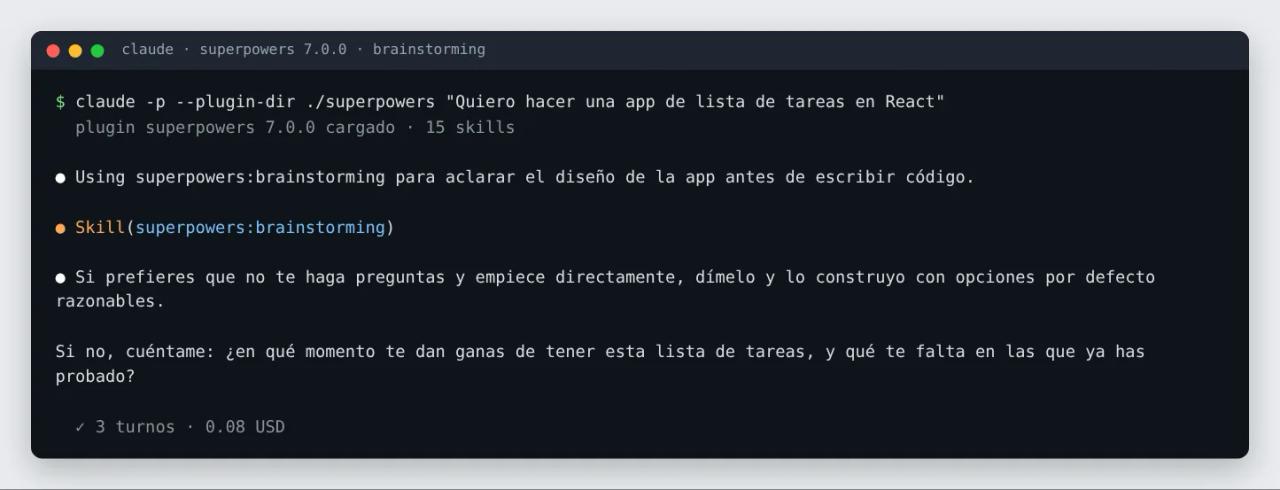
The agent announced "Using superpowers:brainstorming", loaded the skill and replied exactly as the v7.0 SKILL.md prescribes: one line offering to skip the questions and a single open question about a concrete moment ("when do you find yourself wanting this to-do list, and what is missing from the ones you have tried?"). It created no files. Cost: 3 turns and $0.08.
If you answer "skip the questions", the skill is done: the agent states its technical choices (platform, language) in one line and moves on to the normal workflow.
The visual companion
When the conversation is about something visual (a screen, a diagram, two alternative layouts), brainstorming offers a visual companion: a small local Node server that shows the agent's mockups in your browser and records which option you click.
We started it with the plugin's own script and fed it a sample screen with two layouts for the to-do app:
bash skills/brainstorming/scripts/start-server.sh --project-dir .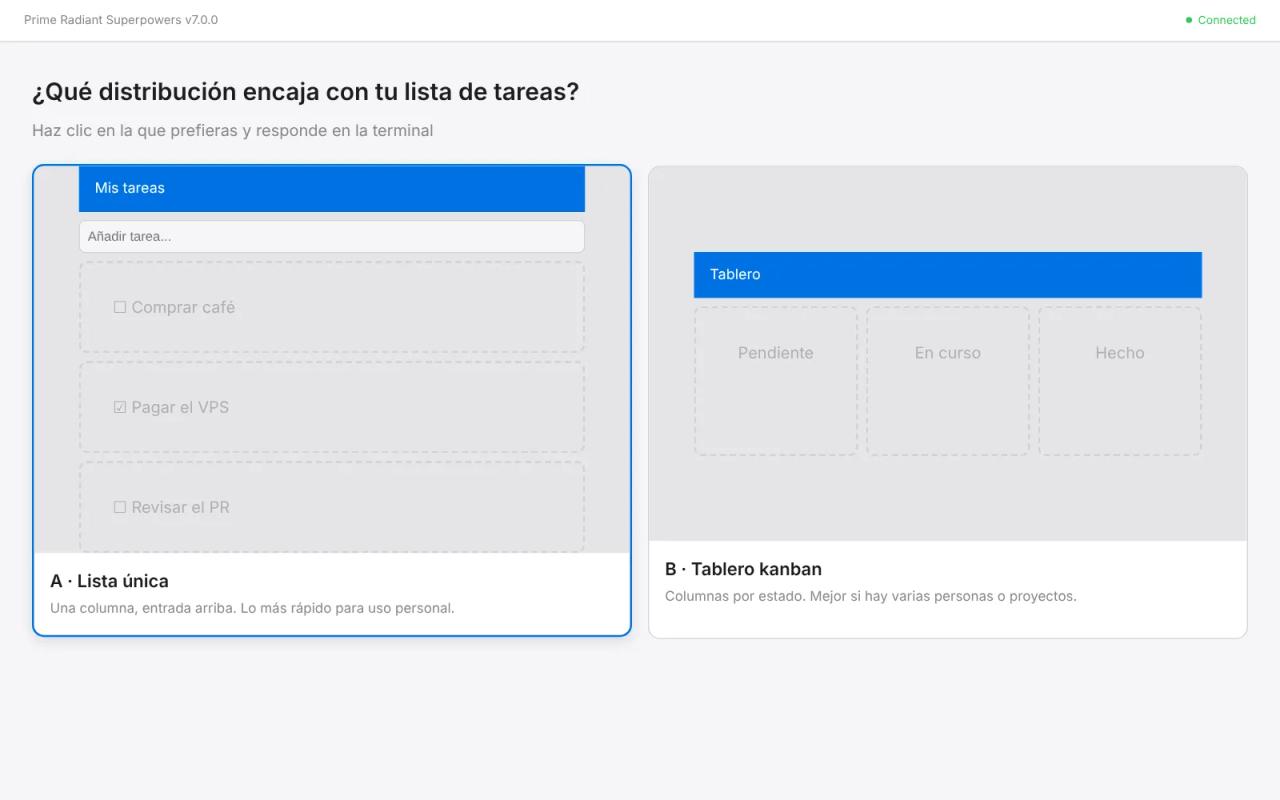
The server returns a URL with a session key (?key=…) and rejects requests without it, shuts down after 4 idle hours and stores screens in .superpowers/brainstorm/ (add that folder to your .gitignore). When we clicked option A, the events file recorded {"type":"click","choice":"lista",...}.
A privacy note: by default the Prime Radiant logo on that page is loaded from their website and includes your Superpowers version, so the team can count users. Nothing about your project is sent. To turn it off, set SUPERPOWERS_DISABLE_TELEMETRY=1. It also honors Claude Code's DISABLE_TELEMETRY and CLAUDE_CODE_DISABLE_NONESSENTIAL_TRAFFIC.
Real test 2: systematic debugging
Second test: a tiny Node project with a real bug. precioConIva(100) (price with VAT) should return 115, but it returns only the tax:
export function precioConIva(base, iva = 15) {
  return Math.round(base * iva / 100 * 100) / 100;
}
We asked the agent (in Spanish) to explain the failing test's root cause before touching anything:
claude -p --plugin-dir ./superpowers "El test falla al ejecutar npm test. Explícame la causa raíz antes de tocar nada."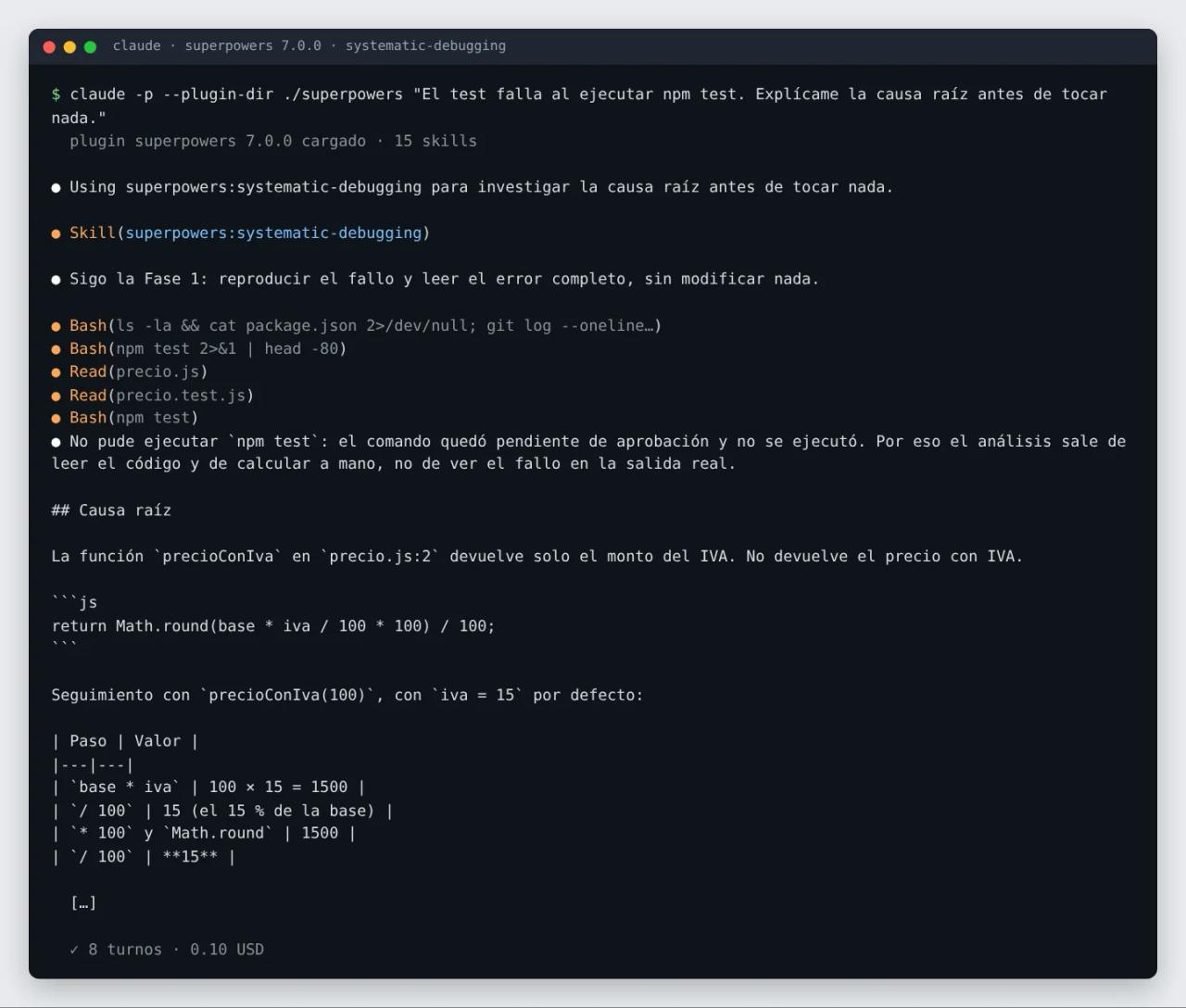
The agent loaded systematic-debugging, announced it was following Phase 1 (reproduce and read the error without changing anything), read precio.js and precio.test.js and delivered a report with:
- The root cause at the exact line (
precio.js:2) and a table tracing the value step by step down to15 !== 115. - A what it is not section (the rounding, the ESM config, a recent regression: the repo has a single commit).
- The question only a human can answer: is the function wrong or the test? Plus a reasoned recommendation (the function, given its name and the test title).
The most telling detail was honesty: in -p mode without permissions, npm test never ran, and the agent said so up front instead of inventing the output. That is verification-before-completion in action. Cost: 8 turns and $0.10.
Pros and limits
What we liked
- It kills the most expensive vibe-coding failure at the root: quickly building something that was not what you wanted.
- It is plain text. You can read every
SKILL.md, understand why the agent does what it does and override it from yourCLAUDE.md. - It works the same in Claude Code, Codex, Cursor or Gemini CLI, so a team can share one methodology even if everyone uses a different agent.
- It is actively maintained: the v6.4.2 notes explain that
writing-planswas rebuilt because some frontier models (they name Opus 5.5) tried to implement the whole project while writing the plan. New plans take a quarter of the time and about a third of the tokens.
What to keep in mind
- More tokens and more turns. A subagent plus a review per task costs more than letting the agent freewheel. For a 20-line script it is overkill, which is why
brainstormingjust does quick, clear tasks. - It is strict on purpose. If you hate TDD or are building throwaway prototypes, say so ("this is a spike") or opt out in your
CLAUDE.md. - New community skills are generally not accepted. The README says changes must work across every supported agent.
- In Hermes Agent, a very long session that compacts over its first turn loses the bootstrap; the README recommends a fresh session if skills stop firing.
Common errors
- "Skills don't fire." Open a new session after installing: the
SessionStarthook only runs at startup, after/clearor after compaction. In Muse and Hermes, restart active sessions. - The hook fails on Windows. v7.0.0 fixed
run-hook.cmdto find per-user Git for Windows installs (%LOCALAPPDATA%\Programs\Git) and skip WSLbash.exelaunchers. Update before debugging. invalid hook "hooks": command hook must specify 'command'in Antigravity. This happened in older versions, whenagyimported the repo as a Gemini extension. Since v7.0.0 there is a native manifest; the install command is unchanged.- "It burns too many tokens." Ask the agent to "figure out what went wrong with superpowers in this session": the
diagnosing-superpowersskill reads the transcript and shows, with evidence, where the budget went.
FAQ
Is Superpowers free?
Yes. It is open source under the MIT license: you can use, modify and redistribute it, commercially too, as long as you keep the copyright notice. Prime Radiant sells enterprise support, but the plugin is the same.
Does it work with Codex, Cursor or Gemini CLI?
Yes. The same repository ships instructions and plugin files for 16 environments. Where there is no startup hook (such as Antigravity), the bootstrap works because the using-superpowers description tells the model to load it at the start of any conversation.
Can I use only some of the skills?
The plugin installs as a whole, but skills only load when they fit. To exclude a specific behavior (for example TDD), say so in your CLAUDE.md: user instructions take priority over skills.
Does it work in languages other than English?
The skills are written in English, but the agent answers in your language. In our tests, every reply to a Spanish prompt came back in Spanish.
How is it different from find-skills?
find-skills searches for and installs third-party skills when you ask for something the agent cannot do yet. Superpowers adds no new capabilities: it enforces a way of working. You can use both together.
Conclusion
Superpowers is the closest thing to giving your agent a senior engineer's habits: understand before building, plan in verifiable steps, test first and no "it works" without proof. In our tests both main gates fired on their own and the agent was more honest about what it could not verify. If you use Claude Code or Codex for more than one-off scripts, install it on a real project for a week and compare.
Next step: to adapt the method to your team, review how Claude Code skills work and write your own with the bundle's writing-skills skill.
// source code
// implementation
More on AI agents

- Skills for your agents
- Claude Code

- Skills for your agents
- Claude Code

- Skills for your agents
- Claude Code