editonny: the free skill that edits your videos from Claude Code (cuts, captions and motion, all local)
editonny is a free, open source skill for Claude Code and Codex that edits video from plain-language requests: it cuts pauses, breaths and false starts, adds word-by-word synced captions, levels the audio, reframes to 9:16 or 1:1 and turns parts of what you say into animated scenes. There is no window or timeline to drive: you talk to your agent, it proposes the settings, you approve them and get back a verified MP4. Transcription and rendering run on your own machine.
It is exactly the kind of tool people look for when they record talking-head Reels, lessons or ads and lose hours trimming silences. In this review we read its source (version 1.1.0, last commit on October 20, 2026) to explain what it really does, how it is built, what you need to install and where its limits are, especially on Windows.
What editonny is and who makes it
- Repository: github.com/soumatheusgomes/editonny
- Version reviewed: 1.1.0 (the
VERSIONfile and the Claude Code plugin manifest). - License: MIT for its own code and docs. Third-party fonts, models, sound effects and libraries keep their own licenses (more below).
- Author: Matheus Gomes (@soumatheusgomes), a Brazilian creator. The README comes in English, Portuguese and Spanish.
- Agents: Claude Code (invoked with
/editonny) and Codex ($editonny). - Tested on: macOS on Apple Silicon. The docs themselves say Windows and Linux "require their own validation".
Part of the engine comes from another MIT project, browser-use/video-use: transcription, transcript packing, cut rendering and the timeline view are adapted from it and keep their attribution.
The license in practice
editonny's code is MIT: you can use it, change it and sell an editing service built on it without asking, as long as you keep the copyright notice. What MIT does not cover are the bundled resources: caption fonts (Anton, Montserrat, Figtree and Caveat under SIL OFL; Permanent Marker under Apache 2.0), the two ONNX models (YuNet, MIT; MediaPipe Selfie Segmentation, Apache 2.0, whose model card forbids surveillance and identity recognition uses) and the sound effects (CC0 for recordings, MIT for synthetic ones). All of it is listed in skills/editonny/engine/THIRD_PARTY_NOTICES.md. Read that file before redistributing the package.
What it does: two services
editonny groups its features into two blocks the README calls "Editor" and "Motion".
Editor
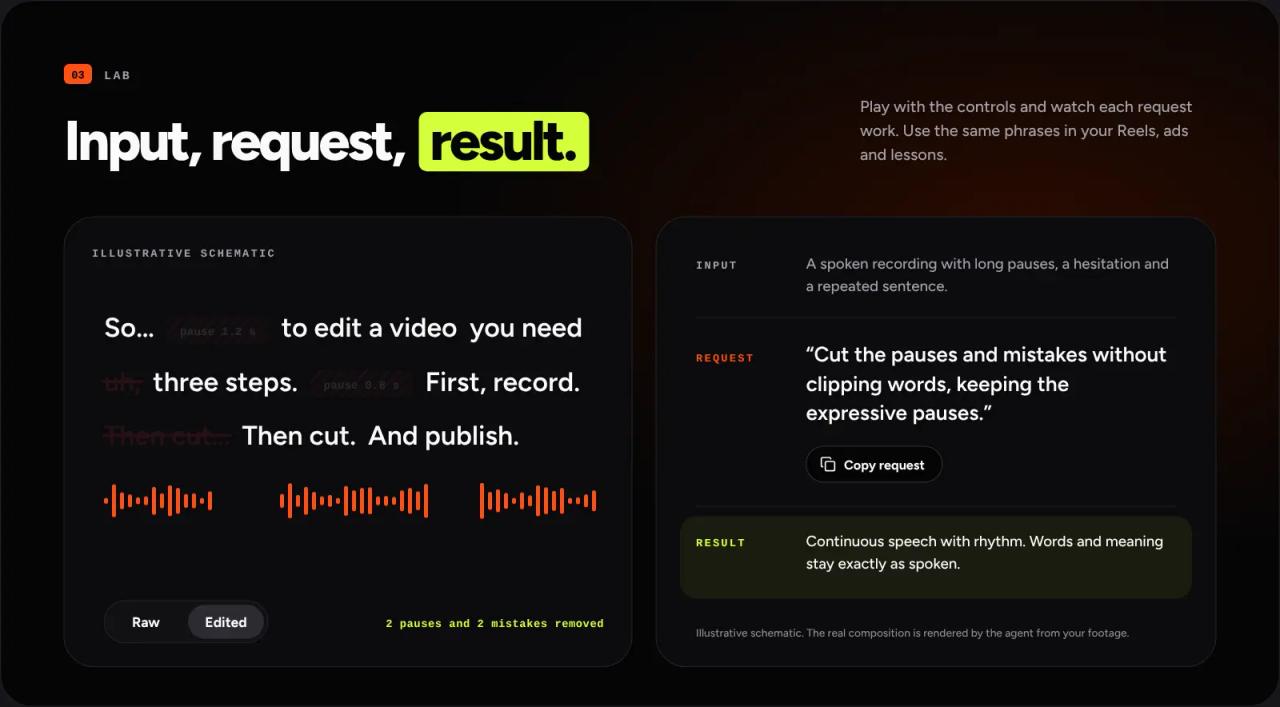
- Standard cleanup: removes unnecessary pauses, audible breaths, mistakes, false starts and repeats, while keeping complete words and intentional pauses. Cuts are measured against the real waveform, not a script.
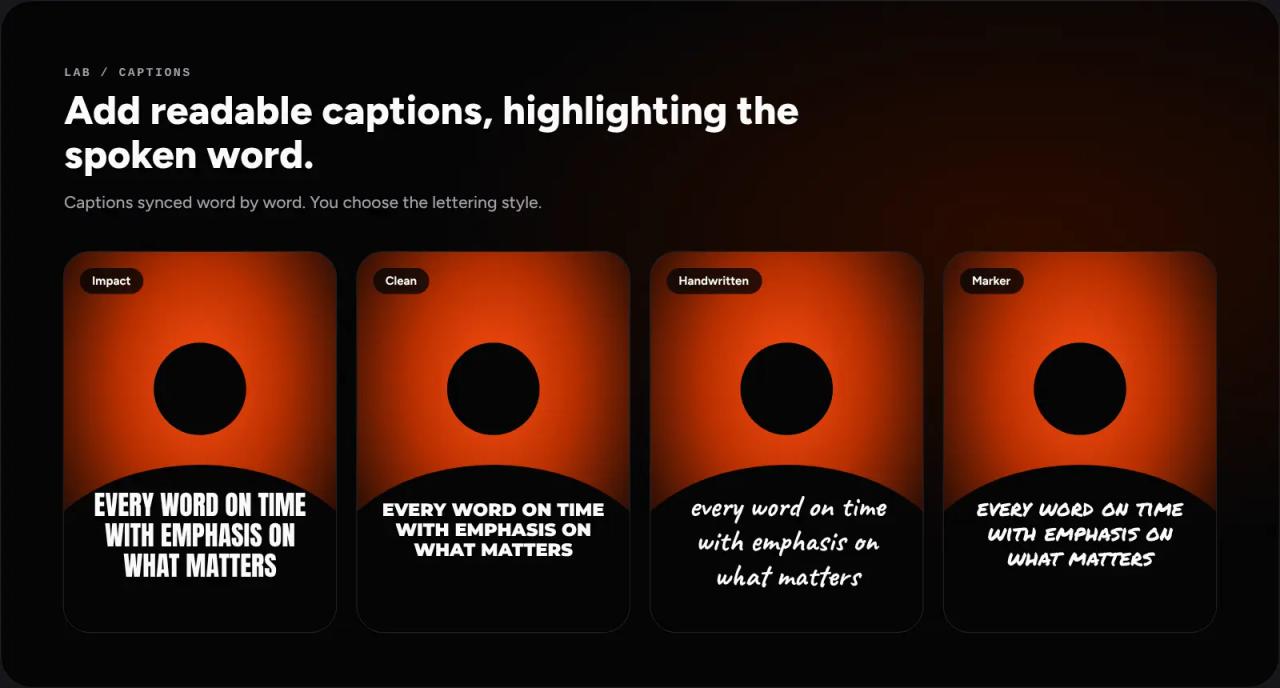
- Captions synced word by word, up to three words on screen, in four type styles, plus optional SRT or VTT files.
- Audio: normalizes voice to −14 LUFS (the social media standard) with a −1 dBTP peak ceiling. Noise reduction, music and effects are off by default.
- Reframing to 9:16, 16:9, 1:1 or 4:5, following the face with local detection.
- Multiple takes and cameras: compares takes, keeps the complete ones and syncs cameras.
Motion
- A catalog of 145 animated scenes: step lists, before and after, highlighted numbers, question and answer, transitions, pointers, proof cards and industry panels (real estate, health, nutrition, legal, creators).
- 79 original videos bundled with the package and used by 35 of those scenes. Each project copies only the clips it uses.
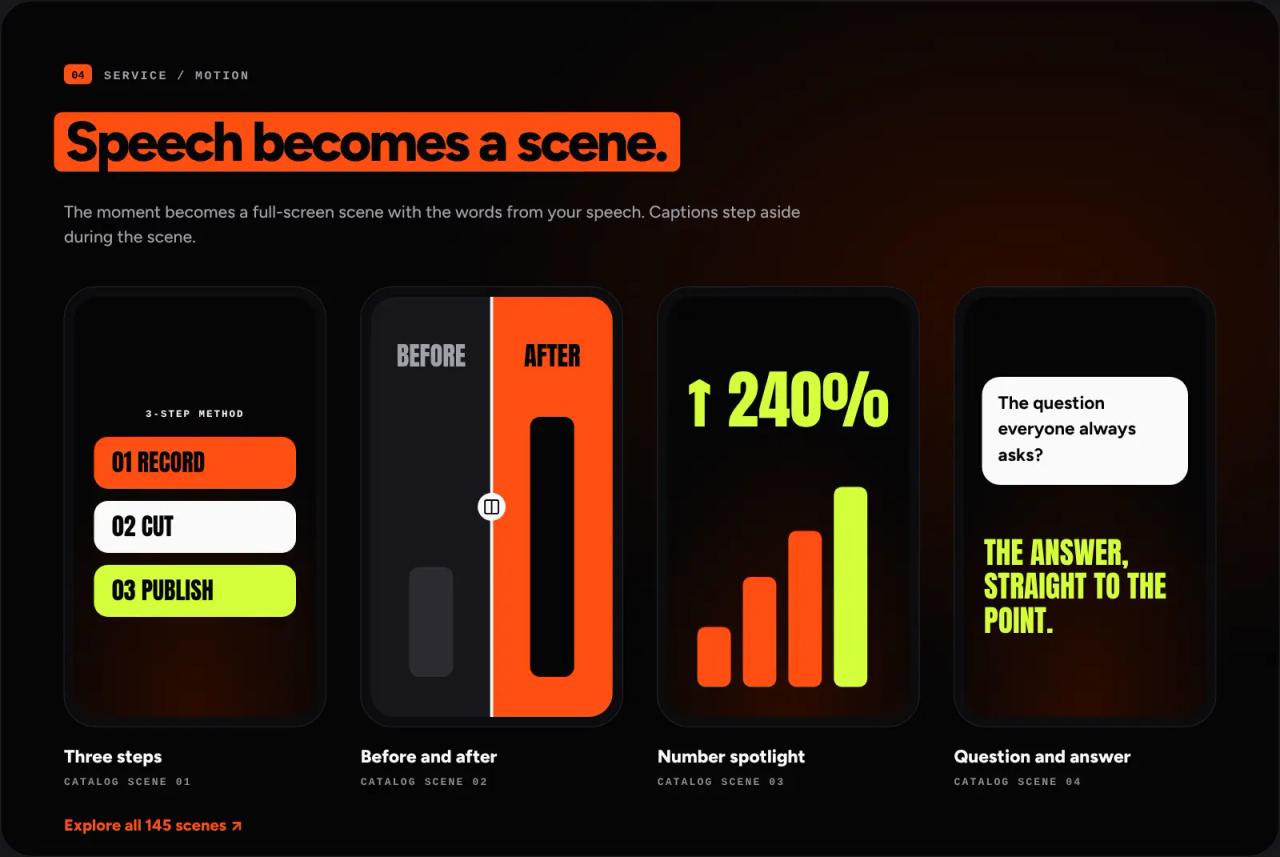
The package stresses something worth repeating: the numbers, offers and testimonials in the scenes are illustrative. The skill is told to replace them with facts you supply and to drop anything you cannot back up, never to invent them.
How it works: the settings card
What sets editonny apart from an auto-cut script is its confirmation flow, written into SKILL.md as a rule:
- You tell your agent what you want and which folder holds the footage.
- The skill runs read-only checks only: metadata, sample frames and up to 30 seconds of audio per file to detect the language.
- It shows a settings card covering ten areas (goal, videos, image, format, language, captions, cleanup, sound, visuals, review and delivery). Each value is tagged "you asked", "from your video" or "suggested".
- It waits for your reply. Even if your first message says "decide everything and continue", the skill cannot approve its own card.
- After your "ok", it creates the project, transcribes, cuts and prepares an 8 to 15 second sample that the agent reviews (or you, if you choose).
- It exports the MP4, runs a quality gate and hands you a delivery card with what changed (for example "4:52 → 3:31, 18 pauses removed").
Output goes to ~/Downloads/editonny/YYYY-MM-DD-title/, with exports/ for finished videos and project/ for editing files. Revisions never overwrite a previous final: each one is v001, v002 and so on.
Two design choices we like:
- It leaves color alone. No filters, "enhancements" or automatic HDR-to-SDR conversion. It keeps the source size, frame rate and color space.
- It adds no audio you did not ask for. Version 1.1.0 (commit
fix: require explicit requests for added audio) requires music, effects and ambience to be requested explicitly. "Make it dynamic" is not enough.
What is inside
| Part | Purpose |
|---|---|
| Python 3.10-3.13 managed by `uv` | Engine: transcription, cuts, audio, faces, captions |
| Faster Whisper (or MLX Whisper on Apple Silicon) with the `large-v3-turbo` model | Local word-level transcription |
| FFmpeg and ffprobe | Cuts, audio, probing and export |
| Node.js 22.13+ and [HyperFrames](/en/blog/hyperframes-html-to-video-ai-agents) 0.8.179 | Scene rendering and final composition in a headless browser |
| OpenCV + YuNet + MediaPipe (ONNX) | Face detection for reframing and person cutout |
| Apple Vision or Tesseract | OCR to check captions are readable and to scan the export for personal data |
If you read our HyperFrames review, here it shows up as the render engine: editonny pins its exact version and fetches it with npx during setup.
A useful detail few people mention: the audit_data.py helper OCRs every frame of the exported video (up to three minutes; longer videos at four frames per second) and flags emails, phone numbers, valid card numbers or personal names. It helps you avoid publishing a tutorial with your email visible in a corner.
Installing editonny in Claude Code
Option 1: ask your agent
This is the author's recommended method. Open Claude Code in any folder and paste the install request from the README:
Install or update the editonny skill for Codex and Claude Code from https://github.com/soumatheusgomes/editonny. Clone the latest version into a temporary folder; I will not download anything manually. Read skills/editonny/SKILL.md and follow its complete setup procedure. If editonny is already installed, compare versions, summarize what changes and update it with its current installation method: the repository installer for the shared installation (keep my settings and back up the previous version) or the host updater for a managed plugin. Prepare compatible local tools, the engine with locked dependencies, the renderer and browser at their pinned versions, the default transcription model, local OCR for caption checks and the bundled resources before the first edit. Verify everything with diagnostics and a synthetic sample, report anything pending, remove the temporary clone and tell me when to restart the agent. Ask for authorization before paid services or sending my files.The agent installs whatever is missing (uv, FFmpeg, Node, Tesseract), downloads the Whisper model and the HyperFrames browser, and runs a synthetic test video. Review every command it proposes before approving it: it will install system software. If skills are new to you, start with our Claude Code skills guide.
Option 2: from the terminal
git clone https://github.com/soumatheusgomes/editonny.git
cd editonny
python3 install.py --target claude
python3 ~/.local/share/editonny/scripts/editonny.py doctor
python3 ~/.local/share/editonny/scripts/editonny.py media status
The installer keeps a single copy in ~/.local/share/editonny and links it at ~/.claude/skills/editonny (or ~/.agents/skills/editonny for Codex with --target codex; --target both does both). It respects CLAUDE_CONFIG_DIR if you use it. --dry-run shows what it would do without touching anything.
Note: the installer's Installation ready. message only means it registered the skill and synced the Python environment. It does not install FFmpeg or Node, and it does not download the transcription model or the render browser. For that, ask the agent to read skills/editonny/SKILL.md and follow its setup procedure, or do it by hand with the versions the package pins.
Mind the size: the visual resources folder (scenes, 79 videos, images, fonts and audio) is about 463 MB, plus the large-v3-turbo model and the render browser.
When it finishes, restart Claude Code and type /editonny.
Your first edit
The README suggests a request like this:
/editonny
Edit a 45-second vertical video from /path/to/footage.
Keep complete takes, clean pauses, breaths, and mistakes, and add clear captions.
Use visual scenes only where they explain the story.
Verify an 8–15 second sample before finishing the export.
The skill will not start cutting from this message: it shows you the settings card first. That is where you make the real decisions, for example "no captions", "keep the pause at 0:42" or "add music". If you change anything, it shows the card again with a ✏️ on the changed rows.
For request ideas, the repo ships a web guide (a Next.js app in web/) with a request builder, all 145 scenes and 54 sample requests in three languages. Start it with npm ci and python3 editonny.py guide at http://localhost:4173. The guide never receives or uploads video.
External services: optional and permission-gated
None of the above needs an LLM API key: your own Claude Code session drives the work. There are optional integrations, and the skill must ask before using them because they send data off your machine or cost money:
- Pexels and Wikimedia Commons for stock images.
- OpenRouter for image generation (paid).
- ElevenLabs for music or sound generation (paid, with its own commercial-use rules).
What to know on Windows and for non-English speech
- Windows is not validated. The tests in
docs/validation.mdwere run on macOS with Apple Silicon. On Windows the installer creates directory links that may need Developer Mode or admin rights; if they fail, the docs ask you to report it rather than create a second copy. - Without Apple Silicon, transcription runs on CPU or CUDA. On Apple Silicon it uses MLX Whisper; elsewhere, Faster Whisper. With
large-v3-turboand no NVIDIA GPU, expect transcription to be noticeably slower than on a Mac. - Non-English speech is fine. Whisper is multilingual, the skill keeps the original spoken language and does not translate unless you ask. The card keeps chat, speech, transcription and caption languages separate.
- OCR on Windows means Tesseract. You need it so caption checks are not left as "not checked"; the skill tries the
basislanguage data first, theneng.
editonny vs other options
| editonny | [Concat](/en/blog/concat-open-source-capcut-alternative) | CapCut | |
|---|---|---|---|
| How you use it | Chatting with Claude Code or Codex | Windowed editor + MCP server | Windowed editor |
| Price | Free (MIT) | Free (AGPL-3.0) | Free with limits / Pro subscription |
| Where it processes | Your machine | Your machine | Your machine, with cloud features |
| Best at | Talking-head video: clean cuts, captions, explainer scenes | Full manual editing with AI help | Trendy templates and effects |
| Needs | An AI agent, Python, FFmpeg, Node | Just the app | An account |
If you want to drag clips by hand, Concat or CapCut fit better. editonny shines when your footage is a person talking and the time sink is cleanup, captions and format variants.
Who is it for?
- Creators and businesses recording talking videos (Reels, TikTok, lessons, sales ads) who already pay for Claude Code or Codex.
- Agencies editing many similar videos for clients: the industry scene catalog and the MIT license let you use it in a paid service.
- Not for people who do not use an AI agent: setup needs Python, FFmpeg and Node, and there is no UI to edit by hand.
Common errors and warnings
MISSING · <tool>fromeditonny.py doctor: FFmpeg, uv, Node or OCR is not on yourPATH. Install it from the official source and rundoctoragain.- "Installation ready." but the first edit stops: the installer does not prepare the model or browser. Ask the agent for the full setup in
references/setup.md. - The skill link fails on Windows: enable Developer Mode or run the terminal as administrator.
- A caption or scene is blocked on HDR footage: native overlays on HDR and Dolby Vision metadata are blocked on purpose. It will offer the clean HDR cut or an SDR version you must accept.
- "Update check unavailable": it could not reach GitHub. That does not mean you are up to date; the skill continues with the installed version.
FAQ
Is editonny free? Yes. The code is MIT and it charges nothing. You still pay for your Claude Code or Codex subscription, and for optional external services if you use them.
Does it upload my videos anywhere? Not by default. Transcription, cuts and rendering happen on your machine. Data only goes to Pexels, OpenRouter or ElevenLabs if you authorize it.
Does it work on Windows? It may, but the author has not validated it. You will need Tesseract for OCR and possibly Developer Mode for the links.
Do I need a graphics card? No. It speeds up transcription with Faster Whisper; without one, transcription runs on the CPU.
Can I use it to edit client videos and charge for it? The MIT license allows it. Check the third-party notices if you use the bundled fonts, sounds or scenes, and never publish the scenes' sample numbers as if they were real.
Does it handle Spanish or Portuguese speech? Yes. It transcribes and captions in whatever language is spoken and replies in the language you write to it.
Conclusion
editonny is the most complete way we have seen to turn Claude Code into a video editor: it has a clear approval flow, does not touch color or add audio on its own, verifies the result with real measurements, and its MIT license lets you use it in a business. In exchange, setup is heavy and outside macOS you are on unvalidated ground. We reviewed it from the source without running it; if you try it on Windows, start with a short clip and doctor to see what is missing. Next, see how its render engine works in our HyperFrames review.
// source code
// implementation
More on AI agents

- Skills for your agents
- Claude Code

- Skills for your agents
- Claude Code

- Skills for your agents
- Claude Code