video-shotcraft: product promo videos with Claude Code and Remotion
If you have a website or an app and need a product promo video, the usual options are expensive (a motion designer or an After Effects subscription) or generic (templates that look nothing like your product). video-shotcraft offers another route: a skill for Claude Code and Codex that captures your product's real pages, picks shots from a library of tuned animation recipes, storyboards the film, animates it in Remotion, syncs it to the music, adds sound effects and hands you a 1920×1080 MP4 you can keep editing.
It is not an AI video generator. Every frame is drawn by React code from your screenshots and copy, so text stays sharp, colors match your brand and everything is editable. We read the whole repository (commit 1266a3e, October 29, 2026) to tell you what it ships, how it works, what you need and what it really costs.
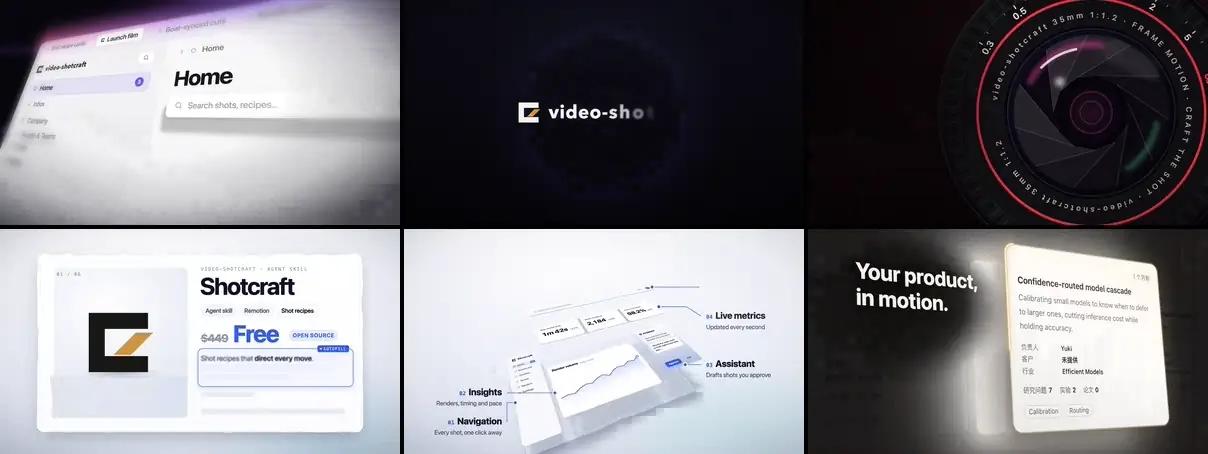
What video-shotcraft is
- Repository: github.com/Vincentwei1021/video-shotcraft
- Author: Wei Yihao (Vincent Wei).
- License: Apache-2.0, not MIT. In practice it is just as permissive: free to use, modify and use in commercial work. If you redistribute a modified copy, keep the license notice and state what you changed. It also includes an explicit patent grant that MIT lacks.
- Popularity: about 13,900 stars and 1,300 forks as of November 8, 2026.
- Format: an Agent Skills folder (
SKILL.mdat the root) and a Claude Code plugin (.claude-plugin/plugin.json). It also works with Codex. - Language: the README is in English (plus Chinese, Japanese and Russian), but
SKILL.md, the production pipeline and the 124 shot cards are in Chinese. The agent doesn't care; you will if you want to edit a rule.
What's inside, checked against the code:
| Part | What it is |
|---|---|
| `references/shots/` | 124 shot cards ("recipes") in 10 categories, 150 variants in total |
| `demos/` | The Remotion implementation of every card: 226 `.tsx` files |
| `template/` | **Ink Press**, a complete 36.2 s promo ready for your screenshots and copy |
| `assets/lib/` | Reusable components: a 2.5D page camera (`PageCam`), captions, flash cuts, digit rolls |
| `workbench/` | **Motion Workbench**, a CapCut-style browser editor to tweak the delivered film |
| `assets/scripts/` | Puppeteer page capture and a Freesound sound-effect search tool |
| `jianying-export/` | Export to a JianYing (CapCut China) project |
| `publish/` | Optional social publishing through the Upload-Post API |
The shot library: 150 named moves
The most valuable part of the repo is not the code but the vocabulary. Each card describes one concrete move (when to use it, duration, energy level, parameters and "critical points" you must not change) and points to its Remotion demo. The categories:
| Category | Shots | Example |
|---|---|---|
| Opening & brand | 11 | `text-as-mask`: the product shows through the title letters |
| Camera | 13 | `exploded-view`: the page tilts in 3D and comes apart |
| Transitions | 19 | `card-flock-tumble`: a flock of cards becomes the headline |
| Typography | 25 | `flying-words`: a word tunnel resolves into the motto |
| UI entrance | 22 | `card-stack`: a fan of cards deals into place |
| Interaction | 13 | `palette-theme-ripple`: a theme change ripples across the app |
| Data | 9 | `axis-rescale-shock`: a spike breaks the chart's axis |
| Light & emphasis | 23 | `spotlight-sweep`: a stage light finds the title |
| Rhythm | 8 | `paparazzi-flash`: three flashes, three crops, one number |
| Outro | 7 | `input-morph-assemble`: the chat box builds the logo |
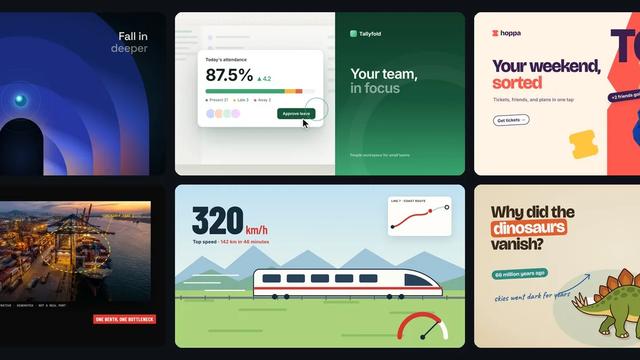
You can watch them all in the official gallery, where you can search, filter and copy shot names. That name is what you give the agent: "use deck-deal-flyin and row-embed to present this feature".
One detail we like: references/shots/ATTRIBUTION.md documents where each technique was studied (promos from ClickUp, Perplexity, Notion, Figma, Raycast and others, plus work published on X and Douyin) and states that everything was re-implemented from scratch, with no third-party footage, artwork or brands.
How the agent works
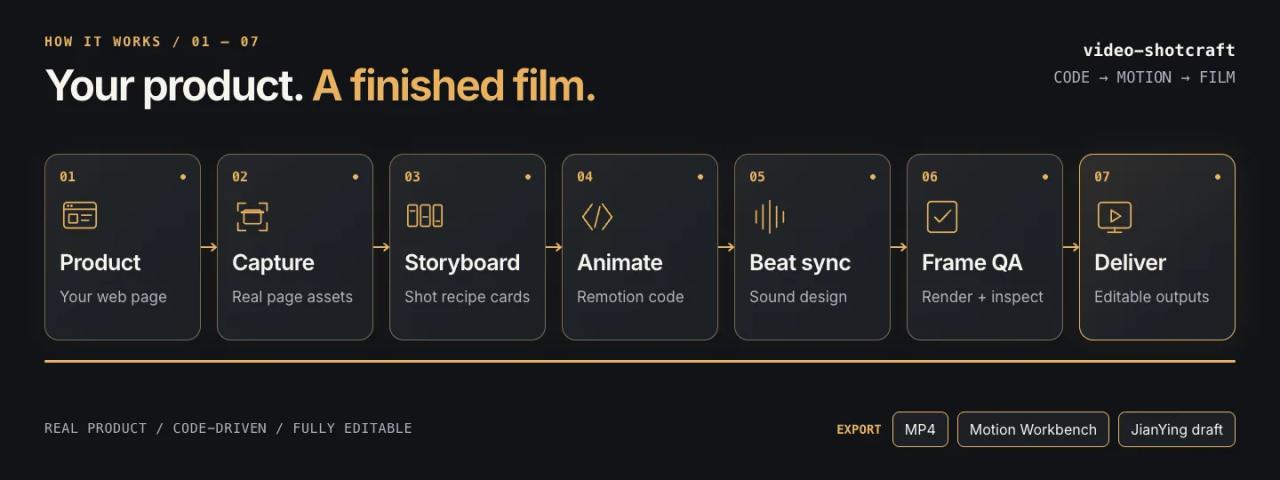
When you ask "make a promo video for my product", SKILL.md makes the agent first run a read-only review of the project (what it does, which screens it has, which sensitive data could leak) and then offer three modes:
- Ink Press template. The fast path: your screenshots, copy and logo replace the sample film's, shot by shot.
- Autonomous free creation. The agent decides visual direction, shots, storyboard and audio and runs to the end without stopping to ask.
- Co-creation. The agent asks you to confirm each key point: product brief, visual direction, feature-to-shot mapping and final storyboard.
If you name the template or specific shots, it skips the question. Then comes an eight-stage pipeline (references/pipeline.md) whose rules show the author has redone a lot of films:
- Real captures, not invented UI. It starts your local dev server and takes 2x full-page screenshots, element cutouts and a
layout.jsonwith every element's coordinates. Animations read that file to know where things fly. - The look comes from your product. Before animating it extracts fonts, sizes, spacing and colors from your code or computed styles. Templates only contribute motion, not the skin.
- One move per shot, and breathing room. Logos hold still for at least 1 second; group landings end with 0.5 s of rest.
- Cut to the beat. If you pick music, it analyzes BPM and kick/snare hits with librosa and checks after rendering that every cut lands within 3 frames of the beat.
- Deterministic rendering.
Date.now()andMath.random()are banned; all randomness uses fixed seeds, so the same code produces the same video. - Independent review. Before you see anything, a clean-context subagent reviews the film frame by frame against the storyboard and the aesthetic rules in
references/aesthetic-rules.md, citing frame numbers for every issue.
Motion Workbench: keep editing without the agent
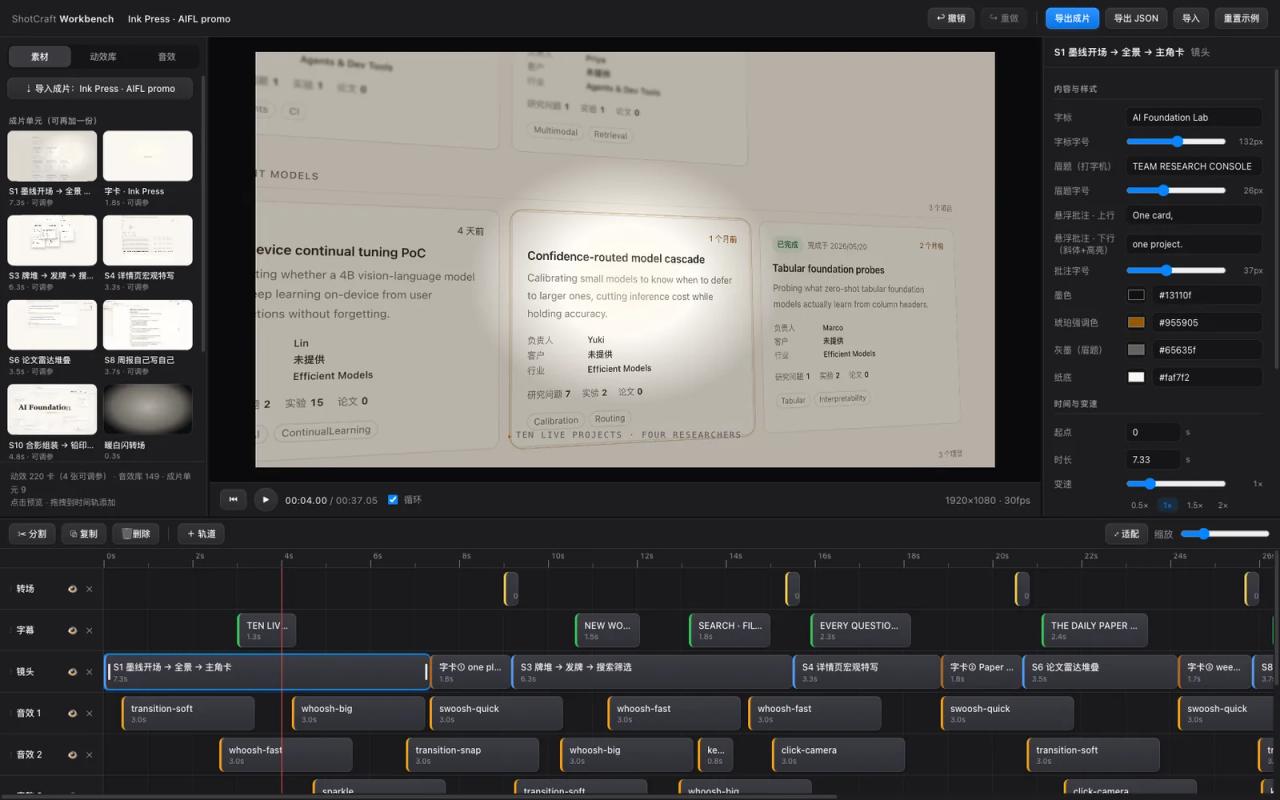
When it's done, the skill opens a browser editor (node workbench/scripts/open.mjs <project>, at http://localhost:5198). The film is split into shot, transition, caption and sound-effect tracks exactly as authored. You can change copy, sizes and colors, move, trim or speed-ramp clips and drag in any of the 150 library shots. Export uses the same Remotion, so preview and render match frame for frame.
It's handy when a client asks "change this sentence" and you don't want to spend another agent session. Note that the UI is in Chinese (buttons like 导出成片, "export film"), and so is the workbench guide (workbench/GUIDE.md).
How to install it
The simplest way is to ask the agent itself:
Install this skill for me: https://github.com/Vincentwei1021/video-shotcraftOr by hand, cloning and linking the folder into Claude Code's or Codex's skills:
git clone https://github.com/Vincentwei1021/video-shotcraft.git
cd video-shotcraft
ln -s "$(pwd)" ~/.claude/skills/video-shotcraft
ln -s "$(pwd)" ~/.codex/skills/video-shotcraft
On Windows, copy the folder to %USERPROFILE%\.claude\skills\video-shotcraft instead of symlinking. The README also mentions npx skills add Vincentwei1021/video-shotcraft; before installing any third-party skill, scan it with SkillSpector.
Requirements:
| You need | For |
|---|---|
| Node.js and npm | Remotion, the template and the workbench |
| ffmpeg and ffprobe | Frame checks and the final review |
| uv | Only for music beat analysis (a one-off Python script) |
| Puppeteer | Only for page capture; the capture script installs it if missing |
Remotion downloads its own headless Chrome on the first render. To check everything works before using your product, render the template:
cd template
npm install
npx remotion still src/index.ts AiflPromo out/qa/f150.png --frame=150
npx remotion render src/index.ts AiflPromo out/promo.mp4
Then just talk to the agent, no commands needed:
Use video-shotcraft to make a promo for my product.
Make a launch film for this repo with the Ink Press template.
Design a product close-up inspired by spotlight-hero-card.
What video-shotcraft costs
The skill is free. What you pay for is everything around it:
| Part | Price | Required? |
|---|---|---|
| video-shotcraft | 0 USD (Apache-2.0) | Yes |
| Agent: Claude Code | from the Claude Pro subscription (20 USD/month) or pay-per-token API | One of the two |
| Agent: Codex | included in paid ChatGPT plans or via API | One of the two |
| Remotion | 0 USD for individuals and companies with up to 3 employees | Yes |
| Remotion company license (more than 3 employees) | 25 USD per seat per month, or 0.01 USD per render with a 100 USD/month minimum (prices as of October 2026, check [remotion.dev/license](https://remotion.dev/license)) | Companies only |
| Freesound sound effects | 0 USD, no API key; CC0 by default or CC BY with attribution | No |
| Bundled background music (5 Mixkit tracks) | 0 USD, commercial use without attribution (the repo itself says to double-check `bgm-tech-house.mp3`, whose exact source is unknown) | No |
| Node, ffmpeg, uv, Puppeteer | 0 USD | Yes (uv and Puppeteer depending on the job) |
| Upload-Post for social publishing | free plan with 10 uploads a month, no TikTok | No |
The math, depending on who you are:
- Freelancer or business of up to 3 people on Claude Pro: zero extra cost. This is the cheapest option and fits most of this blog's readers.
- Agency or company with more than 3 employees: add the Remotion license, about 25 USD a month per person making videos. Still far cheaper than commissioning a 30-second promo from a studio.
- If token usage worries you: start with the Ink Press template or ask for a single shot. Free creation with independent review is the mode that burns the most rounds (and tokens).
We couldn't measure how many tokens a full film uses in this review.
What the README doesn't tell you
Almost all the docs are in Chinese
SKILL.md (about 22 KB), the pipeline, the aesthetic rules, the 124 cards and the workbench UI are in Chinese. The agent understands them fine and answers in your language. On-screen copy comes out in whatever language you ask for, but tweaking a rule means translating that part.
Built for macOS
The README says "tested on macOS; Linux works with the notes below". On headless Linux you need --concurrency=1 on low-core machines, a chrome-headless-shell binary and, if Remotion's CDN is unreachable, --browser-executable=<path>. The Windows JianYing export is marked "untested"; for the rest of the flow on Windows, use WSL if you hit problems.
Landscape by default
The deliverable is 1920×1080 at 30 fps. For Reels, TikTok or Shorts you must explicitly ask for a 9:16 version; the publishing guide itself warns that a landscape video gets black bars or cropping there.
The template ships demo screenshots
Ink Press's screenshots come from an internal research-management tool with fictional data. Always replace them with your product's, and check that no screenshot shows customer data, emails or keys. The skill has rules for this (sensitive data faked or anonymized before capture), but the final responsibility is yours.
It asks you to credit the author
On delivery, the skill suggests tagging the author on X, Douyin or Xiaohongshu and submitting your film to the showcase. It's optional: the video is yours and you can use it commercially without attribution.
What we didn't test
We didn't run the skill or render the template in this review: the analysis is based on code and documentation. All three images in this article come from the repository itself.
FAQ
Is it an AI video generator like Sora or Veo? No. It doesn't generate pixels with a model: the agent writes React components that Remotion renders from your screenshots. That's why text is perfectly legible and you can edit it later.
Can I use it for client videos? Yes. The skill is Apache-2.0, the bundled music is free for commercial use and Freesound is filtered to CC0 or CC BY. The only thing to check is Remotion's license if your company has more than 3 employees.
Does it work for a product that isn't a website? The current focus is web and desktop products, because it captures pages with a browser. You can give it screenshots or screen recordings of a mobile app, and the ClipCard component lets a video clip be the hero of a shot.
How is it different from Bang Motion or HyperFrames? Bang Motion and HyperFrames build the video in HTML with GSAP and don't need a Remotion license. video-shotcraft uses Remotion (React) and adds a library of named shots, beat sync and a post-delivery editor.
Do I need to know Remotion? Not to use it. It helps if you want to tweak a shot's code instead of using the workbench.
Conclusion
video-shotcraft is the most complete video skill we've reviewed for making a product promo video for a digital product: 150 named shots, direction rules distilled from dozens of revision rounds, independent review before delivery and an editor for last-minute changes. For a freelancer or small business on Claude Pro, the extra cost is zero. If you'd rather not depend on Remotion, compare it with Bang Motion; for a full production with voiceover and generated images, see OpenMontage. To get started, open the gallery, pick three shots you like and ask the agent to use them with your website's screenshots.
// source code
// implementation
More on AI agents

- Skills for your agents
- Claude Code

- Skills for your agents
- Claude Code
- Skills for your agents
- Claude Code