OpenMontage: the open source video studio that turns Claude Code into a producer (what it is, how it works and setup)
OpenMontage is an open source system that turns your coding assistant (Claude Code, Codex, Cursor, Copilot or Windsurf) into a video production studio. You ask for "a 60-second explainer about how neural networks learn" and the agent researches the topic on the web, writes the script, plans the scenes, generates or finds the images and clips, narrates, adds music and captions and renders an MP4. The difference is that no central program makes those decisions: the orchestrator is your own agent, guided by YAML manifests and hundreds of Markdown instruction files.
In this review we read its source (main as of October 28, 2026) to explain how it is built, what a video costs, what you can do without paying for any API, which controls keep your bill in check and what you need to know about its license before using it in a business.
What OpenMontage is and who makes it
- Repository: github.com/calesthio/OpenMontage
- Website: openmontage.video
- Author: Calesthio (@calesthio), who builds it "nights and weekends" and accepts GitHub sponsorships.
- Version reviewed: there are no tagged releases; we reviewed commit
195eab2onmain(October 28, 2026, PR #867).setup.pydeclares0.1.0. - License: AGPL-3.0 (details below).
- Stack: Python 3.10+ for the tools, Node.js for rendering (Remotion and HyperFrames) and FFmpeg for encoding.
- Supported agents: Claude Code (
CLAUDE.md), Codex (CODEX.md), Cursor, GitHub Copilot and Windsurf, all pointing to the sameAGENT_GUIDE.md.
The README calls it "the first open-source, agentic video production system", and it reached #1 Repository of the Day on GitHub Trending. Beyond the tagline, what is inside matters to anyone using Claude Code: it is one of the largest examples of a project designed to be operated by an agent, not a person.
A note on the license
On codigoagente we usually cover MIT projects; OpenMontage is not one. AGPL-3.0 lets you use it for free, including for commercial videos: the MP4s you produce are yours and the license does not apply to them. The obligations kick in if you modify the code and distribute it or offer it to others over a network: then you must publish your changes under the same license. A closed "AI video" SaaS built on a modified OpenMontage is not AGPL-compatible.
There is a second point the README does not highlight: the default composition engine, Remotion, has its own license. It is free for individuals and small companies, but companies above a certain size need a paid Remotion license. If you plan to use it in an agency, check Remotion's terms or ask the agent to use HyperFrames or FFmpeg instead.
How it works: the agent is the orchestrator
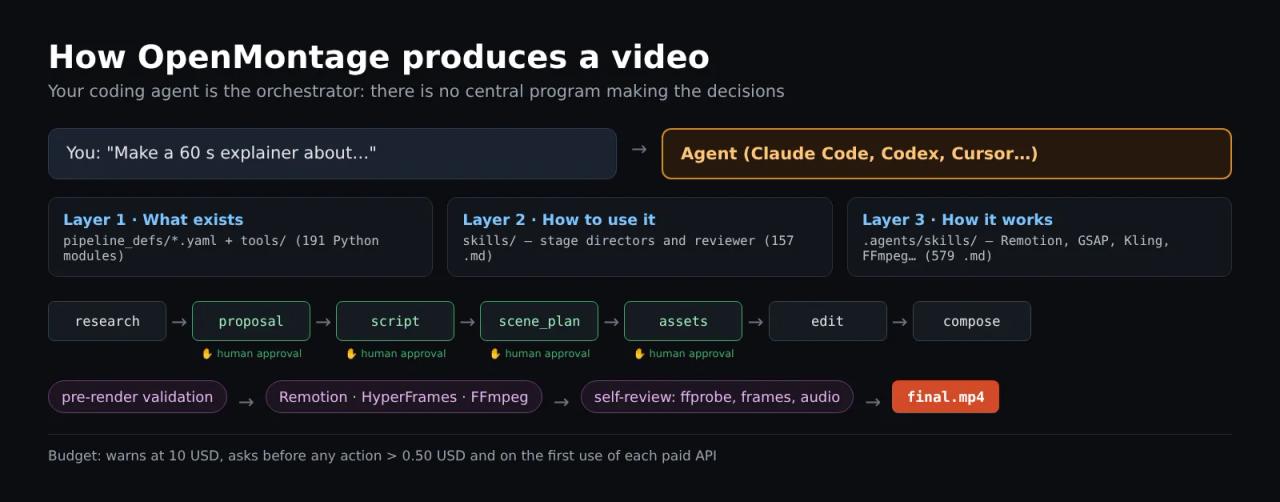
The README puts it plainly: "There is no code orchestrator. Your AI coding assistant IS the orchestrator." Python only provides tools and persistence; creative decisions, the order of work and quality criteria live in files you can read and edit.
Knowledge is split into three layers:
| Layer | Where | What it holds | Size on `main` |
|---|---|---|---|
| 1 · What exists | `pipeline_defs/` and `tools/` | YAML manifest per pipeline and Python tools the registry auto-discovers | 13 manifests, 191 Python modules |
| 2 · How to use it | `skills/` | A Markdown "director" per stage, the reviewer and the checkpoint protocol | 157 `.md` files |
| 3 · How it works | `.agents/skills/` | Knowledge packs per technology: Remotion, GSAP, Three.js, Kling, Seedance, FFmpeg, ElevenLabs… | 579 `.md` files |
Each tool declares in its agent_skills field which Layer 3 file must be read before using it. So before writing a prompt for Kling or Veo, the agent reads that provider's guide.
"Rule Zero"
The repository's CLAUDE.md is nine lines long with a single order: read AGENT_GUIDE.md before responding to anything. That guide (720 lines) opens with Rule Zero: every video request goes through a pipeline, no exceptions. The agent must:
- Pick the pipeline that matches the request.
- Read its manifest in
pipeline_defs/<pipeline>.yaml. - Run preflight: ask the registry which tools are available with your keys and show you the menu.
- Execute stage by stage, reading each stage's director first (
skills/pipelines/<pipeline>/<stage>-director.md).
It explicitly forbids writing ad-hoc Python scripts to call tools. That is an idea worth copying into your own Claude Code projects: the intelligence is in the instructions, not in throwaway code the agent generates.
Stages and approval gates
Every pipeline follows the same flow:
research -> proposal -> script -> scene_plan -> assets -> edit -> composeThe research stage runs real web searches (YouTube, Reddit, Hacker News, news and academic sources) and writes a cited brief before a single line of script. After that, the proposal, script, scene plan, generated assets and publishing pause until you approve. According to the README, the checkpoint writer refuses to mark a gated stage as completed without a recorded approval.
Before rendering, a validation step blocks the render if the plan breaks its promise; for example, a video sold as "motion-led" that is really 80% still images (they call it *slideshow risk*). After the render, the system runs ffprobe, extracts frames at four positions to catch black frames or broken overlays, analyzes audio for silence and clipping and checks captions. If that review fails, the video is not presented.
Backlot: the storyboard that fills itself in
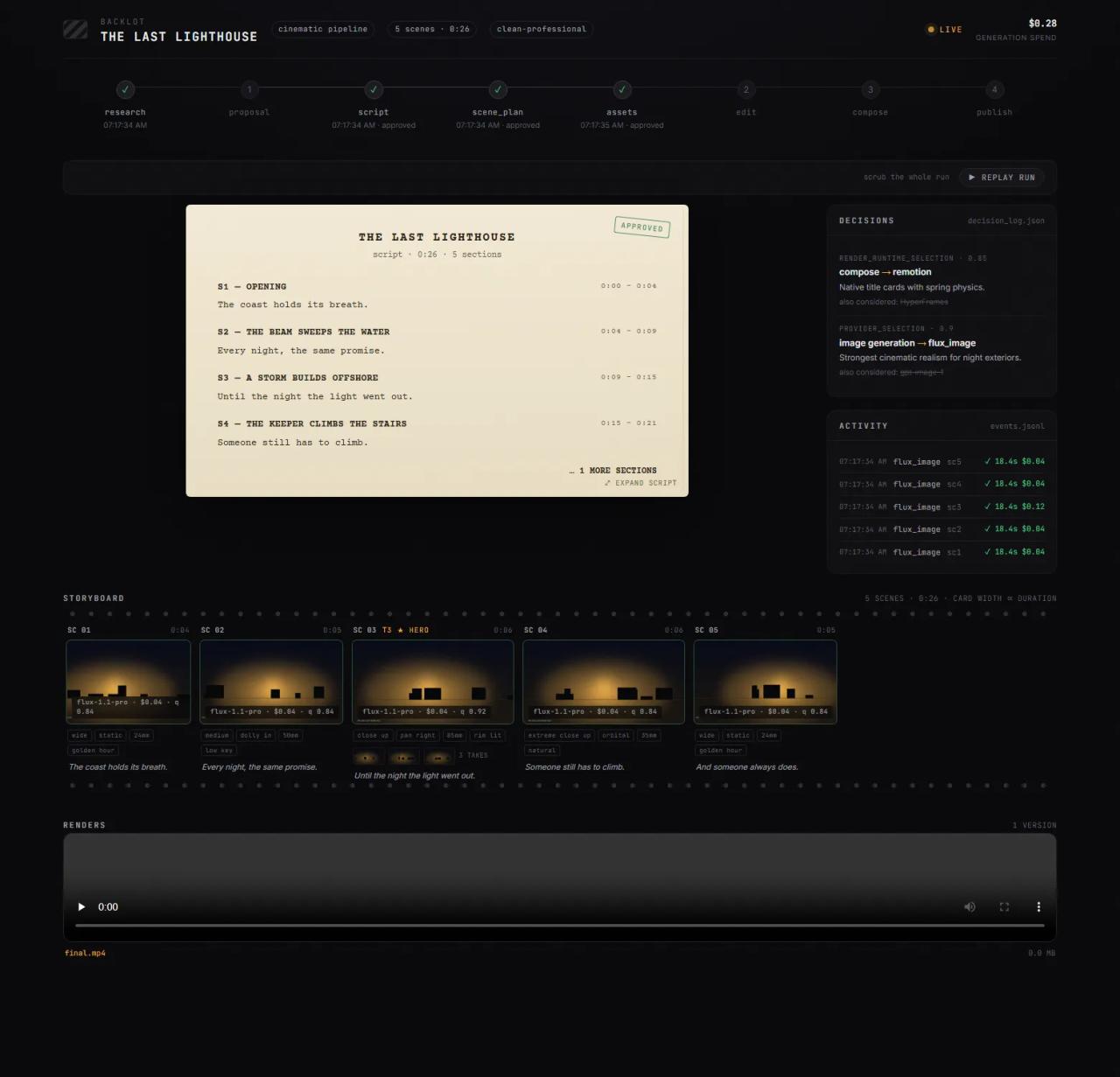
The most striking piece is Backlot, a local board (FastAPI + Uvicorn) that opens when a production starts and fills in from what the pipeline writes to disk: stages, script, scene cards, provider decisions and running spend.
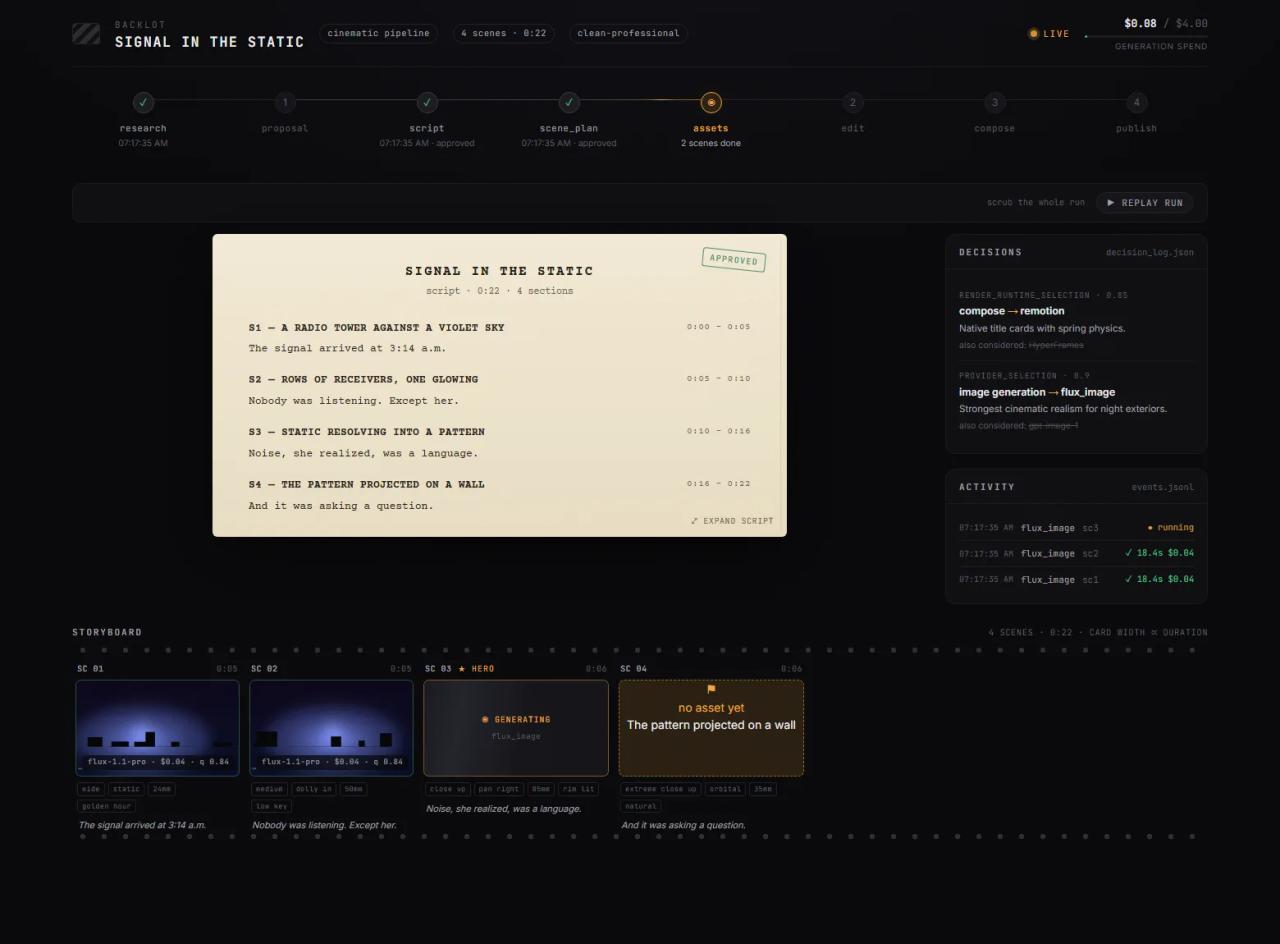
python -m backlot open                  # library of every project on disk
python -m backlot open <project-id>     # one production's board
python scripts/backlot_simulate_run.py  # a simulated production, no spend
The storyboard is also an approval gate: generation pauses on a scene-by-scene contact sheet with takes, prompts, per-asset cost and quality score, so you approve the visuals before the render. When the run is done, Replay run replays the whole production from its timestamps.
Pipelines: what kinds of video it makes
There are 12 production pipelines (the 13th manifest, framework-smoke, is for testing):
| Pipeline | Output |
|---|---|
| Animated Explainer | Explainer with research, narration, visuals and music |
| Animation | Motion graphics and kinetic typography |
| Avatar Spokesperson | Avatar presenter videos |
| Character Animation | Character animation with SVG rigs and GSAP |
| Cinematic | Trailers and teasers |
| Clip Factory | Ranked short clips from one long video |
| Documentary Montage | Documentary montage from real open-archive footage |
| Hybrid | Your footage plus generated visuals |
| Localization & Dub | Subtitle, translate and dub a video |
| Podcast Repurpose | Podcast highlights as video |
| Screen Demo | Software demos and screen tutorials |
| Talking Head | Speaker-to-camera videos |
It can also start from a reference video: paste a Short, Reel, TikTok or local clip and it analyzes transcript, pacing, scenes and style to propose two or three original concepts with estimated costs. The README stresses that it keeps pacing and structure, not content.
What you get without paying for any API
With make setup and no keys you have a complete free path:
| Need | Free tool |
|---|---|
| Narration | Piper TTS, offline |
| Real footage | Archive.org, NASA and Wikimedia Commons (Pexels, Pixabay and Unsplash with a free key) |
| Composition | Remotion (React) or HyperFrames (HTML + GSAP) |
| Post-production | FFmpeg: encoding, mixing, captions, color grading |
| Captions | Generated with word-level timing |
The Documentary Montage pipeline is the most interesting one here: it builds a corpus of clips from open archives, indexes it with CLIP for semantic search and cuts real motion footage to a thematic script. It is not the usual trick of zooming into four stills. Its manifest sets a default budget of 1 USD and a 60-minute wall-time cap.
If you read our HyperFrames guide, you will recognize the second engine: OpenMontage calls it through npx hyperframes for motion graphics pieces and picks Remotion or HyperFrames at proposal time (render_runtime). Silently switching engines mid-production is forbidden by the guide.
With paid providers
Keys go in .env and all of them are optional: fal.ai (FLUX, Veo, Kling, MiniMax), ElevenLabs, OpenAI, Google (Imagen, TTS with 700+ voices, Veo), Runway, Suno, HeyGen, xAI, official Kling, Seedance via Volcengine and more than 60 integrations overall. With an NVIDIA GPU, make install-gpu enables local video generation with WAN 2.1/2.2, Hunyuan, CogVideo or LTX-Video.
Whenever a provider must be chosen, a selector scores all candidates on seven fixed-weight dimensions (task fit 30%, quality 20%, control 15%, reliability 15%, cost 10%, latency 5% and continuity 5%, in lib/scoring.py) and logs the decision with its alternatives.
The costs published in the README give a sense of scale: the animated short "The Last Banana" (60 s, six Kling clips, Google narration and captions) cost 1.33 USD; the multi-model image and video showcases come in around 4-5 USD.
Budget controls, as the code implements them
The README promises "no surprise bills". Reading config.yaml and tools/cost_tracker.py, this is what is actually there:
budget:
  mode: warn                     # observe | warn | cap
  total_usd: 10.00
  reserve_pct: 0.10              # holdback for retries / cleanup
  single_action_approval_usd: 0.50
require_approval_for_new_paid_tool: true- Any action estimated at more than 0.50 USD raises an
ApprovalRequiredErrorand the agent has to ask you, in bothwarnandcapmodes. - The first use of each paid tool also requires approval.
- But the 10 USD total, in the default
warnmode, only flags a warning in the log: it does not block. For a hard limit you must setmode: cap.
Our recommendation: switch to cap and lower total_usd to what you are willing to spend before your first production with paid keys. Also set spending limits in each provider's dashboard, because OpenMontage's controls rely on the agent following the protocol.
Installing OpenMontage
Requirements: Python 3.10+, FFmpeg, Node.js 18+ (22+ if you will use HyperFrames) and a coding agent.
git clone https://github.com/calesthio/OpenMontage.git
cd OpenMontage
make setup
make setup creates a .venv virtual environment, installs the Python dependencies, runs npm install in remotion-composer/, tries to install Piper, warms HyperFrames into the npx cache and copies .env.example to .env.
On Windows without make, the README gives the PowerShell equivalent:
py -3 -m venv .venv; .\.venv\Scripts\Activate.ps1; python -m pip install -r requirements.txt; cd remotion-composer; npm install; cd ..; python -m pip install piper-tts; Copy-Item .env.example .envThen open the folder in Claude Code and ask for the video in plain language. To see what you have before starting:
make preflight      # menu of configured and unconfigured providers
make demo           # render demo videos with no keys
make test-contracts # contract tests, no keys
How we reviewed it: our cloud environment's auto mode blocked installing dependencies from an external repository, so we did not produce a video ourselves. Everything here comes from reading the code, manifests and docs at the commit above; the Backlot screenshots are the project's official ones and show simulated runs.
What to know if you produce in other languages
- The agent writes the script in whatever language you ask for, and the cloud voice providers (Google, ElevenLabs, OpenAI, Azure) speak dozens of languages.
- Piper, the free voice, defaults to the English model
en_US-lessac-mediumand the tool declaresmultilingual: False. Piper does have voices in other languages, but you have to download them and tell the agent to use that model in themodelfield. - Research searches and open archives (Archive.org, NASA) are mostly English-language: ask for other sources if you need them.
- The docs exist in English and Chinese (
README_zh-CN.md).
Who is it for?
- Technical and educational creators who publish explainers often: the explainer pipeline with voice and captions removes a lot of repetitive work.
- Teams already on Claude Code who want product videos, demos or reels without learning an editor.
- Anyone studying how to design a repository for agents: the three-layer split, Rule Zero and per-stage directors are reusable patterns far beyond video.
It is not for you if you want a visual editor to cut your own clips by hand (for that, see Concat) or need an instant result without reviewing proposals: the system is built to stop and ask you.
Common errors and warnings
npm installfails on Windows withERR_INVALID_ARG_TYPE: the README says to usenpx --yes npm installinstead.- HyperFrames unavailable: it needs Node.js 22+.
make hyperframes-doctorchecks node, ffmpeg and npx; if it fails and the production had HyperFrames locked, the agent should stop and tell you, not switch to Remotion on its own. - Piper does not install:
make setupskips it with a notice and narration then depends on cloud providers. - The agent keeps asking for approval: that is by design. Every action above 0.50 USD and every first use of a paid API needs it; raise
single_action_approval_usdif it bothers you, but do not disable it. - The capability dump is huge: the guide says to use
provider_menu_summary()and not pastesupport_envelope()into chat, which can be megabytes on a well-configured machine.
FAQ
Is OpenMontage free? Yes, the code is free and open source. You can produce videos at no cost with Piper, open archives and Remotion or HyperFrames; you only pay for the AI providers you choose to connect, plus your coding agent subscription.
Does it work with Claude Code? Yes. It ships a CLAUDE.md that forces reading AGENT_GUIDE.md before answering. Open the repository folder in Claude Code and ask for the video.
Can I use the videos commercially? The AGPL covers the code, not the videos you produce. Also check the terms of each provider you use (images, music, voices) and Remotion's license if you are a company.
Do I need a GPU? No. Without a GPU it uses cloud providers or the free path with images and archive footage. A GPU is only needed for local video models such as WAN or Hunyuan.
How much does a video cost? It depends on the providers. README examples range from 1.33 USD (a 60 s short with Kling) to about 5 USD (several image and video models). The default budget is 10 USD per project, but in warn mode it is not a hard limit.
Can it run on local models instead of Claude? Not fully yet: the README lists Ollama and LM Studio support as "coming soon".
Conclusion
OpenMontage is the most ambitious project we have seen for producing video with a coding agent, and one of the best examples of how to write a repository for an AI to operate: manifests, per-stage directors, mandatory approvals and a board that shows what it is doing. Its weak spots are the AGPL if you want to build a product on top, a budget cap that only warns by default and an English-only free voice. To try it without spending, clone it, run python scripts/backlot_simulate_run.py to see the board, then ask Claude Code for a short documentary using "real footage only". If the motion graphics side interests you, continue with HyperFrames for websites.
// source code
// implementation
More on AI agents

- Skills for your agents
- Claude Code

- Skills for your agents
- Claude Code

- Skills for your agents
- Claude Code