mcp-builder: Anthropic's skill for building an MCP server with Claude Code
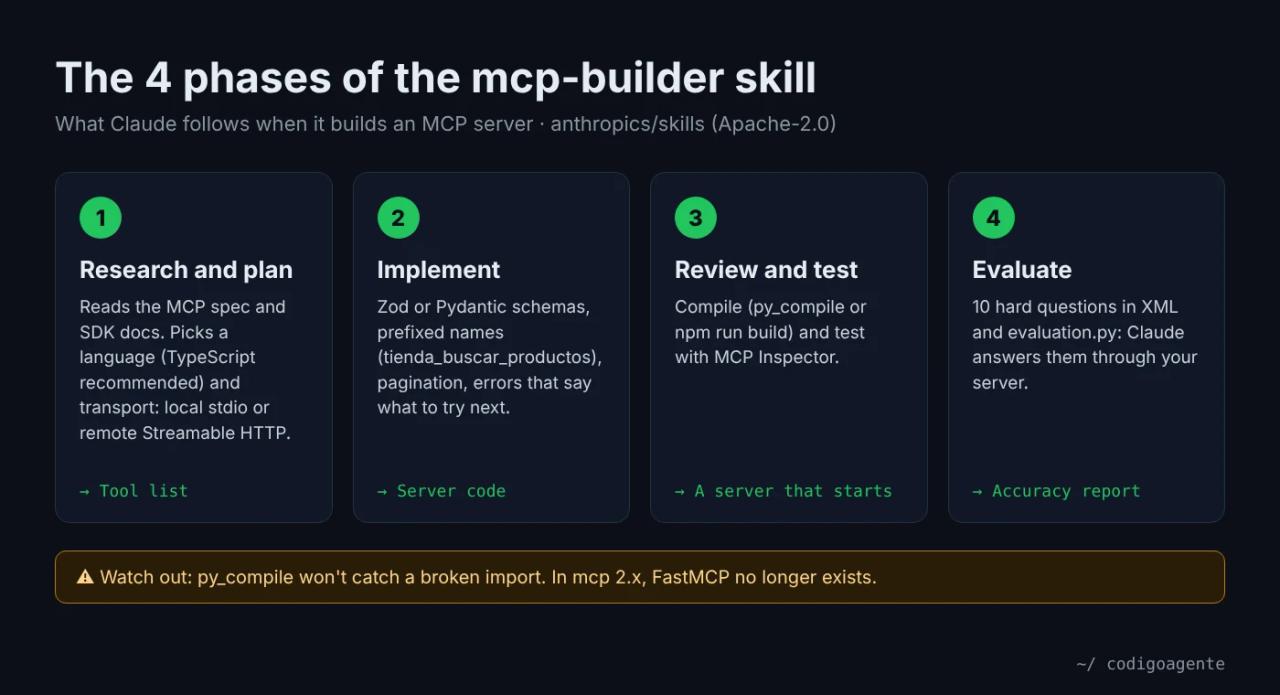
mcp-builder is the skill in Anthropic's official repository that teaches Claude Code to build MCP servers (Model Context Protocol): the "plug" that lets Claude, Cursor or any agent query your database, your API or your spreadsheets through tools you define. With it, Claude researches the protocol, writes the server in TypeScript or Python, tests it and drafts a 10-question exam to measure whether a model can actually use it.
In our tour of Anthropic's 19 official skills we left it for later. Here we put it to work: we read all 4,086 lines (commit 2c5958e, November 6, 2026) and asked Claude Code to build an MCP server for a small coffee shop. It took 99 seconds and cost 0.25 USD. Then we plugged that server into Claude and it answered a real business question for 0.067 USD. Along the way we hit two bugs in the skill that will hit you too: its Python guide and its evaluation script don't work with the current SDK release.
What an MCP server is and why you want one
MCP is an open standard for connecting AI models to tools and data. An MCP server is a small program that exposes functions with a name, a description and parameters (say tienda_ver_stock_critico(umbral)), and a client (Claude Code, Claude Desktop, Cursor) offers them to the model so it can call them when it needs to.
For a small business, that means asking "what do I need to restock?" or "which of Ana's orders are still pending?" in plain language and having the agent check your real data instead of guessing. For a developer, it's the standard way to give an agent access to an internal API without pasting the docs into the chat.
If you're worried about the security of wiring agents to your data, first read how to prevent prompt injection in AI agents: an MCP server is exactly the door it comes through.
What the mcp-builder skill includes
The skill lives in skills/mcp-builder in anthropics/skills and is licensed Apache-2.0: you can copy it, adapt it and use it in commercial projects as long as you keep the license notice.
| File | What it contains |
|---|---|
| `SKILL.md` | The 4-phase process and links to the docs. 252 lines. |
| `reference/mcp_best_practices.md` | Naming rules (`slack_mcp`, `slack_send_message`), pagination, JSON and Markdown output, transports, security and annotations. |
| `reference/node_mcp_server_v2.md` | TypeScript guide for SDK v2 (`@modelcontextprotocol/server`), the recommended one for new servers. |
| `reference/node_mcp_server.md` | The same guide for projects still on SDK v1. |
| `reference/python_mcp_server.md` | Python guide with FastMCP and Pydantic. |
| `reference/evaluation.md` | How to write 10 evaluation questions and run them. |
| `scripts/evaluation.py` and `connections.py` | The harness that runs the questions against your server through the Anthropic API. |
The design ideas that pay off most, and that Claude applied without being asked:
- Service-prefixed names:
tienda_buscar_productos, notbuscar_productos, because your server will sit next to others. - Errors that say what to try: instead of "not found", "No orders for that filter. Customers: Ana, Diego… States: delivered, paid, pending".
- Annotations
readOnlyHint,destructiveHint,idempotentHintandopenWorldHinton every tool. They are hints for the client, not a security boundary. - Pagination with
limit,has_moreandnext_offset, 20 to 50 items by default, so the model's context doesn't fill up. - Transport: stdio for local servers and stateless Streamable HTTP for remote ones. SSE is deprecated.
Installing mcp-builder in Claude Code
Two options. Just this skill, with the skills.sh CLI:
npx skills add anthropics/skills --skill mcp-builder --agent claude-code -yOr the whole example-skills plugin, which ships 12 example skills including mcp-builder:
/plugin marketplace add anthropics/skills
/plugin install example-skills@anthropic-agent-skills
We went with the simplest route: copy the repo's skills/mcp-builder folder into the project's .claude/skills/mcp-builder. Claude Code picks it up on startup.
The test: an MCP server for a coffee shop
We created an empty project with two CSV files for a made-up shop: datos/productos.csv (10 products with SKU, price and stock) and datos/pedidos.csv (10 orders with customer and status). The data is in Spanish, like the shop. Then we ran Claude Code headless:
claude -p "Use the mcp-builder skill. Build a Python MCP server (FastMCP, stdio transport) called tienda_mcp for the small coffee shop whose data is in datos/productos.csv and datos/pedidos.csv. Read-only. It must search products, show low or out-of-stock items and look up orders by customer or status. Create the environment with uv in .venv, install dependencies, compile it with py_compile and test it by starting it. Skip the API evaluation phase." \
  --model sonnet \
  --allowedTools "Read,Write,Edit,Glob,Grep,Bash(uv:*),Bash(python:*),Bash(.venv/bin/python:*)"
(We actually sent the prompt in Spanish; this is a faithful translation.) We picked Python on purpose, even though the skill recommends TypeScript, because it's what most business scripts are written in. Result: 14 turns, 99 seconds, 0.25 USD with Sonnet 5.5. According to the session log, Claude loaded the skill, read only the Python guide (not the TypeScript or evaluation ones) and wrote tienda_mcp.py with three tools:
| Tool | What it does |
|---|---|
| `tienda_buscar_productos` | Searches by text in name or SKU and by category, ignoring case and accents. |
| `tienda_ver_stock_critico` | Lists out-of-stock (0) and low-stock (≤ `umbral`, 10 by default) items, lowest first. |
| `tienda_consultar_pedidos` | Filters orders by customer and status, adding the product name and the USD total. |
Here's one of them. Note the Pydantic schema with descriptions and bounds, and the annotations:
from mcp.server.fastmcp import FastMCP
from pydantic import BaseModel, ConfigDict, Field

mcp = FastMCP("tienda_mcp")

RO = {"readOnlyHint": True, "destructiveHint": False,
      "idempotentHint": True, "openWorldHint": False}


class StockInput(BaseModel):
    model_config = ConfigDict(extra="forbid")
    umbral: int = Field(default=10, ge=0, le=10000,
                        description="'Stock bajo' = stock <= umbral (por defecto 10)")
    incluir_agotados: bool = Field(default=True, description="Incluir productos con stock 0")


@mcp.tool(name="tienda_ver_stock_critico", annotations={"title": "Ver stock bajo o agotado", **RO})
async def tienda_ver_stock_critico(params: StockInput) -> str:
    """Lista productos agotados (stock 0) y/o con stock bajo (<= umbral), de menor a mayor stock."""
    res = []
    for p in sorted(_productos(), key=lambda p: p["stock"]):
        if p["stock"] == 0 and params.incluir_agotados:
            res.append({**p, "situacion": "agotado"})
        elif 0 < p["stock"] <= params.umbral:
            res.append({**p, "situacion": "bajo"})
    return _json(res, umbral=params.umbral)


if __name__ == "__main__":
    mcp.run(transport="stdio")
Bug 1: the Python guide doesn't work with mcp 2.x
Claude's first attempt failed. uv pip install "mcp[cli]" installed mcp 2.3.0, the current release on PyPI (2.0.0 shipped in July 2026), and in the 2.x series FastMCP no longer exists: it was renamed MCPServer. We confirmed it separately in a clean environment:
ModuleNotFoundError: No module named 'mcp.server.fastmcp'. This is mcp 2.x,
where FastMCP was renamed to MCPServer (from mcp.server.mcpserver import MCPServer)
and other APIs changed; see the migration guide ... or pin 'mcp<2' to keep running v1 code.
The skill's python_mcp_server.md uses from mcp.server.fastmcp import FastMCP in every example and doesn't pin a version. Claude fixed it on its own: it downgraded to mcp[cli]<2 (landing on 1.30.0) and wrote that into requirements.txt. Do the same, or ask for SDK v2 with MCPServer from the start. Oddly, the TypeScript side is up to date: it tells SDK v1 and v2 apart and offers a codemod to migrate.
A lesson on the side: python -m py_compile doesn't catch this error. It only checks syntax; the broken import only shows up when the server starts. The skill's phase 3 suggests py_compile for Python, so always start the server for real or list its tools with a client.
Bug 2: the evaluation script breaks too
Phase 4 uses scripts/evaluation.py, which imports connections.py. Its requirements.txt asks for anthropic>=0.39.0 and mcp>=1.1.0, so a clean install pulls mcp 2.3.0 and the script dies on import:
ImportError: cannot import name 'streamablehttp_client' from 'mcp.client.streamable_http'With mcp<2 the import works. Also, if you don't pass -m, the script uses claude-3-7-sonnet-20250219, a model that has been retired. Install it like this and pick a current model:
pip install anthropic "mcp<2"
export ANTHROPIC_API_KEY=your_key
python scripts/evaluation.py -t stdio -c python -a tienda_mcp.py -m claude-haiku-5-5 evaluation.xml
We didn't run the full evaluation: it bills the Anthropic API on top of your Claude Code subscription, and for a three-tool server it isn't worth it. For a server you plan to publish or sell, it is.
Connecting the server to Claude Code
An MCP server is useless until a client uses it. We wrote an mcp.json pointing to the environment's Python and the script:
{
  "mcpServers": {
    "tienda": {
      "command": "/path/to/project/.venv/bin/python",
      "args": ["/path/to/project/tienda_mcp.py"]
    }
  }
}
To keep it always available in Claude Code, you can register it with claude mcp add tienda -- /path/to/project/.venv/bin/python /path/to/project/tienda_mcp.py instead of a file. We used the file and asked a business question (in Spanish: "Which products do I need to restock this week and which pending orders would be affected?"):
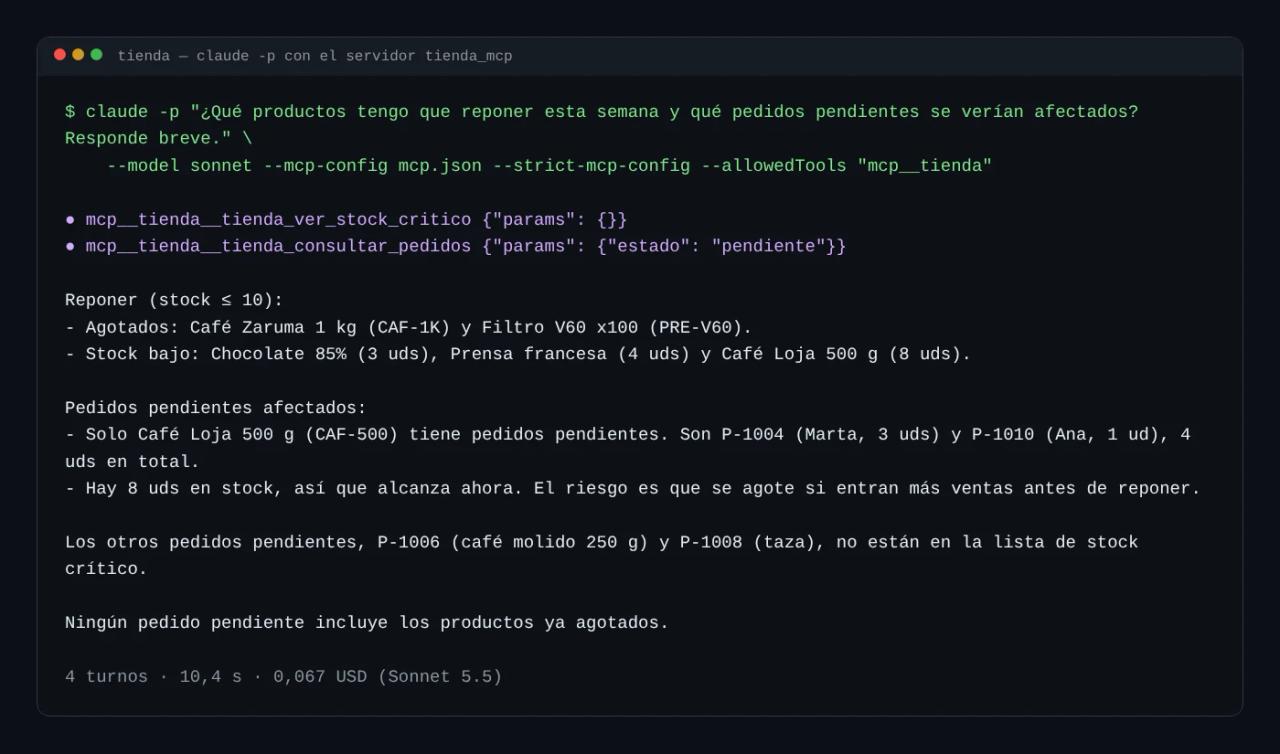
Claude called two tools, tienda_ver_stock_critico with no parameters and tienda_consultar_pedidos with estado: "pendiente", and cross-referenced the results: two products are out of stock, three are low, and only the Loja 500 g coffee has pending orders (P-1004 and P-1010, 4 units out of 8 in stock). We checked it by hand against the CSVs and it's correct.
One Claude Code detail: MCP tools aren't loaded into the context up front. Claude looks them up with ToolSearch when it needs them, so having several servers connected barely costs tokens until they're used.
What it costs to build an MCP server with mcp-builder
| Item | Cost |
|---|---|
| mcp-builder skill | Free (Apache-2.0) |
| MCP SDK for Python or TypeScript | Free (MIT, moving to Apache-2.0) |
| MCP Inspector to test it | Free (`npx @modelcontextprotocol/inspector`) |
| Building the server with pay-as-you-go Claude Code | Our test: **0.25 USD** with Sonnet 5.5. A server for a real API with more endpoints will cost several times that, but it's still small |
| Using it from Claude Code | Our question: **0.067 USD**. Included with a Pro subscription (20 USD/month) |
| Phase 4, evaluation | Billed separately through the Anthropic API: 10 questions with several tool calls each. Cheaper with Haiku |
| Hosting | Local over stdio: 0 USD. Remote over HTTP: a small VPS, like the one in our [Coolify and Docker VPS guide](/en/blog/install-paymenter-vps-coolify-docker) |
The useful comparison here isn't another tool, it's doing it by hand. A developer new to the SDK can easily spend an afternoon reading the spec, choosing a transport and writing schemas, errors and annotations like the ones above. The skill packs all of that, and Claude applied it in a minute and a half for a quarter.
Our recommendation to spend as little as possible: a local stdio server while you're the only user, Python with mcp<2 (or TypeScript v2 if you're starting fresh), no API evaluation until other people will use the server, and a cheap VPS only when you truly need remote access.
Common errors
No module named 'mcp.server.fastmcp'. You have mcp 2.x. Pin mcp[cli]<2 or migrate to from mcp.server.mcpserver import MCPServer.
cannot import name 'streamablehttp_client'. Same issue, in evaluation.py. Install mcp<2 in the script's environment.
The stdio server doesn't respond or the client says the JSON is invalid. Something is writing to standard output. In a stdio server, print calls and logs go to stderr; stdout is reserved for the protocol.
Claude Code doesn't see the tools. Use absolute paths in mcp.json and the virtual environment's Python, not the system one. In claude -p, allow the tools with --allowedTools "mcp__tienda".
The skill doesn't trigger. Name it in the prompt ("use the mcp-builder skill") or invoke it with /mcp-builder.
The server works locally but you don't want it exposed. If you use HTTP on your machine, bind it to 127.0.0.1, not 0.0.0.0, and validate the Origin header, as the skill's best-practices guide asks.
FAQ
Python or TypeScript?
The skill recommends TypeScript with SDK v2, and that's the most up-to-date part of its docs. Python works just as well for reading CSVs, databases or internal APIs, as long as you pin the SDK version.
Can I connect the server to Claude Desktop or Cursor?
Yes. MCP is a standard: the same tienda_mcp.py works in any compatible client. Only the place where you declare it changes (each client has its own config file).
Can the server modify data?
It can, but ours is read-only on purpose. If you add tools that write, mark them destructiveHint: true and let the client ask for confirmation. Annotations protect nothing on their own.
Do I need the evaluation phase?
For your own use, no: a test with real questions like ours is enough. The 10 questions are for comparing server versions or spotting tools the model doesn't understand.
Is it safe to install other people's MCP servers?
An MCP server runs code on your machine with your permissions. Review the code, as you would with a skill: that's what SkillSpector and our Claude Code skills guide are for.
Conclusion
mcp-builder turns "I want Claude to query my data" into a well-designed MCP server in minutes and for cents: prefixed names, validated schemas, useful errors and annotations, without you reading the spec. Its weak spot is versioning: the Python guide and the evaluation script are still written for mcp 1.x, and the SDK is already at 2.3. Pin mcp<2 and it works.
Next step: install it with npx skills add anthropics/skills --skill mcp-builder, pick the spreadsheet or API you check by hand most often and ask Claude for a read-only server for it. And if you also want Claude to test your website, continue with webapp-testing.
// source code
// implementation
More on AI agents

- Skills for your agents
- Claude Code

- Skills for your agents
- Claude Code
- Skills for your agents
- Claude Code