find-skills: the skill that finds and installs skills for you in Claude Code
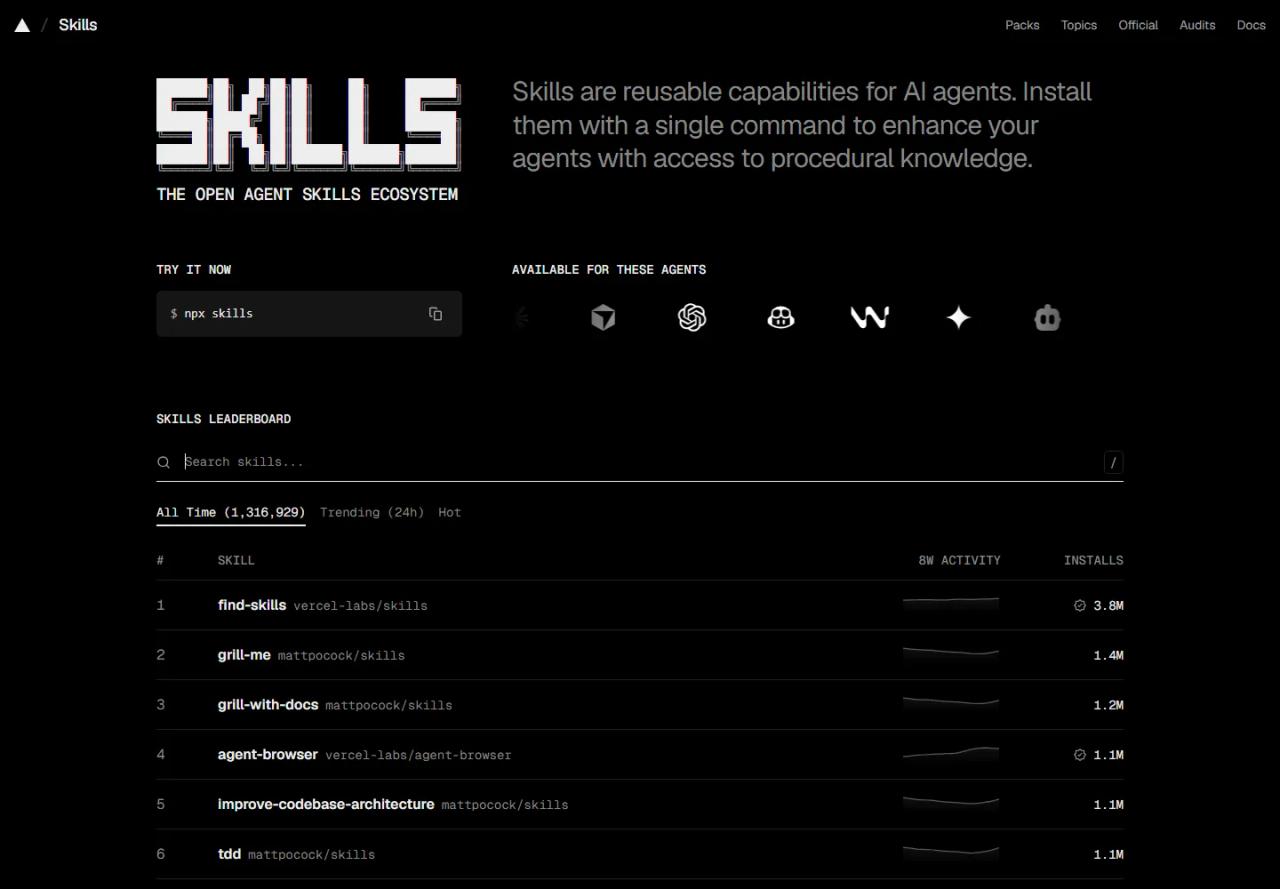
There are thousands of skills for Claude Code and you will never find most of them by browsing. find-skills fixes that: it is a Vercel Labs skill that teaches Claude to search the skills ecosystem, compare the candidates and install the right one when you ask for something it can't do yet. It is the most installed skill on skills.sh, with 3.8 million installs. In this article we install it, test it on a real agency use case and show how to get the most out of it without installing junk.
If this is your first skill, read the Claude Code skills guide first: it explains what a SKILL.md is and where it goes.
What find-skills is
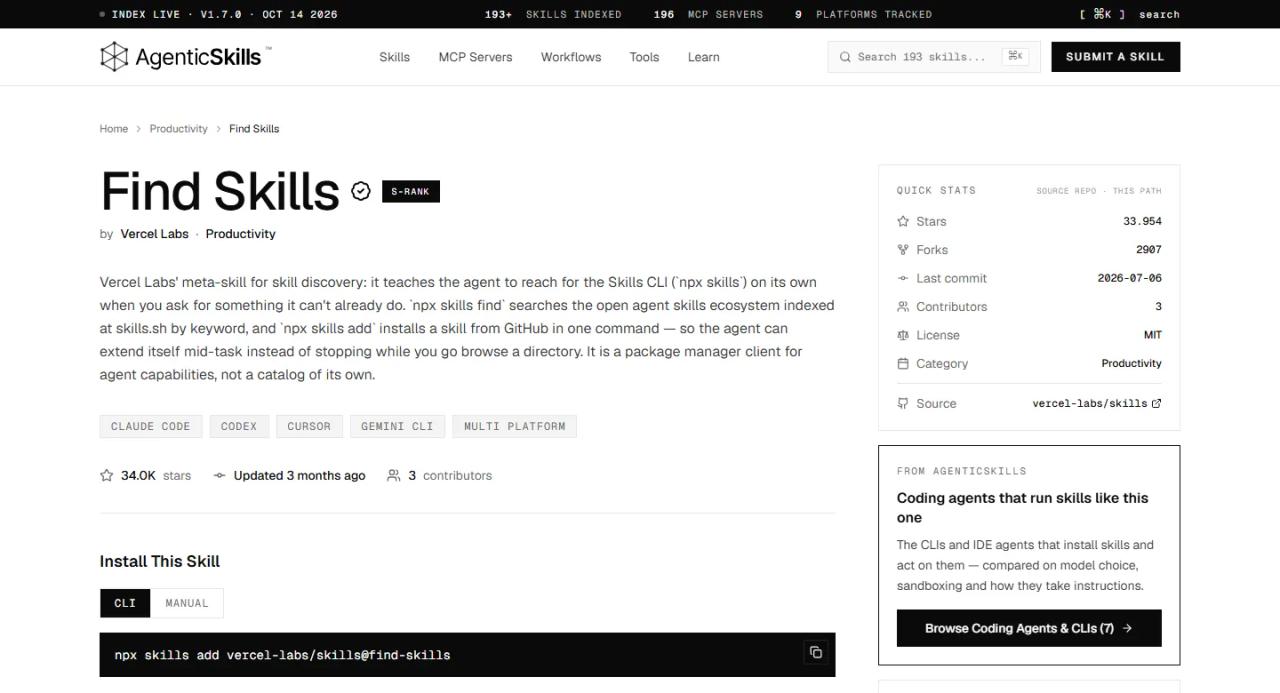
It is a *meta-skill*: it doesn't do a task itself, it teaches Claude to find the skill that does. It lives in the vercel-labs/skills repository, the same one as the skills CLI (version 1.7.2), under the MIT licence, with about 34,000 GitHub stars.
Its SKILL.md tells Claude to use it when you:
- Ask "how do I do X?" and X is a common task that likely has a skill.
- Say "find a skill for X" or "is there a skill that...?".
- Ask "can you do X?" and X is a specialised capability.
- Want to extend your agent or are looking for templates, tools or workflows.
The key is that you don't have to name it: if your request fits, Claude loads it on its own. In our test, an ordinary question about SEO audits was enough.
What it does under the hood
The skill gives Claude six steps:
- Understand what you need: the domain (React, testing, design), the specific task and whether it is common enough for a skill to exist.
- Check the skills.sh leaderboard first, ranked by installs.
- Search with the CLI:
npx skills find <keywords>. - Verify quality before recommending: prefer skills with 1,000+ installs, be wary of anything under 100, favour official sources (vercel-labs, anthropics, microsoft) and check the repo's stars (under 100 = skepticism).
- Present the options with what each does, its installs, its source and the install command.
- Offer to install it if you say yes.
Step 4 is what makes it genuinely useful: instead of handing you the first hit, it filters by reputation.
How to install find-skills
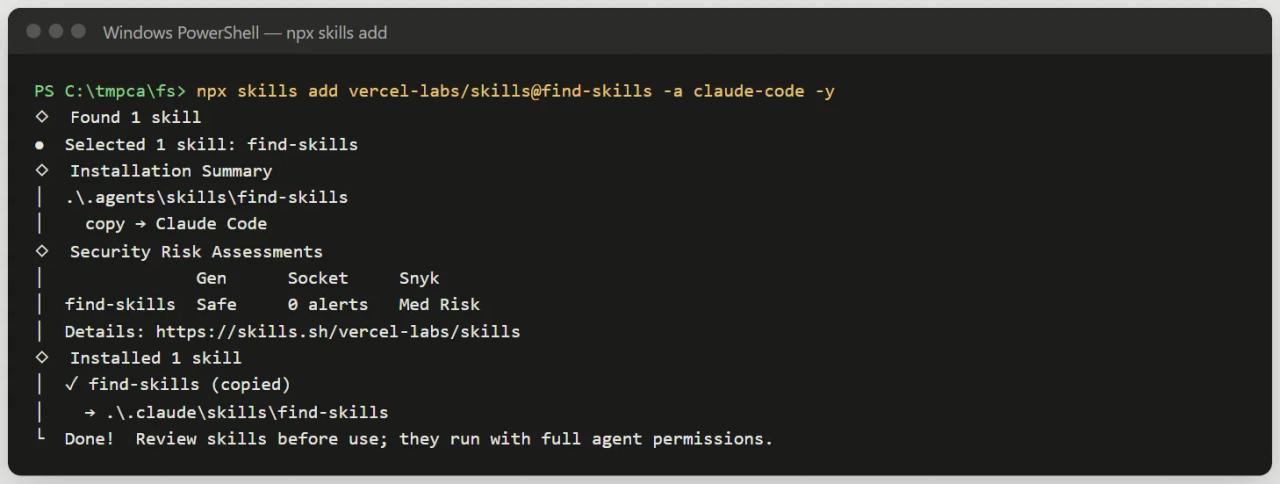
With the skills CLI (Node 22.20 or later):
# This project only
npx skills add vercel-labs/skills@find-skills -a claude-code

# For your user, across all projects (recommended for this skill)
npx skills add vercel-labs/skills@find-skills -g -a claude-code
A global install (-g) makes sense here: it is useful in every project and tied to none.
Without Node you can install it by hand by downloading its SKILL.md:
mkdir -p ~/.claude/skills/find-skills
curl -o ~/.claude/skills/find-skills/SKILL.md https://raw.githubusercontent.com/vercel-labs/skills/main/skills/find-skills/SKILL.md
Bear in mind the skill works by calling npx skills, so without Node it only half works.
Real test: finding SEO skills for an agency
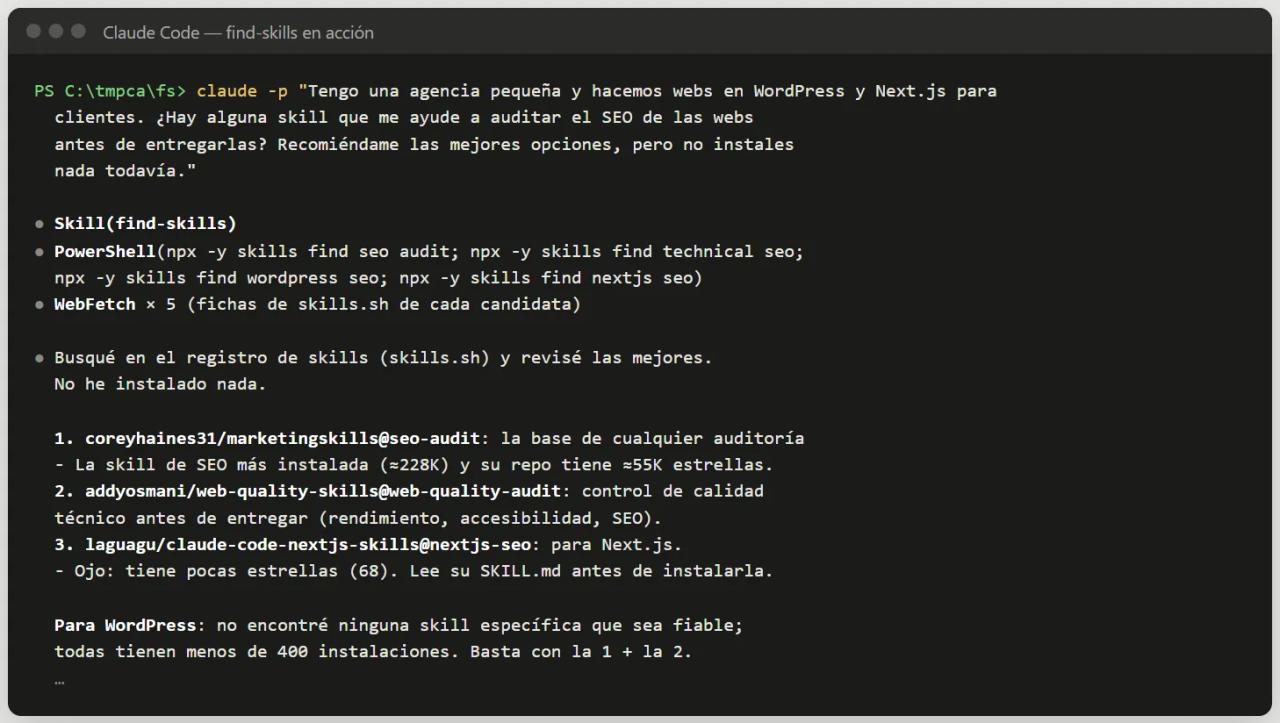
We opened Claude Code in an empty project with find-skills installed and asked an ordinary question, without mentioning the skill (in Spanish; translated here):
I run a small agency and we build WordPress and Next.js sites for clients.
Is there a skill that would help me audit the SEO of sites before handing
them over? Recommend the best options, but don't install anything yet.
Here is what it did, according to the session log:
- Loaded find-skills on its own (
Skill(find-skills)). - Ran four searches:
seo audit,technical seo,wordpress seoandnextjs seo. - Opened each candidate's skills.sh page (5 web fetches) to read what it does, whether it needs accounts or paid keys and how many stars its repo has.
- Replied with a ranked recommendation, installing nothing, as asked. It took under a minute.
What is interesting is how it filtered:
- It recommended
coreyhaines31/marketingskills@seo-audit(about 228,000 installs), which is exactly the one this blog uses to check the SEO of every article. - It added
addyosmani/web-quality-skills@web-quality-auditfor performance and accessibility before handover. - It warned that
nextjs-seohas only 68 stars and should be read before installing. - It ruled out
audit-websiteas a first choice because it needs its own program installed and an account. - For WordPress it said it found no reliable skill: all had fewer than 400 installs. It preferred to admit that rather than recommend something dubious.
That last point is the most valuable one: it saves you from installing abandoned skills or ones from unknown authors.
First attempt on Windows: the PowerShell permission
On the first attempt Claude couldn't run npx skills find and fell back to the skills.sh website. The reason: on Windows, Claude Code runs commands through PowerShell, and we had only allowed Bash(npx:*). Once we also allowed PowerShell(npx:*), the search worked. In an interactive session, just approve the command when asked; to skip the prompt, add a permission rule for npx.
The skills CLI: what find-skills uses underneath
You can use the same commands yourself:
npx skills find seo audit          # search by keyword
npx skills find react --owner vercel   # search one organisation only
npx skills find                    # interactive search
npx skills add <owner/repo@skill>  # install
npx skills list                    # list installed skills
npx skills update                  # update everything
npx skills remove <skill>          # uninstall
npx skills init my-skill           # scaffold a new skill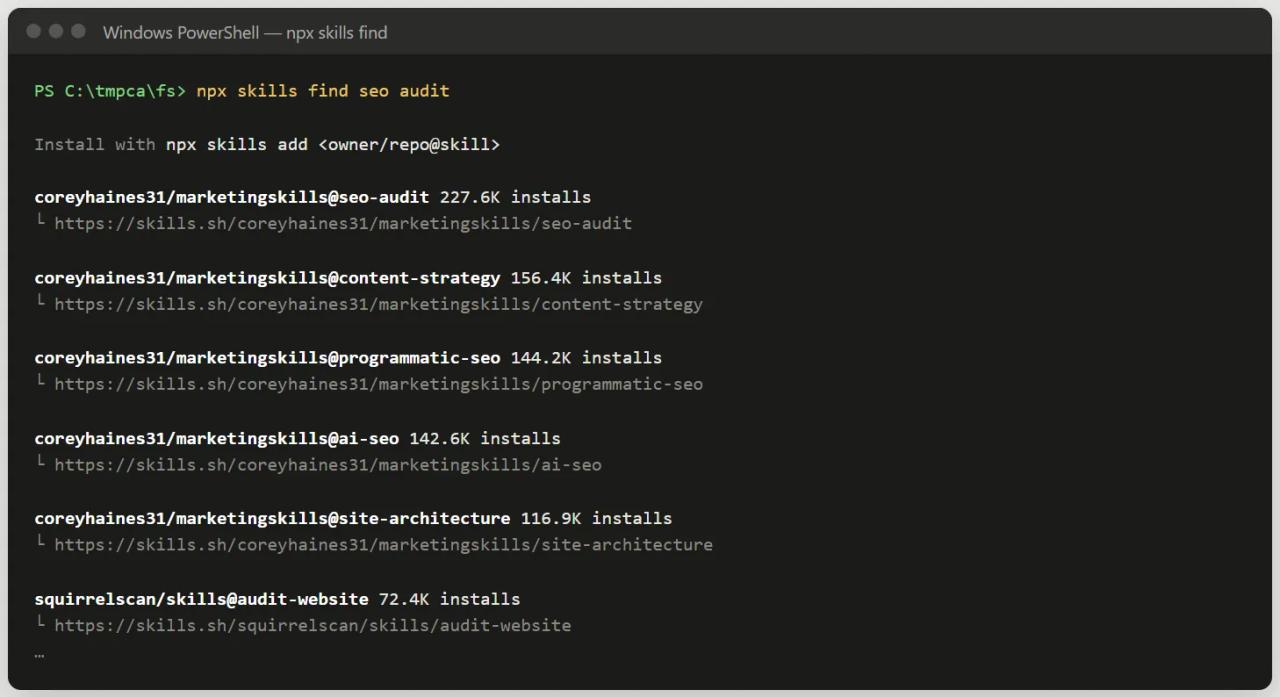
The searches we ran that day give a sense of what's out there:
| Search | Top result | Installs |
|---|---|---|
| `seo audit` | `coreyhaines31/marketingskills@seo-audit` | 227,600 |
| `nextjs` | `vercel-labs/agent-skills@vercel-react-best-practices` | 799,500 |
| `wordpress` | `sanity-io/agent-toolkit@sanity-migration` | 21,000 |
The last one teaches something: searching "wordpress" first returns a skill for migrating *from* WordPress to Sanity. That is why it pays to let find-skills read the pages instead of trusting the top hit.
How to ask Claude for things with find-skills
No special formula needed. Some requests that work well:
Is there a skill for writing end-to-end tests with Playwright? Don't install anything.Find a skill that generates changelogs from commits and tell me how many
installs it has and who maintains it.I need to check this site's accessibility. If there's a reliable skill for
it, install it in this project only and use it.I'm starting a project with Next.js, Supabase and Tailwind. Which official
skills do you recommend installing before I start?Tips:
- Say whether it may install. "Don't install anything" to explore; "install it in this project only" to move fast.
- Ask for the criteria. "Tell me installs, stars and author" gives you what you need to decide.
- Use specific words. "react testing" finds more than "testing", as the skill itself recommends.
What it does for an agency
- Project kick-off: when starting on a new stack, ask for the stack's official skills (Vercel, Supabase, Prisma, Clerk and Cloudflare publish their own) and install them in the client repo.
- One-off tasks: audits, migrations, changelogs, docs. Before doing it by hand, ask whether a skill exists.
- Standardising the team: whatever proves useful, install it per project and commit it so everyone works the same way.
- Quality control: the skill's criteria (installs, author, stars) make a good internal policy for approving third-party skills.
That is how you find skills like Anatomy for technical illustrations or social-media-skills for content.
Security: why Snyk flags it
On install, the CLI showed "Med Risk" from Snyk, and skills.sh shows a WARN for the same audit. That doesn't mean the skill contains malicious code: it is a plain-text SKILL.md with no scripts. The risk lies in what it enables: installing third-party skills from the internet with npx, and those skills run with your agent's permissions.
How to use it safely:
- Don't let it install without asking. Ask for the recommendation first and decide yourself.
- Read the
SKILL.mdof whatever you install, especially if it has few installs or stars. - Install per project what you only use in one project, to limit where it loads.
- Check the security assessment that
npx skills addshows before every install. - Scan it with SkillSpector before installing: in SkillSpector + find-skills we build the full workflow with real tests.
Common errors
Claude doesn't run npx skills find and searches the web instead
It's a permissions issue. On Windows the command goes through PowerShell; approve it when asked or allow npx in your permission settings. The skill still works without the CLI, just less precisely.
npx skills fails with a version error
CLI 1.7.x needs Node 22.20 or later. Check with node -v.
Claude doesn't use find-skills even though I ask about skills
Check it is installed (npx skills list or npx skills ls -g) and in the right path (.claude/skills/find-skills/SKILL.md). To force it, start your message with /find-skills.
It finds nothing for my task
Try synonyms ("deploy", "deployment", "ci-cd"). If nothing really exists, the skill itself suggests creating your own with npx skills init.
FAQ
Is find-skills free?
Yes, MIT licensed. The skills CLI is open source too and needs no account.
Does it work in Codex, Cursor or Gemini CLI?
Yes. The CLI installs into Claude Code, Codex, Cursor, Gemini CLI, OpenCode and other agents that support the Agent Skills standard. Use -a to pick the agent.
Does it install skills without asking?
Only if you allow it. The skill tells Claude to present the options and offer to install. If you say "don't install anything", it won't.
Where do the skills come from?
From the skills.sh index, which collects skills published on GitHub and other git repositories, ranked by installs.
Is it better than browsing skills.sh by hand?
They complement each other for exploring. find-skills' advantage is that Claude searches mid-task, compares several options and explains why it recommends one, without you leaving the session.
Conclusion
find-skills turns Claude Code into its own tool finder: you ask about a task, it looks for the right skill on skills.sh, filters by reputation and installs it if you want. It is the first skill you should install, globally, because it leads you to all the others. Next step: install it with npx skills add vercel-labs/skills@find-skills -g -a claude-code and ask it which skills you're missing for your next project.
// source code
// implementation
More on AI agents

- Skills for your agents
- Claude Code

- Skills for your agents
- Claude Code

- Skills for your agents
- Claude Code