HyperFrames for websites: two immersive motion graphics landing pages built by Claude Code (demos, pros, cons and timing)
HyperFrames was built to turn HTML into video, but its compositions can also play live inside a web page through its <hyperframes-player> component. We wanted to know whether that works for real motion graphics websites, so we asked Claude Code for two sample landing pages: an electric bike brand and an electric car brand. No recorded video: every scene is SVG and GSAP running in the browser, and it moves with the scroll.
Below are both live demos, how they were made, which skills Claude used, how long it took (measured with the system clock) and when HyperFrames makes sense on a website and when it doesn't.
If you don't know HyperFrames yet or how to install it, start with our first HyperFrames article, where we made two MP4 videos with voice-over and music. This one is the follow-up: same framework, different use.

The two live demos
Open them in another tab and scroll down slowly, because screenshots can't show the motion. The demos are in Spanish:
- [Demo 1: Páramo, high-altitude electric bikes](/demos/hyperframes/bicis/index.html)
- [Demo 2: Cauce, an electric coupé shaped in the wind tunnel](/demos/hyperframes/autos/index.html)
Both brands are fictional and the data (prices, range, power) is made up. They work on desktop and mobile, and if your system has "reduce motion" turned on they jump straight to the final state of each scene.
First attempt: correct, but templated
Claude built the first version using only the HyperFrames skills, in about 11 minutes. It worked: a looping animated header, cards, a spec sheet with counters. But it had every tell of a generated landing page: dark background with a cyan accent, gradients, SaaS-catalogue typography and animations that played on their own with no link to what the visitor was doing. The blog owner's feedback was blunt: you could tell it had not gone through any web design or animation skills.
Fair point. So we repeated the brief with different tools and a different approach, and this article covers the second version, which is the one published.
The skills Claude used
The brief asked to use find-skills to look for extra skills. From our cloud container the skills.sh registry is blocked (npx skills find returns *No skills found*), so Claude cloned the repositories it would have found straight from GitHub. Fetching five took 13 seconds:
| Skill | Repository | What it was used for |
|---|---|---|
| `frontend-design` | anthropics/skills | Art direction: avoid AI tells (gradients, black with an acid accent, all-caps labels), pick one thing to be bold about |
| Official GSAP skills (`gsap-core`, `gsap-timeline`, `gsap-scrolltrigger`, `gsap-performance`…) | greensock/gsap-skills | ScrollTrigger with `scrub`, `containerAnimation` for the horizontal carousel and `matchMedia` for mobile |
| `ui-ux-pro-max` | nextlevelbuilder/ui-ux-pro-max-skill | Its design system search suggested "scroll-triggered storytelling" for bikes and a "motion-driven hero" for cars |
| `web-design-guidelines` | vercel-labs/agent-skills | Accessibility review: visible focus, `aria-pressed` on the colour swatches, `prefers-reduced-motion` |
| Lenny's Podcast skills | refoundai/lenny-skills | Product skills (positioning, naming); useful for the message, not for the visuals |
On top of that come the ten skills the HyperFrames CLI installs with init (hyperframes-core, hyperframes-animation, hyperframes-creative, motion-graphics…), which we had already used in the first attempt.
The technique: a composition driven by the scroll
A HyperFrames composition is an index.html with a fixed-size canvas, one paused GSAP timeline registered in window.__timelines and deterministic animation. Normally the player plays it like a video. The change in the second version is to never press play: the page drives the composition from the scroll by calling player.seek() from ScrollTrigger.
window.hfScrub = function (player, vars) {
  whenReady(player, (dur) => {
    if (reduce) { player.seek(dur); return; } // reduced motion: final state
    ScrollTrigger.create(Object.assign({ scrub: true }, vars, {
      onUpdate: (self) => {
        player.seek(self.progress * dur);
        if (vars.onUpdate) vars.onUpdate(self);
      },
    }));
    player.seek(0);
  });
};
On the page, each scene is a tall section with a sticky container that fills the screen:
<section id="ascenso" style="height: 400vh">
  <div class="sticky"><!-- position: sticky; top: 0; height: 100vh -->
    <div class="cover">
      <hyperframes-player id="hfAscenso" src="motion/ascenso/index.html"
        runtime-src="../vendor/hyperframe.runtime.iife.js" muted audio-locked>
      </hyperframes-player>
    </div>
    <h1>Arriba se respira distinto.</h1>
  </div>
</section>
<script>
  hfScrub(document.getElementById("hfAscenso"), {
    trigger: "#ascenso", start: "top top", end: "bottom bottom", scrub: 0.6,
  });
</script>
The other key decision: the scene compositions carry no text. Headlines, figures and buttons are regular HTML on top of the scene, and they read the same scroll progress (the altimeter, the drag coefficient, the km/h). That fixes three problems from the first attempt: Google and screen readers see the text, the text adapts to mobile and it never gets pixelated.
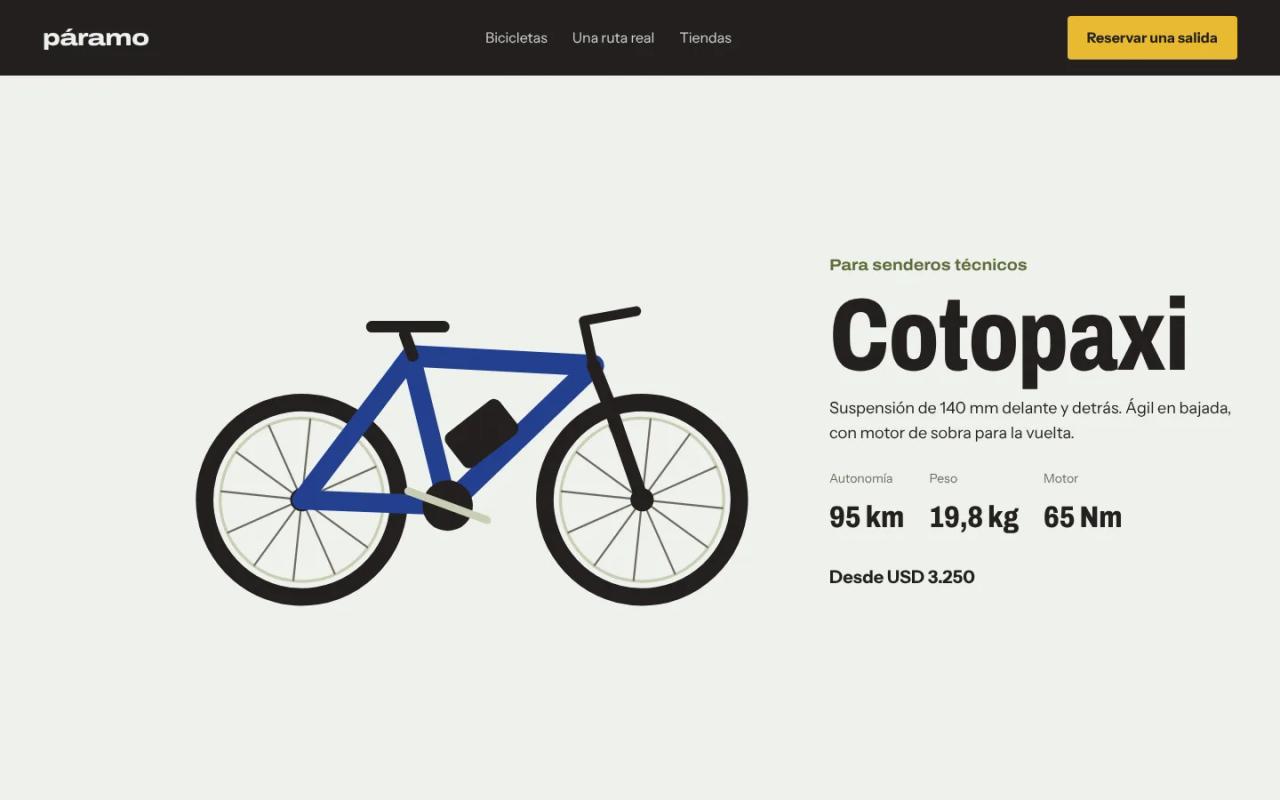
Demo 1: Páramo, from the valley to the volcano
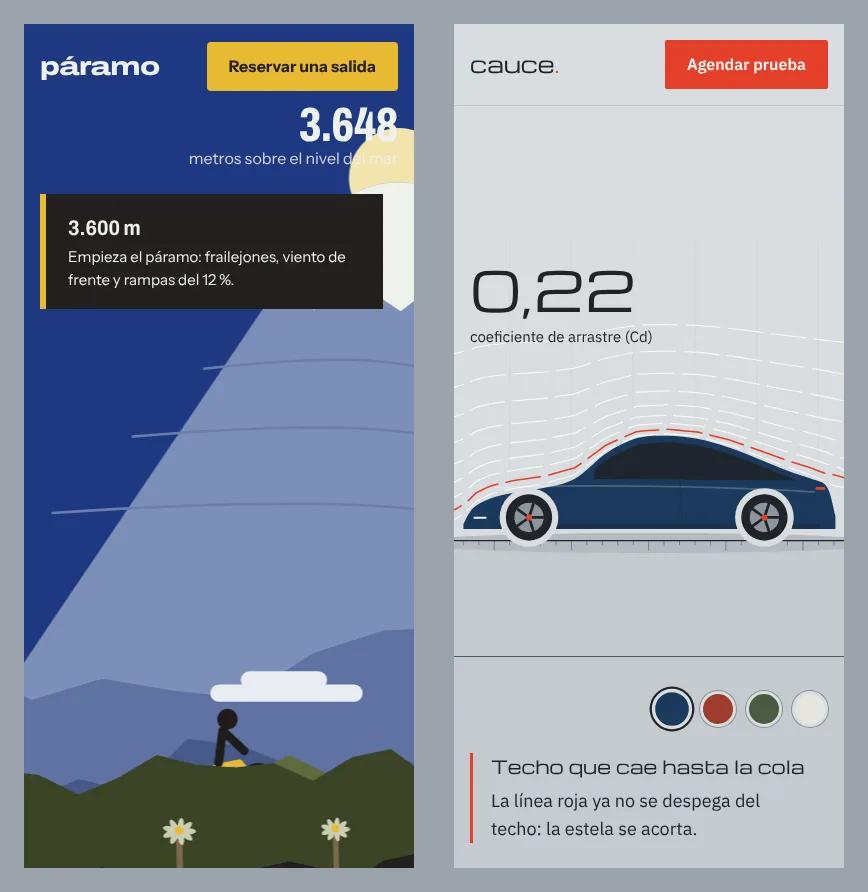
A palette taken from the Andean páramo: basalt, moss, frailejón, ice and a high-altitude cobalt sky, with signal yellow as the only accent. Typography is Archivo, a variable font with a width axis, plus Instrument Sans for body text.
- The climb. A 10 s composition with five mountain layers generated with a seeded PRNG (they always draw the same), a snow-capped volcano, clouds and frailejón plants. As you scroll, the layers split apart in parallax, the sky darkens, the sun rises behind the volcano and a rider moves along the trail. At the same time the HTML altimeter counts from 2,850 to 4,300 m, three altitude notes appear and the headline widens from 62% to 100% on the font's width axis.

- The range. Three bikes in a horizontal carousel that moves with vertical scrolling. Wheels and cranks turn with the distance travelled and each panel has its own colour.
- The route. A 6 s elevation profile (Zumbahua to Quilotoa) that plays once when it enters the screen, with distance, climb and remaining battery.
Demo 2: Cauce, the car shaped by the wind
For the cars, a light wind-tunnel palette: fog grey, graphite, ink blue and a red-orange signal colour for the reference smoke line. Typography is Michroma, wide and technical, only for headlines and figures, with IBM Plex Sans for body text.
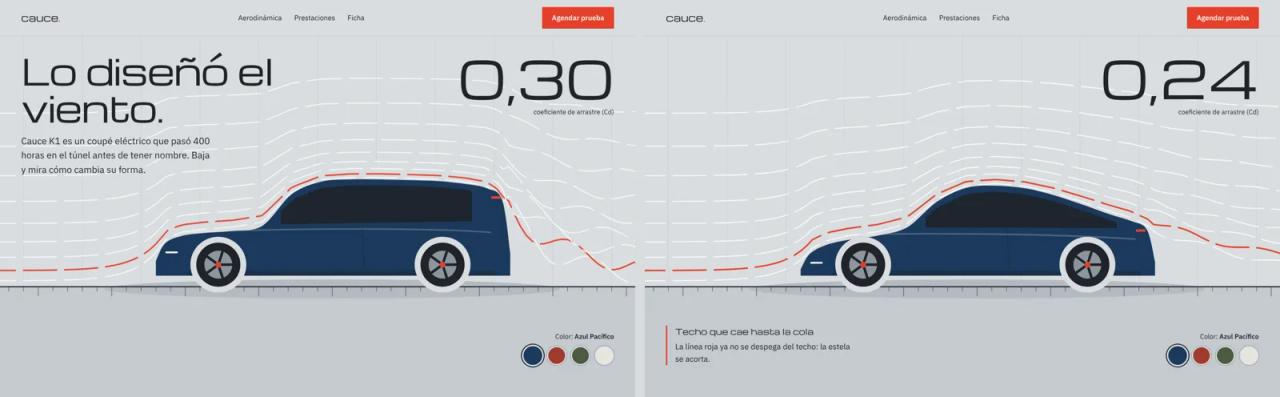
- The tunnel. The car starts as a boxy draft and, as you scroll, the body morphs into a fastback coupé. The smoke lines are recomputed every frame from the body shape: with the draft, the wake breaks into turbulence; with the final shape, the air hugs the roof. The drag coefficient drops from 0.30 to 0.21 along the same curve.
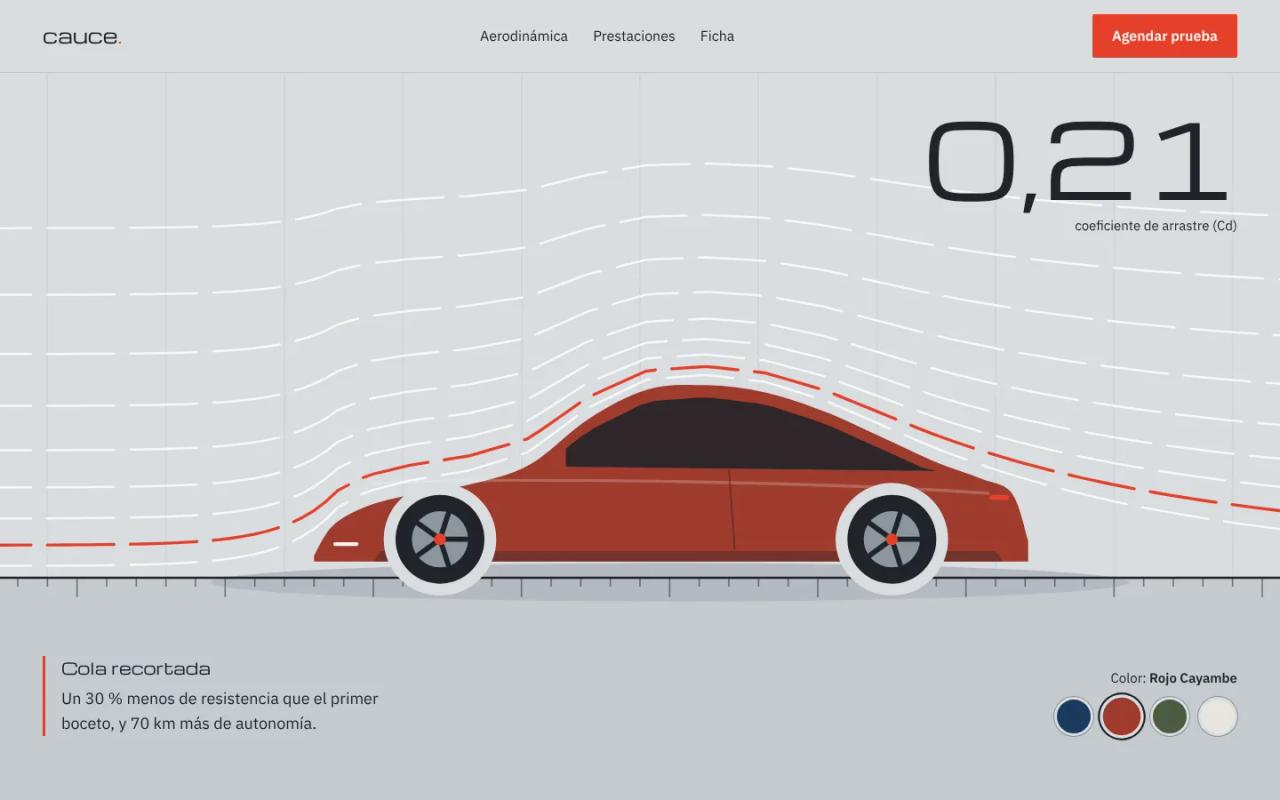
- The colour. Four paint swatches recolour the car live. The body uses a
--paintCSS variable inside the composition, and the page tweens it with GSAP throughplayer.iframeElement.
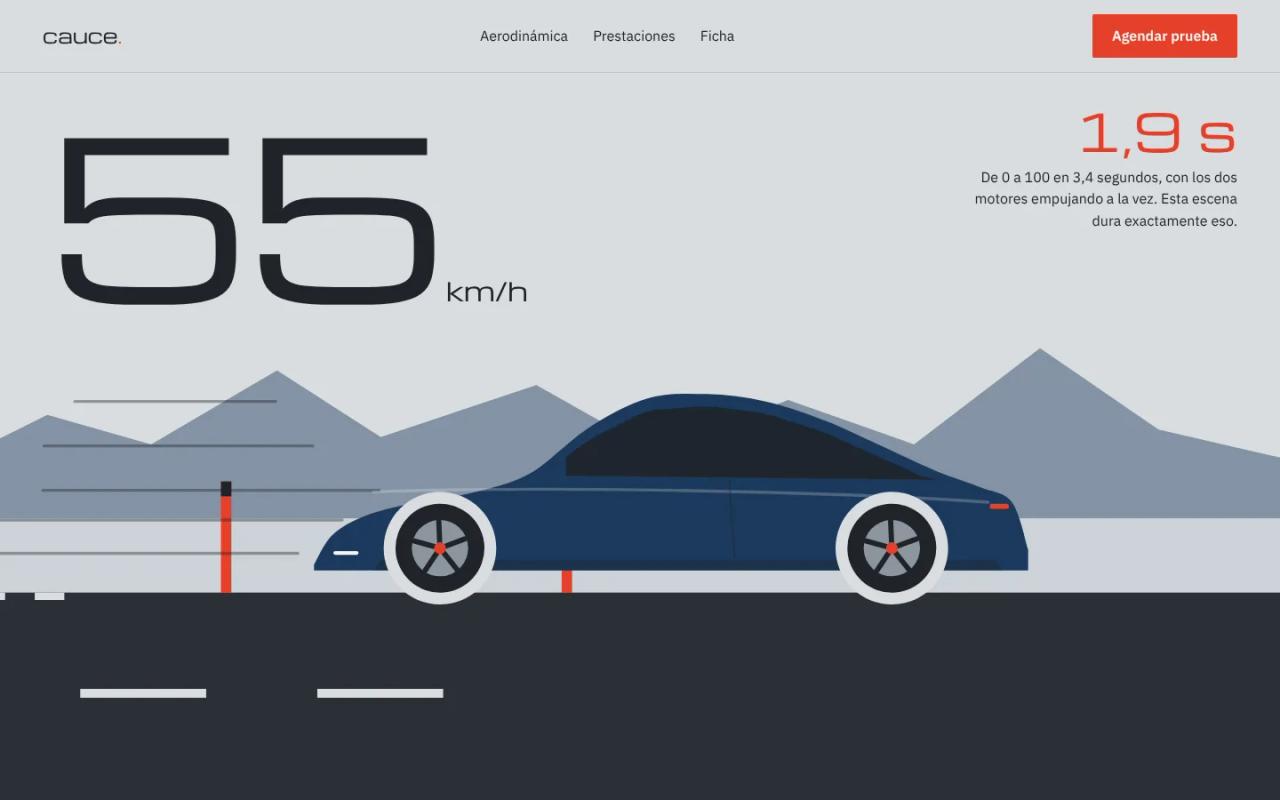
- The 0 to 100. A composition that lasts exactly 3.4 s, the time the car takes to reach 100 km/h. Road markings, posts and mountains move with constant acceleration (8.17 m/s²), the wheels turn with the distance and the rear squats at launch. On top, an HTML speedometer and stopwatch.
How long Claude took
We measured with date -u and each file's modification time.
First attempt (the templated one): 11 minutes from cloning HyperFrames to both sites working, with four looping compositions.
Second version (the published one):
| Milestone | Time (UTC) | Elapsed |
|---|---|---|
| Start, after the feedback on the first attempt | 09:27:54 | 0 min |
| Five skill repositories cloned | 09:28:07 | 13 s |
| First new composition created with `init` | 09:30:02 | 2 min 8 s |
| Route profile and scroll ↔ player bridge | 09:32:54 | 5 min |
| Climb finished after two rounds of visual fixes | 09:36:05 | 8 min 11 s |
| Bike site checked on desktop and mobile | 09:39:03 | 11 min 9 s |
| Wind tunnel and 0 to 100 compositions | 09:42:40 | 14 min 46 s |
| Car site with colour picker, checked on mobile | 09:45:09 | **≈ 17 min** |
In total about 28 minutes across both versions, plus the screenshots for this article. In that time Claude wrote four new compositions, two websites and the ScrollTrigger bridge, and checked them with Playwright screenshots at 1440 px and 390 px.
To be fair to the number: there were no photos, no real brand and no client feedback rounds. On a real project, with your photos or renders and one or two rounds of changes, plan for half a day to a day per site.
How good do they look?
Much better than the first attempt, and HyperFrames is not what made the difference: the design and GSAP skills did. With the same animation tools, the first version looked like a template and the second has one idea per site (climbing a mountain, shaping the wind) told through the scroll. The colours come from the subject rather than a generic palette, and there isn't a single gradient.
What still gives away that it's a demo:
- The illustrations are flat. Mountains, bikes and car are SVG drawn in code. A real brand would want renders or photos, and HyperFrames supports them (
<img>,<video>, Lottie, Three.js), but you have to provide them. - Mobile cropping needs thought. A composition is a fixed 16:9 canvas. In portrait the bike site crops it like a background and pans the camera with the scroll to follow the rider; the car site shrinks it so the whole car fits and fills the floor with its colour. Both work, but they are extra work.
Advantages of HyperFrames on a website
- The linter and snapshots give the agent eyes.
hyperframes checkrenders the animation and measures it: contrast, overflow, rotation pivots.snapshotgrabs frames at the seconds you ask for. Claude used both on every composition before putting it on the site. - One scene, two formats. The climb or the 0 to 100 can be exported to MP4 for social media with
npx hyperframes render, without touching the code. - It can be driven from outside. With
seek()the composition stops being a video and becomes a scene the scroll controls, and with CSS variables the page can recolour it live. - Deterministic. The mountains use a seeded generator: the same scroll position always gives the same frame, on the web and in the render.
- It's HTML, SVG and GSAP. Any front-end developer can edit it by hand. Apache 2.0 licence, commercial use allowed.
Disadvantages and limits
- Weight. The runtime is 531 KB and the player 109 KB, plus GSAP and ScrollTrigger: about 750 KB uncompressed before the first scene. Each composition also loads its own copy of GSAP inside its iframe.
- One iframe per scene. Each player is a separate document. Three or four scenes are fine; twenty are not.
- Don't use ScrollTrigger's
pin. When pinning, ScrollTrigger moves the player in the DOM and the iframe reloads (in Chromium we saw requests being cancelled in a loop). The fix was sections withposition: sticky. - The player doesn't honour
prefers-reduced-motionon its own. We handled it inhfScrub: when the user asks for less motion, it jumps to the last frame. - The skills think in video. They talk about rendering, MP4 and approval before export. Scroll-driven use isn't in the docs: we built it ourselves with
seek(). - For something this interactive, plain GSAP also works. HyperFrames pays off if you also want the scenes as video, or if you want the agent to validate each animation with
checkandsnapshot.
Errors we hit (and the fix)
Cannot set properties of undefined (setting 'main'). The hyperframes-core skill says the runtime creates window.__timelines. Inside <hyperframes-player> the runtime is injected later and the composition stays blank. Fix: add the line before creating the timeline.
window.__timelines = window.__timelines || {};
const tl = gsap.timeline({ paused: true });
The player tries to load the runtime from jsDelivr. That domain was blocked in our container, and in production you shouldn't depend on a CDN either. Fix: copy hyperframe.runtime.iife.js from node_modules/@hyperframes/core/dist/ and point runtime-src at it.
The iframe reloaded while scrolling. It was ScrollTrigger's pin, as explained above. Fix: tall sections with a sticky child.
gsap_non_transform_motion when animating letterSpacing. The linter rejects it because it jumps pixel by pixel. In the second version the headline widens on the font's width axis (font-stretch), which is page HTML and doesn't go through the linter.
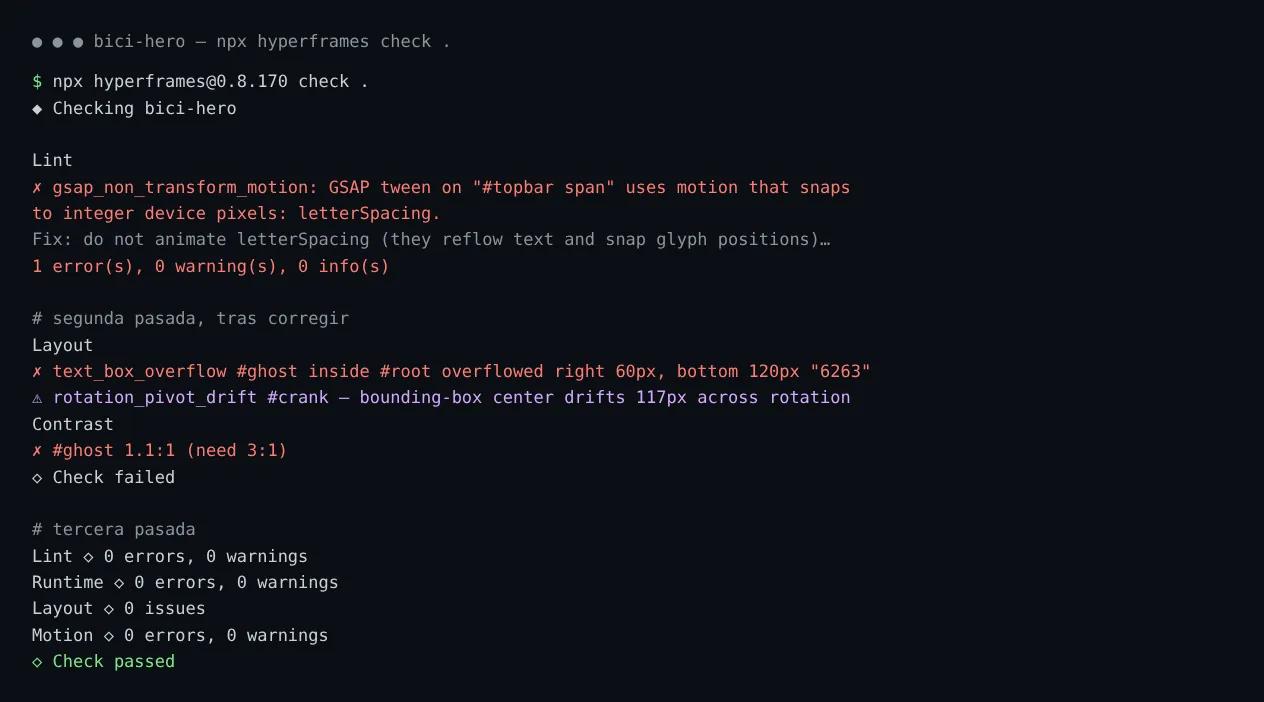
sweep_static: "Nothing on screen moved under seek". It shows up on compositions that redraw SVG paths with setAttribute (the tunnel smoke, the road) instead of animating properties. It's a warning, not an error: the snapshot frames confirm they do move.
FAQ
Can I use HyperFrames on a website without rendering video? Yes. The <hyperframes-player> component plays the composition live in the browser. No FFmpeg needed on the server.
Can a composition be driven by the scroll? Yes, with player.seek(seconds). Connect a ScrollTrigger's progress to the composition's duration, as in hfScrub above.
Does it work with Next.js or React? Yes. Import @hyperframes/player in a client component and use the <hyperframes-player> tag. Compositions go in public/.
Do I need to know GSAP? Not to ask Claude for it. For hand edits it helps: each movement is a tl.to(...) line with its timing.
Can I use it for free on client projects? Yes, the Apache 2.0 licence allows commercial use. Check the licences of any fonts and images you add; the ones in these demos come from Fontsource (OFL).
Conclusion
HyperFrames works for immersive websites if you use it as a scene engine rather than a video player: the page drives it with the scroll, the text stays in HTML and every scene can be exported to MP4 when you need it. What made the difference in the result wasn't the animation tool but giving the agent design judgement: with the design and GSAP skills, the same task went from template to something worth showing.
Next step: open the bike and car demos and scroll slowly. If you want to try it yourself, start by installing HyperFrames, and if you're curious how Claude Code learns these tasks, read the Claude Code skills guide.
// source code
// implementation
More on Open source tools
- Free alternatives to paid apps
- Run it on your server
- Design, image and video
- Free alternatives to paid apps
- Free alternatives to paid apps
- Design, image and video