Filee: the free, open source file converter you use by dragging (266 formats, nothing uploaded)
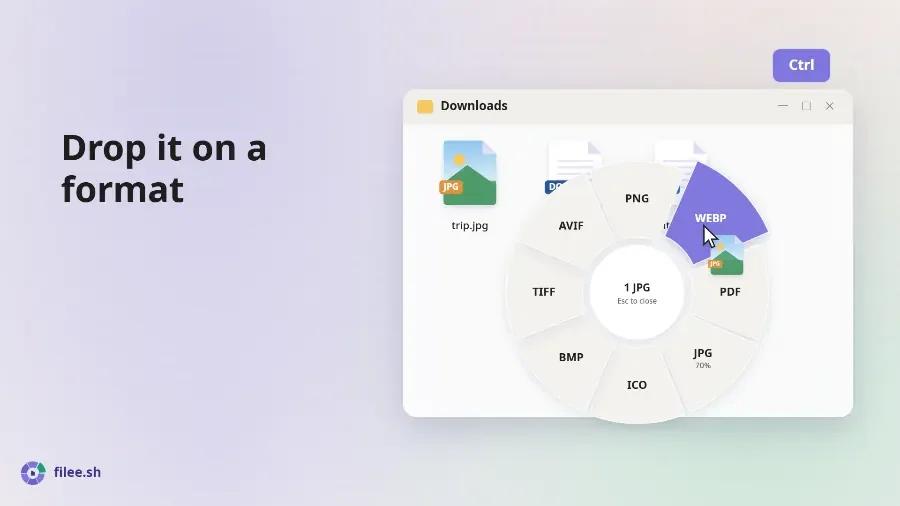
Filee is a free, open source, offline file converter you use by dragging: hold Ctrl (Option on macOS), drag a file, and a ring menu (the "donut") opens right at your cursor with the formats it can become. Drop it on "PDF", "WEBP" or "MP4" and the result appears next to the original. It handles 266 formats (images, PDF, Word, Excel, PowerPoint, e-books, video, audio, CAD, fonts, 3D models...) without Office, without LibreOffice and without uploading anything. It is MIT licensed and runs on Windows, Linux and, as a preview, macOS.
If you regularly open a "convert HEIC to JPG" or "Word to PDF" website and upload client documents to it, this is the tool you were looking for. We read the source of KnifeLemon/Filee (version 2.1.0, released October 24, 2026), built its filee command and converted test files to tell you what it really does, what data leaves your computer and when you will need to download something extra.
What Filee is and who makes it
| Item | Value |
|---|---|
| Repository | [KnifeLemon/Filee](https://github.com/KnifeLemon/Filee) |
| Author | Myeonggu Kim (KnifeLemon) and contributors |
| Version reviewed | 2.1.0 (October 24, 2026), commit `34a854b` |
| License | MIT; third-party components keep their own (`THIRD-PARTY-NOTICES.md`) |
| Platforms | Windows 10/11, Linux x64 and ARM64 (Ubuntu 22.04+), macOS 13+ as a preview |
| Stack | .NET 10, C#, Avalonia UI, ImageMagick, PDFium, PDFsharp |
| UI languages | 17, including English, Spanish and Portuguese |
| Price | Free, no paid tier; funded by donations |
The project is very young and moves fast: the first commit is from September 30, 2026, and in under a month it has shipped 29 releases and more than 1,200 commits. Trendshift ranked it the number 1 C# repository of the week. The upside is that bugs get fixed almost daily; the thing to keep in mind is that it still changes a lot between versions.
How the donut works
The point is that you never open a window. The flow, according to docs/ARCHITECTURE.md:
- Trigger. Filee listens to the keyboard and mouse through SharpHook. When it sees the modifier key plus a drag, it opens the donut before it knows which files you are carrying.
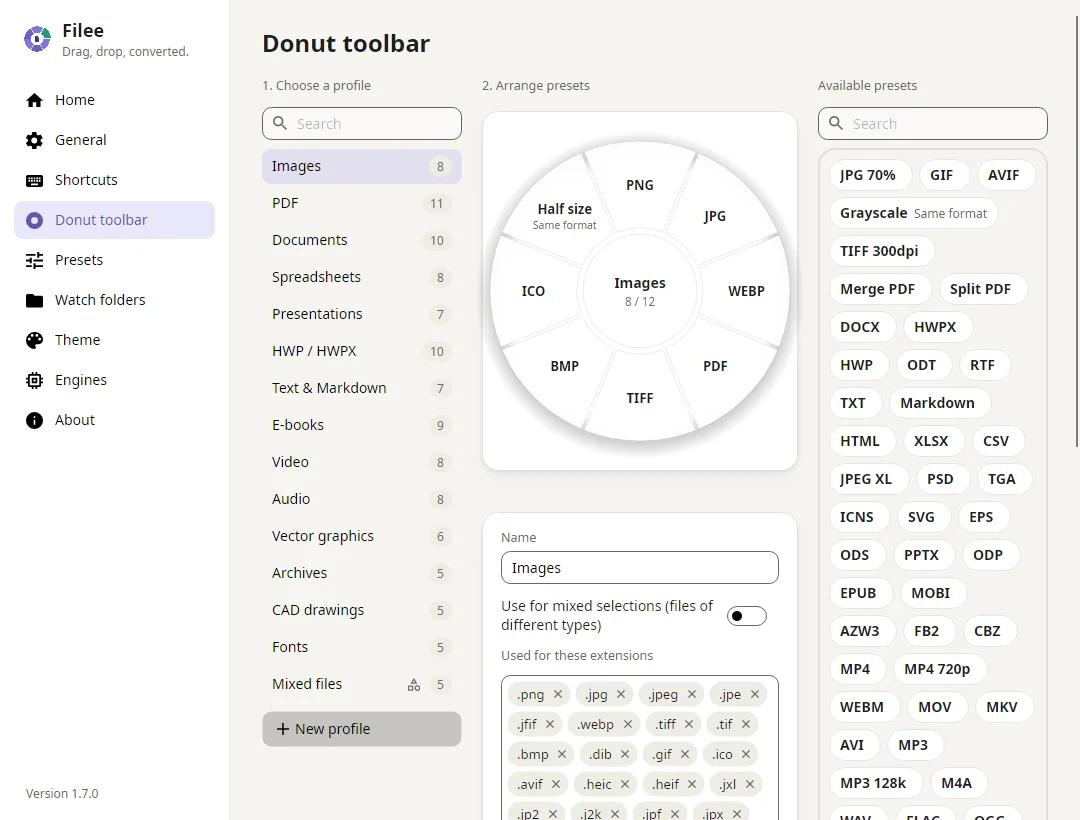
- Profile. When the drag enters the donut, it reads the extensions and picks the profile for that file type (Images, PDF, Documents, Video...). Slices that cannot handle those files are disabled, with the reason.
- Drop. Each slice is a *preset* (a format plus options). Filee always reports the drop as a *copy*, so Explorer never deletes the source.
- Route. For each file, a planner finds the cheapest chain of converters to the target format, at most 3 hops (for example HWP → HWPX → DOCX). It is Dijkstra over the available converter edges.
- Result. Files convert in parallel, the output is saved next to the source under a new name (it never overwrites it, unless you turn on "Replace the original", which sends the source to the Recycle Bin) and it shows up in "Recent conversions".
Two details worth knowing:
- The donut has two sides. Press Tab or turn the mouse wheel to flip it to less common formats and tools: crop, merge PDFs, compress, cut a video clip...
- It works from the browser. Drag a picture, a link to a file or a download out of Chrome, Edge, Firefox or Safari and it converts it the same way. The download is made without your cookies or sign-in, is capped at 2 GB, and programs and installers are refused by extension, media type and first bytes.
If you don't like the gesture, there is also the Explorer right-click menu, a keyboard shortcut, the drop zone in the main window and the filee command.
Which formats it converts (and which need an extra engine)
What sets Filee apart from other desktop converters is that most office conversions need neither Microsoft Office nor LibreOffice. Word, Excel and PowerPoint files are read in-process and turned into PDF by Filee's own layout engine.
| Type | Input examples | Outputs | Works out of the box? |
|---|---|---|---|
| Images | JPG, PNG, WEBP, AVIF, HEIC, PSD, camera RAW, SVG | Each other, PDF, traced SVG, ICO | Yes (writing HEIC needs FFmpeg) |
| DOCX, TXT, PNG, JPG, tables to XLSX, PPTX; merge, split, compress | Yes | ||
| Documents | DOCX, EML, Outlook MSG | PDF, DOCX, EPUB, TXT, HTML | Yes |
| Older documents | DOC, ODT, RTF, Pages | PDF, DOCX, ODT | Needs LibreOffice |
| Spreadsheets | XLSX, XLS, ODS, CSV | PDF, XLSX, CSV, JSON | Yes |
| Presentations | PPTX | PDF, PNG, JPG, DOCX | Yes (PPT needs LibreOffice) |
| E-books | EPUB, MOBI, AZW3, FB2, CBZ | PDF, EPUB, KEPUB, DOCX | Yes (writing MOBI needs calibre) |
| Video and audio | MP4, MOV, MKV, MP3, FLAC, WAV | MP4 (H.264, HEVC, AV1), WEBM, GIF, MP3, M4A | Needs FFmpeg |
| Archives | ZIP, 7Z, RAR, TAR, ISO | Extract, ZIP, 7Z, TAR.GZ | Yes (7-Zip is bundled) |
| CAD | DWG, DXF | PDF, SVG, PNG, DWG ↔ DXF | Yes |
| Fonts, data, 3D, maps | TTF, WOFF2, JSON, YAML, GLB, STL, GeoJSON, KML, GPX | Each other, CSV, XLSX | Yes |
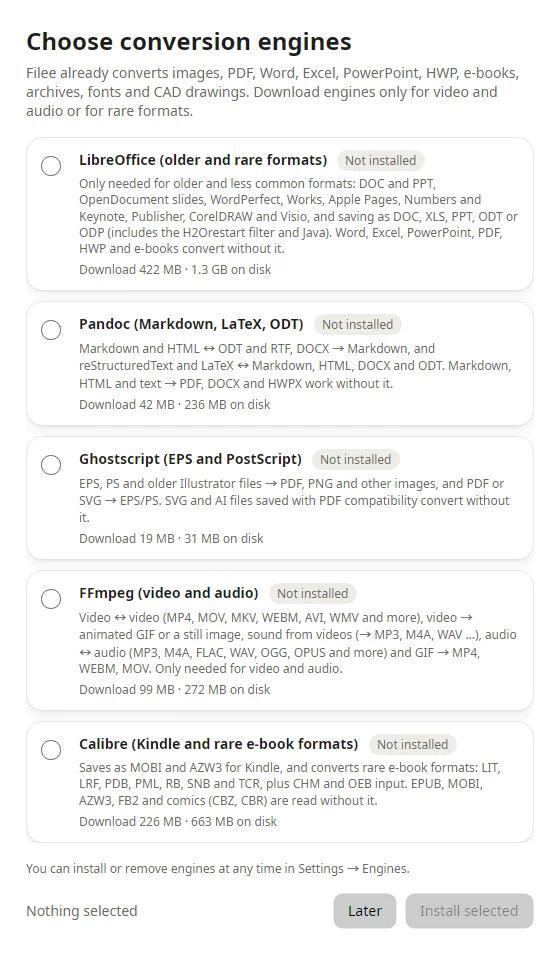
Optional engines are downloaded only if you pick them, from official URLs pinned in engines.json, with a SHA-256 check before unpacking:
| Engine | For | Download | On disk |
|---|---|---|---|
| FFmpeg | All video and audio | ~100 MB | 272 MB |
| LibreOffice | DOC, PPT, RTF, OpenDocument and rare formats | ~420 MB | 1.3 GB |
| Pandoc | Markdown ↔ DOCX/ODT, LaTeX, reStructuredText | ~42 MB | 240 MB |
| Ghostscript | EPS, PostScript | ~20 MB | 31 MB |
| calibre | MOBI, AZW3 and rare e-books | ~216 MB | 660 MB |
| Tesseract | OCR: scans to searchable PDFs | ~50 MB | 160 MB |
One honest caveat the project documents itself: its built-in document-to-PDF engine does no OpenType shaping, so Arabic, Hebrew and Indic scripts would come out wrong. Filee detects them and either routes through LibreOffice or refuses, instead of giving you a broken PDF. English, Spanish and other Latin-1 languages are not affected.
Installing Filee
Downloads are on the Releases page:
- Windows 10/11: run
Filee-<version>-win-Setup.exe, or unzip the portable ZIP and openFilee.exe. Setup can add the Explorer menu, start at sign-in, thefileecommand and the optional engines. Since 2.1.0 the executables are code-signed with a Certum certificate, so SmartScreen and antivirus tools block it less often (a brand-new release may still trigger "More info" → "Run anyway"). - Linux x64/ARM64 (Ubuntu 22.04+): unpack the package and run
./install.sh(no root, needs Python 3). The drag gesture needs X11; on Wayland use the drop zone and the file manager's right-click menu (GNOME and Hyprland have experimental support). - macOS 13+ (preview): unpack the
osx-arm64orosx-x64package and run./install.sh, or drag the app from the.dmg. It is not notarized, so allow the first start in System Settings → Privacy & Security → Open Anyway.
Silent install on Windows (handy when rolling it out to several office PCs):
Filee-2.1.0-win-Setup.exe /VERYSILENT /SUPPRESSMSGBOXESConverting from the terminal with the filee command
Filee ships a CLI that uses the same engines and presets as the app. These are the real 2.1.0 commands and options (from src/Filee.Cli/Help.cs):
filee convert photo.heic --to jpg
filee convert *.png --to webp --quality 80 -o converted
filee convert D:\Scans --recursive --preset to-pdf
filee watch D:\Inbox --to pdf --move-originals
filee formats docx
filee presets| Option | What it does |
|---|---|
| `-t, --to <format>` | Target format: `jpg`, `pdf`, `docx`, `mp4`... (`filee formats` lists them) |
| `-p, --preset <preset>` | Use an app preset, by id or name |
| `-o, --output <folder>` | Save there instead of next to the source |
| `-r, --recursive` | Include subfolders |
| `-q, --quality <1-100>` | Quality for JPG, WebP, AVIF |
| `--overwrite` / `--skip` | What to do when the output exists (default: add a number) |
| `--keep-dates` | Copy the source's created and modified dates |
| `--json` | Print the result as JSON, for scripts |
Exit codes are script-friendly too: 0 all converted, 1 some failed, 2 wrong arguments or a missing input, 3 nothing to convert.
filee watch converts every file that lands in a folder (it waits until the copy is complete) and writes it to converted/. With --move-originals it moves the sources to originals/. It is the simplest way to set up an "inbox" where a team drops scanned invoices, phone photos or documents and gets PDFs or JPGs without anyone lifting a finger.
Hands-on test: what the CLI did on our machine
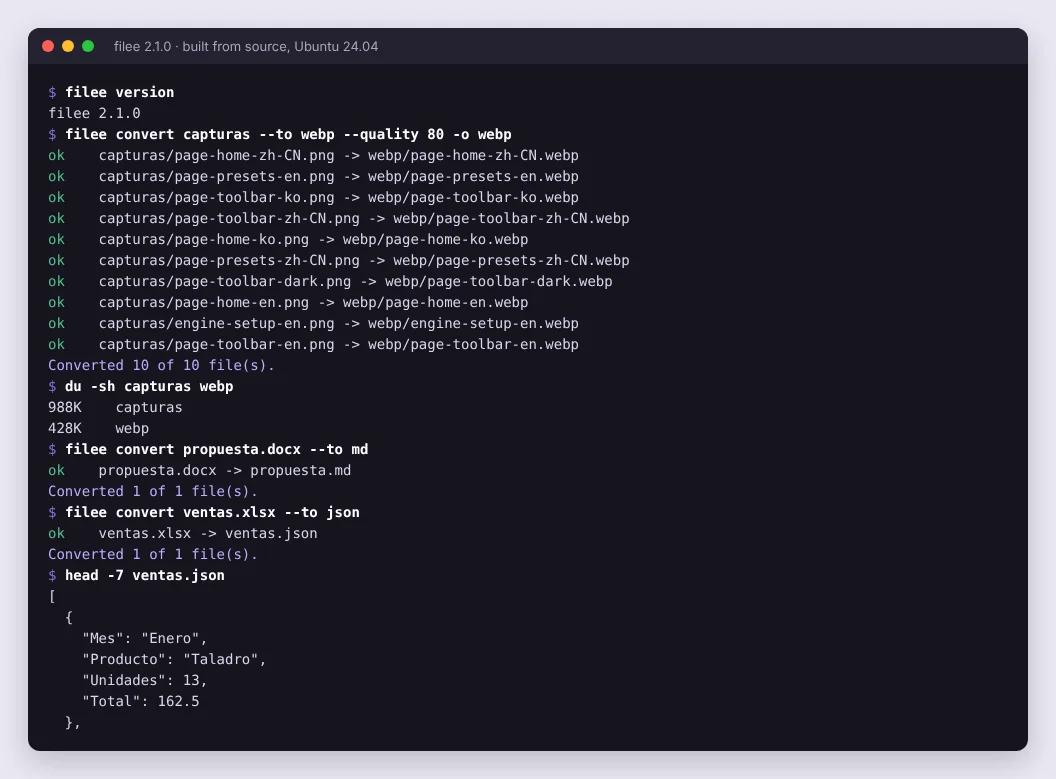
We didn't want to stop at the README. We built the 2.1.0 CLI from source with the .NET 10 SDK on Ubuntu 24.04 and gave it test files: 10 PNG screenshots, a business proposal in DOCX (with a title, a list, a table and accented Spanish text) and a sales sheet in XLSX.
Results:
| Test | Result | Time |
|---|---|---|
| 10 PNG → WebP quality 80 (`--to webp --quality 80`) | 10 of 10; from 987 KB to 413 KB (−58%) | ~1 s total |
| XLSX → JSON | One object per row, headers as keys and numbers as numbers (`13`, `162.5`), not strings | ~0.8 s |
| DOCX → Markdown | Headings, list, table and accents correct; the paragraph in Word's "Title" style is not in the body (Pandoc moves it to metadata) | ~1 s |
| JPG → AVIF | 68 KB → 58 KB | ~2 s |
| Merge 2 PNGs into a PDF (`--preset merge-pdf`) | A 2-page PDF named `<first-file>_merged.pdf` | ~1 s |
| PDF exported from Excel → XLSX | Fails with a clear message: "This PDF has no tables drawn with lines" | — |
Times include .NET start-up on every command, so inside the app (already running) they are shorter.
Two things we learned that the README doesn't tell you:
- Engine discovery really works. Our machine already had LibreOffice, Pandoc and FFmpeg installed, and Filee found them on its own with no setup. A build from source lacks the
rhwpengine the installer bundles, so DOCX → PDF couldn't take Filee's own route: instead of failing, it used LibreOffice (the PDF's *Producer* field says so). With the Windows installerrhwpis included and you don't need LibreOffice for that. DOCX → Markdown went through Pandoc, which is the engine Filee uses for that conversion. It also flagged a missing font (missing fonts: Courier) instead of silently substituting it. - PDF to Excel only reads tables drawn with lines. If the PDF doesn't draw cell borders, it refuses and tells you why. Better than an empty sheet.
Privacy: what leaves your computer
This is the big advantage over conversion websites. The README says Filee uploads nothing and sends no telemetry, and we checked the code: there are only four places that open HTTP connections.
| Connection | File | When |
|---|---|---|
| Update check against `api.github.com` | `Filee.App/Services/UpdateService.cs` | At start and every few hours; turn it off in Settings → About |
| Optional engine downloads | `Filee.App/Services/EngineDownloadService.cs` | Only when you install one |
| OCR language downloads | `Filee.Engines/Ocr/OcrLanguages.cs` | The first time a preset uses that language |
| Downloading a file dragged from the browser | `Filee.Core/Web/WebDownloader.cs` | Only if you drag a link |
None of them sends your files anywhere. For a small business or agency converting contracts, payslips or client photos, that also solves a data protection problem: the document never leaves the machine.
Common errors
Filee doesn't start on Windows 10 (no window, no error). It happens on long-unpatched Windows 10 with CPUs that support Hardware-enforced Stack Protection (CET): Windows enables it but lacks a piece .NET needs. Install the latest cumulative update. If you can't, turn the protection off for Filee only, in PowerShell as administrator:
Set-ProcessMitigation -Name Filee.exe -Disable UserShadowStack
Set-ProcessMitigation -Name filee-cli.exe -Disable UserShadowStack
A donut slice is grey with "Needs LibreOffice" or "Needs FFmpeg". That format needs an optional engine. Install it in Settings → Engines; if it is already installed on your system, Filee finds it and marks it "Found on this PC".
On Linux with Wayland the gesture doesn't open the donut. The global gesture needs X11. Use the drop zone or the file manager's right-click menu.
macOS says the app "can't be opened". It isn't notarized. System Settings → Privacy & Security → Open Anyway.
FAQ
Is Filee free? Yes. It is open source under the MIT license, with no paid tier or limits. The author accepts donations (GitHub Sponsors, Patreon, Ko-fi).
Do I need Microsoft Office to convert Word or Excel to PDF? No. DOCX, XLSX, XLS and PPTX are converted by Filee's own engines. Only older or less common formats (DOC, PPT, RTF, OpenDocument text) need LibreOffice. Filee never uses Microsoft Office even if it is installed.
Can it convert iPhone HEIC photos to JPG? Yes, with nothing else installed. The other way, JPG to HEIC, needs FFmpeg.
Does it compress PDFs? Yes, with PDFsharp and, if the preset asks for it, Ghostscript for smaller files.
Does it do OCR? Since 2.1.0, yes: with Tesseract (optional download) it turns scans and pictures into searchable PDFs or editable documents. On a Mac it uses Apple Vision with no download.
Is it safe? The code is open, there is no telemetry, and since 2.1.0 the Windows binaries are signed. Files downloaded from the browser are never run and installers are refused. As with any project that is one month old, update often.
What are the alternatives? Online converters upload your files to a server. On the desktop, File Converter (GPL-3.0, Windows only) works from the right-click menu. Filee adds the drag gesture, office conversions without Office and Linux and macOS support.
Conclusion
Filee is one of those tools you install once and that saves you clicks every day: a photo to WebP for the web, an Excel sheet to PDF for a client, a video to MP4, all without uploading anything. The donut gesture is the eye-catcher, but the real value is that Word, Excel, PowerPoint and PDF work without Office, and that the code confirms your files stay on your computer.
If you like free alternatives like this, also see BG0 for removing image backgrounds in the browser and Recordly, the open source screen recorder.
// source code
// implementation
More on Open source tools
- Free alternatives to paid apps
- Run it on your server
- Design, image and video
- Free alternatives to paid apps
- Free alternatives to paid apps
- Design, image and video