OpenMuse: CopilotKit's open source personal agent, installed and tested
OpenMuse is an open source personal agent from CopilotKit: you ask for an outcome ("fill in this form", "summarize my spending", "watch this page") and the agent makes a plan, works on the server with its own browser, a Linux terminal and your files, and asks for approval before it sends anything. It is MIT licensed, ships an iOS, Android and web app, and went from zero to more than 5,500 GitHub stars in six weeks.
We installed it in a clean Linux container, ran its 487 tests and used the web app for real with the fictional sample data it ships with. Here is what it is, how it is built, how to install it, what worked in our test and the fine print the README only mentions in passing: chat does not start without a CopilotKit Intelligence key, an external service that is not part of the MIT code.
What OpenMuse is and who builds it
- Repository: github.com/CopilotKit/OpenMuse
- Author: CopilotKit, the company behind the React copilot framework and the AG-UI protocol.
- Version reviewed: 0.1.0-alpha (first public release on 15 September 2026), at commit
50b016cfrom 25 October 2026. - License: MIT ("Copyright (c) 2026 OpenMuse contributors"). You can use it, modify it and sell it. Note that CopilotKit Intelligence, the service that stores conversations, is not covered by that license.
- Status: alpha, meant for self-hosting and building on. The README itself says "Clone this template and customize it however you want".
The idea is the "agent mode" of commercial assistants, but with the code on your own server: the agent has a computer (persistent Chromium plus an optional Linux container), its work is visible (plans, steps, receipts) and results arrive as cards in the chat: emails, web pages, PDFs, plans and spending summaries.
What it does: the app's screens
The app (Expo + React Native) has five tabs at the bottom: Chat, Activity, Ideas, Goals and Apps. This is what the alpha includes, based on its feature table and what we saw using it:
| Surface | What it does |
|---|---|
| **Chat** | CopilotKit chat with streamed AG-UI events, a message queue, drafts that survive navigation, and email, browser, PDF and finance cards. |
| **Agent computer** | Persistent Chromium profiles with a **Take control** button so you can take over; optional Linux terminal with a receipt per command and a file editor. |
| **Activity** | Durable tasks with a plan, progress, input requests, pause, resume, cancel, approvals and receipts. |
| **Ideas** | Suggestions drawn from your mail and calendar, with the evidence shown; accept, edit or dismiss them. |
| **Goals & tracking** | Goals with milestones and recurring checks on public pages: changes, text appearing or a price dropping below a threshold. |
| **Documents** | Email attachment → PDF → form values → filled copy → reviewed reply → receipt. |
| **Finance** | Import a transaction CSV and get a summary with categories and a savings goal. |
| **Gmail & Calendar** | Google OAuth adapters; every send or calendar change requires a stored review. |
What it does not do yet (see the roadmap): automatic bookings and payments, bank, health or social connectors, push notifications, voice, multi-user and OCR for scanned PDFs.
How it is built
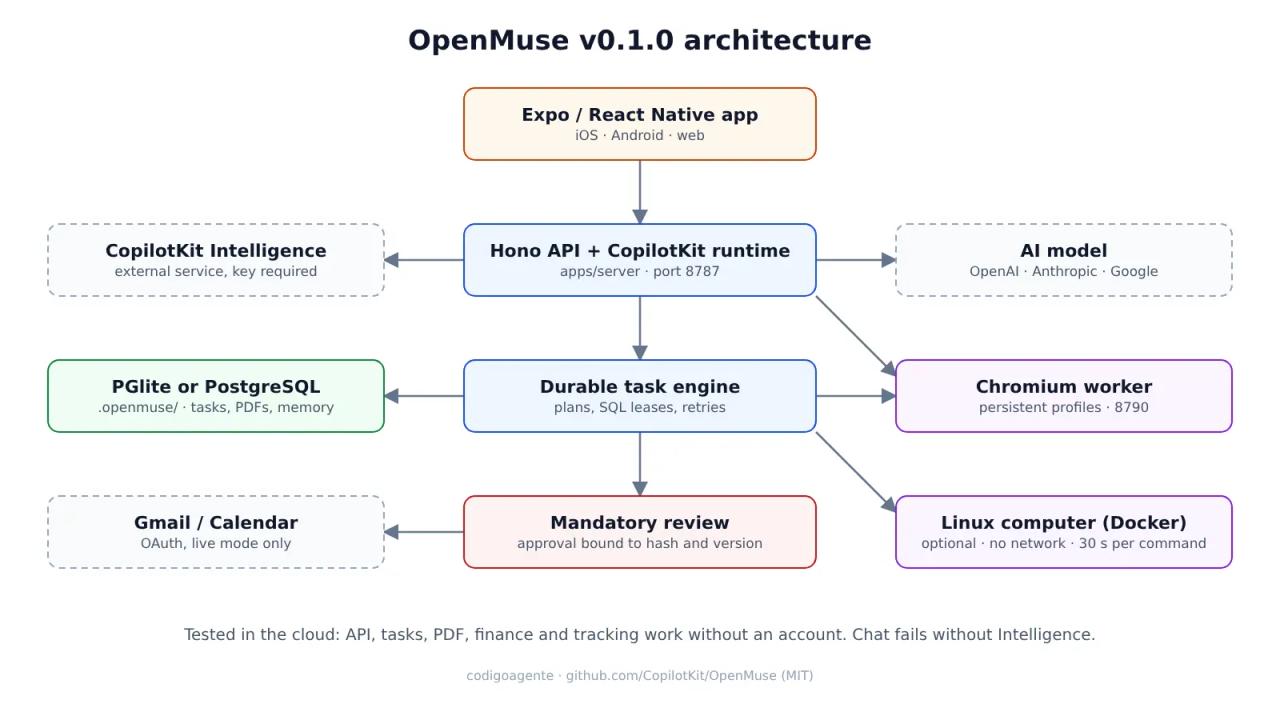
It is a TypeScript monorepo managed with pnpm. The parts that matter:
apps/server: a Hono API with the CopilotKit runtime, the task engine, reviews, files and persistence. It defaults to PGlite (embedded Postgres) in.openmuse/; to run the task worker as a separate process you need PostgreSQL, because PGlite cannot be opened by two processes.apps/mobile: the same UI for iOS, Android and web, using the headless hooks from@copilotkit/react-native.apps/worker: a Playwright and Chromium browser service, token-protected, with persistent profiles on port 8790.apps/computer: a nonroot Linux Docker image for the agent's terminal.- Models: the agent uses TanStack AI with OpenAI, Anthropic and Google adapters (
MODEL=provider/model). The Render Blueprint defaults toopenai/gpt-5. - Web search: on by default through Parallel's free Search MCP. Queries and some context go to Parallel; turn it off with
WEB_SEARCH_ENABLED=false.
Security is the most carefully designed part of the project. Every external action (sending an email, creating an event) becomes a proposal bound to the account, the content and the version, and the server will not dispatch it without a recorded approval. If a write ends in an uncertain state after a network failure, it is never retried automatically. The Linux container runs as UID 1000 with a read-only root filesystem, no capabilities, no network, 512 MB of RAM, one CPU and 30 seconds per command. The README sums it up in a line worth reading twice: website, email and document content "supplies evidence, not permission to act".
Requirements and installation
The README asks for Node 24 LTS, pnpm 11.19.0 and a CopilotKit Intelligence project key. The sample app needs no model, Google account or Docker. We used Node 22.22.0 (package.json allows >=22) and it worked.
git clone https://github.com/CopilotKit/OpenMuse.git openmuse
cd openmuse
pnpm install --frozen-lockfile
cp .env.example .env
npx copilotkit@latest login
npx copilotkit@latest project select
pnpm dev
project select generates two values for the server's .env: CPK_INTELLIGENCE_API_KEY and CPK_TELEMETRY_ID. Start the web app in another terminal:
pnpm dev:webThe app runs at http://localhost:8081 and the API at http://localhost:8787/api/health. For iOS or Android: pnpm --dir apps/mobile ios or pnpm --dir apps/mobile android (Xcode or the Android tooling required).
To let the agent browse, add the Chromium worker:
pnpm --dir apps/worker exec playwright install chromium
pnpm dev:browser
with BROWSER_WORKER_URL=http://127.0.0.1:8790 and a random WORKER_TOKEN of at least 32 characters in .env. And for the Linux terminal:
docker build -t openmuse-computer:local apps/computer
COMPUTER_ENABLED=true pnpm dev
For a real model: AGENT_BACKEND=model, MODEL=anthropic/<model-id> (or openai/..., google/...) and the matching provider key.
Deploying it to a server
The repo includes a render.yaml with three services: the API (Standard plan with a 1 GB disk), the static web app and the browser as a private service. The README warns that at 512 MB the API runs out of memory before it binds a port, because of PGlite. If you prefer your own VPS, there is also an infra/compose.yaml for the browser worker with a read-only container, cap_drop: ALL and a 2 GB memory limit.
In live mode (the one you need beyond localhost) you also need OPENMUSE_ACCESS_KEY (24+ characters) and TOKEN_ENCRYPTION_KEY (32 bytes, base64). It is one owner per deployment protected by a shared key: not a multi-user system.
Our real test in a clean container
We installed it in a fresh Linux container with the fictional sample data (sample mode) and no CopilotKit account, to see which parts of the product work on their own.
1. Tests: 487 out of 487
pnpm install --frozen-lockfile took 18 seconds. pnpm test ran 487 tests in 2 minutes: 487 passed, 0 failed, 0 skipped. They cover the task engine, persistence across PGlite restarts, worker races, reviews, Google adapters against mocked HTTP servers, the browser and the computer. For comparison, the September verification document mentioned 154 tests: the project is moving fast.
2. Chat does not start without CopilotKit Intelligence
With a placeholder key, the API starts (/api/health returns {"ok":true,"mode":"sample","agentConfigured":true}) and the Expo web export loads, but chat shows this:
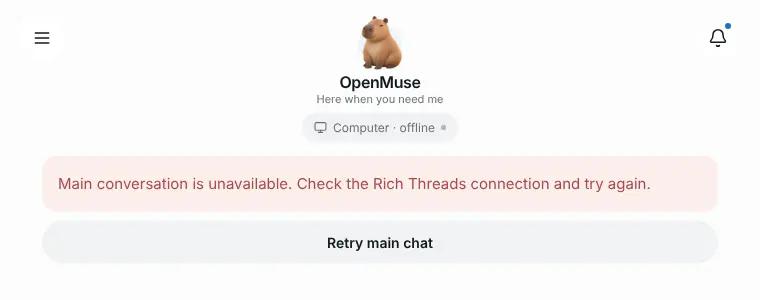
The server log shows why: the API calls api.intelligence.copilotkit.ai to create the main thread (getOrCreateThread) and returns a 502 when that fails. In other words, chat, the heart of the product, depends on an external CopilotKit service in every mode, local included. The sample app needs no model, but it does need that account. Sign-up is free, but it is worth knowing before you call it "100% self-hosted".
3. What works without an account: tasks, PDFs, finance and tracking
Everything that does not go through chat works against the local API. The Ideas tab shows two suggestions drawn from the fictional mailbox, each with its source email:
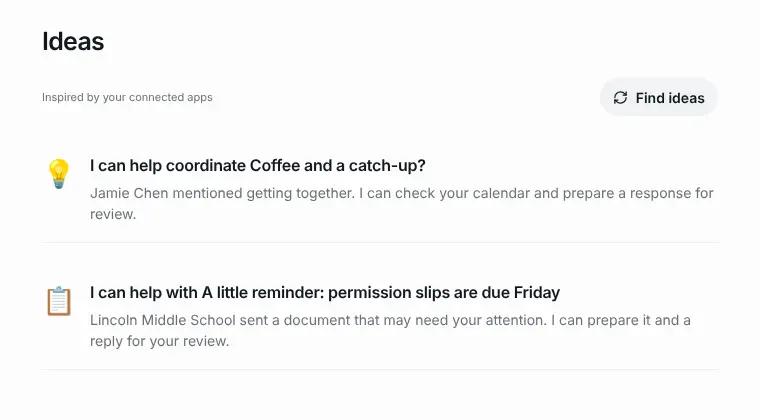
We pressed Start this on the permission slip. The task found the attached PDF and stopped to ask for input: it lists the fields the form supports (participant_name, guardian_name, emergency_contact, emergency_phone, additional_notes, permission_granted) and notes that the original stays intact.
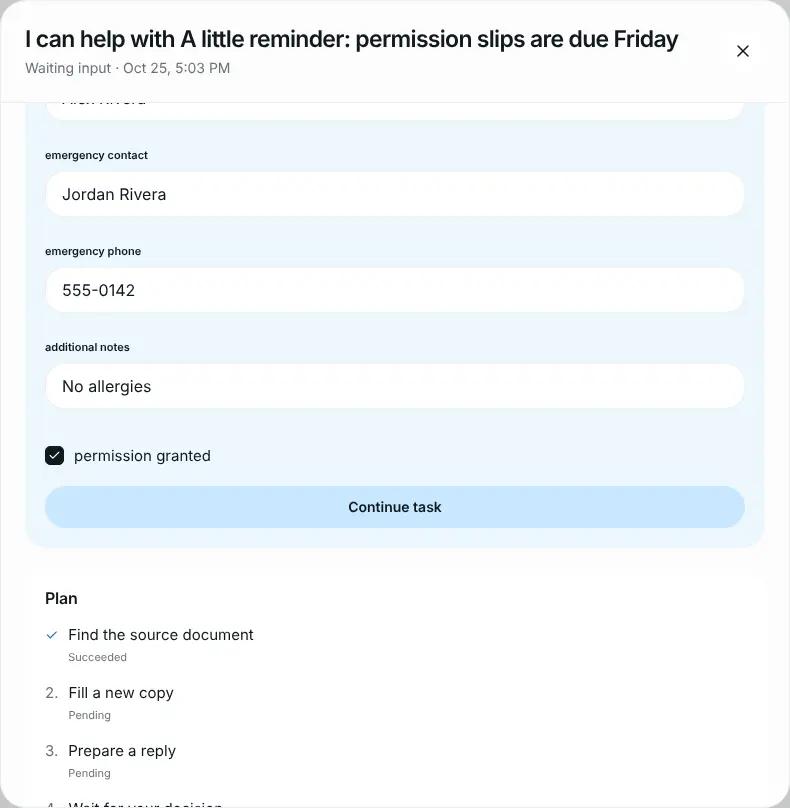
On continuing, the server generated Field trip permission slip — filled.pdf (2 pages), prepared the reply to the school and moved to Waiting approval. The review shows the account, recipient, subject, body, the attachment with its version (81948de5) and a 30-minute expiry:
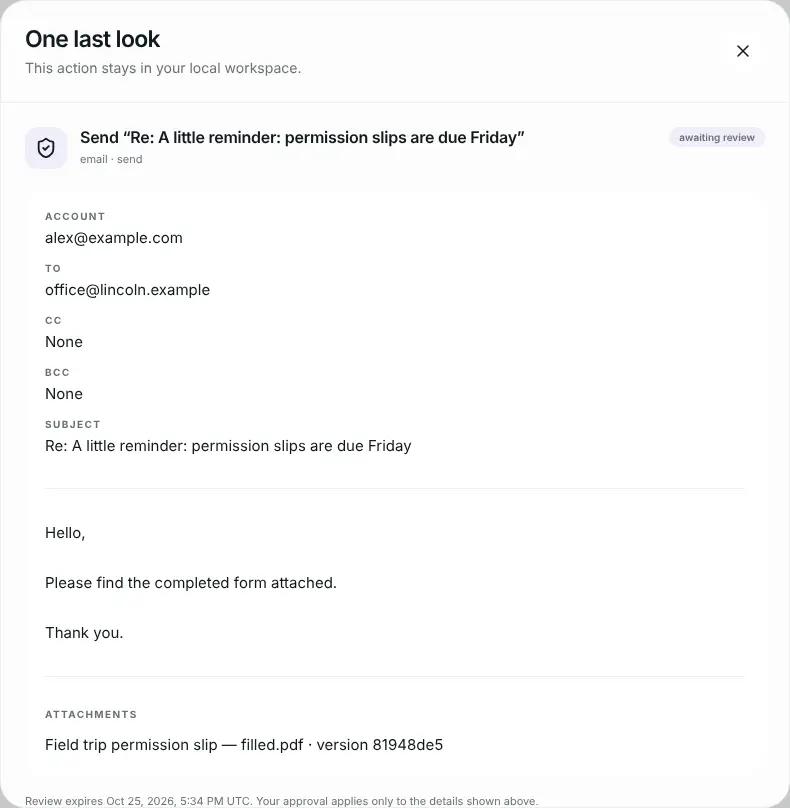
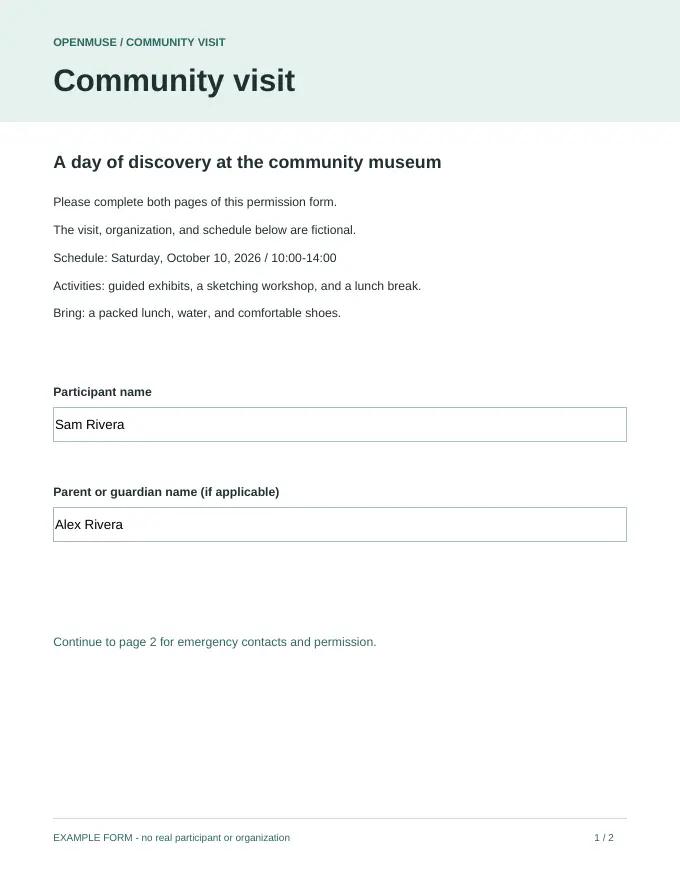
We approved with Approve locally and the task finished with "Reply saved in your local Sent mail". We opened the generated PDF on disk (.openmuse/files/) and the fields were filled in:
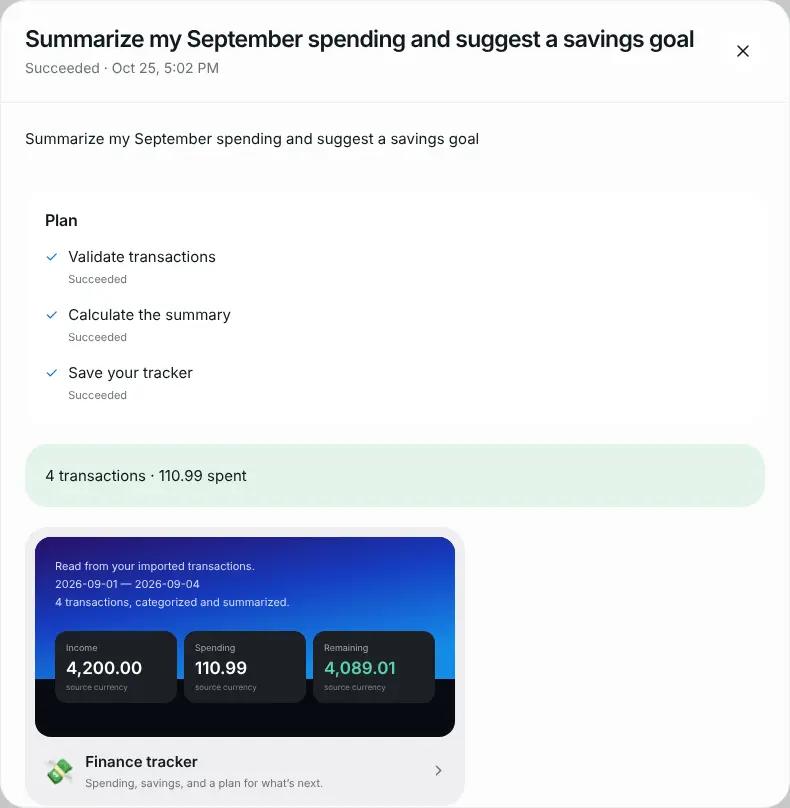
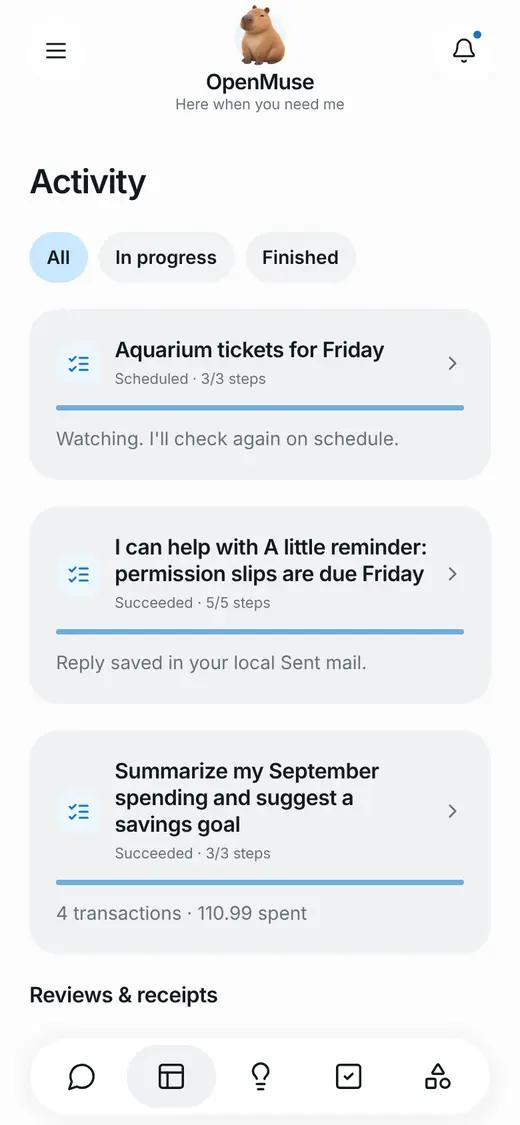
Next we delegated a Finance task from Menu → Delegate task → Finance → Try example transactions with four sample transactions. Within seconds the three-step plan (validate, calculate, save) finished with income 4,200.00, spending 110.99 and remaining 4,089.01: the screenshot at the top. Finally, in Goals → Track we created a watch on the built-in availability page, scheduled every 15 minutes. On mobile, the Activity tab collects it all:
What we could not test
We did not connect a real model or a Google account, and the agent's browser could not reach the internet from our container, so we did not evaluate the agent's quality on open-ended tasks. The project is upfront about this: its verification document says its demo videos use scripted model responses (CopilotKit AI Mock) on top of a real Chromium, and that acceptance with live models and real Google accounts is still pending.
Security and privacy: what you should know
- Telemetry is on by default. The CopilotKit SDK sends usage events to
telemetry.copilotkit.ai(PostHog) tagged as OpenMuse, with 100% sampling. Turn it off withCOPILOTKIT_TELEMETRY_DISABLED=trueorDO_NOT_TRACK=1. - Conversations live in CopilotKit Intelligence, not in your database. Tasks, PDFs and memory do stay in
.openmuse/. - The browser is not a security boundary. Playwright disables Chromium's internal sandbox; keep the worker private with its own token.
- The optional E2B provider changes the rules: the desktop has internet access, passwordless
sudoand publicly reachable ports. A prompt-injected agent could exfiltrate data from there, as itsSECURITY.mdwarns. - Treat
.env,.openmuse/and the browser profiles as private data: they hold tokens and sessions.
If you are going to give an agent access to your email, also read our guide on scanning skills before installing them: the injection risk is the same.
Common errors
"Main conversation is unavailable. Check the Rich Threads connection and try again." CPK_INTELLIGENCE_API_KEY is missing or invalid, or the server cannot reach api.intelligence.copilotkit.ai. Run npx copilotkit@latest login and project select again and restart the API.
"OpenMuse requires CPK_INTELLIGENCE_API_KEY" on startup. The server refuses to start without that variable in any mode. Put it in the root .env.
The Render API restarts without binding a port. 512 MB plan: PGlite does not fit. Move to Standard.
Sample mode rejects the host. sample mode only accepts loopback (127.0.0.1). On a server use WORKSPACE_MODE=live with OPENMUSE_ACCESS_KEY and TOKEN_ENCRYPTION_KEY.
The "Start tracking" or "Delegate task" button does nothing. It stays disabled until you fill in the main text field ("What are you watching?" or "What would you like done?").
FAQ
Is OpenMuse free? The code is (MIT). You pay for the model you use and, if you deploy it, the hosting. CopilotKit Intelligence has free sign-up, but it is a separate service with its own terms.
Can I use it with Claude? Yes: AGENT_BACKEND=model, MODEL=anthropic/<model-id> and ANTHROPIC_API_KEY.
Does it work offline? Not entirely: chat needs CopilotKit Intelligence. Tasks, PDFs, finance and tracking work against the local API.
Is it multi-user? No. One owner per deployment, with a shared key.
Is it production-ready? It is an alpha. For experimenting or as the base of your own product, yes; for handing it your real Gmail without reviewing the code, not yet.
Conclusion
OpenMuse is one of the most serious foundations we have seen for building a personal agent: durable tasks that survive restarts, version-bound approvals, a network-less container for commands and 487 tests that pass on the first run. The catch is that chat depends on CopilotKit Intelligence even locally, and telemetry ships switched on. If you want your own agent for your business, clone it, turn off telemetry, plug in your model and start with the document and finance flows, which already work end to end.
Want more agents and skills for working with AI? Have a look at Superpowers for Claude Code and our Claude Code skills guide.
// source code
// implementation
More on AI agents

- Skills for your agents
- Claude Code

- Skills for your agents
- Claude Code

- Skills for your agents
- Claude Code