Archify: the agent skill that turns your code or an idea into interactive architecture diagrams
Archify is a skill for coding agents (Claude Code, Codex CLI, Cursor and OpenCode) that turns a plain-language description, or the code in a repository, into an interactive architecture diagram saved as a single HTML file. It is not a static picture: you can click a node, follow the path of a request, switch between light and dark themes and export to PNG, SVG or video. This article covers what it does, which diagram types it produces, how to install it, how to prompt your agent well and what changed in its license.
If you have never installed a skill, start with the Claude Code skills guide. If you want to learn system design before drawing it, see System Design 101.
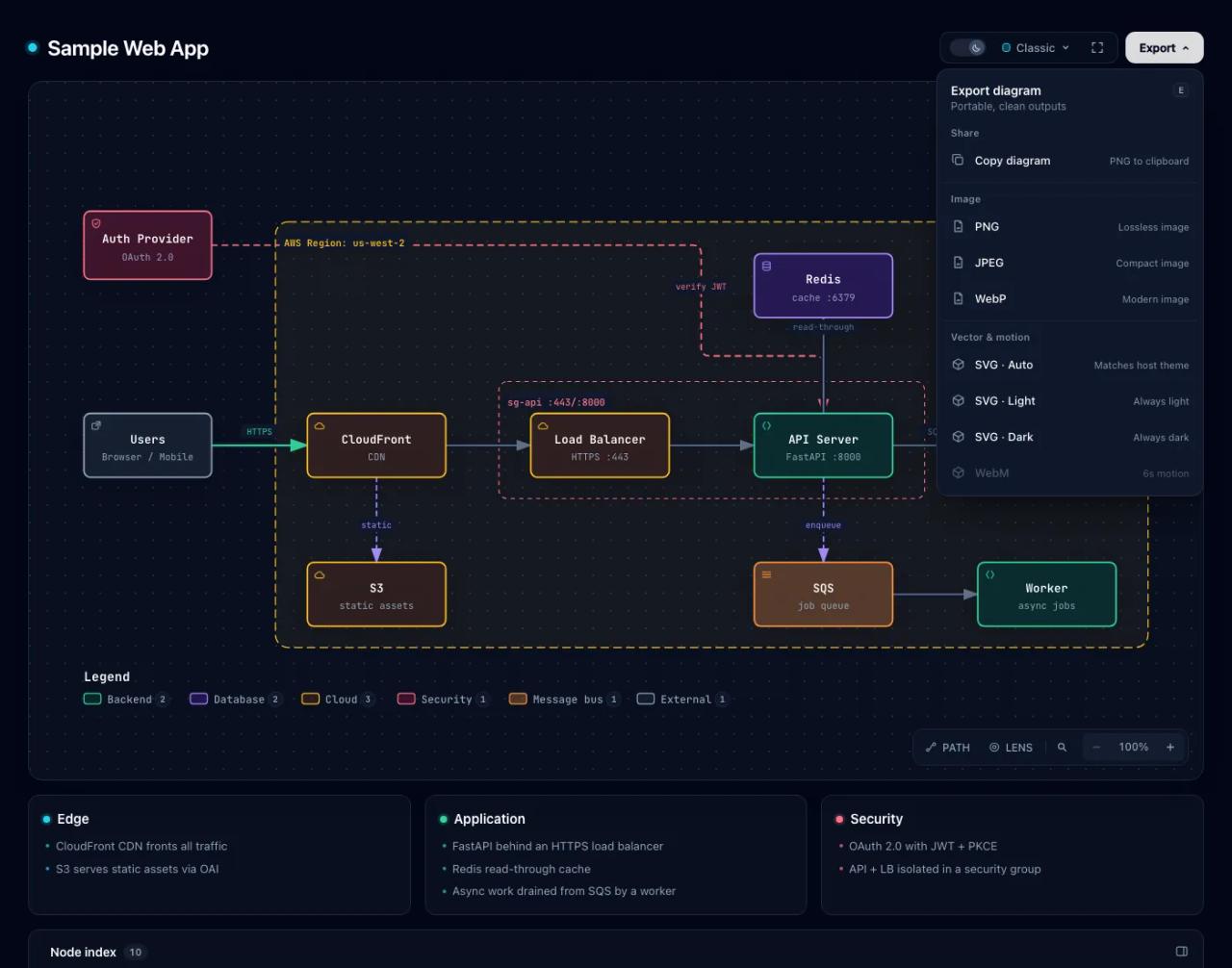
What Archify is
It is the tt-a1i/archify repository on GitHub. It started as a derivative of Cocoon-AI/architecture-diagram-generator and has become something else: a renderer with its own validation plus a skill that teaches the agent how to use it. Facts as of October 28, 2026:
- Stable version: 3.2.0, released October 18, 2026.
- Popularity: about 90,700 stars and 6,100 forks. It reached number 1 on GitHub Trending's weekly all-language list in early September 2026.
- Requirements: Node.js 18 or later. The CLI has zero dependencies: no
npm installand no API keys. The final checks use a Chromium browser. - Compatibility: Claude Code, Codex CLI, Cursor and OpenCode with every feature; Claude.ai by uploading the ZIP as a skill (if the sandbox has Node.js); community integrations for Hermes Agent and DeepSeek Harness.
The idea is simple: you describe what you want to see, the agent writes typed JSON (the repository calls it a *typed JSON IR*), and Archify validates it and renders a self-contained HTML page. Because the diagram comes from a source file, you can keep asking for changes ("add authentication", "highlight the cache-miss path") and the agent edits only what is needed.
The ten diagram types
Version 3.1 went from five to ten types. The skill picks the right one from your question:
| Type | Best for | What to tell it |
|---|---|---|
| **Architecture** | Components, services, storage, trust boundaries | Scope, core components, primary path |
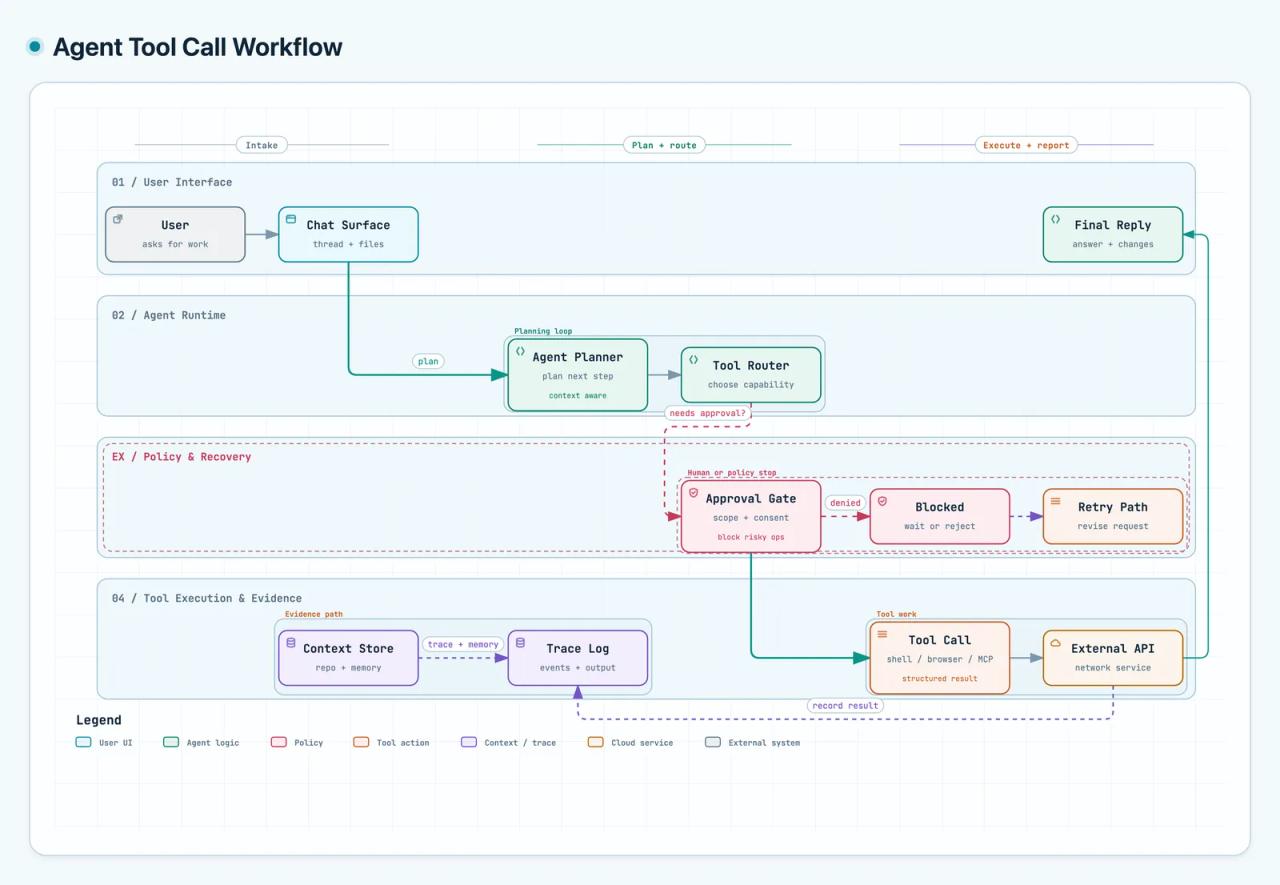
| **Workflow** | CI/CD, approvals, tool calls, runbooks | Participants, order, branches, exceptions |
| **Sequence** | API calls, caching, auth, async traces | Who calls whom, returns, timing |
| **Data Flow** | ETL pipelines, lineage, personal data | Sources, transforms, sinks |
| **Lifecycle** | States, retries, waits, terminal outcomes | States, events, retry and cancel paths |
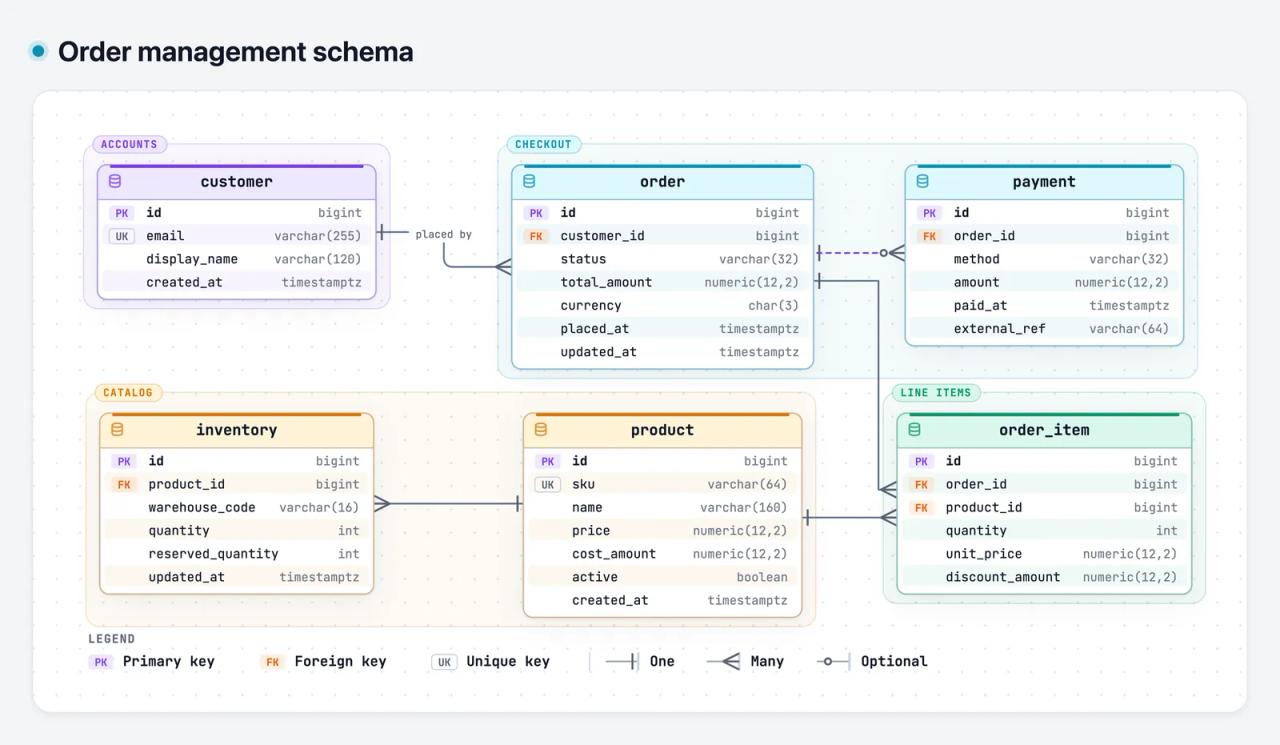
| **ERD** | Database schemas | Tables, typed columns, keys, cardinality |
| **Class** | Classes, interfaces and their relationships | Types, key members, inheritance, dependencies |
| **Tree** | Single-parent hierarchies | Root, levels, what each branch holds |
| **Timeline** | What happened when: incidents, releases | Timestamps with time zone, events, sources |
| **Waterfall** | Where a request's time went | Spans, start, duration, nesting |
One ERD rule we liked: the skill must draw every column with its SQL type and keys, and it groups tables by domain. No boxes with three made-up fields.
Not sure which type fits? The CLI has a guide:
node archify/bin/archify.mjs guide "Show an API request with Redis cache miss"What you can do with the diagram
The output is one HTML file. Open it in a browser without installing anything and send it to someone else: the interactions travel with it. The controls, per the README:
| Action | Key |
|---|---|
| Diagram guide | `?` |
| Find and focus a node | `/` |
| Trace a route between two nodes | `R` or `PATH` |
| Compare one or two roles (backend, database...) | `L` or `LENS` |
| Overview radar | `M` or `MAP` |
| Presentation mode | `F` |
| Style, theme and export | `S`, `T`, `E` |
Every view has a stable link: #focus=api, #route=web~db or #lens=backend~database open the diagram already focused. Handy to paste into an issue or a PR.
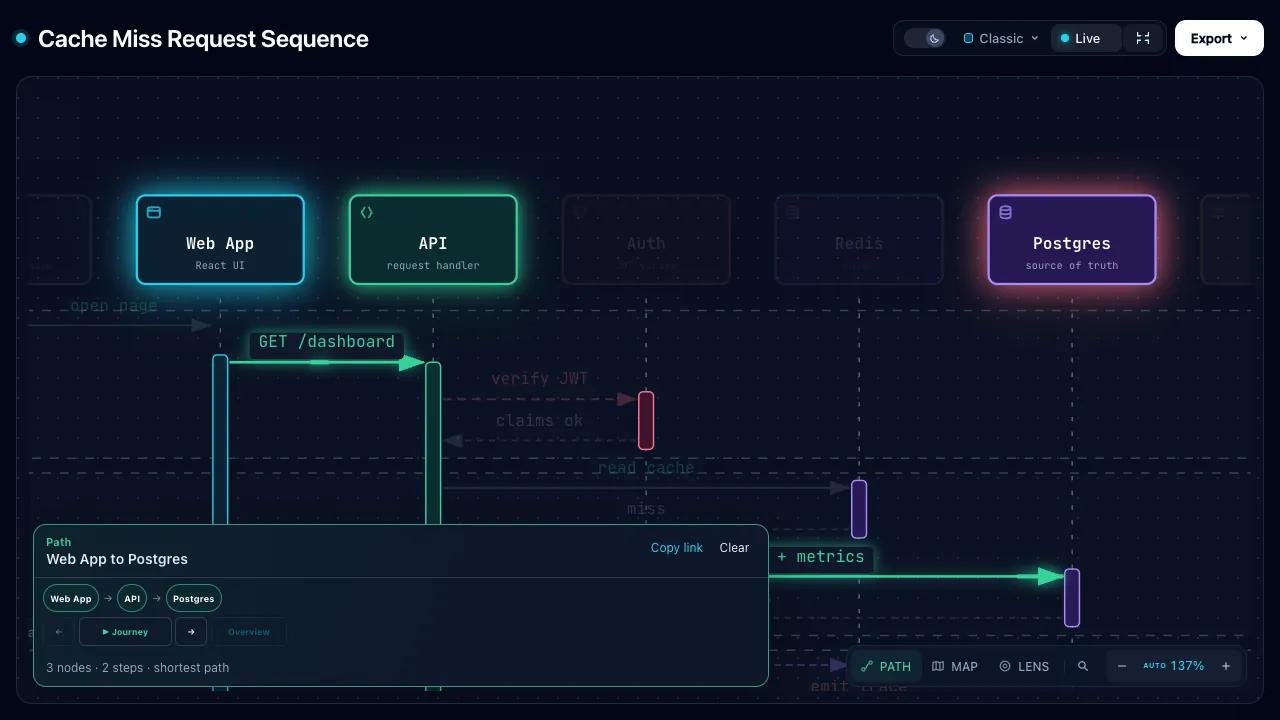
Export gives you PNG (also to the clipboard), JPEG, WebP, SVG in light, dark or auto, a 6-second WebM video and 1200×630 "share cards" of a specific route, made for social media.
New in 3.2: one-page answers
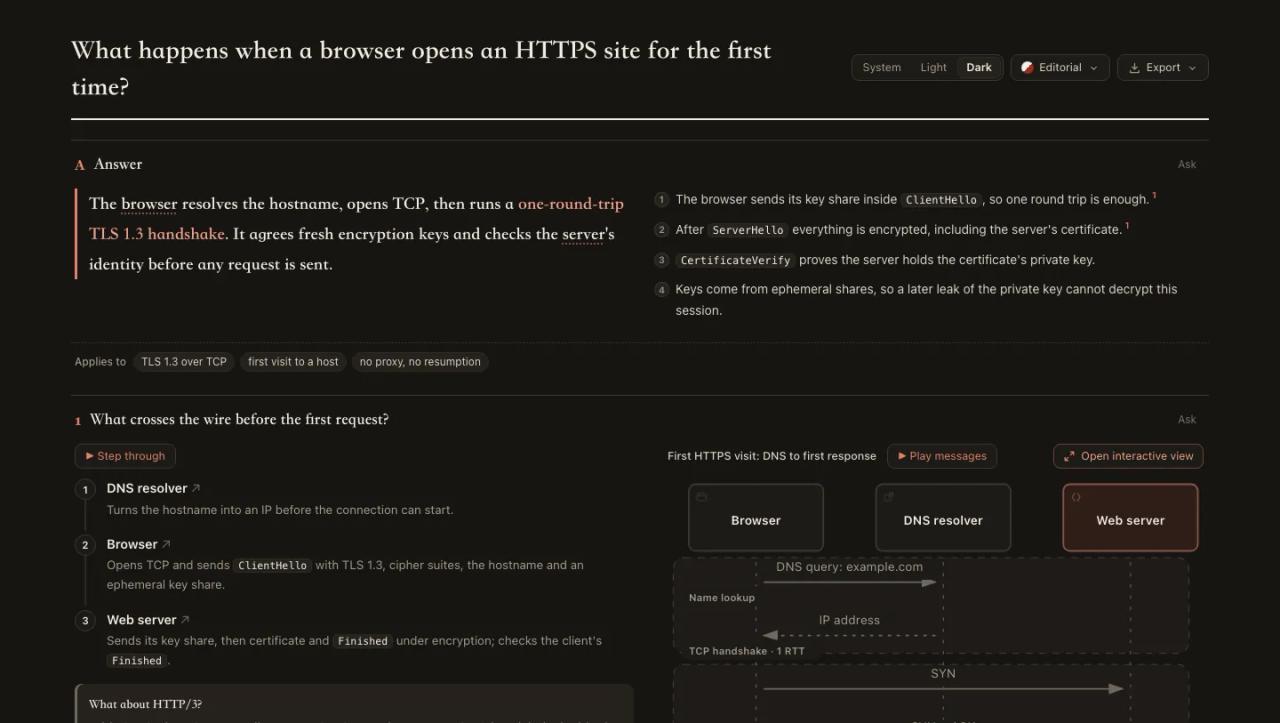
3.2.0 adds explainers: ask the agent to answer "as a page" and Archify builds a document with the conclusion first and one panel per question, with tables, steps, charts, code and validated diagrams. Steps light up on the diagram as you read and each claim can cite numbered sources. It exports as a long image or a PDF.
How to install Archify
The official install uses Vercel Labs' skills installer (the same one we covered in find-skills):
npx skills add tt-a1i/archify -g-g installs it for your user, so it works in every project. For an explicit, non-interactive install, for example for Cursor:
npx -y skills add tt-a1i/archify --skill archify --agent cursor --global --copy --yesTo try it without installing:
npx skills use tt-a1i/archify@archify --agent codexWhere it lands in each agent:
| Agent | Folder |
|---|---|
| Claude Code | `~/.claude/skills/` or the project's `.claude/skills/` |
| Codex CLI | `~/.agents/skills/` or `.agents/skills/` |
| OpenCode | `~/.config/opencode/skills/`, `.opencode/skills/` or `.agents/skills/` |
| Claude.ai | Upload `archify.zip` under Settings → Capabilities → Skills |
To check it works, from the skill folder:
node bin/archify.mjs doctor
node bin/archify.mjs demo ./archify-demo
The update notice
Archify occasionally fetches a manifest with the latest stable version to tell you a new one exists. According to the README, the request sends no version, agent, code or prompts, only normal HTTP metadata (IP and time), and it never installs anything on its own. To turn off all networking:
export ARCHIFY_UPDATE_CHECK_DISABLED=1How to ask your agent for a diagram
You don't need a repository. Start with one sentence:
Use Archify to diagram a web request: Browser calls the API,
the API checks Redis, and a cache miss queries PostgreSQL and fills the cache.
For a diagram of your own code, open the agent in the repository and be specific about scope. This is the prompt the project itself recommends:
Analyze this repository, then use archify to create a high-level runtime architecture diagram.
Show 8–12 core components, one primary path, external dependencies, and trust boundaries.
Put supporting detail in cards instead of adding more edges.
When the diagram comes from a repository, each node can carry an SRC n badge that opens the exact file and line range behind it, pinned to a commit. The skill makes the agent record the path and line range of every component and relationship while it reads the code, and forbids asserting something just because a package name suggests it.
Then keep going in the chat: "move auth to the left", "switch to the light theme", "highlight the rollback path".
Why the diagrams come out clean
What sets Archify apart from asking any model for "a Mermaid diagram" is validation. Before delivery, the finalize command chains four checks: the JSON schema, the layout (labels must not sit on lines, routes must not cross needlessly), the HTML/SVG, and a run in a real browser. If something fails it returns JSON with the rule code, the exact element and the allowed fixes, and the agent gets two rounds to repair it. If it still fails, the last good file stays in place: you never get a half-broken diagram.
What Archify does not do
- It is not a drawing editor. You don't drag boxes around; you ask the agent for changes.
- It does not convert Mermaid automatically. Give it a Mermaid diagram and the agent reads it for topology and writes fresh JSON. The result does not copy Mermaid's styling.
- It does not build dashboards. The skill says so in its own description.
- It does not host your diagrams. You get an HTML file; where you publish it is up to you.
- It does not measure real timings on its own. In Timeline and Waterfall the values are illustrative unless they come from your logs or traces, and the diagram says so.
The license: from MIT to Apache-2.0
There is an important detail here. Until October 25, 2026, Archify was MIT. That day the main branch moved to Apache-2.0:
- Version 3.2.0 (the latest release, October 18) shipped under MIT and keeps it.
- Current
maincode and future releases are Apache-2.0. Historical MIT grants remain in effect; see theNOTICEandLICENSE-MITfiles. - The license covers the engine and templates, not your diagrams: what you create with Archify is yours.
For normal use (installing it, generating diagrams for your own projects or your clients) both licenses let you do it for free, commercially too. Apache-2.0 adds two obligations if you redistribute modified code: keep the NOTICE and state which files you changed. It also gives you no right to use the Archify trademark.
Where it helps day to day
- Onboarding to someone else's project. Ask for a map of an unfamiliar repository and get, in minutes, a view that links back to the real code.
- Documentation for a client. An HTML file that opens in any browser and that the client can explore looks far better than a whiteboard photo.
- Reviewing architecture changes.
archify compare architecture base.json head.jsonproduces an "Architecture Delta" with what was added, removed and moved between two versions. - Explaining incidents. Timeline for the chronology, Waterfall to see where a request lost its time.
- Technical content. Diagrams exported as images or video for a post or a talk.
FAQ
Is Archify free? Yes. It is open source (MIT up to 3.2.0, Apache-2.0 since) and needs no account or API key. You only pay for the tokens of the agent you use.
Does it work with Claude Code? Yes, with every feature. It installs into ~/.claude/skills/ with npx skills add tt-a1i/archify -g.
Do I have to give it access to my repository? No. You can work from descriptions only. If you want a diagram of your code, the agent reads it locally; Archify does not upload anything to a server.
Can I edit the diagram by hand? You can edit the JSON source and render again, or ask the agent. There is no visual editor.
Which languages does the interface support? The viewer UI ships in English, Simplified and Traditional Chinese, Spanish, Korean and Arabic via meta.locale. The diagram content comes out in whatever language you prompt in.
Is Archify the same as Anatomy? No. Anatomy draws isometric machines that explain a concept through a metaphor. Archify draws literal technical diagrams: services, tables, sequences.
Conclusion
Archify fixes a real problem: architecture diagrams you ask an AI for usually come out with crossed arrows, labels on top of lines or invented components. Its staged validation and its insistence on citing the code make the result reliable and shareable as is. Install it with npx skills add tt-a1i/archify -g, try it on your current project's architecture, and for more tools like this see the Claude Code skills guide.
// source code
// implementation
More on AI agents

- Skills for your agents
- Claude Code

- Skills for your agents
- Claude Code

- Skills for your agents
- Claude Code