FigCraft: the open source Figma alternative built in Rust (hands-on test with screenshots)
FigCraft is an open source UI design and prototyping tool that mirrors the Figma workflow: frames, auto layout, components with variants, variables, prototypes and a Dev Mode that generates code. It is written in Rust, works with no account and offline, and ships under the MIT or Apache-2.0 license. It went viral on X as "the free Figma alternative", so we installed it and tested it to separate what it really does from what the threads claim.
Short version: the editor works and is surprisingly complete for a 0.5 release, the CLI and MCP server are the most interesting part if you work with AI agents, and it is still an alpha. Its own authors estimate it is "about 49% of the way to replacing Figma for real work".
What FigCraft is and who makes it
The repository describes FigCraft as "an open-source, clean-room reimplementation of Figma, rebuilt in pure Rust". Clean-room means it was written from public documentation and observed behaviour, with no Figma code, file formats, icons or images. The README also states it is not affiliated with Figma, Inc.
- Repository: github.com/storytold/figcraft
- Official site: getartcraft.com/apps/figcraft
- Version tested: 0.5.1, released on 12 October 2026. The main branch already says 0.6.0 in its
Cargo.toml, not yet released. - License: dual, MIT or Apache-2.0 at your option. The ArtCraft name and logos are trademarks and are not covered: forks must remove them.
- Status: alpha ("early alpha" on its own badge).
The viral posts say it comes from "the same guy who went viral for building open-source Adobe alternatives". The repository is not signed by one person: the copyright reads "ArtCraft Team and the FigCraft contributors". The same team does publish a family called the Crafting Apps, all open source and in Rust: PhotoCraft (image editing), VectorCraft (vector illustration), FilmCraft (video), LightCraft (raw development), PdfCraft, EffectCraft (motion graphics) and DesignCraft (page layout). FigCraft is the interface design one.
What you can do with FigCraft
The viral list mentions "design user interfaces, reusable components, interactive prototypes, responsive layouts and AI-powered workflows". Here is what the README says and what we could check:
| Feature | What it includes | Did we test it? |
|---|---|---|
| UI design | Frames, shapes, text, layers, pages, light and dark theme | Yes |
| Auto layout | Vertical, horizontal, wrap and grid; Hug / Fill / Fixed; padding and gap | Yes |
| Components | Components, instances with overrides, variants, Assets panel | Official screenshots |
| Variables | Colour, number, string and boolean, with modes (light/dark) | Opened the panel |
| Vectors | Pen, Pencil, vector networks, editable booleans, variable-width strokes | No |
| Prototyping | Connections, triggers, transitions, flows and presentation view | Prototype tab |
| Dev Mode | Measurements, annotations, ready for dev and CSS, HTML, React, Leptos, SwiftUI and Compose code | Yes, CSS |
| Collaboration | Live sessions with cursors and chat, self-hosted `figcraft-server` | No (preview) |
| Automation | CLI, JSON control channel and MCP server on one command registry | Yes |
| Files | `.figcraft` on your disk; SVG, PNG, JPG, WebP and PDF; opens `.fig` "best effort" | Rendered with the CLI |
One important point about the "AI" part: FigCraft has no built-in AI design generator. What it offers is that any agent (Claude Code, Claude Desktop or another MCP client) can drive the app with the same commands you trigger with the mouse. We show it below with a test.
How to install FigCraft
Installers are on the GitHub releases page. For 0.5.1 there are:
- Windows:
.msiinstaller (x64, x86 and ARM64) or a portable.zip. The x64 portable build containsfigcraft.exeandfigcraft-cli.exe. - macOS: universal
.dmg(Apple silicon and Intel), signed and notarized, plus a separate.zipwith the CLI. - Linux: AppImage,
.deb,.rpm, Flatpak and.tar.gz(x86_64 and ARM64). The.tar.gzcontainsbin/figcraftandbin/figcraft-cli. - FreeBSD: x86_64
.tar.gz. - Web: a
.zipwith a static site (WebAssembly) you can host yourself.
A SHA256SUMS.txt is published next to the files so you can verify the download. On Linux, for example:
curl -LO https://github.com/storytold/figcraft/releases/download/v0.5.1/figcraft-0.5.1-linux-x86_64.tar.gz
curl -LO https://github.com/storytold/figcraft/releases/download/v0.5.1/SHA256SUMS.txt
sha256sum --check --ignore-missing SHA256SUMS.txt
tar xzf figcraft-0.5.1-linux-x86_64.tar.gz
./figcraft-0.5.1-linux-x86_64/bin/figcraft-cli --version
The last line prints figcraft-cli 0.5.1.
Building from source
You need Rust 1.95 or newer. The UI fonts live in a separate repository, craft-fonts, which must sit next to it; without it, FigCraft falls back to your system fonts.
git clone https://github.com/storytold/figcraft
git clone https://github.com/storytold/craft-fonts
cd figcraft
cargo run --release -p figcraft
If you clone craft-fonts after a first build, run cargo clean -p figcraft-text so the next build embeds the fonts.
The web build, locally
For our screenshots we used the release's web build, served from any folder. It needs no backend: an index.html, a .js file and a .wasm of about 18 MB.
curl -LO https://github.com/storytold/figcraft/releases/download/v0.5.1/figcraft-web-0.5.1.zip
unzip figcraft-web-0.5.1.zip
cd figcraft-web-0.5.1
python3 -m http.server 8765
Open http://localhost:8765 in a browser with WebGPU or WebGL2. We ran it in Chromium with no GPU (software rendering) and it worked, though slower than the native app.
Hands-on: a frame, auto layout and Dev Mode
The interface is built so that Figma users have nothing to relearn: toolbar at the bottom, layers on the left, Design/Prototype panel on the right and the same shortcuts (F frame, R rectangle, T text, Shift+A auto layout).
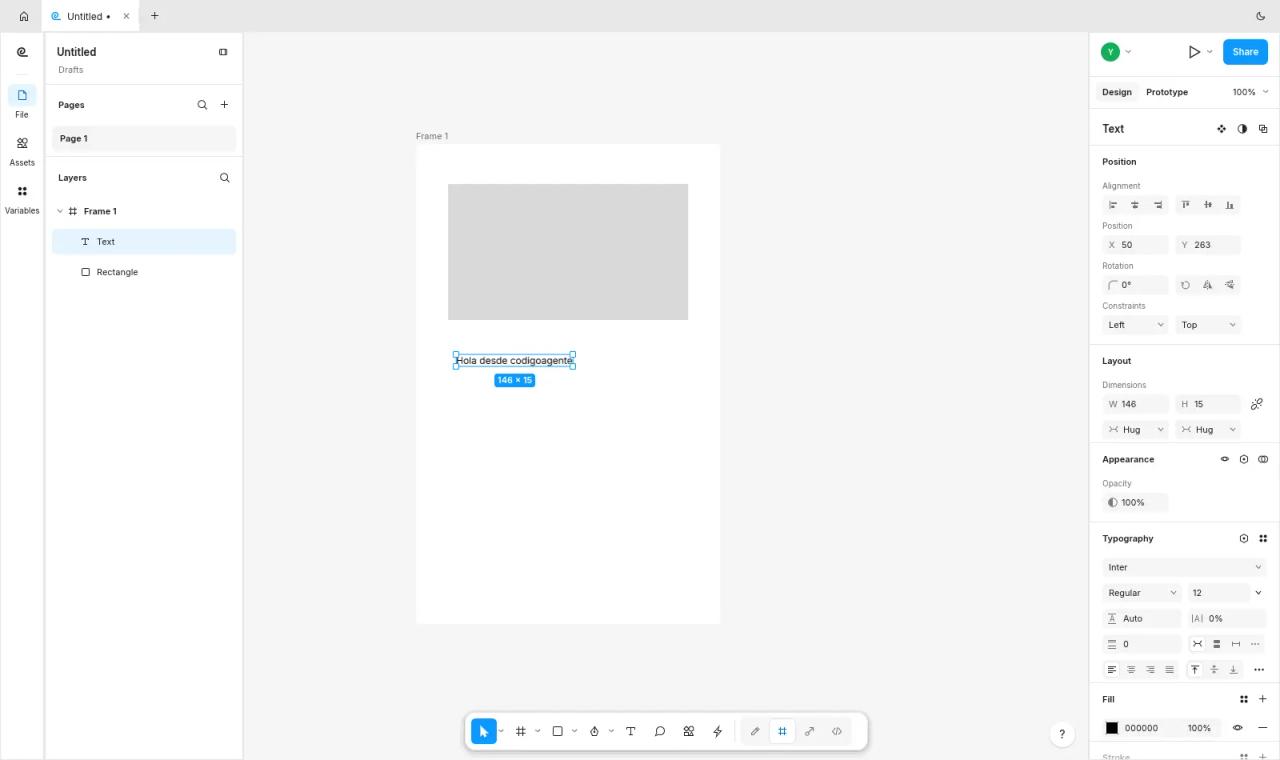
We created a frame with F, drew a rectangle with R and added text with T:
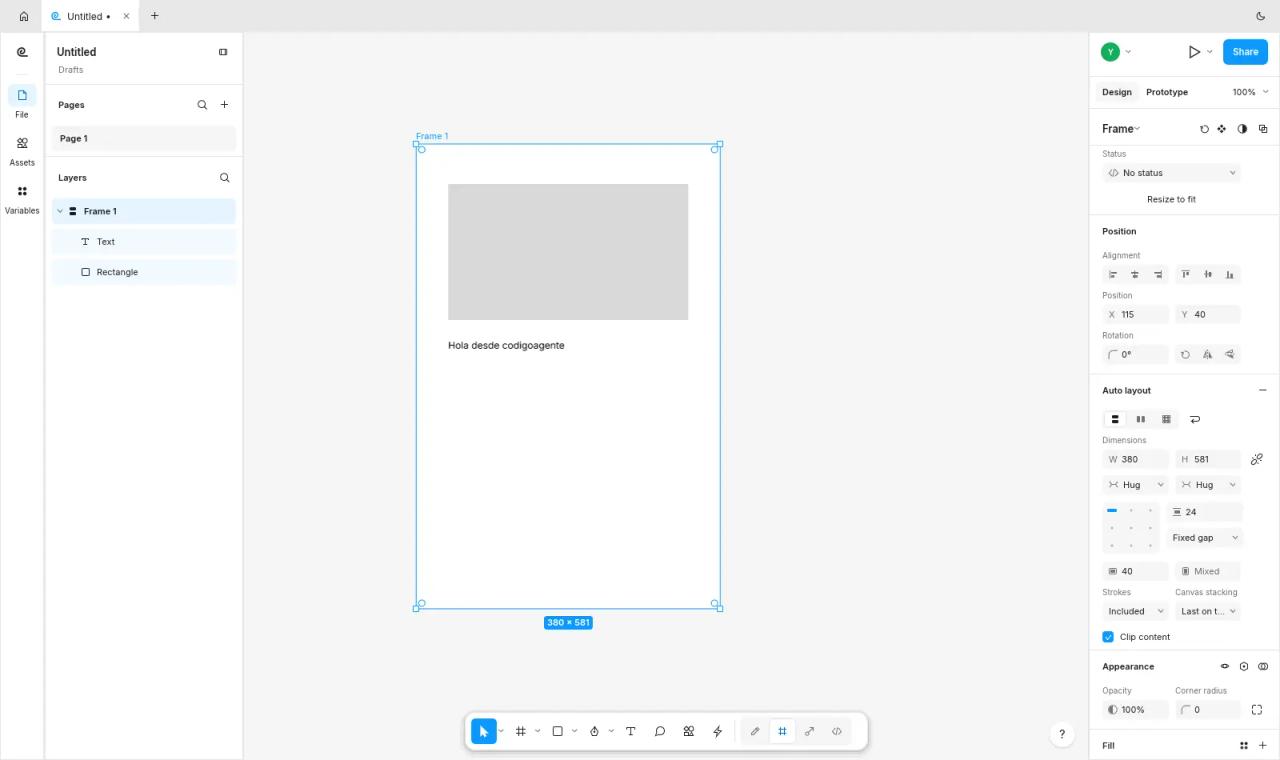
With the frame selected, Shift+A adds auto layout. In our test it came out horizontal; we switched it to vertical in the panel and set a gap of 24. The children reflow and the frame switches to Hug width and height:
Then we turned on Dev Mode (the </> icon in the bottom toolbar) and selected the frame. The inspect panel shows measurements, direction, gap and padding, and the code at the bottom:
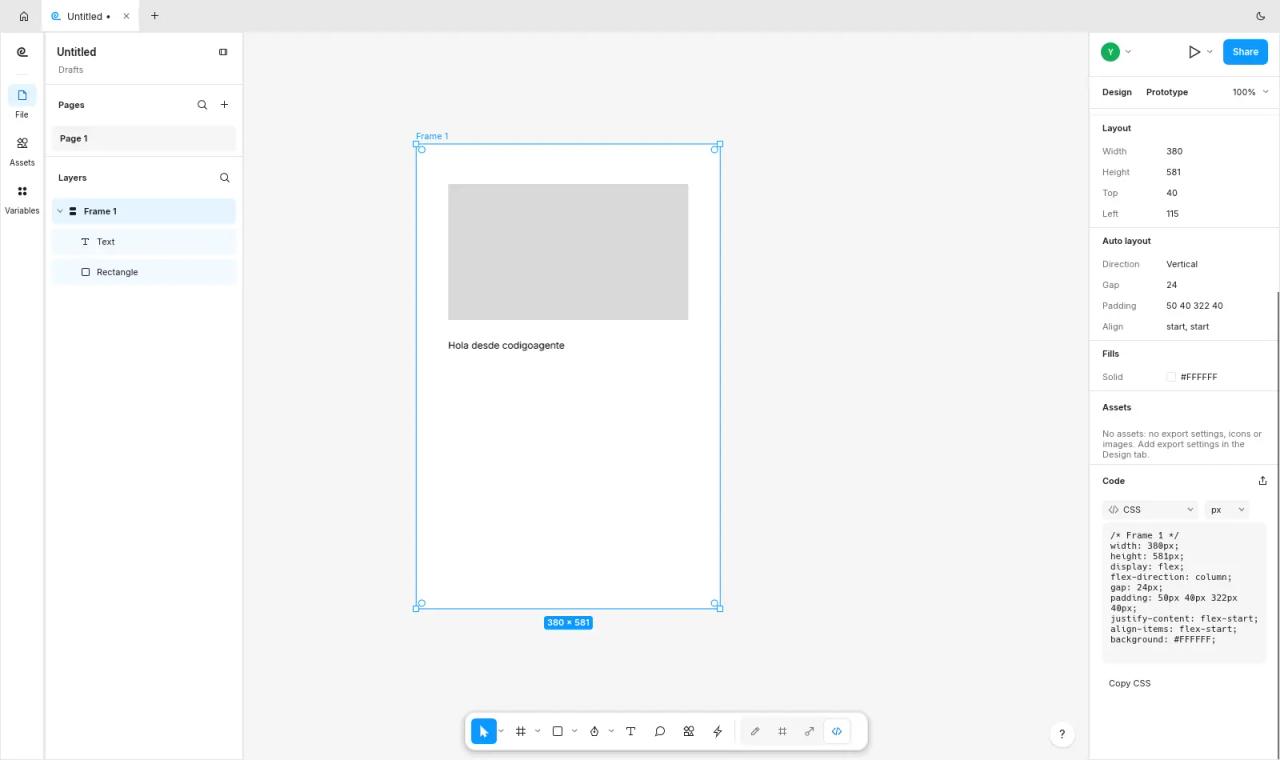
This is the CSS we got from the Copy CSS button:
/* Frame 1 */
width: 380px;
height: 581px;
display: flex;
flex-direction: column;
gap: 24px;
padding: 50px 40px 322px 40px;
justify-content: flex-start;
align-items: flex-start;
background: #FFFFFF;
Note the 322 px bottom padding: when it applied auto layout, FigCraft kept the empty space of the hand-drawn frame as padding. Figma does the same, but check it before you ship the code.
Components, variants and prototypes
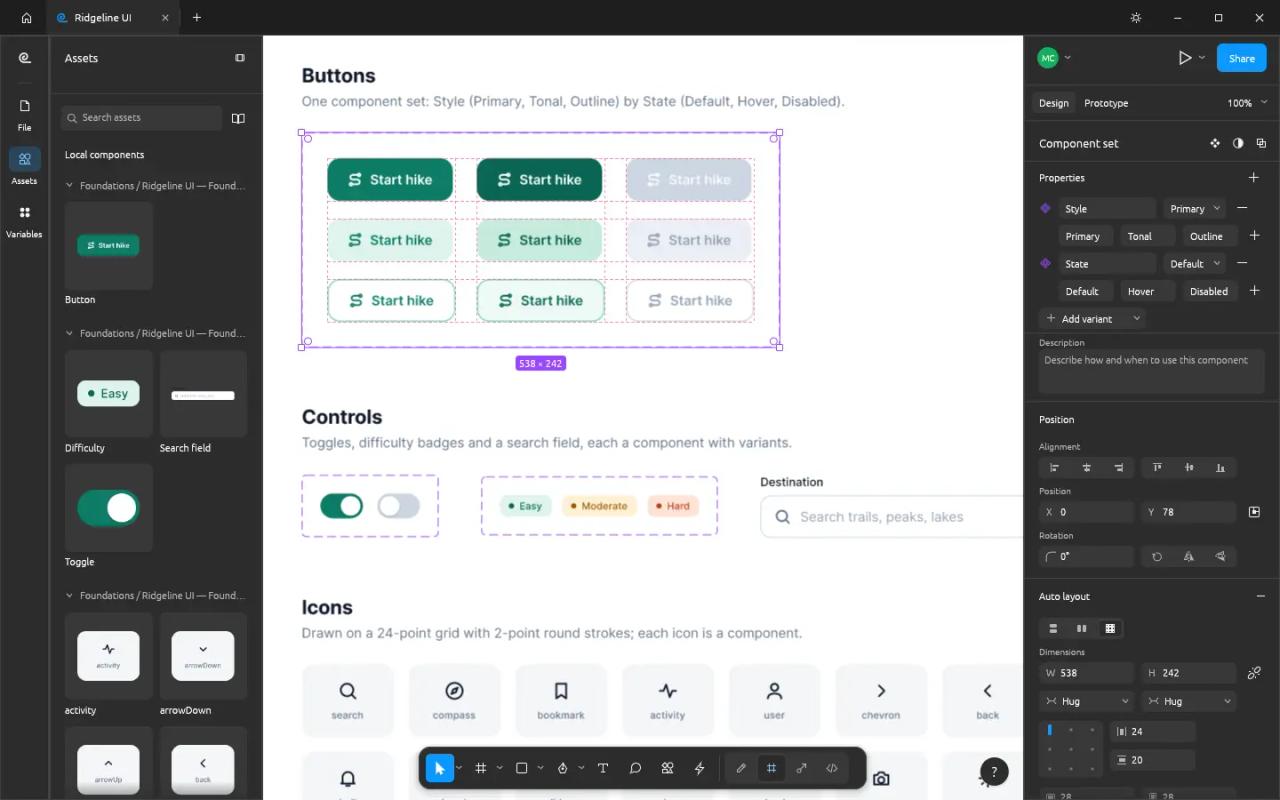
We did not build a design system from scratch, but the repository ships sample files in examples/ and official screenshots of these features. This one shows components, with a nine-variant button (Style × State) and the Assets panel:
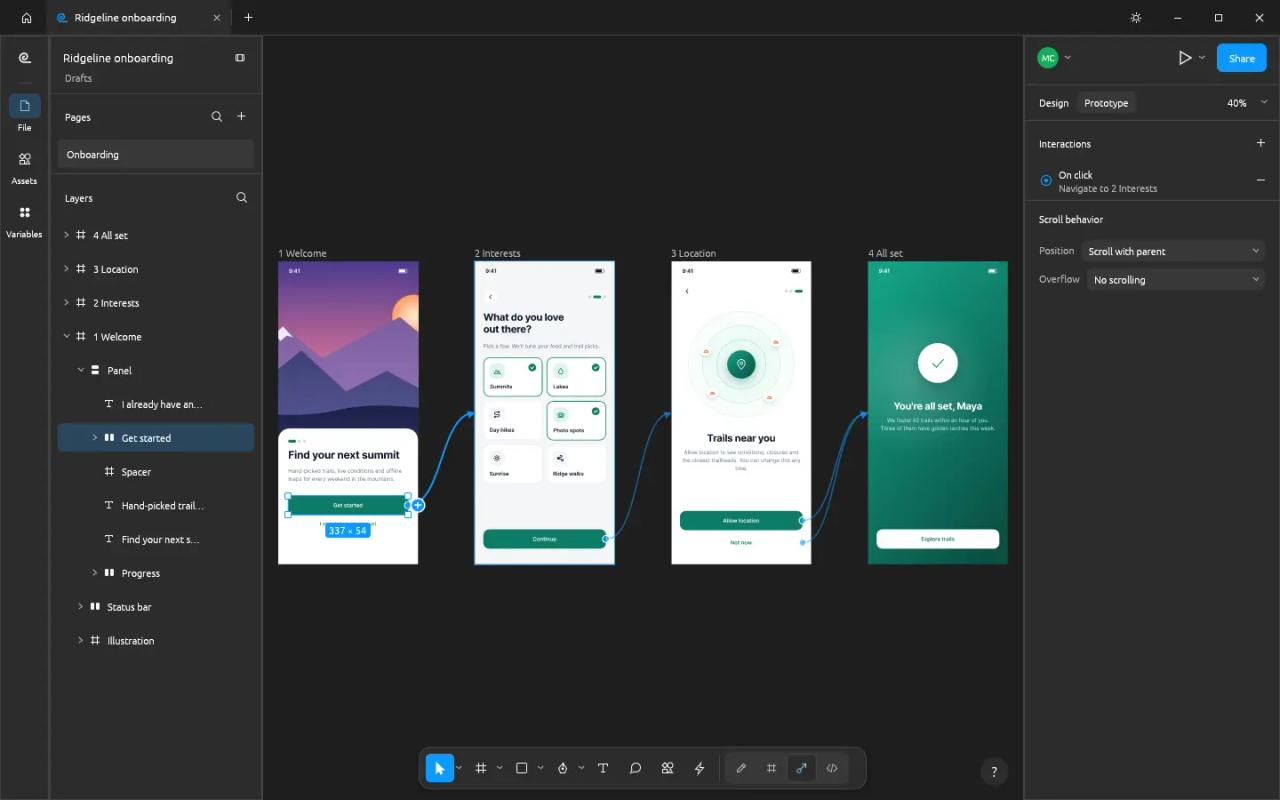
And this one shows prototyping, with connections between onboarding screens:
The interesting part: CLI and MCP server for AI agents
Every menu item, tool and gesture in FigCraft is a command in a single registry, and the UI, the CLI, the control channel and the MCP server all call those same commands. The site says "400+"; figcraft-cli commands in 0.5.1 listed 536 for us.
Render a file without opening the app
figcraft-cli info examples/ridgeline-app.figcraft
figcraft-cli render examples/ridgeline-app.figcraft -o ridgeline.png --scale 1
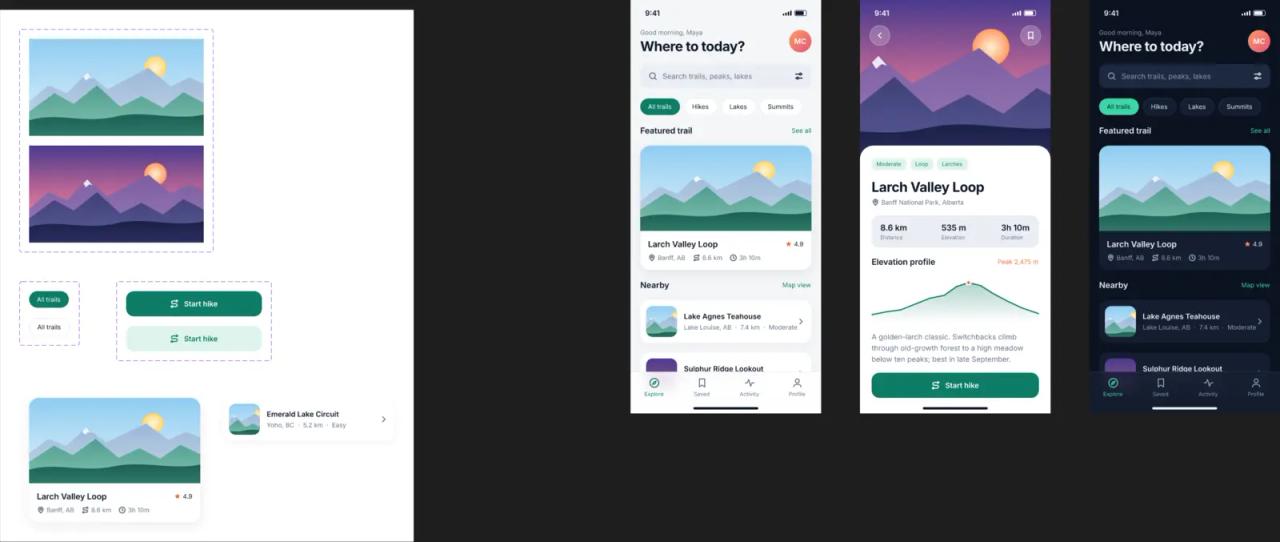
info reported 349 nodes and 17 variables, and render produced a 2639×1117 PNG with FigCraft's own renderer:
Design with a command script
figcraft-cli run runs a list of commands in a windowless session and saves the result. This script builds a card with two texts and a rectangle and applies vertical auto layout:
[
  {"command": "frame.create", "params": {"x": 0, "y": 0, "width": 360, "height": 200, "name": "Card"}},
  {"command": "node.create", "params": {"type": "text", "parent": 2, "x": 24, "y": 24, "text": "codigoagente", "props": {"fontSize": 28}}},
  {"command": "node.create", "params": {"type": "text", "parent": 2, "x": 24, "y": 70, "text": "Designed from the FigCraft CLI", "props": {"fontSize": 16}}},
  {"command": "node.create", "params": {"type": "rectangle", "parent": 2, "x": 24, "y": 120, "width": 160, "height": 44, "name": "Button"}},
  {"command": "layout.add", "params": {"ids": [2], "direction": "vertical"}}
]figcraft-cli run tarjeta.json --out card.figcraft
figcraft-cli render card.figcraft -o card.png --scale 2Each step prints one JSON line ({"command":"frame.create","ok":true,"result":{"id":2},"step":0}) and if one fails nothing is saved. Ids are assigned in order: the first page is 1 and the first layer is 2.
Connect it to Claude Code over MCP
figcraft-cli mcp starts an MCP server over stdio. There are two modes: headless (an in-memory document) or attached to the open app, so you watch the changes live:
claude mcp add figcraft -- /path/to/figcraft-cli mcp
claude mcp add figcraft-app -- /path/to/figcraft-cli mcp --attach 7979
For the second one, start the app with figcraft --control 7979; that channel only listens on 127.0.0.1. In our test the 0.5.1 server answered initialize as figcraft 0.5.1 and exposed 18 tools: list_commands, run_command, batch, create_node, set_properties, inspect_document, get_node, select, export, screenshot, open_file, save_file, undo, redo, pointer, key, type_text and inspect_ui.
With screenshot and export the agent can see what it designed and fix it, which is what makes this a useful workflow rather than a demo. If you don't use MCP or skills yet, start with our Claude Code skills guide and find-skills, which helps you find tools for your agent.
FigCraft vs Figma: what it still lacks
The README is candid, and worth reading before you move a team over:
- Alpha: "about 49% of the way to replacing Figma for real work", by its own estimate. Nearly all of the main menu is wired, but it has not been checked against real Figma documents.
.figfiles: open "best effort". It also imports the Figma REST API file JSON with prototypes and variables.- Collaboration: a preview. No accounts, teams or cloud: the link or code is the access.
- Online sharing is not end-to-end encrypted: "Share ▸ Online" uploads the file to the public server
collab.craftapps.dev, stored unencrypted, and deletes it after 30 days unused. For confidential work, run your ownfigcraft-serveror share on the local network. - Plugins: its own sandboxed WebAssembly plugins, not Figma's.
On the plus side: no account, no telemetry, no subscription; your files stay local; it opens instantly and it is genuinely free software under a permissive license.
Errors and surprises we hit
- "Open file" does nothing in the web build. The hosting guide says so: on the web "native file dialogs aren't wired up yet" and it starts with one new document. Use the desktop app or
figcraft-clito open the examples. Software rasterizer detected - loss of performance expected. Shows up in the browser console when there is no GPU. It works, just slowly; with hardware acceleration it goes away.error: unknown option --help.figcraft-cli commands --helpdoes not exist. Runfigcraft-cliwith no arguments for the general help, andfigcraft-cli commands --filter <text>to filter the list.- Horizontal auto layout by default.
Shift+Aon a frame with loose children made it horizontal for us. Change the direction in the panel, or pass"direction": "vertical"tolayout.addfrom the CLI. - Missing fonts when building. Without
../craft-fonts, the app uses system fonts and text can look different from the official screenshots.
FAQ
Is FigCraft free?
Yes. Every build is free and the code is free software under MIT or Apache-2.0. Only the ArtCraft trademarks are excluded from the license.
Can I use FigCraft for commercial work?
The MIT/Apache-2.0 license allows it, including modifying and redistributing it. What holds it back today is maturity: it is an alpha, so don't make it the only tool on a client project yet.
Does FigCraft open Figma files?
It opens .fig "best effort" and the JSON exported by the Figma REST API. The CLI can also export to .fig (--format fig). Expect some loss on complex files.
Does it have AI?
It does not generate designs on its own. It has an MCP server and a CLI so an agent like Claude Code can design with it using the same commands as the UI.
Does it run in the browser?
Yes, through the WebAssembly web build, which you can host on any static hosting. It needs WebGPU or WebGL2 and, for now, cannot open local files.
What languages does it support?
The interface ships in English and Spanish, with the Spanish still a draft awaiting review. You switch it in Preferences.
Conclusion
FigCraft is the most complete open source Figma alternative we have tested: auto layout, components, variables, prototypes and Dev Mode all work in a native, free app with a permissive license. It does not replace Figma for a team today, and its authors are the first to say so. If you design with AI agents, the CLI and MCP server already justify installing it: download 0.5.1, connect figcraft-cli mcp to Claude Code and ask it for your first screen.
// source code
// implementation
More on Open source tools
- Free alternatives to paid apps
- Run it on your server
- Design, image and video
- Free alternatives to paid apps
- Free alternatives to paid apps
- Design, image and video