OpenSEO: the open source Semrush and Ahrefs alternative you plug into Claude Code
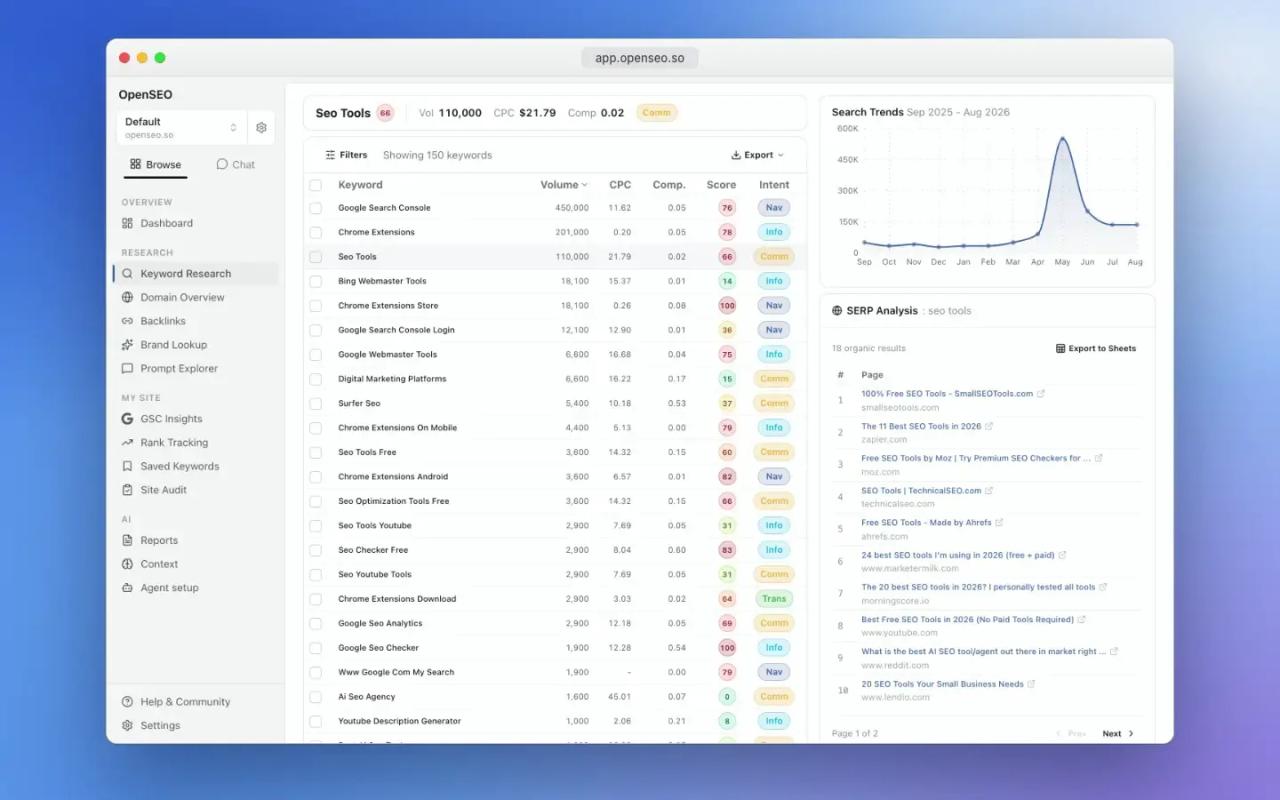
OpenSEO is an open source SEO tool that positions itself as an alternative to Semrush and Ahrefs: keyword research, rank tracking, competitor research, backlinks, site audits and visibility in AI answers. It is MIT licensed, you can run it on your own machine with Docker and, what really sets it apart, it exposes an MCP server so Claude Code, Codex, Cursor or ChatGPT can work with real SEO data instead of giving generic advice.
In this article we read the code of v0.1.14 (October 19, 2026) and its documentation to explain what it does, how it is built, what it costs to run, how to install it and how to get value out of it from Claude Code with concrete examples.
What OpenSEO is and who makes it
- Repository: github.com/every-app/open-seo
- Website and hosted version: openseo.so
- Version reviewed: v0.1.14, released October 19, 2026. New versions ship almost weekly.
- License: MIT (copyright Ben Senescu). You can use it, modify it and sell it as a service without publishing your changes.
- Business model: the code is free; the hosted version costs $10/month and includes $10 of usage.
The README sums up the idea: "an SEO tool for *the people*". If Semrush or Ahrefs are too expensive or you never touch 80% of their menus, OpenSEO gives you the core workflows, pay as you go, with no mandatory subscription.
One important caveat up front: OpenSEO has no web index of its own. Search volume, difficulty, SERP and backlink data come from the [DataForSEO](https://dataforseo.com) API, a pay-as-you-go SEO data provider. OpenSEO adds the app, projects, scheduled tracking, Google integrations and the MCP server for agents on top.
What it does: the core workflows
| Workflow | What it includes |
|---|---|
| Keyword research | Ideas from seeds, volume, CPC, competition, keyword difficulty (KD), intent, 12-month trend and the SERP for each keyword |
| Domain overview | Estimated organic traffic, keywords a domain or URL ranks for, SERP competitors |
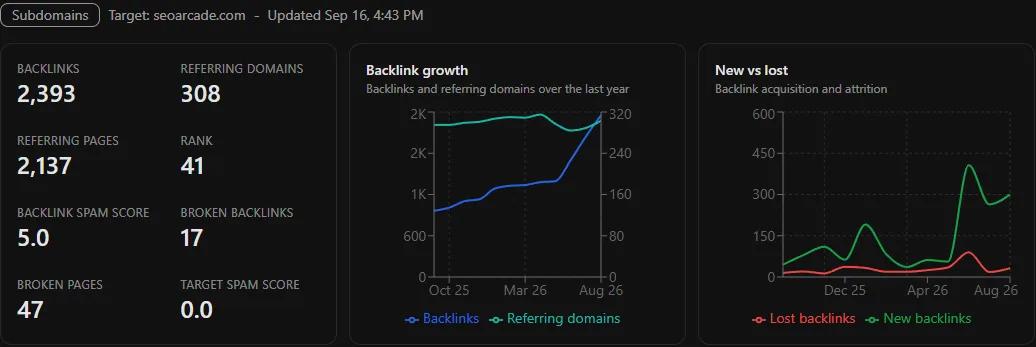
| Backlinks | Backlinks, referring domains, growth, new and lost links, broken links and spam score |
| Rank tracking | Google rankings per keyword, device and language, plus local Google Maps rank grids |
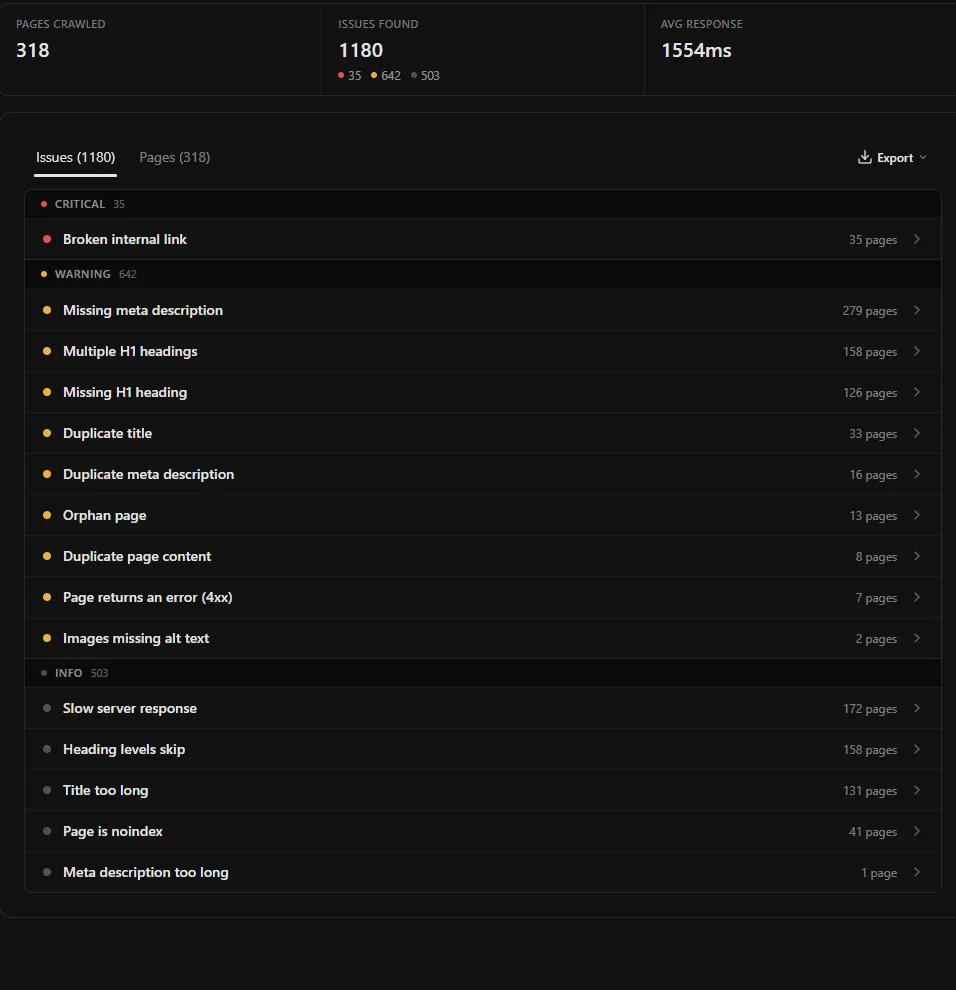
| Site audit | Crawls your pages and groups issues by severity: broken links, meta descriptions, H1s, duplicate titles, orphan pages, `noindex` |
| AI visibility | Tracks questions in ChatGPT, Gemini and Google AI Overviews: whether you are mentioned, cited, and which competitors show up |
| First-party data | Google Search Console and Google Analytics 4 connected to the project |
| Indexing | Submit new or changed URLs to Bing and other engines with IndexNow (new in v0.1.14) |
| Agents | MCP server, 12 SEO skills and a plugin for Claude Code, Codex and Cursor |
How it works under the hood
The repository is a modern TypeScript app built to run on Cloudflare Workers, though it also runs locally inside Docker thanks to workerd, the Workers runtime:
- Frontend and server: TanStack Start with React 19 and shadcn components (on Base UI, not Radix).
- Database: Drizzle ORM with SQLite (D1 on Cloudflare, a local file in Docker) or Postgres. The whole schema stays compatible with both.
- Auth: three modes (
AUTH_MODE):local_noauthfor personal use,cloudflare_accessfor internet-facing installs andhosted(Better Auth) for the paid version. - MCP: the official
@modelcontextprotocol/sdk1.30 over HTTP at/mcp, with OAuth or an API key on the hosted version and no auth in local mode. - Scheduled jobs: a cron every five minutes dispatches the rank and AI visibility checks that are due.
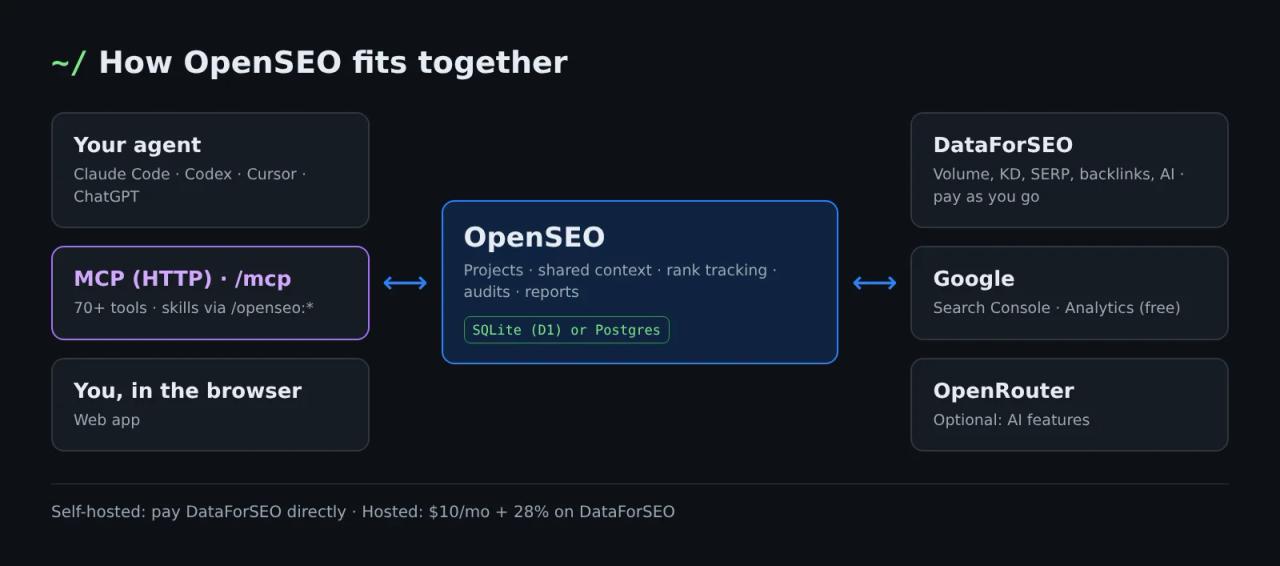
The MCP server is where most of the effort went. We counted more than 70 tools in src/server/mcp/tools: research_keywords, get_keyword_metrics, get_serp_results, get_ranked_keywords, get_backlinks_overview, run_site_audit, get_search_console_performance, inspect_urls, create_rank_tracker, estimate_rank_tracker_cost, submit_indexnow_urls, get_project_context, save_report and many more. Two design decisions make the difference compared with pointing your agent at the raw DataForSEO API:
- Trimmed responses. The keyword tool drops the 12-month trend (about 80% of each row, according to the project) and SERPs come back as rank, domain, title, URL and description. Fewer tokens, fewer reading mistakes by the agent.
- The agent knows the price before it spends. There are estimation tools (
estimate_rank_tracker_cost,estimate_ai_visibility_cost), and repeated SERP lookups in the same project within 12 hours are not billed again.
On top of that there is project context: business, goal, positioning, competitors, key pages, writing preferences and a research log. Every skill reads it first, so you stop re-explaining your business to Claude each session and you don't pay twice for the same research.
What OpenSEO really costs
You have two paths, and on both you pay for the data you use:
| Hosted (openseo.so) | Self-hosted (Docker or Cloudflare) | |
|---|---|---|
| Software | $10/month with $10 of usage included | Free (MIT) |
| Data | DataForSEO price + 28% | DataForSEO price, paid directly |
| Search Console, Analytics, context, reports | No credits used | Free |
| Maintenance | None | Yours |
On the hosted version, 1 credit = $0.001. Using the rates the project itself documents in its pricing calculator (web/src/routes/_marketing/pricing.tsx):
- A keyword research run with 150 results: about $0.042 at DataForSEO, 54 credits hosted.
- A backlink profile with one year of history: 79 credits.
- One rank check (top 40, one device): about $0.002.
- One question to one AI engine for visibility tracking: 2 credits.
If you self-host, DataForSEO gives you $1 of free credit when you sign up, but the minimum top-up is $50. For a blog or a small business that balance lasts months; for an agency watching many clients, the $10 hosted plan can cost the same or less than running everything yourself.
Option 1: use OpenSEO in Claude Code with the plugin
The fastest path if you already use Claude Code and the hosted version works for you. The plugin installs the MCP server and all 12 skills at once. Inside Claude Code:
/plugin marketplace add every-app/open-seo
/plugin install openseo@openseo
If the output says Run /reload-plugins to activate., run /reload-plugins. Claude Code will ask you to log in to OpenSEO; if it doesn't, open /mcp, pick OpenSEO and finish the login.
The skills are namespaced with the plugin name:
/openseo:seo-project-setup
/openseo:seo-coach
/openseo:keyword-research
/openseo:keyword-clustering
/openseo:competitive-landscape
/openseo:competitor-analysis
/openseo:seo-audit
/openseo:local-seo
/openseo:link-prospecting
/openseo:ai-prompt-research
/openseo:ai-visibility-audit
/openseo:seo-report
If you only want the MCP server, without skills:
claude mcp add --transport http --scope user openseo https://app.openseo.so/mcpFor headless environments (CI, servers), create a key under Settings → API keys in the app and pass it as a header:
claude mcp add --transport http --scope user openseo https://app.openseo.so/mcp --header "Authorization: Bearer oseo_YOUR_KEY"If this is your first plugin or skill, we cover the basics in what Claude Code skills are and how to install them.
Option 2: self-host OpenSEO with Docker
This is the path the project recommends for trying it out or for personal use. You need Docker Desktop (or Docker Engine with Compose) and a DataForSEO account.
Step 1: get your DataForSEO key
At app.dataforseo.com/api-access click "Send by email" and copy the long credential labelled Base64. It is the base64 encoding of email:api_password. If you only have the email and API password, generate it yourself:
printf 'you@email.com:YOUR_API_PASSWORD' | base64On Windows with PowerShell:
[Convert]::ToBase64String([Text.Encoding]::UTF8.GetBytes("you@email.com:YOUR_API_PASSWORD"))Careful: this is not the "API key" shown in the DataForSEO dashboard, it is the base64 of login and password. It is the most common mistake.
Step 2: clone and configure
git clone https://github.com/every-app/open-seo.git
cd open-seo
cp .env.example .env
Edit .env and uncomment at least the key:
DATAFORSEO_API_KEY=ZW1haWxAZXhhbXBsZS5jb206cGFzc3dvcmQ=
# Optional: port (defaults to 3001)
PORT=3001
# Optional: turn off anonymous telemetry
OPENSEO_TELEMETRY_DISABLED=1
# Optional: AI features (SAM agent, prompt ideas)
# OPENROUTER_API_KEY=
Telemetry sends aggregate counts (installs, projects, feature usage) tied to a random ID; according to the docs it never includes URLs, keywords, prompts or emails. OPENSEO_TELEMETRY_DISABLED=1 or DO_NOT_TRACK=1 turns it off.
Step 3: start it
docker compose up -d
docker compose logs -f
compose.yaml uses the ghcr.io/every-app/open-seo:latest image. The first start builds the app inside the container and takes one or two minutes; later starts reuse the build as long as the variables don't change. Before building, you get a checklist ([ ok ], [warn], [info]) telling you what is missing.
Open http://localhost:3001. To check health from the terminal:
curl http://localhost:3001/api/health
docker compose ps
Step 4: connect Claude Code to your local install
Your instance serves MCP too, with no login in local mode:
claude mcp add --transport http --scope user openseo-local http://localhost:3001/mcpSkills don't come with the plugin when you self-host (the plugin only points at the hosted version), so install them separately:
npx skills add every-app/open-seo --skill '*' --agent claude-codeReview third-party skills before you install them; our SkillSpector post shows how to scan them for dangerous instructions.
Security: don't expose it as is
In Docker, OpenSEO runs with AUTH_MODE=local_noauth: there is no login, anyone who reaches the port is an admin. That is why compose.yaml only binds the port to 127.0.0.1. If you want it reachable from outside, put it behind a reverse proxy with authentication (Cloudflare Access, a private tunnel, Tailscale) and add the hostname:
ALLOWED_HOST=seo.yourdomain.com docker compose up -dFor a team or several devices, the README recommends the Cloudflare install (works on the free plan and ships with Cloudflare Access) over Coolify, Railway or Dokploy, at least until those deployments get simpler.
Option 3: OpenSEO on your own Cloudflare account
A summary of docs/SELF_HOSTING_CLOUDFLARE.md for the team setup:
git clone https://github.com/every-app/open-seo.git
cd open-seo
corepack enable
pnpm install
pnpm alchemy login
pnpm alchemy cloudflare bootstrap
Requirements: Node 22.6 or newer, pnpm and a Cloudflare account with R2 enabled (it needs a payment method on file even within the free tier). Then you create .env.selfhost with your DataForSEO key and deploy with pnpm deploy:selfhost --yes, which provisions the database, the Workers and the Cloudflare Access login gate. JavaScript rendering in site audits needs a paid Workers plan.
Concrete examples with Claude Code
With MCP connected, the project's advice is to start from one focused workflow instead of asking the agent to "do SEO". Here are four cases and the tools called under the hood.
1. Set up the project once
/openseo:seo-project-setup
My site is mydomain.com, we sell invoicing software for small businesses in Spain.
The skill fills in the project context (update_project_context): business, goal, competitors and key pages. It is free, and every other skill reuses it.
2. Keyword research for a specific market
/openseo:keyword-research
Seeds: "e-invoicing", "invoicing software". Market: United Kingdom, English.
According to its SKILL.md, the skill reads the context first (get_project_context), checks whether the same research ran in the last 30 days so it doesn't buy it again, calls research_keywords with 1-5 seeds and 150 results, inspects the SERP for the best candidates with get_serp_results and, if Search Console is connected, hydrates your position 5-20 queries with get_keyword_metrics. The result is saved as a report in the project via seo-report.
3. Estimate the cost before tracking rankings
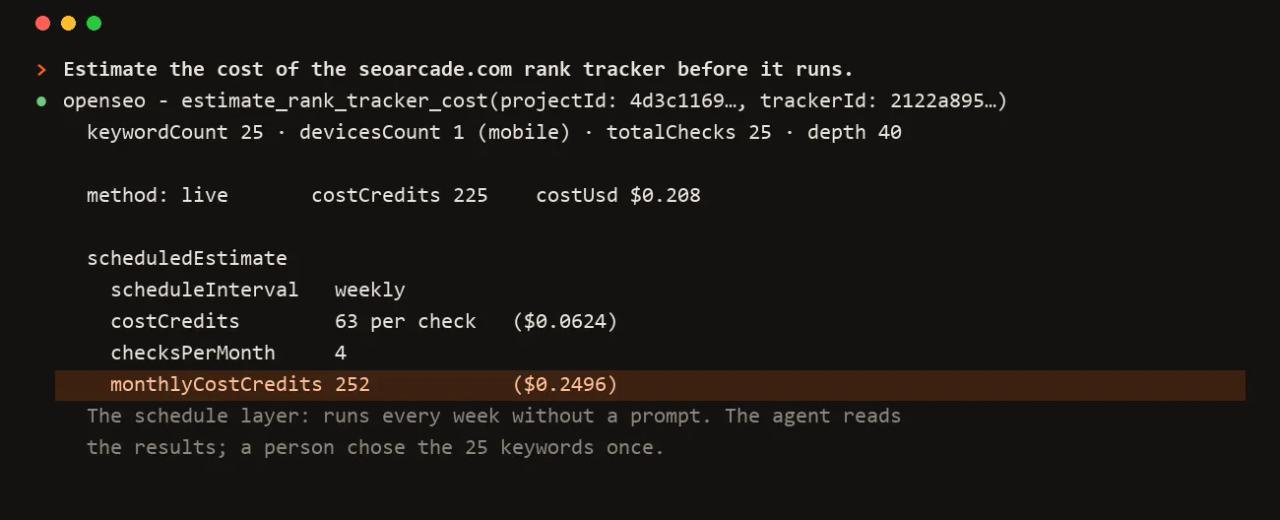
Create a rank tracker for mydomain.com with these 25 keywords, mobile, weekly.
Tell me the monthly cost before you turn it on.
The agent uses create_rank_tracker and estimate_rank_tracker_cost. Scheduled checks go through DataForSEO's task queue, which costs roughly a third of the live API. In Docker, the startup checklist warns that scheduled rank tracking does not run on its own: trigger checks from the Rank Tracking page.
4. Find out whether AI assistants recommend you
/openseo:ai-prompt-research
What do people ask ChatGPT about invoicing software in the UK, and who gets cited?
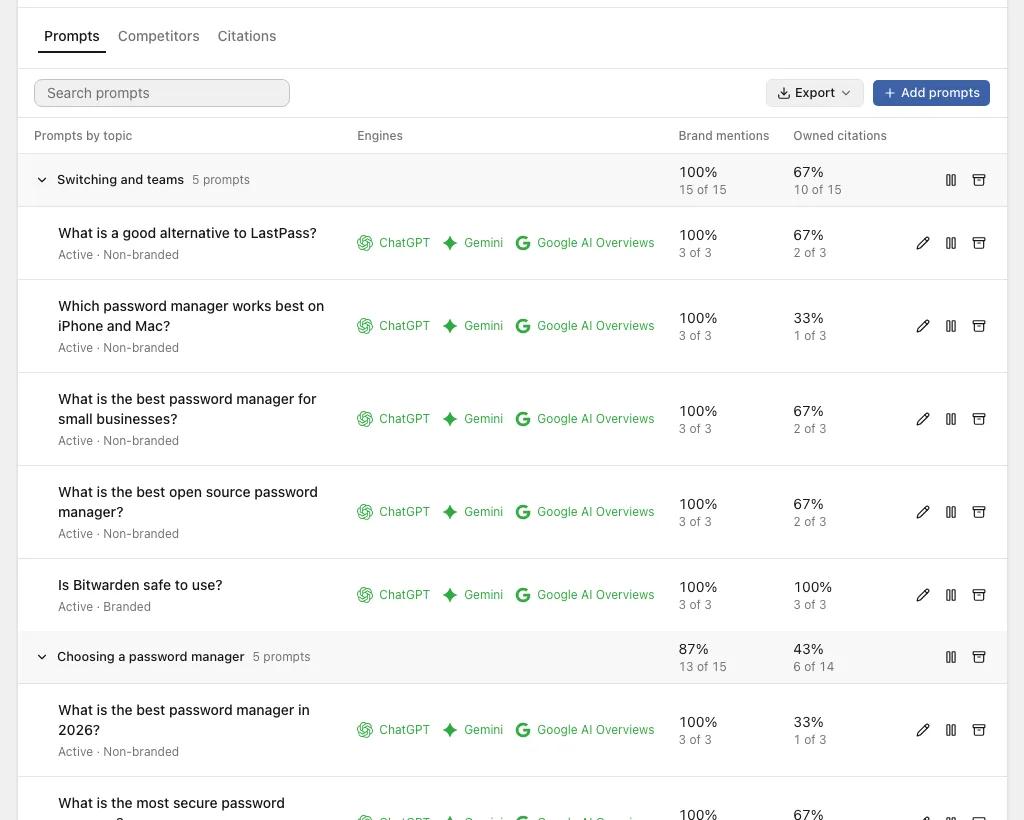
The AI visibility tools (research_ai_visibility_prompts, run_ai_visibility_check, get_ai_visibility_sources) show the cost before running anything and then let you schedule daily, weekly or monthly tracking.
Common errors
DATAFORSEO_API_KEY: Not set — all SEO data features will be unavailable until it is. The container starts, but with no data. Put the key in .env and recreate the container: docker compose up -d --force-recreate open-seo. A plain docker compose up -d doesn't always pick up .env changes.
Set, but does not decode as base64 of login:password. You pasted the dashboard API key or the unencoded text. Generate the base64 with printf 'email:password' | base64.
"Blocked request" when opening it through your domain. Vite returns this when you access it through a host other than localhost. Add ALLOWED_HOST=yourdomain.com and recreate the container.
/reload-plugins says 0 skills. That's normal: the summary only counts the plugin's commands/ folder. Try a skill directly, for example /openseo:seo-audit.
/plugin uninstall openseo@openseo replies "not installed in this project". You installed it in another scope. Use claude plugin uninstall openseo@openseo --scope user.
Codex: Authorization server response missing required issuer. Affects Codex 0.143-0.146. Upgrade to 0.147.0 or later, or connect with an API key.
Pros and cons
Pros:
- MIT license and readable code: you can adapt it or build your own tool on top.
- Pay as you go. For a small site, a few dollars a month versus the $129/month Ahrefs Lite plan the project compares against.
- The MCP server and skills are carefully built: trimmed responses, visible costs, context shared across sessions and across Claude, Codex, Cursor and ChatGPT.
- Search Console, Analytics, reports and context don't use credits.
Cons:
- It depends on DataForSEO: no account, no data, and the first top-up is $50.
- Version 0.1: it changes every week and some features (Search Console when self-hosting, JavaScript rendering) need extra setup.
- Docker mode has no login; exposing it to the internet means adding auth yourself.
Who is it for? People doing SEO for their own projects or a handful of clients who already work with an AI agent. If you rely on Semrush's advanced features (ads, social, huge historical databases), it won't fully replace it; if your work is keyword research, rank tracking and audits, it covers the essentials for a fraction of the price.
Frequently asked questions
Is OpenSEO free? The software is (MIT). The data isn't: you pay DataForSEO directly when self-hosting, or $10/month with $10 of usage included on the hosted version.
Do I need to code to use it? Not for the hosted version. For Docker, copying the commands in this article is enough.
Does it work for markets outside the US? Yes. DataForSEO covers Google in most countries; in keyword research you pick country and language, and for a specific city the skills use search_serp_locations.
Can I use OpenSEO without Claude Code? Yes. It has a full web app, and the MCP server also works with Codex, Cursor, Claude Desktop and ChatGPT.
Can I deploy it on Coolify? Technically it is a Docker container, but Docker mode has no authentication and the project advises against Coolify or Dokploy unless you are already experienced. If you do it, protect it behind a proxy that requires login.
Conclusion
OpenSEO is the most interesting open source Semrush and Ahrefs alternative if you work with agents: its MCP server and skills turn Claude Code into an SEO analyst with real data and visible costs. Try it first with Docker locally and DataForSEO's $1 of free credit; if it convinces you and you don't want to maintain anything, the $10/month hosted plan is the next step. To grow your skill set further, see how to search for Claude Code skills with find-skills.
// source code
// implementation
More on Open source tools
- Free alternatives to paid apps
- Run it on your server

- Design, image and video
- Free alternatives to paid apps
- Free alternatives to paid apps
- Design, image and video