Call.md: the open source AI meeting copilot that transcribes live, suggests what to say and saves everything as Markdown
Call.md is an open source desktop app that turns your meetings into a live agent loop: it records the call, transcribes it in real time with you and them on separate channels, suggests lines and questions while you talk, queries your MCP tools when the conversation calls for it and, when you hang up, writes a summary with action items to a folder of Markdown files. It is published by VideoDB under the MIT license and runs on macOS and Windows x64.
It is the closest thing to Gong, Otter or Granola that you can read line by line. We went through the code of video-db/call.md (version 1.0.4, commit ba53ebe from August 19, 2026) to explain what it really does during a call, the rules behind its nudges, what data leaves your computer and what you need to install it. Short version: the code is open, but transcription and AI depend on VideoDB's service and API key.
What Call.md is and who makes it
| Item | Value |
|---|---|
| Repository | [video-db/call.md](https://github.com/video-db/call.md) |
| Author | VideoDB, a video platform for AI agents |
| Version reviewed | 1.0.4 (`package.json`), commit `ba53ebe`, August 19, 2026 |
| License | MIT (declared in `package.json` and the README) |
| Platforms | macOS 12+ (Apple Silicon and Intel) with an installer; Windows x64 built from source |
| Stack | Electron 42, React 19, TypeScript, tRPC, SQLite with Drizzle, shadcn/ui |
| Requires | A VideoDB API key, microphone and screen recording permissions |
The project started in February 2026 as a sales copilot (the first commit is literally "init: meeting copilot" and the core service is still called sales-copilot.service.ts). A day later it was reworked for general use, which is where the name comes from: every meeting ends up as a handful of .md files that you, or your agent, can read later.
A note on the license: the repository has no LICENSE file. MIT is stated in the "license" field of package.json and in the README badge. That is enough in practice to use or modify it, but if you redistribute it inside a product, keep a copy of that declaration with the version you ship.
What it does before, during and after a meeting
Before: preparing the call
When you create a meeting you type a name and a description. From that, the app generates 3 multiple-choice questions (4 options each) about what a good outcome looks like, what risks exist and which decisions are expected. Your answers become a checklist to track during the call. If you connect Google Calendar, it also syncs your upcoming meetings.
During: transcription, suggestions and tools
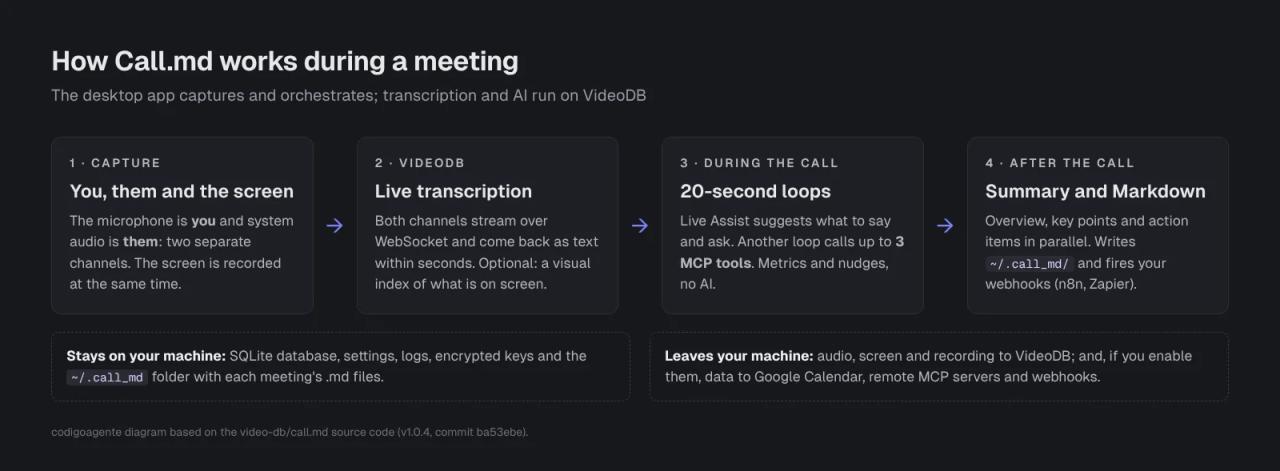
- Two-channel transcription. The microphone is labeled "you" and system audio is labeled "them", so it knows who is speaking without guessing voices.
- Live Assist. Every 20 seconds it sends the latest chunk of transcript to the model and gets back up to 3 lines to say (
say_this) and up to 3 questions to ask (ask_this), always first person and tied to something that was just said. If the conversation is going fine, it returns empty lists. - MCP tools in the background. A second loop, also every 20 seconds, decides whether what is being discussed calls for data your MCP servers can provide ("what stage is the Acme deal in?") and calls up to 3 tools per round. Results show up in a Markdown panel. Its system prompt forbids making data up and asks it to flag anything that is "not safe to share aloud".
- Metrics and nudges. Talk ratio, words per minute, questions, monologues and interruptions. This part is plain statistics, no AI (details below).
- Bookmarks to mark key moments.
After: summary, Markdown and webhooks
When you stop recording it runs three extractions in parallel: a narrative overview, key points by topic and concrete action items. Then it writes the meeting to your home folder:
~/.call_md/
├── index.md                         chronological index of every meeting
└── meetings/2026/10/25/<meeting>/
    ├── summary.md                   overview, key points and action items
    ├── transcript.md                full transcript with timestamps
    ├── visual.md                    description of what was on screen
    └── metrics.md                   talk ratio and pace
If you set up webhooks, it sends n8n, Zapier or your CRM a JSON payload with the title, duration, summary, topics, action items, checklist, transcript and a link to the VideoDB player.
How it works under the hood
It is an Electron app with two processes. The main process (Node) captures audio and screen with the VideoDB SDK, stores everything in SQLite and exposes a local tRPC API; the renderer (React) only draws the UI. The interesting part lives in src/main/services:
| Service | What it does |
|---|---|
| `videodb.service.ts` and `rtstream-transcript.service.ts` | Open the capture session and receive the transcript over WebSocket. |
| `live-assist.service.ts` | The 20-second loop that suggests what to say and ask. |
| `mcp-inference.service.ts` | The 20-second loop that calls your MCP tools via tool calling. |
| `copilot/conversation-metrics.service.ts` and `nudge-engine.service.ts` | Metrics and nudges, no model. |
| `copilot/summary-generator.service.ts` | The three end-of-call extractions. |
| `markdown-export.service.ts` | Writes `~/.call_md`. |
| `workflow-webhook.service.ts` | Sends webhooks with SSRF protection. |
One detail the README does not spell out: every model call goes to VideoDB's API (https://api.videodb.io, OpenAI SDK compatible) using the ultra model. There is no setting to plug in your own Anthropic or OpenAI key; you would have to change llm.service.ts.
Nudge rules: what it measures and when it interrupts you
Nudges are not decided by an AI. They are fixed rules in nudge-engine.service.ts and conversation-metrics.service.ts, with at most one nudge every 2 minutes so they do not get in the way:
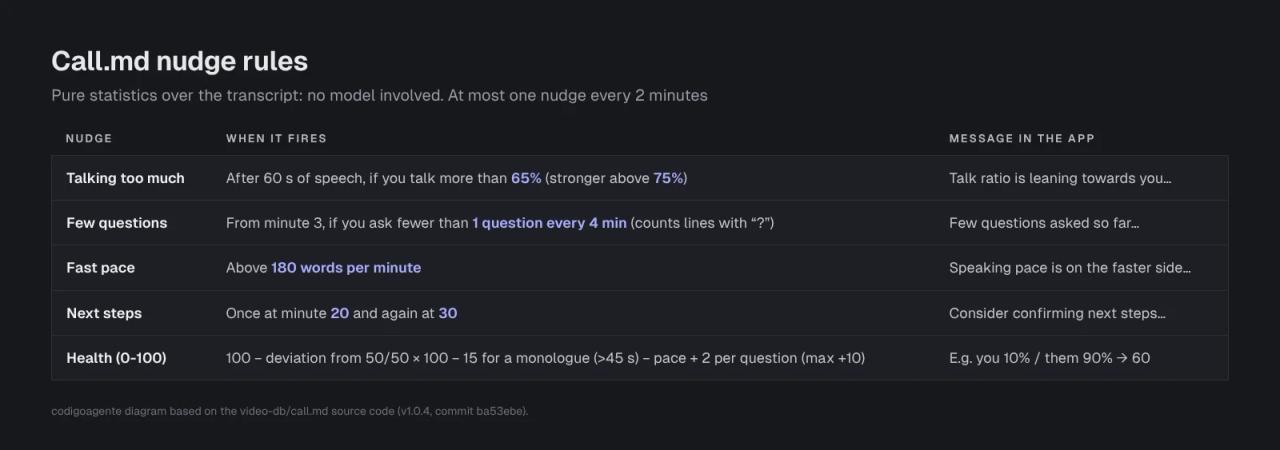
The health score in the official screenshot matches the formula: you talk 10% and they talk 90%, the deviation from 50/50 is 0.4, which subtracts 40 points. Hence 60/100.
Two things to keep in mind:
- Questions are counted by looking for a
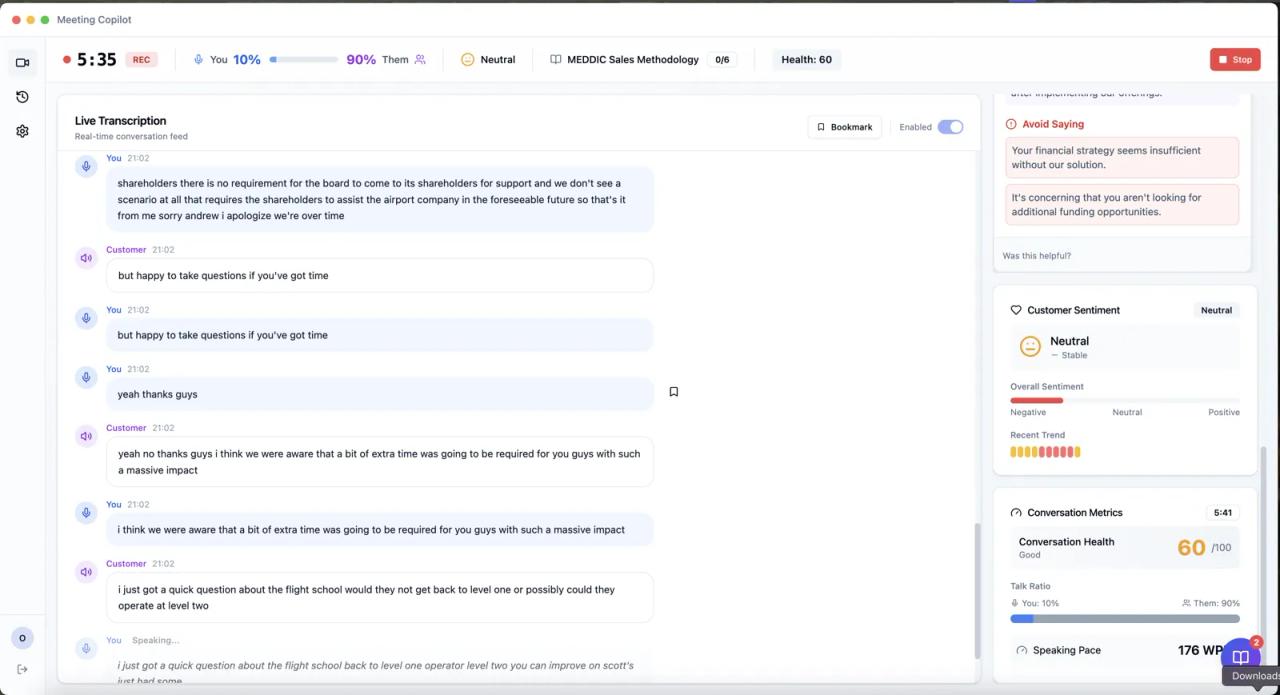
?character in your lines. If the transcript has no question marks (the official screenshot shows unpunctuated text), the counter runs low and the "few questions" nudge fires too often. - Nudge messages are hard-coded in English, and the Live Assist and summary prompts do not specify an output language. Transcription supports 17 languages plus automatic detection (Settings → Transcription). We could not test a real call, so we cannot confirm which language the summary comes out in for non-English meetings.
Requirements and installation
On macOS
The official installer downloads the .dmg for your architecture and copies it to Applications:
curl -fsSL https://artifacts.videodb.io/call.md/install | bashThen open Call.md, grant microphone and Screen & System Audio Recording in System Settings → Privacy & Security, and paste your VideoDB API key (from console.videodb.io; the README says there is a free one). Google Calendar is optional.
Read any curl | bash before running it: the repository's script is scripts/install.sh, it only runs on macOS and does not use sudo (if it cannot copy the app to Applications, it suggests rerunning with sudo).
On Windows x64 (from source)
There is no published Windows installer, but recording works if you build it yourself. You need Node.js 22.12 or later and npm 10:
git clone https://github.com/video-db/call.md.git
cd call.md
npm ci
npm run dist:win
That produces an unsigned NSIS installer. To develop instead of packaging: npm install, npm run rebuild (rebuilds better-sqlite3 for Electron) and npm run dev. On Linux and Windows ARM64 the UI, MCP servers, webhooks and history work, but the app refuses to record because VideoDB does not ship the capture binary for those platforms.
We did not install it ourselves: our test environment is Linux without a VideoDB account, where recording is not possible, so this review comes from the code rather than a real call.
Connecting your MCP tools
In Settings → MCP Servers → Add Server you pick the transport: stdio for a local server (a command) or http for a remote one. Each server's environment variables and headers are stored encrypted with AES-256-GCM. During a meeting, the MCP loop sees every connected tool and picks which one to call.
Privacy: what stays on your machine and what leaves it
The README says "local-first", which is true for storage but not for processing:
- Stays on your machine: the SQLite database, settings, logs (with credentials redacted), keys encrypted with the OS keychain and the
~/.call_mdfolder. - Goes to VideoDB: audio from both channels, the screen, the exported recording (with a player link) and everything sent to the model.
- Leaves if you enable it: Google Calendar, remote MCP servers and webhooks.
The rest is handled well: the local API only listens on 127.0.0.1, the data folder is 0700, webhooks block private and cloud metadata IPs, and recordings stop on their own at 2 hours (with a warning 5 minutes before; paused time does not count).
Recording a call with other people has legal implications: in many places you must notify or get consent, and here the recording also goes through a third-party provider. If you plan to use it with clients, read our guide to the legal risks of AI-built apps.
Using Call.md notes with Claude Code
Since every meeting ends up as Markdown, your coding agent can read it with no integration at all. From any project in Claude Code:
Read ~/.call_md/index.md and today's client meeting folder.
Using summary.md and transcript.md, open an issue for every agreed task
that affects this repository, quoting the transcript timestamp.
It also works the other way around: connect an MCP server for your task board or CRM to Call.md so that when someone asks "how is the login ticket going?", the answer shows up on screen without you searching for it.
Common errors
Recording does not start. Check microphone and screen recording permissions, that your VideoDB API key is valid and that you are on macOS (arm64 or x64) or Windows x64.
No transcript appears. Make sure the microphone and system audio are enabled in Settings and wait 5-10 seconds: the first chunks take a while. It needs an internet connection.
The transcript comes out in English. Pick the language in Settings → Transcription; it applies to the next recording, not the current one. If it is still English, VideoDB's engine does not support that language and the app falls back to the default (documented in issue #25).
The recording stopped by itself. You hit the 2-hour limit. It is saved and summarized as if you had pressed Stop. To change it, edit MAX_RECORDING_DURATION_MS in src/shared/constants/recording.ts and rebuild.
Your lines also show up as "them". The microphone is picking up your speakers. Use headphones: the official screenshot itself shows lines duplicated across both channels.
Native module errors while developing. Run npm run rebuild and confirm you are on Node.js 22.12 or later. On macOS, logs are in ~/Library/Application Support/call-md/logs/.
FAQ
Is Call.md free? The code is, under the MIT license. Transcription and AI use VideoDB's API, which has its own pricing.
Does it work offline? Not for the parts that matter: transcription, suggestions and the summary need a connection to VideoDB.
Can I use it with Claude or GPT directly? Not without changing the code: every model call goes through VideoDB's API.
Does it join the meeting as a bot? No. It records what you hear and say from your own computer, so it works with Zoom, Meet, Teams or any other app without an extra participant joining.
Does it work on Linux? For the UI, history and MCP servers, yes; for recording, no.
Can I modify it and sell it? The MIT license allows it. Keep in mind it still depends on VideoDB unless you replace the capture and transcription layers.
Conclusion
Call.md is a very complete foundation for your own meeting copilot: per-channel transcription, live suggestions, MCP tools during the call and, above all, Markdown output that any agent can read. What it is not: self-hosted. The code is yours, but audio and AI go through VideoDB. If that works for you, try it on an internal call, tune the nudge thresholds to the way you work and point your agent at ~/.call_md.
If you want to record your screen for demo videos rather than meetings, see Recordly. For another open source agent that works for you, check our hands-on test of OpenMuse.
// source code
// implementation
More on AI agents

- Skills for your agents
- Claude Code

- Skills for your agents
- Claude Code

- Skills for your agents
- Claude Code