Cloudflare's security-audit skill: how to audit your code's security with Claude Code (guide and real test)
security-audit is the skill Cloudflare released to turn your coding agent (Claude Code, Codex, Cursor or any other agent with sub-agents) into a source-code security auditor. It is not a pattern scanner: it splits the work across isolated agents that map the architecture, hunt for bugs, try to disprove what they find and hand back a report with file and line traces. It ships under the MIT license.
This guide covers what it does under the hood, how to install it, how to set it up in a project and how to use its two modes. We tested it in Claude Code 2.1.305 against an invoicing API with three deliberately planted vulnerabilities, and we show you the output of each mode, how long it took and what it cost.
If skills are new to you, start with the Claude Code skills guide.
What security-audit is and where it comes from
Cloudflare calls it "the skill that seeded Cloudflare's vulnerability discovery harness". In their post *Build your own vulnerability harness* (June 2026) they explain that the system started as a roughly 450-line skill that audited one repository, and that they later turned each phase into its own agent backed by a database and an orchestrator. This skill is the single-repo starting point.
Facts we checked in the cloudflare/security-audit-skill repository:
| Item | Value |
|---|---|
| License | MIT, Copyright (c) 2025-2026 Cloudflare, Inc. |
| Last commit reviewed | `c1c8a8c`, September 14, 2026 |
| Skill files | `SKILL.md` + 14 `.md` guides + JSON schema + 2 validators |
| Validators | `validate-findings.cjs` and `validate-coverage-ledger.cjs`, zero dependencies |
| Requirements | An agent with parallel sub-agents, Node.js and an OS-enforced sandbox to run project code |
The skill is agent-neutral: it talks about a "parent", a "Task tool" and research or general agents, and each platform maps those onto its own sub-agents. In Claude Code the parent is the main session and the rest are sub-agents launched with the Agent tool.
How it works: the six phases of a full audit
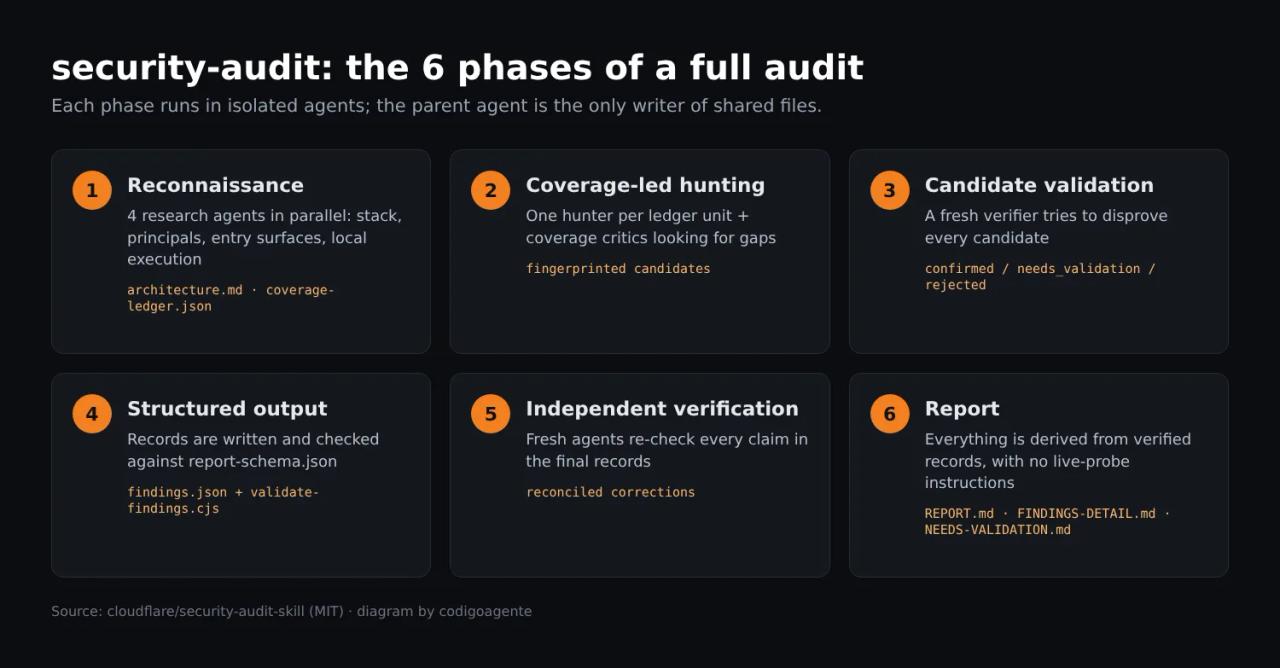
- Reconnaissance. Four agents read the code in parallel: product and stack, principals and authorization controls, entry surfaces and sensitive sinks, and what can be run locally. The parent writes
architecture.mdand a coverage ledger (coverage-ledger.json): one unit per combination of entry surface, trust boundary, subsystem and attack class. - Coverage-led hunting. One hunter per ledger unit, each in its own isolated directory. Then a coverage critic checks what was left unexamined and can open new units.
- Candidate validation. Every candidate goes to a fresh verifier whose job is to disprove it. The agent that validates is never the one that found the bug.
- Structured output. Results are written to
findings.jsonand checked againstreport-schema.json. - Independent verification. Fresh agents re-check the claims in the final records.
- Report.
REPORT.md,FINDINGS-DETAIL.mdandNEEDS-VALIDATION.mdare derived from the verified records, never the other way round.
The three verdicts
Every finding ends in one of these states:
| Verdict | Meaning | Severity? |
|---|---|---|
| `confirmed` | Complete source trace **and** a local (sandboxed) observed result that crosses a real boundary | Yes: critical, high, medium, low or informational |
| `needs_validation` | A source-grounded hypothesis blocked by one specific missing fact | No |
| `rejected` | A candidate the verifier disproved | No |
This rule is what sets the skill apart from a generic "review my code" prompt: no observed evidence, no severity. You will see it in the test.
Attack classes
ATTACK-CLASSES.md defines the core classes (injection, access control, resource and file handling, cryptography and secrets, business logic, feature abuse and data leakage, chained vulnerabilities, a "wildcard" and "obvious things"). On top of that there are ten domain guides that load only when reconnaissance finds that boundary in the code: web protocols and auth, client side, AI and LLM, supply chain, cloud and deployment, RPC and messaging, resource exhaustion, data isolation, desktop and mobile, and memory safety and binaries.
Installing the skill
With the skills CLI
This is the README's method. It installs the skill in the current project:
npx skills add https://github.com/cloudflare/security-audit-skill \
  --skill security-audit
With --global it is available to your user in every project:
npx skills add https://github.com/cloudflare/security-audit-skill \
  --skill security-audit \
  --global
If you have not used this CLI before, our find-skills post explains how to search for and install skills with it.
Manually, by copying the folder
If your network blocks skills.sh (ours did in the test container), clone the repo and copy skills/security-audit to where Claude Code looks for skills:
git clone --depth 1 https://github.com/cloudflare/security-audit-skill /tmp/security-audit-skill
mkdir -p .claude/skills
cp -r /tmp/security-audit-skill/skills/security-audit .claude/skills/
To install it for all your projects, copy it to ~/.claude/skills/ instead of .claude/skills/. When you open Claude Code you will see security-audit in the skills list and can call it with /security-audit.
Setting it up in a project
There is no config file: the skill is configured through what you ask for and the environment it runs in. These are the points worth settling in the repository.
1. Where reports go
By default it writes outside the repository, to ~/security-audit-skill/<repo>/run-<N>. It only accepts a directory inside the project if you ask for it explicitly and Git ignores the whole directory. If you want reports next to the code, add it to .gitignore:
# security-audit reports (they contain attack paths, do not commit them)
/security-audit/
Then say so in the prompt: "save the report to ./security-audit/run-1".
2. Profile, scope and budget
| Profile | Use it for | Behaviour |
|---|---|---|
| `quick` | Small repos, first passes, re-runs | One hunter wave, one final critic and one verifier per candidate |
| `standard` | Default | The full workflow as written |
| `deep` | Large or high-stakes code | Units per subsystem and lifecycle, critics until a clean pass and separate verifiers |
You can narrow the scope ("only src/api", "only the diff between v1.2.0 and main") and set a budget as a maximum number of agents. The skill reserves the 4 reconnaissance agents, the critics and at least one verifier first; if the budget cannot cover that, it launches nothing and asks for more room.
3. A sandbox for running code
To mark a bug confirmed the skill has to reproduce it locally, and it only runs project code inside an OS-enforced sandbox with all of these guarantees:
- no external network (at most an isolated loopback);
- an empty environment with explicitly allowlisted variables and a temporary
HOME; - read-only target and toolchain, with writes only to its
scratch/directory; - CPU, memory, process, file-size, disk and wall-clock limits.
If any of them is missing it executes nothing and leaves the finding as needs_validation with a validation plan. It also never installs dependencies or lets the build fetch them. In other words, if you want confirmed findings, the agent has to run in an environment like that (for example, a container with no network, the repo mounted read-only and resource limits). We deliberately gave it none, and you will see the result below.
4. One line in CLAUDE.md
So the whole team uses it the same way, put the convention in the project's CLAUDE.md:
## Security
- Audits use the `security-audit` skill. Reports go to `./security-audit/run-<N>` (ignored by Git).
- `quick` profile for small changes, `standard` before every release.
- Never test against production: source code and local sandbox only.
How to use it: guidance mode and full audit
The skill has two modes and picks one based on how you ask:
- Guidance mode (default): security questions, reviewing a file, triaging a specific bug. It uses only the parts of the skill it needs and creates no files.
- Full audit: when you explicitly ask to "audit" or "pen-test" the code, for a "full" or "comprehensive" review, or for report files. It runs all six phases and writes every artifact.
Example prompts from the README:
security audit this codebase
find security vulnerabilities in ./src
do a security review, output to ~/audits/my-project
If the request is ambiguous, the skill asks one question before creating any files.
Real test: auditing an invoicing API with three planted bugs
We wrote a minimal Express + better-sqlite3 + JWT API: five files, multi-tenant (each user belongs to a company and the token carries companyId). In src/routes/invoices.js we left three bugs on purpose (the comments are in Spanish because we ran the test in Spanish):
// Lista las facturas de la empresa del usuario, con búsqueda por cliente.
router.get("/", (req, res) => {
  const q = req.query.q || "";
  const rows = db
    .prepare(
      `SELECT id, customer, total FROM invoices
       WHERE company_id = ${req.user.companyId} AND customer LIKE '%${q}%'`
    )
    .all();
  res.json(rows);
});

// Devuelve una factura por id.
router.get("/:id", (req, res) => {
  const row = db.prepare("SELECT * FROM invoices WHERE id = ?").get(req.params.id);
  if (!row) return res.status(404).json({ error: "not found" });
  res.json(row);
});

// Descarga el PDF de una factura de la empresa del usuario.
router.get("/:id/pdf", (req, res) => {
  const row = db
    .prepare("SELECT pdf_file FROM invoices WHERE id = ? AND company_id = ?")
    .get(req.params.id, req.user.companyId);
  if (!row) return res.status(404).json({ error: "not found" });
  res.sendFile(path.join(PDF_DIR, req.query.file || row.pdf_file));
});
SQL injection in the search, a cross-tenant IDOR on GET /:id and path traversal through ?file=. The JWT check, on the other hand, is done right (algorithm pinned to HS256, fails closed), to see whether the skill invents problems where there are none.
Guidance mode: three bugs in 23 seconds
First, a quick review with no files, calling the skill by name (the prompt and answer are in Spanish):
claude -p "/security-audit Revisión rápida en modo guía de src/: dime qué vulnerabilidades reales hay, con archivo y línea, severidad y el arreglo mínimo. No escribas archivos."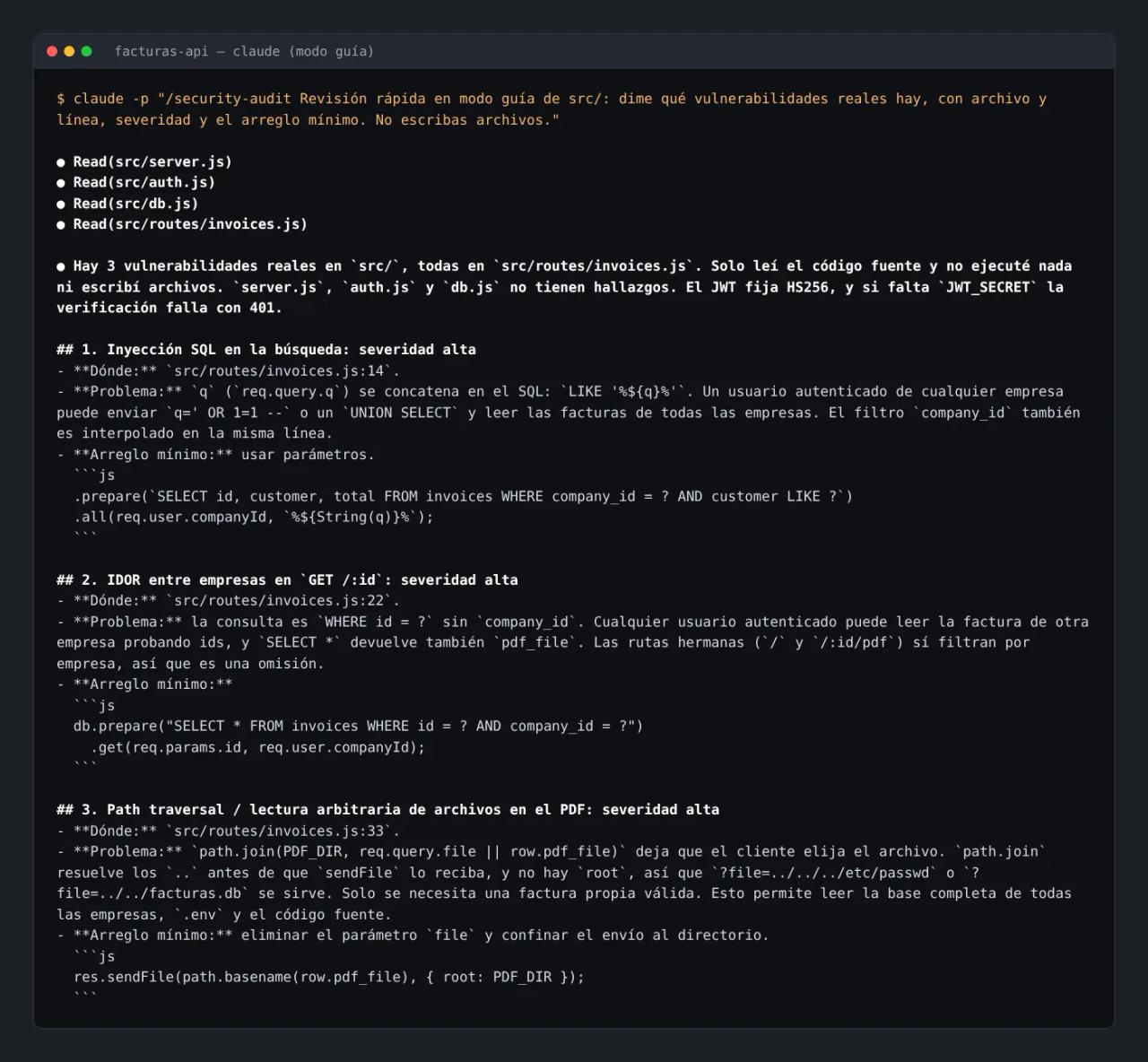
It found all three bugs with their lines (14, 22 and 33), proposed the minimal fix for each one and finished by suggesting regression tests (company A requesting company B's invoice must return 404). It called the JWT check sound and did not report missing helmet or rate limiting as vulnerabilities. It took 23 seconds and 7 turns.
One detail: the first time we asked without naming the skill ("check the security of this API") and Claude answered without loading it. On a case this small the result was similar, but on a real repo the difference is the method, so call it by name (/security-audit or "use the security-audit skill").
Full audit with the quick profile
Next, the full workflow with a 14-agent budget and an instruction not to run project code:
claude -p "Haz una auditoría de seguridad completa de este repositorio con la skill security-audit, perfil quick, presupuesto máximo de 14 agentes. Guarda el informe en ~/audits/facturas-api/run-1. No ejecutes el código del proyecto."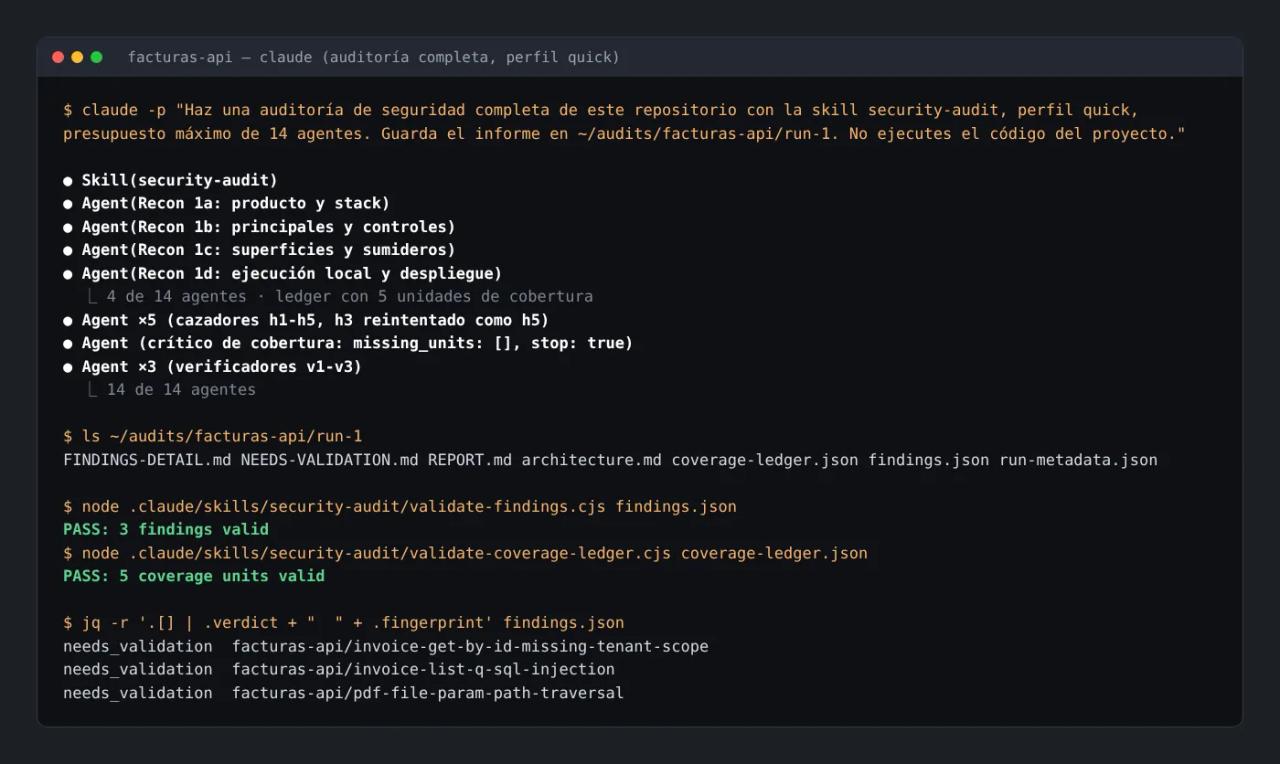
What happened, according to the session itself and run-metadata.json:
- Reconnaissance: 4 agents in parallel. It selected the
WEB-PROTOCOL-AND-AUTH.mdandDATA-ISOLATION-AND-LIFECYCLE.mdguides and excluded AI, cloud, supply chain and the rest because the code shows none of those boundaries. - Ledger: 5 coverage units (JWT,
server.jswiring, list,/:idand/:id/pdf). - Hunting: 5 hunters. One did not return valid JSON and the skill retried that unit with another agent in the same wave, noting it in the report.
- Critic:
missing_units: [], no gaps. - Verification: 3 verifiers, one per candidate. All three upheld their candidate.
- Validators:
PASS: 3 findings validandPASS: 5 coverage units valid.
It took about 7 minutes. The session reported an equivalent cost of USD 2.59 in API tokens for a five-file repo; on a real project it scales with the number of ledger units.
Why none came out "confirmed"
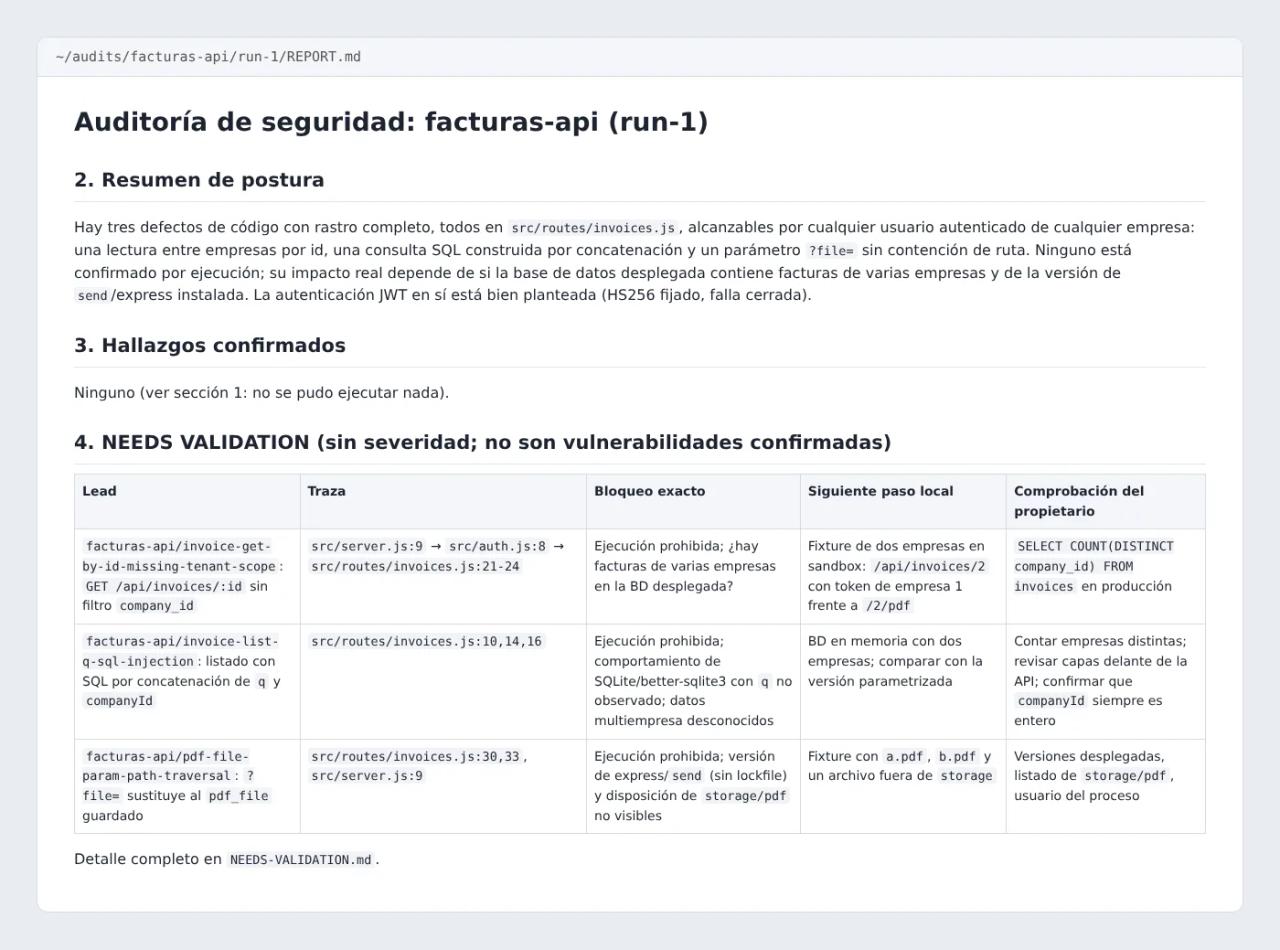
All three bugs are real and the traces are correct, yet the report says "Confirmed findings: none". That is the skill's rule at work: we forbade it from running code and there was no verifiable sandbox, so it could not observe the bug and does not assign severity. For each lead it records:
- the trace (
src/server.js:9→src/auth.js:8→src/routes/invoices.js:22); - the exact blocker (for example, "does the deployed database hold invoices for more than one company?");
- a local validation plan with dummy data (two companies, two tokens, request the other company's invoice);
- a read-only owner check (
SELECT COUNT(DISTINCT company_id) FROM invoices); - the minimal fix (
WHERE id = ? AND company_id = ?).
In practice this is what you want from an automated auditor: it would rather under-claim than pad a report. The fixes match the ones from guidance mode; the difference is that the full audit records what was covered (the ledger) and what is still unproven.
Repeated runs and coverage
One pass does not exhaust a repository. The README is explicit: in their test runs, a single run found roughly half of the vulnerabilities that repeated runs found in total.
Runs are additive. If you start run-2 on the same repo, the skill reads the previous coverage-ledger.json and findings.json files and:
- re-verifies earlier
confirmedrecords when the source is unchanged, and revalidates them from scratch when it changed; - turns everything left as
needs_validation,deferredorblockedinto current work; - never lets an earlier
rejectedrecord suppress review of its unit, only that exact claim.
A sensible pattern: quick on every large PR, standard before every release and deep whenever you touch authentication, payments or tenant isolation.
security-audit vs Claude Code's /security-review
Claude Code ships a /security-review command that reviews the pending changes on the current branch. It is fast and useful before a merge. security-audit audits the whole repository (or the scope you give it), with a coverage ledger, independent verifiers and a validated output schema. They complement each other: /security-review day to day, security-audit for periodic audits.
Common errors
The skill does not activate. With generic requests ("review this API") Claude may answer without loading it. Name it: /security-audit ... or "use the security-audit skill".
Every finding comes out needs_validation. That is not a bug: there was no sandbox with all four guarantees, or you told it not to run code. Give it an isolated environment if you need confirmed findings with severity.
It refuses to save the report inside the repo. It only accepts that when Git ignores the whole directory. Add it to .gitignore or use the default path under ~/security-audit-skill/.
incomplete_reason: "budget_cannot_fund_reconnaissance_and_reserves". The budget does not cover the 4 reconnaissance agents plus the critics and one verifier. Raise the budget, narrow the scope or switch to quick.
npx skills add does nothing. If your network blocks skills.sh, use the manual install by copying skills/security-audit to .claude/skills/.
FAQ
Is it free? The skill is MIT and free. You pay for the tokens of whatever model your agent uses: in our test, about USD 2.59 in API cost for a quick audit of five files.
Does it work with Codex, Cursor or other agents? It is written for any agent with parallel sub-agents and read tools. We only tested it in Claude Code.
Does it fix the code? No. It describes the minimal fix and the regression tests, but it never modifies the audited code.
Can it test my production site? No, by design. It forbids probing deployed endpoints, external services or real data; everything is source code and local sandbox.
Is it useful for AI or agent projects? Yes. If reconnaissance finds prompts, tools or MCP, it loads AI-AND-LLM.md with classes such as prompt injection, tool abuse and sub-agent trust.
Conclusion
security-audit is the most rigorous way we have seen to put an agent to work auditing code: it separates the finder from the validator, records what was reviewed and refuses to put a severity on what it has not demonstrated. Install it in .claude/skills/, keep the reports folder out of Git and start with a quick run on your project. If you want more skills that change how your agent works, read on with Superpowers for Claude Code.
// source code
// implementation
More on AI agents

- Skills for your agents
- Claude Code

- Skills for your agents
- Claude Code

- Skills for your agents
- Claude Code