Impeccable: the free skill that removes the “AI look” from your websites in Claude Code (real test)
Impeccable is a design skill for coding agents such as Claude Code, Codex, Cursor or Gemini CLI. It gives the agent a vocabulary of 24 commands (critique, audit, polish, bolder, adapt...) and a 62-rule detector that catches the usual “AI design” tells: Inter for everything, purple-to-blue gradients, cards nested in cards, gray text on colored backgrounds.
It is free and open source. The only thing you pay for is the tokens of the agent you already use. In our test, a full review of a landing page plus a mobile fix cost 0.49 USD in total with Claude Code. Below: how to install it, what it actually did to one of our pages, and two security details worth knowing before you turn it on.
What Impeccable is and who makes it
- Repository: github.com/pbakaus/impeccable
- Author: Paul Bakaus. It started from Anthropic's frontend-design skill and extends it a lot.
- Version reviewed: 4.8.0 (engine 0.1.18), commit
c8891a9from November 5, 2026. - License: Apache 2.0, not MIT. In practice it is just as permissive: you can use it in commercial and client projects, modify it and redistribute it. If you redistribute it, keep the license notice and the
NOTICE.mdfile and state what you changed. Apache 2.0 also adds an explicit patent license that MIT lacks. - Third-party content: the iOS and Android guides derive from platform-design-skills, MIT licensed, as
NOTICE.mdstates. - Supported agents: Claude Code, Cursor, Codex CLI, GitHub Copilot, Gemini CLI, OpenCode, Devin, Kiro, Trae and a dozen more.
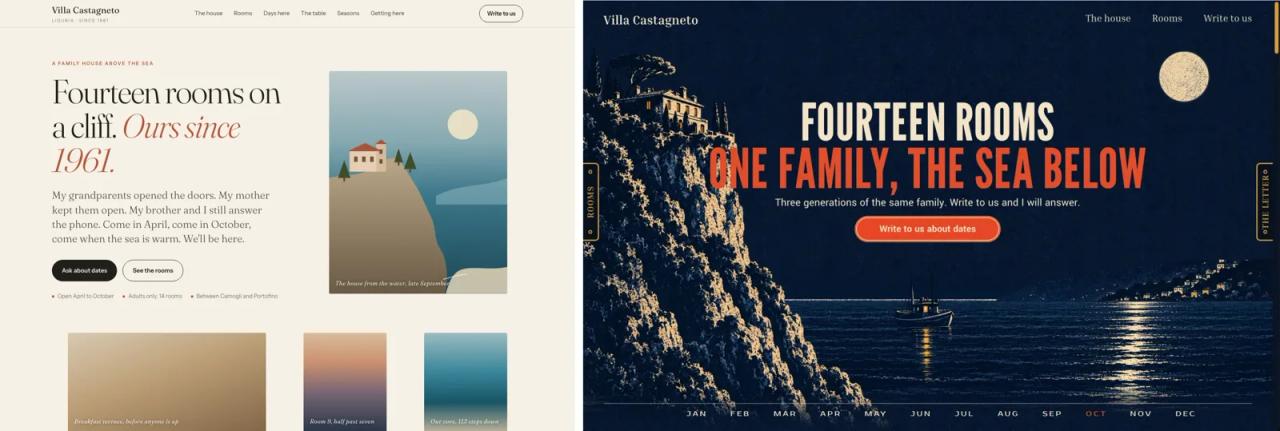
You have seen the problem it tackles a thousand times. Ask an agent for a landing page with no other context and you get the same page everyone else gets. Impeccable fights that three ways: precise words for design changes, a reviewer that scores the page, and a detector that uses no AI.
The 24 commands, grouped
| Group | Commands | What for |
|---|---|---|
| Steer | `bolder`, `quieter`, `distill`, `colorize`, `typeset`, `layout`, `animate`, `delight`, `overdrive` | Push the design one way: bolder, calmer, fewer things, better type, motion... |
| Review | `critique`, `audit` | `critique` scores usability against 10 heuristics; `audit` checks accessibility, performance and responsive behavior, ranked P0 to P3 |
| Finish | `polish`, `harden`, `clarify`, `adapt`, `optimize`, `onboard` | Final pass, errors and edge cases, copy, mobile, speed, first-run flows |
| Iterate live | `live`, `generate` | Pick an element in the browser and try variants |
| Plan | `shape`, `init`, `document`, `extract` | Plan before coding, write `PRODUCT.md` and `DESIGN.md`, extract a design system |
The 24th is craft, now deprecated. Usage looks like this:
/impeccable init
/impeccable critique the pricing section
/impeccable quieter the landing page
/impeccable adapt index.html
init runs once per project: it reads your code, asks only what it can't infer (who the product is for, what it must achieve) and writes PRODUCT.md. Every later command reads it. The README itself recommends narrow targets: a close review of one section beats a whole page at a glance.
Installing Impeccable
The fastest way, from your project root:
npx impeccable installThe installer detects your agents, asks whether to install per project or globally, and offers the design hook, which runs the detector every time the agent edits a UI file. Reload the agent and run /impeccable init. To update: npx impeccable update.
Other options:
- Claude Code plugin:
/plugin marketplace add pbakaus/impeccable, then install it from/plugin. - Manual copy, no Node: clone the repo and copy
.claude/skills/impeccableinto your project's.claude/skills/or into~/.claude/skills/. This skips the hook.
git clone --depth 1 https://github.com/pbakaus/impeccable
mkdir -p your-project/.claude/skills
cp -r impeccable/.claude/skills/impeccable your-project/.claude/skills/
The skill runs a small compiled engine that ships next to it or downloads once into ~/.impeccable/bin/. It needs no Node or Python to run.
If this is your first skill, the step-by-step is in Claude Code skills: what they are and how to install them.
Real test: Impeccable reviews a bike shop landing page
For the article on building a landing page with Claude Code and 4 skills we made a page for a fictional bike repair shop in Quito. We gave that same page to Impeccable in an empty project, with Claude Code in non-interactive mode and read-only permissions:
claude -p "/impeccable critique index.html. Do not edit files."In 50 seconds and for 0.25 USD it returned a score of 24 out of 32 (75%) across the 10 usability heuristics. It found problems we had missed:
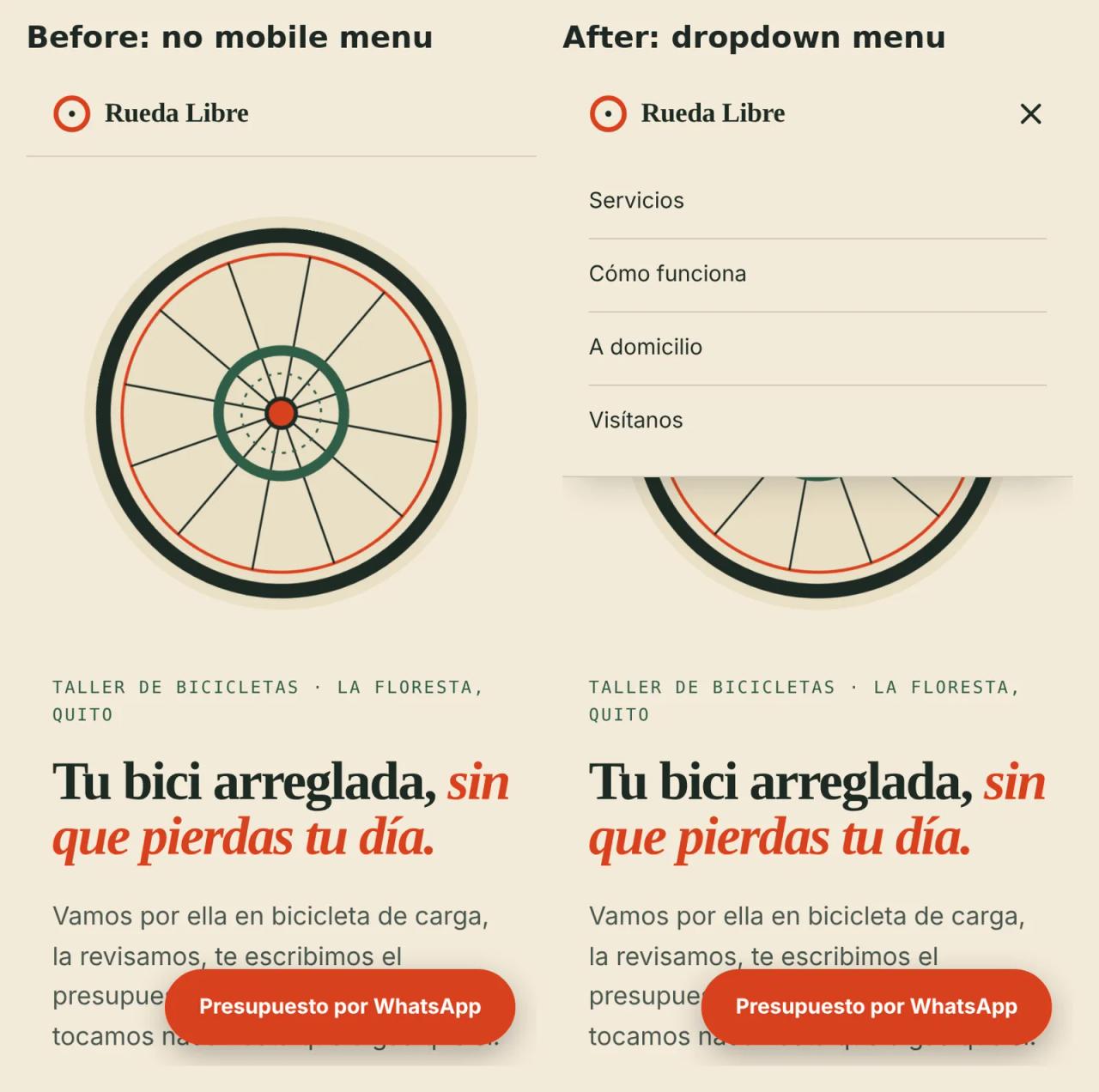
- [P1] No navigation on mobile. Below 900 px the menu disappeared and nothing replaced it.
- [P1] The business's key differentiator has no image. The cargo bike that picks up your bike only exists in the copy.
- [P1] No social proof and no coverage area. “North Quito” doesn't tell you whether they reach your neighborhood.
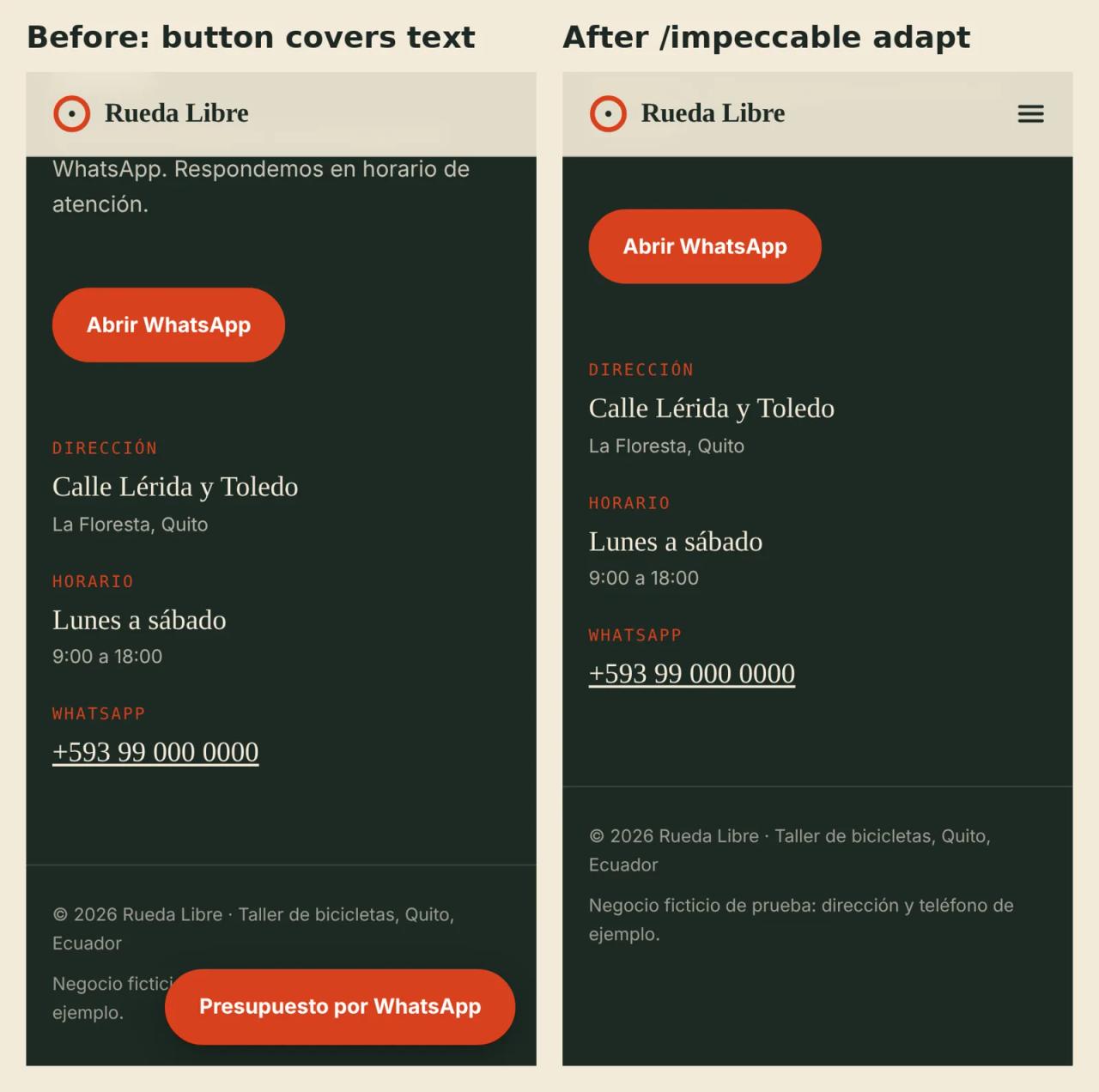
- [P2] The floating WhatsApp button covers the last button and the legal text.
- Fine details: no
scroll-margin-top(headings end up under the sticky header when you jump to an anchor) and noog:image, on a page whose only channel is WhatsApp.
Each problem came with the command that fixes it. We ran the next one, this time allowing edits:
claude -p "/impeccable adapt index.html: fix the mobile navigation and the floating button overlap."In 46 seconds and for 0.23 USD it added a 44 px menu button with aria-expanded, a dropdown panel that closes on Escape or when you tap a link, and a fade that hides the floating button while another WhatsApp button is on screen. That was 36 new lines of HTML.
What it didn't do so well
- The floating button still covers hero text on the first mobile screen. The fix only hides it when another WhatsApp button is visible. You can see it in the menu screenshot.
- It missed the label above the heading (“TALLER DE BICICLETAS · LA FLORESTA”), which its own quality guide bans. That makes sense: the detector didn't run in our test because we limited the agent to reading and editing files, and the model alone skips rules. The report itself flagged this as “degraded mode”.
- It didn't check the result on screen. With no browser available, the agent said plainly that it hadn't verified the result. We took the screenshots above ourselves with Playwright.
The practical takeaway: Impeccable does more when you let it run its engine and hook, and when the agent can open the page in a browser.
The detector: 62 rules, no AI, no cost
The detector is the most useful part for small teams, because it calls no model and needs no API key. Run it in your terminal or CI:
npx impeccable detect src/                   # scan a folder
npx impeccable detect http://localhost:5173  # scan the rendered page
npx impeccable detect --json .               # output for scripts
npx impeccable detect --github src/          # GitHub Actions annotations
npx impeccable detect --list-rules           # list every rule
On JSX or TSX files it applies the pattern rules (overused font, gradient text, nested cards, labels above headings...). Rules that need a rendered page, such as low contrast or tiny text, only run when you scan a URL. It exits with code 2 when it finds problems, so you can block a PR with it.
If your brand uses Inter on purpose, allow it project-wide:
npx impeccable ignores add-value overused-font Inter --reason "Brand font"There is also a free Chrome extension that flags the same issues on any open page.
How much Impeccable costs
| Piece | Cost |
|---|---|
| Skill, CLI, detector and Chrome extension | 0 USD (Apache 2.0) |
| `critique` of one landing page (our test) | 0.25 USD in Claude Code tokens |
| `adapt` for mobile (our test) | 0.23 USD in Claude Code tokens |
| Detector in CI | 0 USD, no AI involved |
To spend as little as possible:
- Run the free detector first. Fix what it finds without spending a token and leave only design decisions to the agent.
- Aim commands at small targets.
critique the pricing sectionreads less code and costs less than reviewing the whole site. - If you already pay for Claude, Codex or Copilot, Impeccable adds nothing to the bill: it uses the quota you already have.
- If you want to pay nothing, it also works with Gemini CLI and OpenCode, which support free models. Output quality depends on the model, so review the design yourself.
Security: two things to check before you turn it on
- The hook runs outside your approval. In Claude Code, installed hooks run even when you deny the model's commands, and the first edit can download the engine. For a run without hooks:
claude --settings '{"disableAllHooks": true}'. - Live mode can launch an agent with no permission checks. When you apply copy edits from the browser and no chat session is active, it runs
codexorclaudewith approvals and sandboxing turned off. SetIMPECCABLE_LIVE_COPY_AGENT=chat(oroff) in the environment before startinglive. Only use it on your local checkout, never on a deployed site.
On telemetry: when a new design starts, the skill fetches visual directions from the impeccable.style catalog and anonymously records which one you picked. According to the README it never sends your code or your PRODUCT.md. Turn it off with npx impeccable telemetry off or DO_NOT_TRACK=1.
If you worry about what the skills you install can do, also read how to scan skills before installing them.
Common errors
- The
/impeccablecommand doesn't show up. Reload the agent after installing. In Codex use$impeccableor the/skillsmenu. In Cursor and Gemini CLI you may need to enable Agent Skills in settings. - “Context loading did not run”. The launcher couldn't run (permissions, network, or Windows without
sh). The skill still works by reading your files, but without the detector. On Windows usescripts/impeccable.cmd. - The hook does nothing in Codex. Open
/hooksand approve the project hook (again after any update that changes it). - The detector never flags contrast. Those rules only run against a URL. Start your dev server and run
npx impeccable detect http://localhost:3000. - Your repo fills up with
.impeccable/files. Copy the README's.gitignoreblock. Keepconfig.json,design.json,PRODUCT.mdandDESIGN.mdin the repo.
FAQ
Is Impeccable free?
Yes. The skill, CLI, detector and Chrome extension are free and open source under Apache 2.0. You only pay for the tokens of the agent you use it with.
Can I use it on client projects?
Yes. Apache 2.0 allows commercial use. If you redistribute a modified skill, keep the license and NOTICE.md and state what you changed.
Is it for new websites or only for improving existing ones?
Both, but the author says it is strongest on interfaces that already exist. To start, pick one component and run critique on it.
How is it different from Anthropic's frontend-design skill?
Impeccable started from it. It adds the 24 commands, project context in PRODUCT.md and DESIGN.md, the deterministic detector, the automatic hook and live mode.
Conclusion
Impeccable is one of the best value skills around: it is free, reviewing a landing page costs a few cents, and it found real mobile bugs we had missed. Start with npx impeccable detect on your project, which costs nothing, then run a critique on the section you care about most. Review the hook, and don't use live mode outside your local checkout.
If you are building a landing page from scratch, continue with building a landing page with Claude Code and 4 skills. For more useful skills, try find-skills, the skill that finds skills for you.
// source code
// implementation
More on AI agents

- Skills for your agents
- Claude Code

- Skills for your agents
- Claude Code

- Skills for your agents
- Claude Code