prompts.chat: the largest open source prompt library, in Claude Code, over MCP and on your own server
prompts.chat is the best-known open source prompt library on GitHub. It started in December 2022 as *Awesome ChatGPT Prompts*, a list of prompts like "Act as a Linux terminal", and today it is a full application with a website, a CLI, an MCP server, a Claude Code plugin and a self-hosted edition you can run as a private prompt library for your team.
In this article we go through what is actually in the repository, what the prompt file contains (with our own analysis), how to use it from Claude Code and any MCP client, and how to run your own instance with Docker. It is written for developers and agencies who reuse prompts every day and want them out of scattered notes.
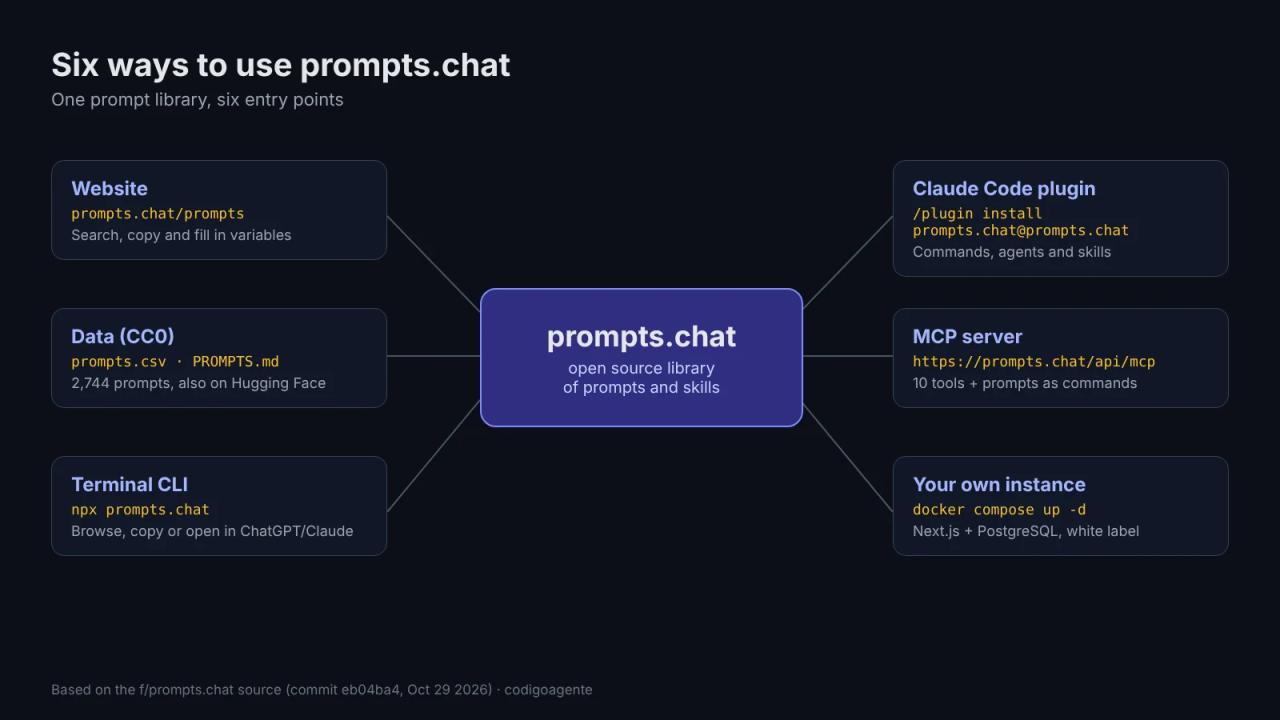
What prompts.chat is
It is the f/prompts.chat repository, maintained by Fatih Kadir Akın and the community. Facts as of this review (October 29, 2026, commit eb04ba4):
- Popularity: over 143,000 GitHub stars according to its README, a GitHub Staff Pick and the most-liked dataset on Hugging Face (fka/prompts.chat).
- Stack: Next.js 16 (App Router), Prisma with PostgreSQL, Auth.js, shadcn/ui on Radix and the official MCP SDK.
- Contents: the web app (
src/), the prompt file (prompts.csvandPROMPTS.md), the Claude Code plugin (plugins/claude/), theprompts.chatnpm package with a CLI and a library (packages/prompts.chat), a Raycast extension and an interactive prompting book. - UI languages: 17.
It works with any chat model: ChatGPT, Claude, Gemini, Llama or Mistral. Prompts are plain text and do not depend on a provider.
License: MIT for the code, CC0 for the prompts
prompts.chat is dual-licensed, and it is worth understanding before you reuse anything:
| What | License | In practice |
|---|---|---|
| Source code, configuration and the book (`src/`, `prisma/`, `scripts/`, `src/content/book/`) | **MIT** | Use, modify and sell it as long as you keep the copyright notice. |
| Prompts and data (`prompts.csv`, `PROMPTS.md` and user-submitted prompts) | **CC0 1.0** (public domain) | Copy, adapt and use them in commercial products with no attribution. |
When a file is unclear, LICENSE says MIT applies by default. The Claude Code plugin also declares MIT in its plugin.json.
What is inside prompts.csv: our analysis
We opened prompts.csv (174,736 lines, because many prompts span several) and counted its act, prompt, for_devs, type and contributor columns:
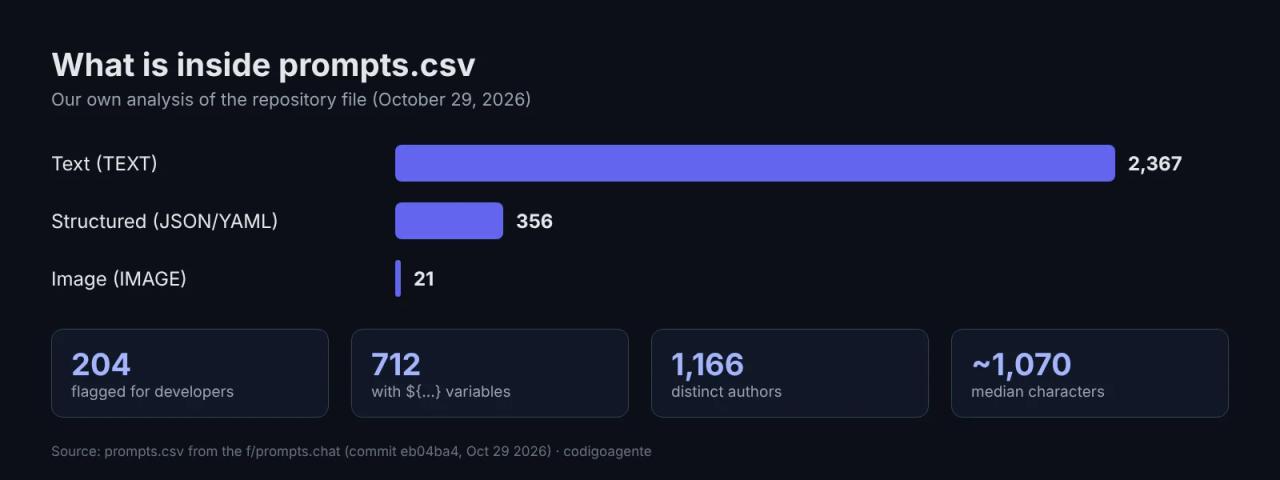
- 2,744 prompts in total: 2,367 text, 356 structured (JSON or YAML) and 21 image.
- 204 have
for_devs = TRUE: Linux terminal, JavaScript console, SQL terminal, IT architect, cybersecurity specialist, tech writer... - 712 use variables with the
${name}or${name:default}syntax, which the website and the MCP server fill in before copying. - 1,166 distinct authors. The median prompt is about 1,070 characters, although a few go past 140,000.
The practical takeaway: the 2022 "Act as..." prompts are still there, but the useful part for a developer is the structured and dev-flagged prompts. Image prompts are few in the CSV because the site also supports video and audio, and many live only in the prompts.chat database.
Six ways to use it
1. The website
At prompts.chat/prompts you search by text, category or tag, fill in variables in the form and copy the result. Without an account you can read and copy; with one (GitHub, Google or Apple) you can keep private prompts, vote, comment and propose edits to other people's prompts through a *change request* system similar to a pull request.
2. The raw data
prompts.csv and PROMPTS.md are synced from the website. To feed the library into your own workflow (an internal RAG, a search tool, fine-tuning), download the CSV or the Hugging Face dataset. Being CC0, there are no usage restrictions.
3. The terminal CLI
The prompts.chat npm package (version 0.1.1) ships a prompt browser for the terminal:
npx prompts.chatIt is keyboard-driven: / searches, Enter opens a prompt, c copies it filling in variables, C copies it raw, r opens it in ChatGPT, Claude or another chat and o opens it in the browser.
The same package exports a library to build typed prompts from code (builder, chat, image, audio, variables, quality). This is the example from its README:
import { builder } from 'prompts.chat';

const prompt = builder()
  .role("Senior TypeScript Developer")
  .task("Review the following code for bugs and improvements")
  .constraints(["Be concise", "Focus on critical issues"])
  .variable("code", { required: true })
  .build();
It helps when your application generates prompts and you want the whole team to write them with the same structure instead of concatenating strings.
4. The Claude Code plugin
This is the most direct way to have the library inside your agent. In Claude Code:
/plugin marketplace add f/prompts.chat
/plugin install prompts.chat@prompts.chat
The plugin (version 1.0.0, folder plugins/claude/prompts.chat) installs four pieces:
| Piece | What it does |
|---|---|
| `/prompts.chat:prompts` and `/prompts.chat:skills` commands | Search prompts or skills, with `--type`, `--category` and `--tag` filters. |
| `prompt-manager` and `skill-manager` agents | Search, fill variables, save and improve prompts; the second downloads skills to `.claude/skills/<slug>/`. |
| `prompt-lookup` and `skill-lookup` skills | Activate on their own when you ask for a prompt template or a skill. |
| MCP server | Points to `https://prompts.chat/api/mcp` (HTTP). |
Usage examples:
/prompts.chat:prompts code review
/prompts.chat:prompts midjourney --type IMAGE
/prompts.chat:skills testing automation
Be careful with skill-manager: installing a skill gives your agent new instructions. Before you accept one from an open catalog, scan it with SkillSpector or read it in full. If you are not sure what a skill is yet, start with the Claude Code skills guide.
5. The MCP server in any client
If you use Cursor, Windsurf, Claude Desktop or another MCP client, add the remote server:
{
  "mcpServers": {
    "prompts.chat": {
      "url": "https://prompts.chat/api/mcp"
    }
  }
}
Or the local version, which runs the @fkadev/prompts.chat-mcp package (1.0.9) under the hood:
{
  "mcpServers": {
    "prompts.chat": {
      "command": "npx",
      "args": ["-y", "prompts.chat", "mcp"]
    }
  }
}
Reading src/pages/api/mcp.ts, the server exposes 10 tools:
- Prompts:
search_prompts(up to 50 results, filters by type, category and tag),get_prompt(with variable filling),save_promptandimprove_prompt. - Skills:
search_skills,get_skill,save_skill,add_file_to_skill,update_skill_fileandremove_file_from_skill.
It also publishes the database prompts as MCP prompts, 20 per page: in clients that support them they show up as commands you can call directly.
The read tools work without an account. save_prompt, save_skill and improve_prompt require an API key, created at prompts.chat/settings and passed through the PROMPTS_API_KEY variable or a header with the same name. improve_prompt turns a basic prompt into a structured one and can return it as text, JSON or YAML.
6. Your own private library
This is the most interesting part for a company or an agency: the same code runs an internal prompt library with your brand, your users and your login. We cover it in the next section.
How to self-host prompts.chat
Requirements per SELF-HOSTING.md: Node.js 24, PostgreSQL and npm. There are three routes.
Option A: npx wizard
npx prompts.chat new my-library
cd my-library
It clones a clean copy of the repository (without .github, .claude, packages/ or dev scripts), installs dependencies and runs a wizard that sets branding, theme, authentication (GitHub, Google, Apple, Azure AD, OIDC or email and password), languages and features. The result is written to prompts.config.ts.
Option B: Docker Compose
This is the one we recommend on a VPS. The repository's compose.yml starts PostgreSQL 17 and the ghcr.io/f/prompts.chat:latest image, and serves the app on port 4444:
git clone https://github.com/f/prompts.chat.git
cd prompts.chat
export AUTH_SECRET=$(openssl rand -base64 32)
export POSTGRES_PASSWORD=$(openssl rand -base64 24)
docker compose up -d
Open http://localhost:4444. To load the sample prompts:
docker compose exec app npx prisma db seedTwo production defaults in compose.yml worth changing: the PostgreSQL password is prompts if you do not set POSTGRES_PASSWORD, and AUTH_SECRET is auto-generated if you do not pin it, which invalidates sessions on every restart.
Option C: bring your own database
If you already run PostgreSQL (Neon, Supabase or your own server), start only the app container:
docker run -d \
  --name prompts \
  -p 4444:3000 \
  -e DATABASE_URL="postgresql://user:pass@your-host:5432/prompts?schema=public" \
  -e AUTH_SECRET="$(openssl rand -base64 32)" \
  ghcr.io/f/prompts.chat:latest
White label with PCHAT_ variables
All customization happens through runtime environment variables, with no rebuild:
services:
  app:
    environment:
      PCHAT_NAME: "Our agency prompts"
      PCHAT_DESCRIPTION: "The team's prompt library"
      PCHAT_COLOR: "#ff6600"
      PCHAT_AUTH_PROVIDERS: "github,google"
      PCHAT_LOCALES: "en,es"
      PCHAT_DEFAULT_LOCALE: "en"
      PCHAT_FEATURE_PRIVATE_PROMPTS: "true"
      PCHAT_FEATURE_MCP: "true"
Semantic search and AI generation (PCHAT_FEATURE_AI_SEARCH, PCHAT_FEATURE_AI_GENERATION) need OPENAI_API_KEY. OPENAI_BASE_URL is supported, so you can point it at any OpenAI-compatible API and choose models with OPENAI_EMBEDDING_MODEL and OPENAI_GENERATIVE_MODEL.
With PCHAT_FEATURE_MCP on, your instance exposes its own MCP endpoint too: your team can connect Claude Code to the internal library instead of the public one.
Database backup:
docker compose exec db pg_dump -U prompts prompts > backup.sqlIf you have never deployed something like this on a VPS, the procedure is the same one we followed in how to install Paymenter with Coolify and Docker: one app and one PostgreSQL database behind a domain with HTTPS.
The interactive prompting book
The repository includes *The Interactive Book of Prompting*, MIT-licensed, in src/content/book/. It has more than 30 MDX chapters, from the anatomy of a prompt to chain-of-thought, few-shot, JSON and YAML prompts, context engineering, agents and skills, MCP and persistent bots, translated into 16 other languages. There is also a section for kids aged 8 to 14 at prompts.chat/kids.
What it is good for as a developer or agency
- Internal prompt library. The clearest case: the prompts that work (code review, proposal writing, client replies) move out of Notion into a private site with versions, votes and search.
- Prompts inside the agent. With the plugin or MCP, Claude Code can look up a proven template before improvising one.
- Data for your product. Being CC0, the CSV can seed a prompt generator, a search tool or an evaluation dataset.
- A product for clients. The MIT code lets you run a prompt library under a client's brand and charge for setup and maintenance.
Common errors
- Sessions drop after restarting the container. You did not set
AUTH_SECRETand it was regenerated. Put it in the.envnext tocompose.yml. Authentication required. Please provide an API key.when callingsave_promptorimprove_promptover MCP. Those tools need the API key from prompts.chat/settings inPROMPTS_API_KEY.- AI search does not show up in your instance.
PCHAT_FEATURE_AI_SEARCHdefaults tofalsein Docker and also needsOPENAI_API_KEY. - The instance starts empty. That is expected: run
docker compose exec app npx prisma db seedto load the samples or import your own prompts.
FAQ
Is prompts.chat free? Yes. The website is free, the code is MIT and the prompts are CC0. You only pay if you enable AI features on your own instance (the OpenAI or compatible API) and for the server you host it on.
Can I use the prompts in a commercial product? Yes. The prompts are public domain (CC0 1.0): copy, modify and sell them with no attribution.
Is it the same as Awesome ChatGPT Prompts? Yes, it is the same repository renamed. The original list is still in PROMPTS.md.
Does it work with Claude, not just ChatGPT? Yes. The prompts are generic text, and there is an official Claude Code plugin plus an MCP server for any compatible client.
Do I need an account to use the MCP server? Not to search and read. You do to save prompts or skills and to use improve_prompt.
Can I run the library in another language? Yes. The UI is translated into 17 languages; on your instance set PCHAT_LOCALES and PCHAT_DEFAULT_LOCALE.
About this review
Everything above comes from reading the repository's code and files at the stated commit, and the prompts.csv analysis is our own count. We did not run the instance or the CLI for this review, so the commands are the ones from the official documentation, not screenshots of our own test.
Conclusion
prompts.chat is no longer a list of prompts: it is a library with an API, MCP, a Claude Code plugin and a self-hostable white-label edition, all under licenses that allow commercial use. If you work with Claude Code, install the plugin and try /prompts.chat:prompts on your next task. If your team shares prompts by hand, run your own instance with Docker. And if you want to extend what your agent can do, continue with find-skills.
// source code
// implementation
More on AI agents

- Skills for your agents
- Claude Code

- Skills for your agents
- Claude Code

- Skills for your agents
- Claude Code