tdd and diagnosing-bugs: feedback loops so your agent's code actually works
The third failure the mattpocock/skills repository goes after is the most frustrating: you're aligned with the agent, it knows what you want, and still the code doesn't work. The cause, according to its author, is almost always the same: the agent is coding blind, with no feedback loops telling it whether what it wrote does what it should. tdd and diagnosing-bugs are the two skills that build those loops: one for writing new code and one for hunting hard bugs.
This is part six of the Matt Pocock skills guide. Both skills are MIT licensed and model-invoked: the agent loads them when the task fits (or you call /tdd and /diagnosing-bugs).
Why they belong together
Both start from the same *Pragmatic Programmer* quote: "The rate of feedback is your speed limit". And both depend on the same thing: a command that goes red when something is wrong and green when it's right.
| `tdd` | `diagnosing-bugs` | |
|---|---|---|
| When | Building a feature or fixing a simple bug | Stubborn bugs, flaky failures, performance regressions |
| Loop | One test per cycle, red → green | One command that reproduces *this* bug |
| Ends with | Behaviour tested at agreed seams | Fix + regression test + cleanup |
| Used by | `implement`, `implement-spec` | An on-ramp to the main flow |
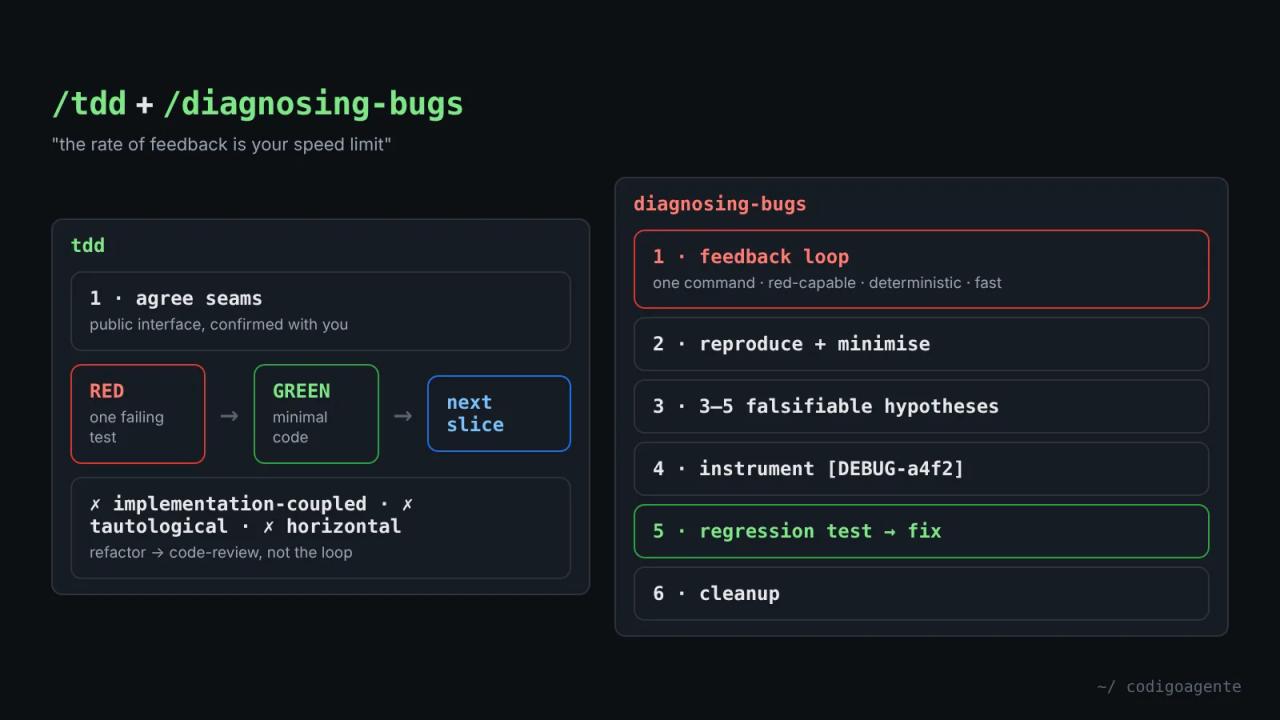
tdd: red-green at agreed seams
tdd isn't an explanation of what TDD is. It's the reference that makes the red → green loop produce tests worth keeping.
What a good test is
A good test verifies behaviour through public interfaces, not implementation details. It reads like a specification ("user can checkout with valid cart") and survives refactors because it doesn't care about internal structure. The skill ships good and bad test examples in tests.md and mocking rules in mocking.md: mock only at system boundaries (external APIs, sometimes the database, time, randomness), never your own modules.
Agreed seams before any test
This is the rule that changes the agent's behaviour the most. A seam is the public boundary where you observe behaviour without reaching inside. The skill says:
Test only at pre-agreed seams. Before writing any test, write down the seams under test and confirm them with the user.
The agent proposes each seam with a line on what it catches and what it misses. Since you can't test everything, agreeing seams up front puts the effort on critical paths and complex logic, not every trivial case. If to-spec already agreed the seams, implement reuses them.
The three anti-patterns
- Implementation-coupled: mocks internal collaborators, tests private methods or verifies through a side channel (querying the database instead of using the interface). The tell: the test breaks on refactor even though behaviour didn't change.
- Tautological: the assertion recomputes the expected value the way the code does (
expect(add(a, b)).toBe(a + b)). It passes by construction and can never disagree with the code. Expected values must come from an independent source: a known literal, a worked example or the spec. - Horizontal slicing: all the tests first, then all the code. It tests *imagined* behaviour. The right way is one test, one minimal implementation, repeat.
Rules of the loop
- Red before green: the failing test first, then only enough code to pass it.
- One slice at a time: one seam, one test, one implementation per cycle.
- Refactoring isn't part of the loop. It belongs in review (
code-review), not in the red-green cycle.
diagnosing-bugs: a method for hard bugs
diagnosing-bugs is for bugs that don't yield at first glance: the intermittent failure, the regression that crept in between two good versions, the slowdown with no clear cause. It has six phases, and the skill asks you not to skip any without a reason.
Phase 1: build a feedback loop
"This is the skill. Everything else is mechanical." If you have a pass/fail signal that goes red on *this* bug, you will find the cause. If you don't, no amount of staring at code will save you. The skill lists ten ways to build one, in this order:
- A failing test at the seam that reaches the bug.
- A
curlscript against the dev server. - A CLI invocation with a fixed input diffed against known-good output.
- A headless browser script (Playwright or Puppeteer).
- Replaying a captured trace (request, payload, event log).
- A throwaway harness with a minimal slice of the system.
- A fuzz loop with 1,000 random inputs.
- A bisection harness for
git bisect run. - A differential loop: the same input through the old and new version.
- As a last resort, a bash script with a human in the loop (
scripts/hitl-loop.template.sh).
Then you tighten the loop: faster, sharper signal, more deterministic. "A 30-second flaky loop is barely better than no loop; a 2-second deterministic one is a debugging superpower." For non-deterministic bugs, the goal is a higher reproduction rate: a 50% flake is debuggable; 1% isn't.
The phase ends when you can name one command you've already run, that reproduces the user's exact symptom, that's deterministic and fast, and that the agent can run without you. If you catch yourself reading code to build a theory before that command exists, the skill tells you to stop.
Phases 2 to 6
- Reproduce and minimise: confirm it's the failure the user described and not a nearby one, then cut the repro down until every element is load-bearing.
- Hypothesise: 3 to 5 ranked, falsifiable hypotheses ("if X is the cause, changing Y will make it disappear"). Show them to the user before testing, because they often know something that re-ranks them.
- Instrument: one variable at a time, debugger before logs, and every log tagged with a unique prefix like
[DEBUG-a4f2]so a singlegrepremoves them. For performance, measure first, then bisect. - Fix and regression test: the test comes before the fix, but only if there's a correct seam. If there isn't, that's a finding: the architecture is preventing the bug from being locked down.
- Cleanup: original repro green, regression test passing, zero
[DEBUG-...], prototypes deleted, and the correct hypothesis written in the commit or PR.
A safety rule worth applying to any AI debugging: before showing commands or output, the agent replaces every secret with <REDACTED> and builds loops on environment variables.
How they combine
The natural flow: tdd builds, diagnosing-bugs rescues when something breaks, and its phase 5 hands back to tdd for the regression test. If phase 5 finds no seam to lock the bug down, the next step is retro (what would have prevented it) or improve-codebase-architecture (create that seam), covered in part 8.
An example with the newsletter from part 5: the "Sending approved issues" ticket is built with tdd at the "send issue" seam using a fake email provider adapter. If some subscribers get the email twice in production, diagnosing-bugs starts with a loop that fires the cron twice in parallel against that adapter and counts sends per recipient. Until that loop goes red, nobody touches the idempotency key.
Common mistakes
- Letting the agent write every test at once. That's the horizontal slicing the skill forbids.
- Accepting tests that mock your own modules. They break on every refactor.
- Asking "fix this bug" with no repro. The agent will offer a plausible theory that's probably wrong.
- Leaving debug logs in the code. With the unique prefix there's no excuse.
FAQ
Does it work with any test framework? Yes. The skills talk about seams and interfaces, not Jest, Vitest or pytest.
Do they trigger on their own? Yes, they're model-invoked. Their descriptions mention "red-green-refactor", "test-first", "diagnose" or "debug this", and when you report something broken, failing or slow. You can also call /tdd or /diagnosing-bugs.
What if the bug only happens in production? The skill says to stop and say so, then ask you for environment access, a captured artifact (HAR, logs) or permission for temporary instrumentation.
Next step
Next time your agent says "it's fixed", ask for the command that proves it was failing before. In part 7 of the guide we put these pieces together with implement and code-review, the pair that builds a ticket and reviews it on two axes.
// source code
// implementation
More on AI agents

- Skills for your agents
- Claude Code

- Skills for your agents
- Claude Code

- Skills for your agents
- Claude Code