implement and code-review: build each ticket with TDD and review it on two axes
With the tickets ready (covered in to-spec and to-tickets), it's time to build. implement is the skill that does it: it takes a ticket or a spec, builds it with tdd at the agreed seams and closes with code-review, a review of the diff on two axes run separately: does it follow the repository's standards? and does it do what the spec asked? We cover them together because implement isn't done until it has gone through code-review.
This is part seven of the Matt Pocock skills guide (mattpocock/skills repository, MIT license). We also cover implement-spec, the variant that builds an entire spec with parallel subagents.
implement: short on purpose
The implement SKILL.md has six instructions:
- Implement the work described in the spec or tickets.
- If given a ticket reference, fetch it from the issue tracker and state its title before starting. If it's ambiguous, ask.
- Call
tddwhere possible, at pre-agreed seams. - Run typechecking regularly, single test files regularly, and the full suite once at the end.
- When done, call
code-review. - Commit to the current branch.
It's short because it delegates: the method lives in tdd and quality control in code-review. You can change either without touching implement.
The recommended flow with several tickets is one /implement per ticket with /clear in between. Each ticket was written to fit a fresh context window, so the previous one's context is disposable.
implement-spec: the whole spec with subagents
When you'd rather orchestrate than drive each ticket, /implement-spec builds the whole spec in one run:
- It reads the tickets as a task graph, not a list: there's always a frontier of ready tickets.
- It creates an integration branch and, for each ready ticket, launches an implementer subagent with a fresh context, in its own worktree and branch, driving
tdd. - When an implementer finishes, a merger subagent integrates its work. If that unblocks new tickets, it launches more implementers.
- At the end it runs a single
code-reviewover the integration branch and fixes the findings with a new implementer. - If the tracker closes work through PRs, it opens a draft after the first merge and marks it ready at the end. Then it cleans up the worktrees.
Communication between subagents is minimal and goes through context pointers: paths to the spec, tickets, research notes and earlier commits, without copying information that's already there.
code-review: two axes that don't mix
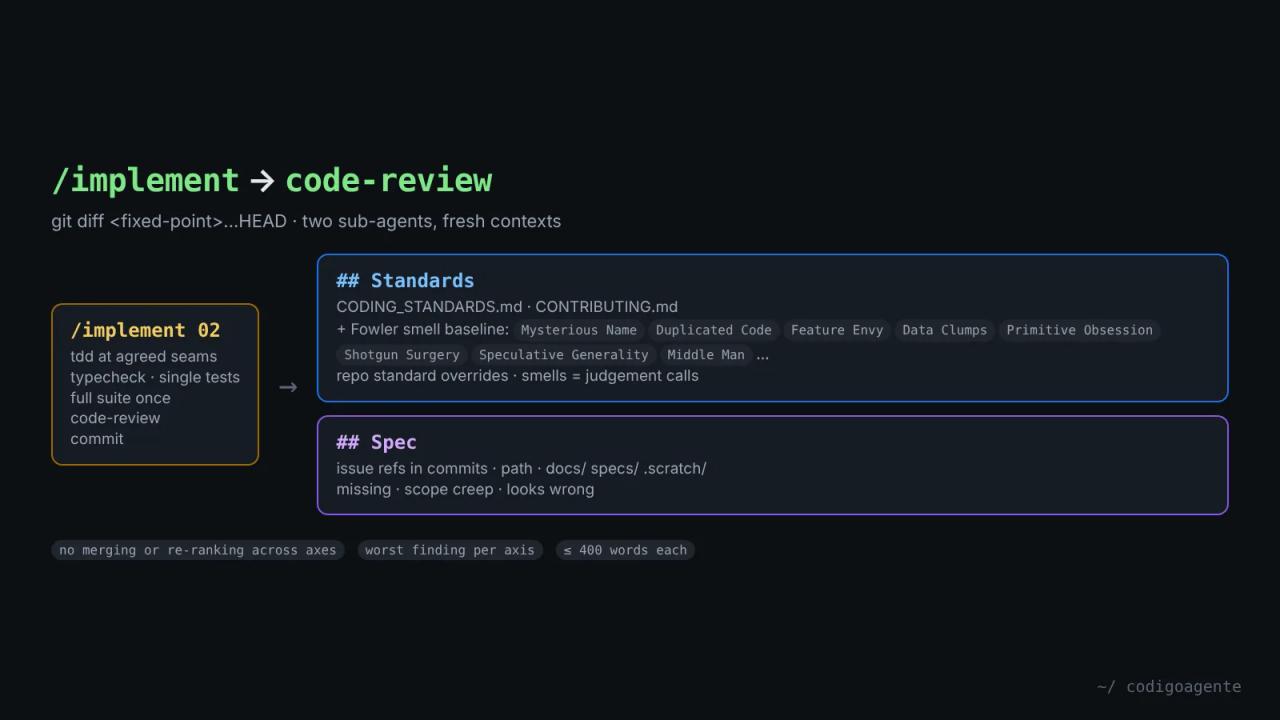
code-review reviews the diff between HEAD and a fixed point you supply (a SHA, a branch, a tag, main, HEAD~5) on two axes:
- Standards: does the code follow the repository's documented standards?
- Spec: does the code faithfully implement the originating issue or spec?
Why two axes instead of one
A change can pass one axis and fail the other:
- Code that follows every standard but implements the wrong thing: Standards pass, Spec fail.
- Code that does exactly what the issue asked but breaks conventions: Spec pass, Standards fail.
If a single reviewer looks at both, one masks the other. That's why each axis runs in a subagent with its own context, in parallel, and the final report shows them under ## Standards and ## Spec without merging or re-ranking. It doesn't even pick a single "worst issue" overall: it gives the worst within each axis.
The process
- Pin the fixed point: check that it resolves (
git rev-parse) and the diff isn't empty, before launching anything. It usesgit diff <point>...HEADwith three dots, to compare against the merge-base. - Find the spec: issue references in commit messages (
#123,Closes #45), a path you pass, a file underdocs/,specs/or.scratch/, or it asks you. With no spec, the Spec axis is skipped and the report says so. - Find the standards: every file documenting how code should be written, always including
CODING_STANDARDS.mdorCONTRIBUTING.mdif present. - Launch both subagents together, each capped at 400 words.
- Aggregate with a one-line summary: findings per axis and the worst in each.
The smell baseline
Even if your repository documents nothing, the Standards axis always carries a fixed list of Fowler code smells (*Refactoring*, chapter 3), each with its fix: mysterious name, duplicated code, feature envy, data clumps, primitive obsession, repeated switches, shotgun surgery, divergent change, speculative generality, message chains, middle man and refused bequest.
Two rules keep them in check: a documented repository standard always overrides the baseline, and each smell is always a judgement call ("possible feature envy"), never a hard violation. Anything a tool already enforces (linter, formatter) is skipped.
How they combine
/implement 02            → tdd at the agreed seams
                         → typecheck and single test files while working
                         → full suite at the end
                         → code-review against the fixed point
                              ├─ Standards (subagent)
                              └─ Spec: ticket 02 (subagent)
                         → commit
The refactoring tdd keeps out of the red-green loop comes back here: the Standards axis's smells are the list of candidate refactors. And since the Spec axis reads the original ticket, it catches both what's missing and scope creep: behaviour nobody asked for.
If you only want the review, code-review works on its own: "review since main" on any branch or PR. For automatic review on every GitHub PR there are dedicated tools like Open Code Review; code-review is meant to run inside your agent session.
Common mistakes
- Not giving a fixed point. Without one,
code-reviewasks for it. Know where you're reviewing from. - Expecting it to fix what it finds.
code-reviewreports; fixes are done byimplement(or a new implementer inimplement-spec). - Putting style rules in
CLAUDE.md. The reviewer is the one that should enforce standards; the implementer is under more context pressure. We cover this in part 13 withretro. - Running
implement-specwithout tickets that have blocking edges. No graph, no frontier to parallelise.
FAQ
Does implement create branches or PRs? No: it commits to the current branch. implement-spec does create an integration branch and, where it applies, a draft PR.
How much does implement-spec cost? It depends on the number of tickets: one subagent per ticket plus merge and review subagents. On large specs it's the fastest option, not the cheapest.
Does code-review work on other people's PRs? Yes, with the PR's branch and its issue as the spec.
Next step
Try /code-review on your current branch with main as the fixed point and see whether the two axes agree. In part 8 of the guide we move on to codebase health with improve-codebase-architecture and codebase-design.
// source code
// implementation
More on AI agents

- Skills for your agents
- Claude Code

- Skills for your agents
- Claude Code

- Skills for your agents
- Claude Code