to-spec and to-tickets: from a chat with your agent to a spec and tickets it can execute
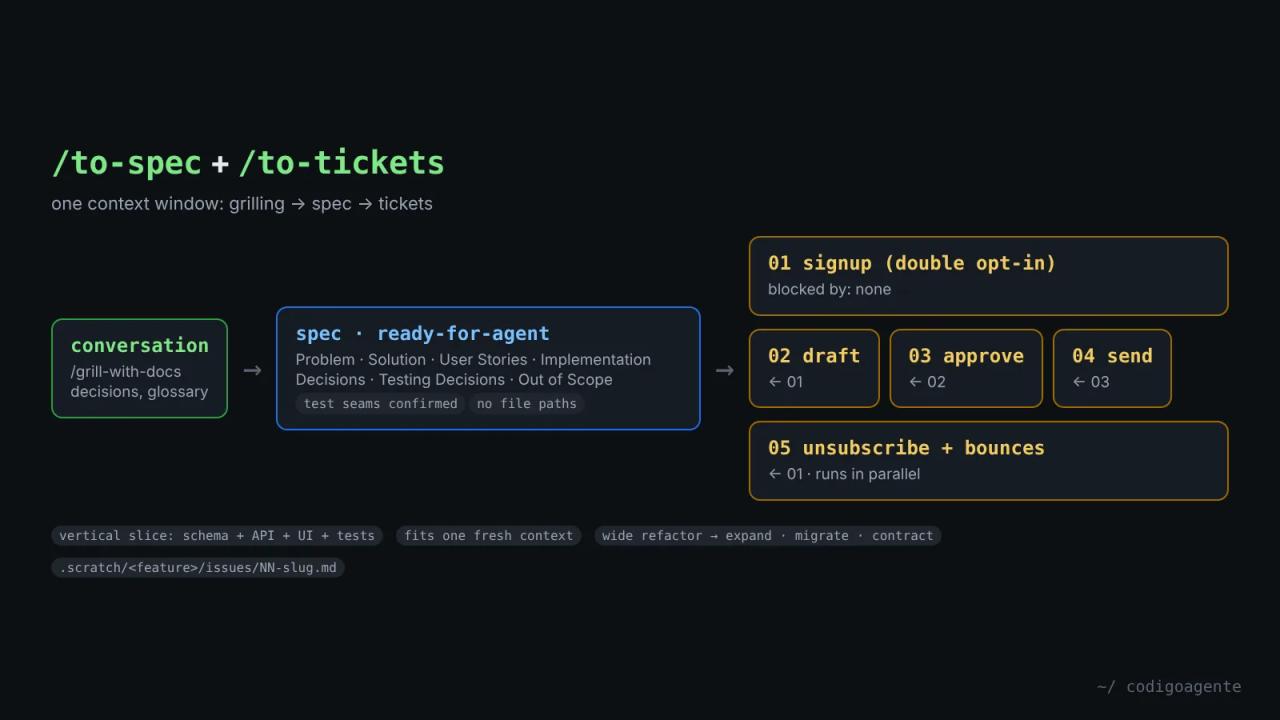
After a grill-me or grill-with-docs session you have something valuable: a reasoned design. But it lives in the conversation, and the conversation is gone as soon as you clear the context. to-spec and to-tickets are the pair that turns it into executable work: a spec published to your issue tracker and a list of tickets with their dependencies, each sized for an agent to finish in one session.
This is part five of the Matt Pocock skills guide (mattpocock/skills repository, MIT license).
When you need this pair
ask-matt, the repository's router, frames it as a fork after the grilling:
- Does the work fit in one session? Go straight to
/implementin the same context window. - Is it a multi-session build?
/to-spec, then/to-tickets.
One important detail: keep the grilling, the spec and the tickets in one context window. Don't compact until after to-tickets, because each step needs the verbatim reasoning of the one before, not a summary.
Both skills need to know where your issue tracker is. If you haven't run /setup-matt-pocock-skills, they'll ask you to.
to-spec: synthesise, don't interview
The first rule of to-spec is what it doesn't do: "Do NOT interview the user; just synthesize what you already know". The grilling is over; now it's time to write.
Its three-step process
- Explore the repository, if it hasn't already, using the
GLOSSARY.mdvocabulary and respecting the ADRs in the area it touches. - Propose the test seams: the public points where the feature will be verified. It prefers existing ones, as high as possible, and as few as possible: "the ideal number is one". This is the only point where it asks you to confirm.
- Write the spec from its template and publish it to the issue tracker with the
ready-for-agentlabel, skipping triage.
The spec's sections
| Section | What it holds |
|---|---|
| Problem Statement | The problem from the user's point of view |
| Solution | The solution, also from the user's side |
| User Stories | A **long** numbered list: "As an <actor>, I want a <feature>, so that <benefit>" |
| Implementation Decisions | Modules, interfaces, schemas, API contracts, architectural decisions |
| Testing Decisions | What a good test is, which modules get tested, similar tests that already exist |
| Out of Scope | What's left out |
| Further Notes | Everything else |
A rule worth copying: no file paths and no code snippets, because they go stale fast. The only exception is a snippet from a prototype that captures a decision better than prose (a state machine, a type, a schema).
to-tickets: vertical slices with blocking edges
to-tickets splits the spec (or a plan, or the conversation) into tracer-bullet tickets. The idea comes from *The Pragmatic Programmer*: instead of building layer by layer, each ticket cuts a narrow but complete path through every layer.
The rules of a vertical slice
- It cuts through every layer: schema, API, UI and tests. Never one layer alone.
- When done, it's demoable or verifiable on its own.
- It fits in one fresh context window.
- If prefactoring is needed, that ticket goes first: "make the change easy, then make the easy change".
Each ticket declares its blocking edges: which other tickets must finish first. A ticket with no blockers can start now. The set of tickets ready at any moment is the frontier, the same idea as in grill-me.
The exception: wide refactors
Renaming a column or retyping a shared symbol breaks thousands of call sites at once and can't be sliced vertically. For that the skill uses expand-contract:
- Expand: add the new form beside the old one, breaking nothing.
- Migrate call sites in batches (per package or directory), each batch its own ticket, with CI green because the old form still exists.
- Contract: delete the old form once nothing uses it.
It checks with you before publishing
Before creating anything, it shows the numbered list with title, blockers and what each ticket delivers, and asks whether the granularity is right, whether the edges are real, and whether any ticket should be merged or split. It iterates until you approve.
Where the tickets end up
- Local Markdown: one file per ticket in
.scratch/<feature>/issues/01-slug.md,02-slug.md..., numbered blockers first. - GitHub, GitLab or another tracker: one issue per ticket with the platform's native blocking relationship and the
ready-for-agentlabel. If the source was an issue, the tickets become its sub-issues.
The local ticket template:
# 02: Send the weekly draft for review

**What to build:** on Sunday a draft is generated with new products and active deals, and the admin gets an email to review it.

**Blocked by:** 01

**Status:** ready-for-agent

- [ ] The draft includes only published products with stock
- [ ] With nothing new, no draft is generated and the admin is notified
Example: the grill-me newsletter turned into tickets
We took the design we closed in the real grill-me session (a weekly newsletter for a bike shop with manual review) and applied the to-tickets rules by hand to see the shape it would take. It's an illustrative example, not skill output:
| # | Ticket | Blocked by | What it delivers |
|---|---|---|---|
| 01 | Double opt-in signup | None | Footer form, confirmation email and an active subscriber on confirm |
| 02 | Weekly draft | 01 | Sunday cron that builds the draft and alerts the admin |
| 03 | Review and approval | 02 | Admin page with preview, test send and an "Approve" button that freezes the content |
| 04 | Sending approved issues | 03 | Cron every 15 minutes that sends in batches with idempotency |
| 05 | Unsubscribe and suppression | 01 | One-click unsubscribe link, `List-Unsubscribe` and a bounce webhook |
Notice two things. No ticket is "create the tables" or "build the frontend": each is a complete path you can test. And 05 depends only on 01, so it can move in parallel with 02, 03 and 04.
Common mistakes
- Asking
to-specto ask more questions. It won't: if decisions are missing, go back togrill-with-docs. - Compacting between
to-specandto-tickets. The tickets will come out with less nuance than the spec. - Horizontal tickets. "Newsletter backend" and "newsletter frontend" can't be verified separately.
- Too many blocking edges. If every ticket depends on the previous one, you lose parallelism. Check each edge in the review step.
- Running the tickets through
/triage. They're already agent-ready. Triage is for issues that arrive from outside.
FAQ
Can I use to-tickets without to-spec? Yes. It accepts a plan, a spec, the current conversation or an issue reference.
Does it work with Jira or Linear? Yes, if you described them in /setup-matt-pocock-skills. It uses the native blocking relationship where there is one.
How big is a ticket? Whatever fits in a fresh context window. If a ticket needs compacting halfway, it was too big.
Next step
Run /to-spec right after your next grill-with-docs and let /to-tickets split it. In part 6 of the guide we see how each ticket gets built with tdd and how hard bugs get fixed with diagnosing-bugs.
// source code
// implementation
More on AI agents

- Skills for your agents
- Claude Code

- Skills for your agents
- Claude Code

- Skills for your agents
- Claude Code