pr and wizard: pull requests you understand at a glance and wizards for the steps only you can take
An agent can write the code, but there are two moments when it needs a person. One is review: someone has to read the pull request and decide whether to merge it. The other is steps only a human can take: signing up for a provider, copying a key from a dashboard, setting a secret on GitHub. pr and wizard are Matt Pocock's skills for those two moments: one gives the PR the shape a human reads fastest, and the other turns manual steps into a terminal wizard you run once and never explain again.
This is part twelve of the Matt Pocock skills guide (mattpocock/skills repository, MIT license). Both are model-invoked when the task fits.
pr: the shape of a good pull request
pr fires whenever the agent writes a PR body. It gives a three-section template and one general rule: no preamble, brief prose and the GLOSSARY.md vocabulary.
## Summary

<diagram, diff-sketch, or tree>

## Evidence

- **Before:** <screenshot / output / failing test run>
  **After:** <screenshot / output / passing test run>

## Merge Danger

**Door:** <one-way or two-way>

**Blast Radius:** <one-word description>
Summary: the smallest view that makes it clear
Instead of paragraphs, the summary picks the smallest representation that shows the change. The skill offers a menu (taken from Dex Horthy's show-me skill at HumanLayer, credited in CREDITS.md):
- Pseudocode for logic or algorithms.
- A call tree for runtime control flow.
- A component tree for UI structure.
- A file tree for responsibilities or a broad refactor.
- Mermaid for component interaction or data flow.
- A
diffof the sketch, not the code, when the point is what changes on a shape that already exists:
 on(save)
-  write content
+  if content is unchanged
+    return cached result
+  write new content
+  invalidate cache
You can use one or several; "it is unlikely you will use all of them". The rule is to include only the calls, files and states the reviewer needs for their current question.
Evidence: before and after
Concrete proof that it works. Screenshots are "S-tier" when the change is visual and the environment allows it. Execution evidence (test results, console output) is "A-tier": the exact test that failed before and passes now.
Merge Danger: one-way or two-way door
- Two-way door: a cheap revert walks it back. Low risk.
- One-way door: destructive actions or hard-to-reverse decisions (deleting data, migrations, public contract changes).
Plus the blast radius in one word, with its possible consequences: layout shift, breakage for API consumers, mobile responsiveness...
wizard: a terminal wizard for human steps
Some procedures are tedious to do by hand and tedious to re-explain to an AI every time: onboarding a provider, generating keys, setting CI secrets, a one-off migration. wizard generates an interactive bash script that walks the person step by step: it opens each URL, says exactly what to click and copy, captures the values, writes them where they belong (.env, GitHub secrets), asks for confirmation at each stage and shows how many are left.
The skill is explicit: it's not for steps the agent can take itself. It's for when a human is genuinely in the loop.
The template already solves the UX
The skill ships template.sh with a library that's never hand-edited: stage-by-stage progress, confirmation gates, cross-platform URL opening (WSL included), hidden secret entry, idempotent .env upserts, gh secret and gh variable writes, and a closing summary. The agent only writes the stages below the STAGES marker, using these helpers:
| Helper | Purpose |
|---|---|
| `stage` | Starts a stage and clears the screen |
| `say`, `step` | Explains what to do |
| `open_url` | Opens the page before asking for its value |
| `ask`, `ask_secret` | Captures a value; the second hides it |
| `write_env` | Writes to `.env` without duplicates |
| `set_secret`, `set_var` | Sets GitHub secrets and variables |
| `confirm`, `pause` | Asks for confirmation before anything irreversible |
The template's own example stage, for Stripe keys:
stage "Stripe: API keys"
say "We'll grab your Stripe test keys and store them for local dev + CI."
open_url "https://dashboard.stripe.com/test/apikeys"
step "On the API keys page, copy the Publishable key (starts pk_test_)."
ask STRIPE_PUBLISHABLE_KEY "Paste the publishable key:"
ask_secret STRIPE_SECRET_KEY "Paste the secret key:"
write_env STRIPE_SECRET_KEY "$STRIPE_SECRET_KEY"
set_secret STRIPE_SECRET_KEY "$STRIPE_SECRET_KEY"
The process
- Scope the procedure: read
.env,.env.example, the README,docker-compose*and.github/workflows/*(everysecrets.*orvars.*is a value the wizard must produce). It shows you the stages and values, and you confirm. - Map each stage's journey: which URL, what to do there, where the value appears. If it doesn't know a dashboard's current UI, it must say so and ask you or check the docs: never invent steps.
- Author the wizard from the template, one stage per step, in dependency order.
- Verify:
bash -n,shellcheckif available, andchmod +x. It doesn't run it end to end (it opens browsers and waits on a person); it traces it statically: every value lands where it should and everyset_secretmatches asecrets.*in CI.
By default it's ephemeral: used once and deleted. If it's a repeatable setup path, it gets committed and linked from the README.
How they combine
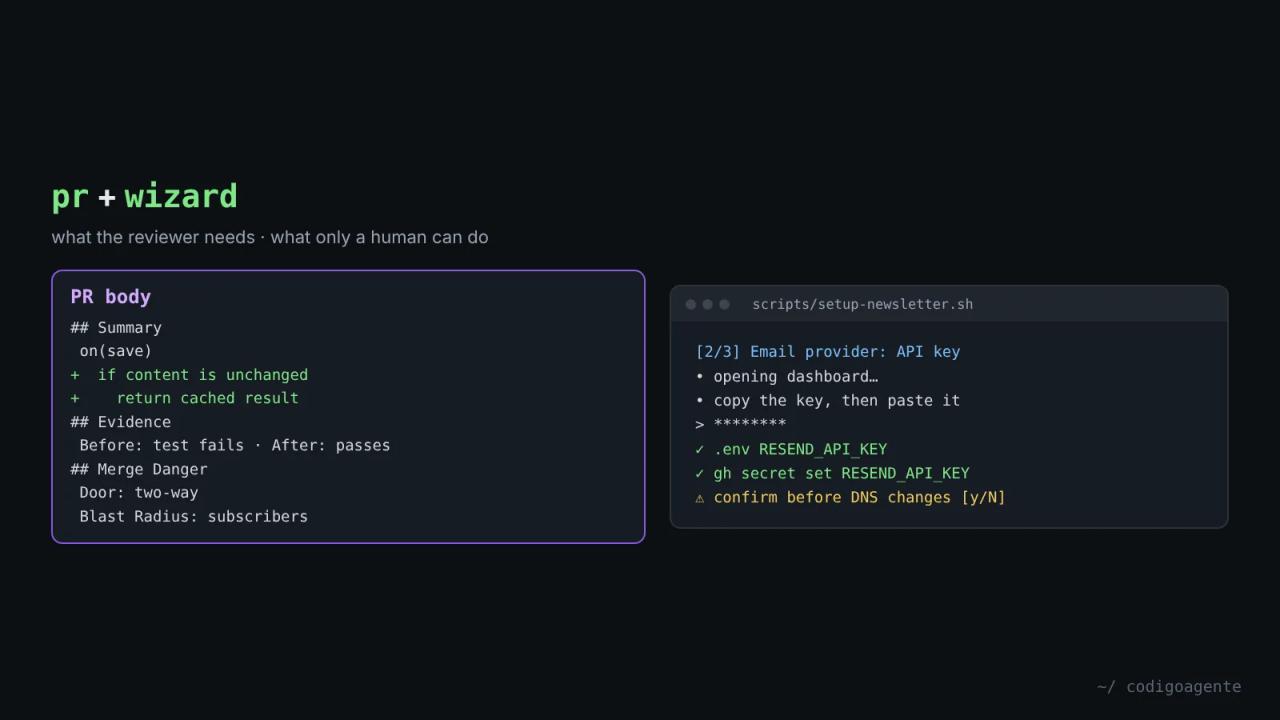
They're the human face of the end of the flow. An example with the newsletter from part 5:
implementbuilds the "Sending approved issues" ticket.- The code needs an email provider key, DNS records and a GitHub Actions secret. The agent can't log into your dashboard, so
wizardgeneratesscripts/setup-newsletter.shwith three stages: create the key, add the DNS records (with aconfirmbefore continuing), and store the key in.envand GitHub secrets. prwrites the PR: a call tree of the sending cron, the idempotency test output before and after, and a two-way door with blast radius "subscribers", because a bug would email real people.- The reviewer sees in the description that the next step is running the wizard, not a list of loose instructions.
Common mistakes
- Prose summaries. If the change fits in a five-line tree, three paragraphs are noise.
- "Works on my machine" as evidence. The skill asks for a concrete before and after.
- Marking everything as a two-way door. A migration that drops columns isn't undone by a revert.
- Editing the
template.shlibrary. Consistency across wizards is the whole point. - Letting the wizard invent menus. If the agent doesn't know the dashboard, it should say so.
FAQ
Does wizard need the GitHub CLI? Only for set_secret and set_var, which use gh secret and gh variable.
Does it work on Windows? The script is bash: on Windows, use WSL or Git Bash. URL opening handles WSL.
Does pr open the PR for me? No: it defines the body's shape. Creating the PR is up to your agent or implement-spec.
Next step
Ask your agent to rewrite your last PR's description with the pr template and see how much faster you understand it. In part 13 of the guide we look at retro and writing-for-agents, the pair that improves the agent's environment after every session.
// source code
// implementation
More on AI agents

- Skills for your agents
- Claude Code

- Skills for your agents
- Claude Code

- Skills for your agents
- Claude Code