prototype and research: answer design questions before you build with your agent
Not every design question can be settled by talking. "Does this state model survive the weird case?" or "what should this dashboard look like?" call for something you can touch. And "what are this provider's API limits?" calls for reading documentation, not opinions. prototype and research are the pair for those two situations: one produces throwaway code that answers a question, the other sends a background agent to read primary sources while you keep working.
This is part nine of the Matt Pocock skills guide (mattpocock/skills repository, MIT license). Both are skills the model can invoke on its own when the task fits.
Where they fit in the flow
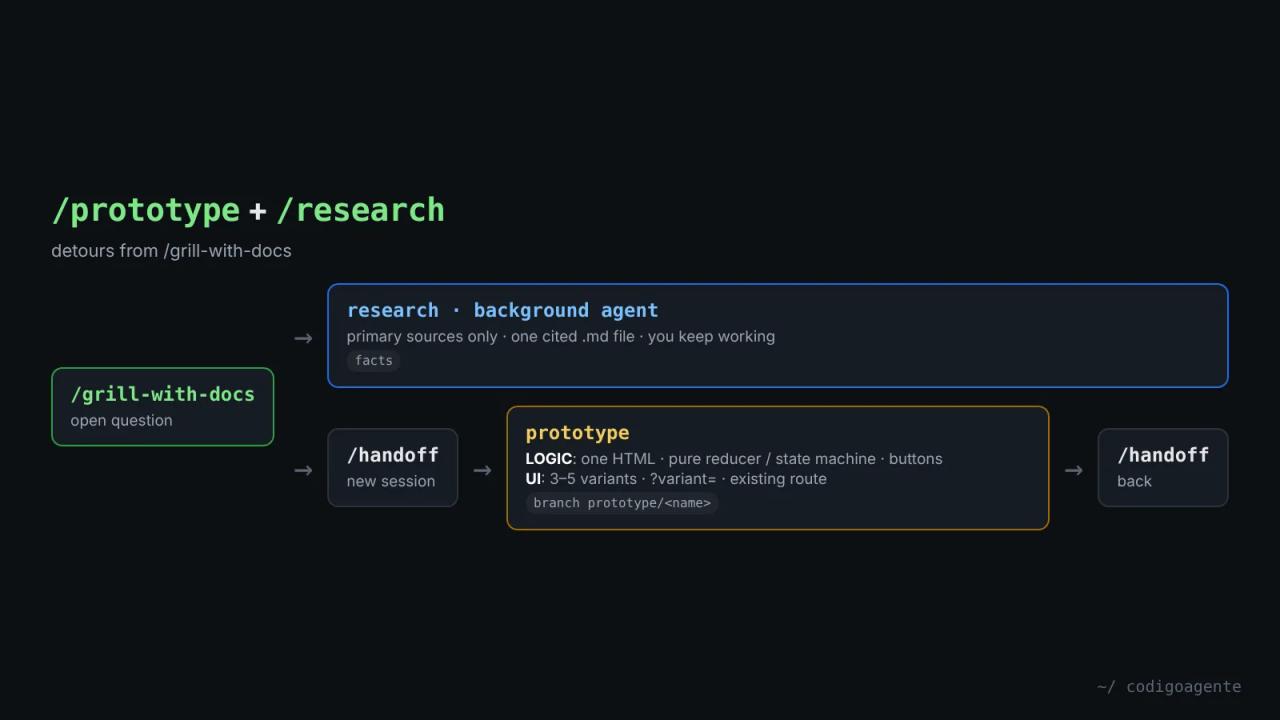
During a grill-with-docs session, questions come up that conversation can't close. ask-matt proposes a detour:
- A question of fact (documentation, third-party APIs, source code):
researchin the background. The answer goes back into the grilling. - A question that needs a runnable answer (state, business logic, a UI you have to see):
/handoffto a new session,prototypethere, and/handoffback with what you learned.
In wayfinder, covered in part 10, they're two of the four ticket types: research (no human) and prototype (human in the loop).
prototype: throwaway code that answers a question
The skill's definition: "A prototype is throwaway code that answers a question. The question decides the shape". There are two branches, and picking the wrong one wastes the whole prototype.
Logic branch: one HTML file you double-click
For "does this logic or state model feel right?". The output is a single HTML file with no framework, no bundler and no server, that you can email to someone who doesn't code:
- The question, written at the top, visible on the page.
- The logic isolated in a pure module: a
(state, action) => statereducer, a state machine, a set of pure functions or a class with a clear method surface. No DOM inside. The page calls the module, never the other way round. - The current state in a readable panel, re-rendered after every click.
- Free-play buttons, one per action, to poke in any order, plus guided walkthroughs in tabs for the hard cases.
Everything in the business's language, not the code's. Point 2 is the key: once the prototype answers the question, that pure module can be lifted into the real code as is.
UI branch: several variants on one route
For "what should this look like?". The output is several radically different variants (3 by default, 5 at most) on one route, switched with a ?variant= parameter and a floating bottom bar.
The skill strongly prefers mounting the variants on an existing page, with its real header, sidebar and data. An empty route is a vacuum where every variant looks fine. Only when there's no page it could live in does it create a new route with "prototype" in the name.
Shared rules
- Throwaway from day one and clearly marked, but placed next to the code it's for.
- Trivial to run: one command (
pnpm <name>) or a double-click. - No persistence unless persistence is the question, and then with a "PROTOTYPE, wipe me" style name.
- No polish: no tests, no error handling beyond what makes it run.
- Surface the state after every action or variant switch.
- Capture it when done: the validated decision goes into the real code, and the prototype is kept on a
prototype/<name>branch offmain, linked from the issue. It's a primary source for whoever comes next.
research: an agent that reads for you
research is the shortest skill in the repository. It launches a background agent with a fresh context, so you keep working while it reads. Its brief has three points:
- Investigate against primary sources: official docs, source code, specs, first-party APIs. No secondary write-ups. Every claim is traced back to the source that owns it.
- Write the findings to a single Markdown file, citing each claim.
- Save it where the repository already keeps such notes, or somewhere sensible, and say where.
The result doesn't replace thinking: it's material to take into grill-with-docs. Research feeds the decision; it doesn't make it.
How they combine
Both answer questions that block a decision, but of opposite kinds: research brings facts from outside and prototype generates first-hand experience. Used in sequence, they reinforce each other. An example with the newsletter we designed in the real grill-me session:
- research: "what sending limits and bounce webhooks does the provider's free plan have?". The agent reads the official docs and leaves a file with links. This confirms or corrects what the agent said from memory during the grilling.
- prototype (logic): an HTML file with the weekly issue's state machine (draft, approved, sent, skipped) and buttons for "approve late", "change a price after approval" or "two crons at once". Someone who doesn't code can try it.
- prototype (UI): three variants of the review page on the real admin route.
All three answers go back to grill-with-docs and from there to to-spec. If a prototype snippet captures a decision better than prose (the state machine), to-spec can include it, noting it came from the prototype.
Common mistakes
- Picking the wrong branch. A logic question answered with three pretty screens answers nothing.
- Polishing the prototype. If it has tests and error handling, it's no longer throwaway.
- Merging the prototype into
main. The decision goes tomain; the prototype lives on its branch. - Asking
researchto decide. It brings cited facts; the decision is still yours. - Accepting secondary sources. If the file cites a blog instead of the official docs, ask it to redo it.
FAQ
Does research need web search? For external documentation, yes: the agent has to be able to read the sources. For questions about your own code or installed dependencies, reading files is enough.
Can I show the logic prototype to a client? That's its purpose: an HTML file with no install, in the business's language.
How many UI variants should I ask for? Three by default. Past five they stop being radically different.
Next step
Next time you're debating a state model in the abstract, ask for a logic prototype and try it with buttons. In part 10 of the guide we look at wayfinder and triage, the two skills that manage huge efforts and work that arrives from outside.
// source code
// implementation
More on AI agents

- Skills for your agents
- Claude Code

- Skills for your agents
- Claude Code

- Skills for your agents
- Claude Code