Matt Pocock's skills for Claude Code: what they are, how to install them and where to start
Matt Pocock's skills are a pack of 27 instruction files for coding agents (Claude Code, Codex, GitHub Copilot, Gemini CLI, Cursor and others) that target the usual failures of working with AI: the agent doesn't understand what you want, it talks in too much jargon, it ships code that doesn't work, and it leaves the project as a ball of mud. Matt Pocock, known for his TypeScript courses, publishes them in the mattpocock/skills repository under the MIT license.
This is part one of a 14-article guide. Here you'll see what's in the repository, how to install it, how it's organised and the workflow it proposes. In the next articles we go through the skills in complementary pairs, with two articles on the most popular one: grill-me.
If skills are new to you, read the Claude Code skills guide first.
What Matt Pocock's skills are
The README pitches them as "skills for real engineers, not vibe coding". Underneath is a critique of frameworks that take over the whole process (it names GSD, BMAD and Spec-Kit): they take control away from you and make bugs in the process itself hard to fix. These skills are small, easy to adapt and composable: each does one thing, and some call others.
Facts checked in the repository:
| Fact | Value |
|---|---|
| License | MIT, Copyright (c) 2026 Matt Pocock |
| Plugin version | `mattpocock-skills` 1.3.2 (`.claude-plugin/plugin.json`) |
| Commit reviewed | `4ae2317` (October 31, 2026) |
| Skills in the plugin | 27 (20 engineering, 7 productivity) |
| Supported agents | Claude Code, Codex, GitHub Copilot (CLI and VS Code), Gemini CLI and any agent `npx skills` supports |
| Dependencies | None: they're Markdown files, except `wizard` and `diagnosing-bugs`, which ship bash templates |
The four problems they try to solve
The README organises the whole repository around four failures. Keep them in mind, because every skill in this guide answers one of them:
- The agent didn't do what you wanted. There's a communication gap between you and the agent. The fix is a grilling session before you start:
grill-meandgrill-with-docs. - The agent is too verbose. It uses 20 words where one would do because it doesn't know the project's jargon. The fix is a shared language written down in a
GLOSSARY.md:domain-modeling. - The code doesn't work. The agent lacks feedback loops: types, a browser and tests. The fix is
tdd(red-green) anddiagnosing-bugsfor the hard bugs. - We built a ball of mud. Agents speed up software entropy. The fix is caring about design:
codebase-designandimprove-codebase-architecture.
How to install the skills
The README gives one command per agent. Pick one route per agent: if you install the plugin and also copy the files with npx skills, you get every skill twice.
Claude Code (updates itself):
claude plugin install mattpocock-skills@claude-plugins-officialCodex:
codex plugin marketplace add mattpocock/skills
codex plugin add mattpocock-skills@mattpocock
GitHub Copilot (CLI):
copilot plugin marketplace add mattpocock/skills
copilot plugin install mattpocock-skills@mattpocock
Gemini CLI (manual updates, re-run both commands to update):
gemini skills install https://github.com/mattpocock/skills.git --path skills/engineering
gemini skills install https://github.com/mattpocock/skills.git --path skills/productivity
Any other agent (Cursor, OpenCode, Windsurf, Amp...) or if you want editable files:
npx skills@latest add mattpocock/skills -a cursorWith the Claude Code plugin the skills carry the plugin prefix: you call them as /mattpocock-skills:grill-me. If you copy them with npx skills, they're plain /grill-me. To search and compare other skill packs there's find-skills.
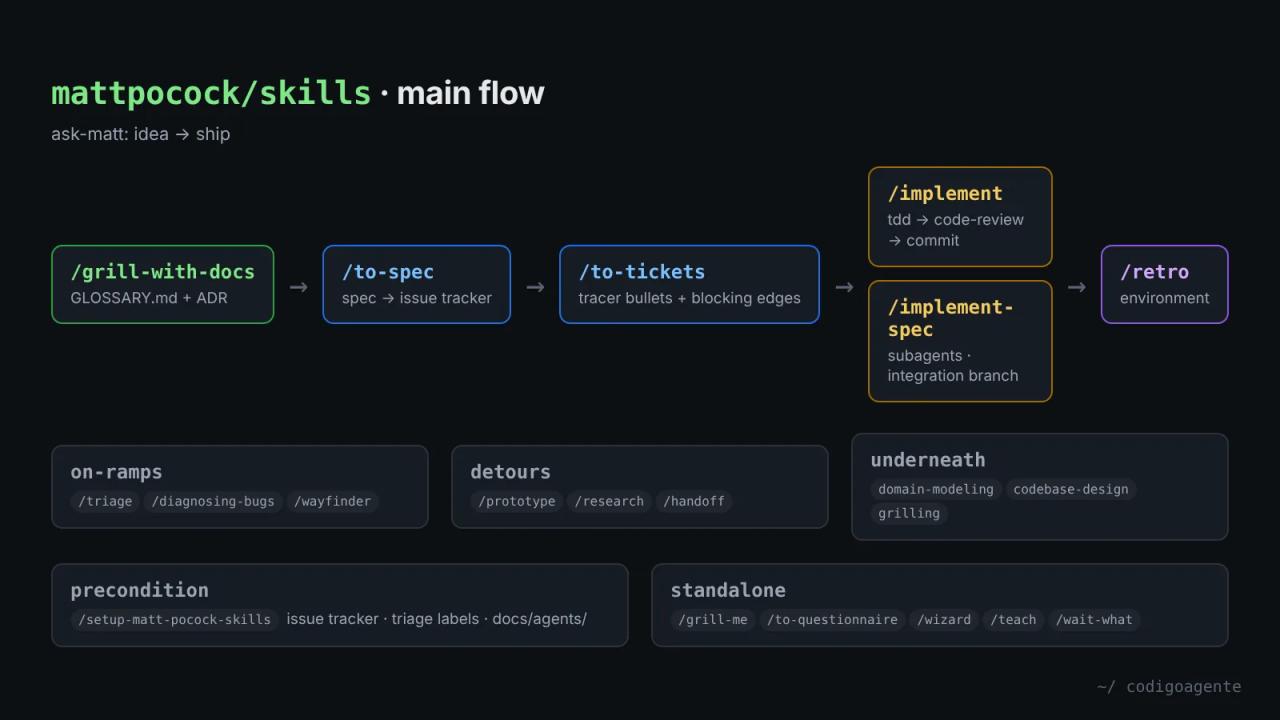
The starter pair: setup-matt-pocock-skills and ask-matt
The first two skills you should use don't write code. One prepares the repository and the other tells you which skill fits each moment.
setup-matt-pocock-skills: configure the repository once
The engineering skills assume three things about your project: where issues live, which labels you use to triage them, and where the glossary and decisions are kept. /setup-matt-pocock-skills asks once per repository:
- Issue tracker: GitHub (via the
ghCLI), GitLab (viaglab), local Markdown under.scratch/<feature>/, or anything else you describe in a paragraph (Jira, Linear...). - Triage labels: only if the
triageskill is installed. The defaults areneeds-triage,needs-info,ready-for-agent,ready-for-humanandwontfix. - Domain docs: a single
GLOSSARY.mdanddocs/adr/at the root (the usual case), or aGLOSSARY-MAP.mdfor a monorepo with several contexts.
It isn't a script: it explores the repository (git remote -v, CLAUDE.md, docs/adr/, .scratch/), shows you what it found, asks for confirmation section by section and then writes. The result is an ## Agent skills block in your CLAUDE.md (or AGENTS.md; it never creates one when the other exists) and three files under docs/agents/:
docs/agents/
├── issue-tracker.md   # how to create and read issues
├── triage-labels.md   # only if you use /triage
└── domain.md          # where GLOSSARY.md and ADRs live
If you work alone and don't want GitHub issues, pick local Markdown: specs and tickets live as files in .scratch/, versioned with the code.
ask-matt: the router that tells you which skill to use
Nobody remembers 27 skills. /ask-matt is a router: describe your situation and it tells you which flow to follow. The useful part is that its SKILL.md holds the full map of how the pieces fit:
- Main flow (idea → ship):
grill-with-docsto sharpen the idea,to-specandto-ticketsif the work spans several sessions,implement(which drivestddand closes withcode-review), andretroat the end. - On-ramps:
triagewhen bugs and requests pile up,diagnosing-bugswhen something is broken, andwayfinderwhen the project is huge and foggy. - Codebase health:
improve-codebase-architecturewhenever you have a spare moment. - Vocabulary underneath:
domain-modelingandcodebase-design, which other skills load under the hood. - Standalone:
grill-me,prototype,research,to-questionnaire,wizard,wait-what,teachandwriting-for-agents.
Together they're the starter pair: setup gets the repository ready and ask-matt points the way when you don't know what's next.
Skills you invoke and skills the agent invokes
The repository splits skills by who can invoke them:
- User-invoked (
disable-model-invocation: truein Claude Code): they only run when you type/name. They orchestrate processes:grill-me,to-spec,implement,retro... - Model-invoked: the agent loads them on its own when the task fits, and you can call them too. They hold the reusable discipline:
tdd,grilling,code-review,codebase-design...
The composition rule is simple: a user-invoked skill may call model-invoked skills, never another user-invoked one. That's why grill-me is a single line ("call the grilling skill") and implement delegates to tdd and code-review.
What the plugin doesn't install
Two folders sit outside the plugin:
misc/: skills the author rarely uses, such asgit-guardrails-claude-code(hooks that blockgit push,reset --hardorclean),setup-pre-commit(Husky + lint-staged) ormigrate-to-shoehorn.in-progress/: beta skills that may change or disappear, such asloop-me,claude-handofforsoftware-factory. Install them one by one withnpx skills@latest add mattpocock/skills --skill=<name>.
This guide covers the 27 in the plugin.
Context hygiene: when to clear the session
One of the most useful tips in the repository isn't a skill but a rule from ask-matt: keep the grilling, the spec and the tickets in one context window, without compacting until after to-tickets, because each step builds on the verbatim reasoning of the one before. After that, each implement can start fresh from its ticket.
The limit is what the author calls the "smart zone": about 150,000 tokens on current models, past which the model reasons less sharply. At the boundary between phases it gives five options in this order: continue, /clear, /handoff, a subagent or /compact. /compact is the default, but the last one you should reach for.
Common mistakes when starting
- Installing two ways. Plugin plus
npx skillsduplicates every skill. - Skipping
/setup-matt-pocock-skills.to-spec,to-tickets,triageandcode-reviewwill answer "run the setup first" if they don't know where the issue tracker is. - Expecting user-invoked skills to fire on their own.
grill-meorto-specwon't trigger even when the task fits: you have to type the command. - Confusing
grill-mewithgrill-with-docs. They run the same interview, but the second writes a glossary and ADRs. Inside a repository, the author always recommends the second.
FAQ
Are they free? Yes. MIT license: you can use, modify and redistribute them, commercial projects included, as long as you keep the copyright notice.
Do they work with any model? The README says so. We tested grill-me and grill-with-docs with Claude Code 2.1.316 and Sonnet 5.5; the other skills in this guide were reviewed from source.
How are they different from Superpowers? Superpowers enforces a full process with a hook loaded into every session. Matt Pocock's skills ship no hooks: you decide which skill to use and when.
Do they work in other languages? The SKILL.md files are in English, but the agent answers in the language you write in. In our tests the whole grilling came out in Spanish.
Next step
Install the plugin, run /setup-matt-pocock-skills in your project and move on to the next part of the guide: grill-me, the most popular skill in the repository, explained in depth and tested in a real four-round session.
// source code
// implementation
More on AI agents

- Skills for your agents
- Claude Code

- Skills for your agents
- Claude Code

- Skills for your agents
- Claude Code